Jira Reviews & Pricing

What Is Jira?
Industry Specialties: Serves all industries
Jira is an all-in-one agile-based solution suite that helps organizations manage projects with agile methodologies, customization and collaboration. It helps teams track, plan and release projects and supports Kanban, Scrum or hybrid workflows. As a project manager, you can plan and prioritize their team’s assignments in a fully-visible environment that tracks performance as progress is made.
It’s supported by over 3,000 modules that can be customized to enhance user experience. You can manage projects on-the-go via internet-connected mobile devices and a native app. It integrates with tools like Azure, GitHub and Bamboo while remaining scalable for operations of any size.
Our analyst-certified product scores gave Jira a respectable 76, based on how well it met our 119 features and requirements, putting it at number nine on our project management software leaderboard. Top-scoring modules, based on our data, include customizations, dashboards, and reporting and task management.
Users liked Jira’s broad functionality, effective remote collaboration features and range of integrations. Conversely, they weren’t fond of occasional lag times, the rather steep learning curve and complicated back-end administrative management.
Jira offers a free forever plan for up to ten users. Its pricing is subscription-based and varies depending on the number of users you select. For example, the price for five users starts at $8.60 per user per month and starts to decrease when you get over 100 users.
Our Research Process for Jira
Since SelectHub uses Jira’s Standard plan, getting test access was only a matter of requesting a user login and setting up a private project.
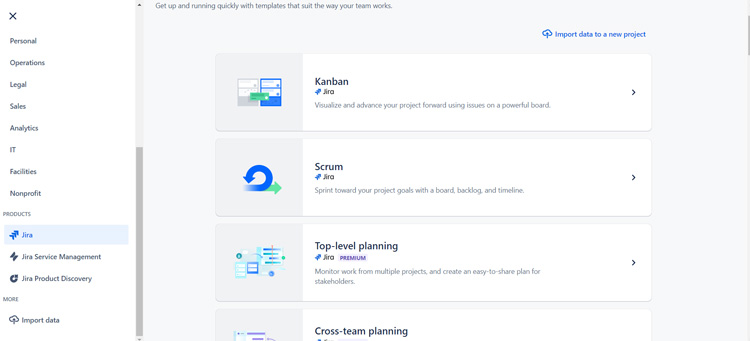
I used the project management template in the work management section to duplicate our content creation process, complete with workflows, automations, custom fields and reports. And of course, I couldn’t pass up the chance to build a sprint project.
To add another dimension to my analysis, I used our internal scoring system, based on a multitude of data carefully collated by our research team, to compare Jira’s capabilities against competitors like Airtable, Smartsheet, Teamwork and ProofHub.
I also watched tutorials and scoured Jira’s help center to help move my project forward when I got stuck. For a glimpse into user POVs, I browsed software review sites and contacted Jira users personally to chat about what they like and don’t like.


Jira Pricing
Based on our most recent analysis, Jira pricing starts at $9 (Per User, Monthly).
- Price
- $$$$$
- Starting From
- $8.60
- Pricing Model
- Per User, Monthly
- Free Trial
- 7-14 Days (Request for Free)
Training Resources
Jira is supported with the following types of training:
- Documentation
- In Person
- Live Online
- Videos
- Webinars
Support
The following support services are available for Jira:
- Phone
- Chat
- FAQ
- Forum
- Help Desk
- Knowledge Base
- Tickets
- Training
- 24/7 Live Support
Jira Benefits and Insights
Key differentiators & advantages of Jira
- Use Agile-Focused Project Management: Adopt the best of agile methodologies with a platform designed to optimize Kanban and Scrum boards along with mixed methodologies of your own. While their agile boards shine, I liked that you’re not strictly bound by, say, using only Scrums with a board view and can use lists and custom fields to manage any type of project really, not just bug tracking or product development.
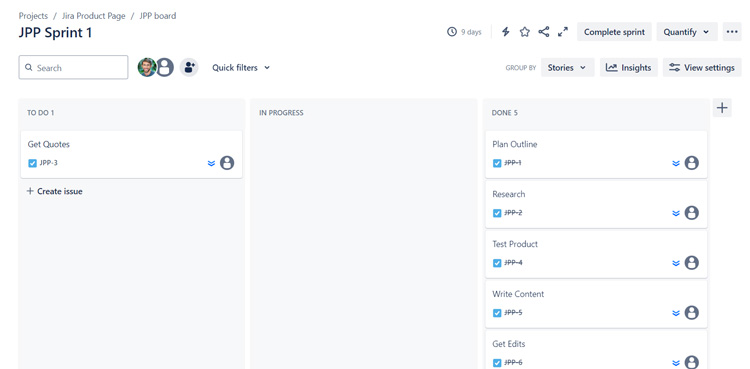
- Optimize Sprint Planning: Race to the finish line one issue at a time with the Scrum feature. Set up sprints across projects with automations, custom boards and stories. I appreciated the drag-and-drop functionality to build sprints, advance sprint planning and the sprint report.
- Build Custom Workspaces with Programming: Jira scored an 86 for its customization module, tying with Airtable, ProofHub and Teamwork and beating Smartsheet (83). I especially liked how you can make your workspace fit the specific needs of teams and projects by adapting templates, building automations, and modifying issues with code and logic-based modifications for statuses, transitions properties, conditions, validators or post functions.
- Access Deeper Insights: With a score of 90 for dashboards and reporting, Jira surpassed Airtable (85), Smartsheet (80) and Teamwork (67). What stood out to me were burn-up and burn-down charts for sprints, their pre-configured (and customizable) charts they call “gadgets” and integrations with tools like Charts for Jira.
Industry Expertise
Jira Reviews
Based on our most recent analysis, Jira reviews indicate a 'great' User Satisfaction Rating of 87% based on 27805 user reviews from 5 recognized software review sites.

27805 reviews
Synopsis of User Ratings and Reviews
Based on an aggregate of Jira reviews taken from the sources above, the following pros & cons have been curated by a SelectHub Market Analyst.
Pros
What Users Like
Cons
What Users Dislike
Researcher's Summary:
Agile enthusiasts on Twitter (or X, but who really calls it that?) would have you believe they’re everywhere, in every workplace. And maybe it is a superior way of handling your workflow — we at SelectHub too count amongst the multitude of Jira users.
Having gone out and tested a bunch of project management tools on my own, I was grateful that access to this one — and its fuller suite of features — was built in for me. I just logged in and got to work.
For starters, I liked that you can set up projects (post- watching a couple tutorials) by searching through the templates and modifying the base template to meet your needs. I chose the base project management one and went from there.
Another interesting feature I came across was the bundles option, where you can add multiple templates and projects into a bundle. Perfect for our company to monitor and sync our design and content teams, while retaining separate workflows for both teams to keep things organized.
Speaking of workflows, here’s my hot take: the way Jira does workflows may be my favorite way to do workflows. Its workflow editor was the most straightforward and intuitive workflow tool I’ve used thus far. From adding new statuses (that then show up on your other boards), putting in transitions and defining validation rules, it all just made sense. I created a very simple transition that made it so when a piece of content goes from in progress to complete it always shows a start date.
Jira has more programming than most project management solutions, but it was quite simple to set up basic projects and create automations even with my self-proclaimed limited tech expertise. A full-fledged coder who understands more than the occasional splash of basic programming language could really shine.
Customization was another big win. I especially enjoyed how easy it was to customize task cards and columns in the issue view by simply checking the boxes. Task (or issue) management was on point, with multiple views, custom workflows, task assignment, in-card collaboration and time tracking, and custom fields. It offers comprehensive (but not overly advanced) reports and a helpful summary dashboard.
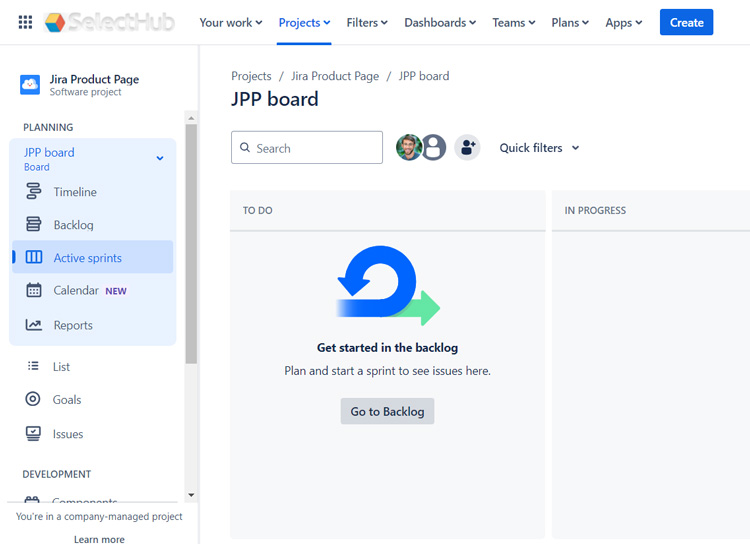
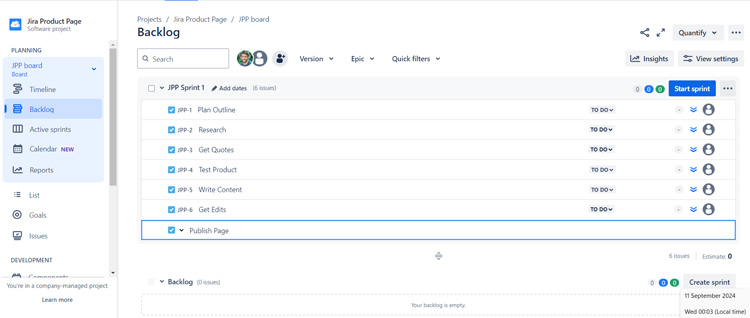
Sprints were intuitive and easy to execute. I especially appreciated the drag-and-drop feature for planning, moving incomplete issues to the backlog, a future sprint or a new sprint.
I was a little disappointed I couldn’t test some of the features from the Premium plan, like approvals and advanced planning tools, as the telltale AI sparkle called out to me like the Green Goblin’s mask. Maybe my Jira villain origin story starts another day.
Some users mentioned a learning curve, and I would agree, as I relied on videos and the help center to guide me through some parts of the setup lest this test take weeks not days.
Overall, Jira is a match made in heaven for agile enthusiasts and users who want a flexible, customizable project management platform and don’t mind getting into the weeds with learning courses and tutorials.
Key Features
- Agile Boards: Manage your tasks, or issues using Scrum and Kanban boards with custom statuses, fields and transitions. Create new issues using the button below each status. You can view projects using a list, board or timeline view.
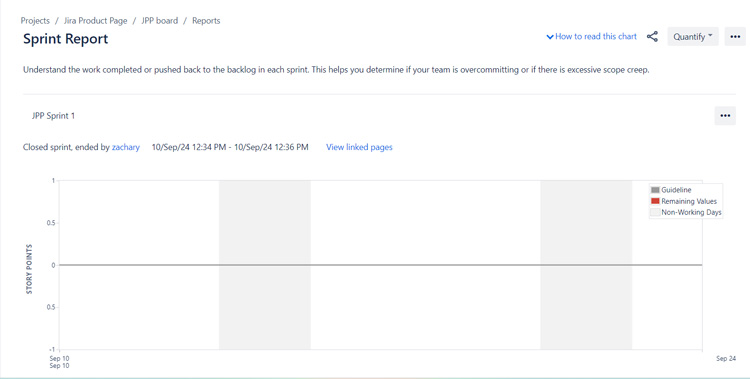
- Reports and Insights: Get insights into where your team is at throughout every stage of the project by generating custom reports like the average age report, created vs. resolved issues report and sprint report. Manage workloads with the time tracking report, user workload report and version workload report. Use the summary view to monitor activity, status overview, priority breakdown and related projects.
- Collaboration Features: Communicate with team members and assignees directly on the issue card with comments and mentions. Attach files, view card activity and add descriptions for additional instructions. Integrate with Outlook, Slack and other communication tools.
- Custom Automations: Build custom automation rules by setting a trigger with the option to add an action, a condition or a branch. Get a helping hand by searching for triggers related to what you want to automate and selecting recommended actions and conditions.
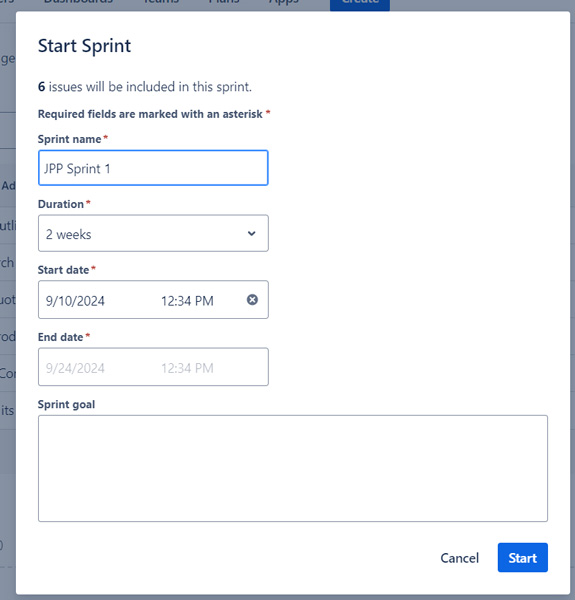
- Sprint Management: Use the Scrum option to run sprints. Fill in project details like name, duration and scope and add tasks and drag and drop them to your sprint using the backlog. Complete your sprints and auto-add pending tasks to the backlog or to a new sprint and run a sprint report for insights.
- Task Management: Manage tasks by creating customizable issue cards under each status or by importing issues from CSV files. Add assignees, due dates, time tracking, comments, descriptions, teams, labels, status and priority to issues. Move tasks from status to status using transitions and workflow automation.
- Customizable Workflows: Create custom workflows for your tasks and subtasks by going to project settings and clicking on issue types. Set statuses based on the type of task you’re completing or from the project template you select. Automate actions by setting rules for transitions from one status to another.
See It In Action: Sprint Planning

Cost of Ownership
Limitations
- Steep learning curve.
- Occasionally lags with multiple projects and data sets.
- Limited Epic functionality in the mobile app.
Training Resources
- Community: Connect with fellow users and experts, get access to webinars and attend training sessions.
- Atlassian University: Complete paid and free e-learning courses on Jira.
- Knowledge Base: Troubleshoot issues, search for articles and access how-to tips.
Compare Project Management Software
Head-to-Head
Comparison
vs
- 5pm
- AdaptiveWork
- Adobe Workfront
- Airtable
- Asana
- Avaza
- Backlog
- Basecamp
- Celoxis
- Cerebro
- Clarity PPM
- ClickUp
- Cora PPM
- Daptiv
- Freedcamp
- GanttProject
- Hive
- LiquidPlanner
- MeisterTask
- Micro Focus
- Microsoft Project
- monday.com
- nTask
- OpenProject
- Paymo
- Planisware
- Planview
- Podio
- Primavera P6
- Project Insight
- Projectlibre
- ProjectManager
- Projecto
- ProofHub
- Quickbase
- Redmine
- SAP PPM
- Sciforma
- ServiceNow SPM
- Smartsheet
- TaskRay
- Teamwork
- Trello
- Wimi
- WorkflowMax
- WorkOtter
- Wrike
- YouTrack
- Zenkit
- Zoho Projects
Relevant Articles
Pricing for Project Management Software

Similar Products
Here are the most similar products to Jira.




Christina George

Dianna Dragonetti