---
description: Is ClickUp the right solution for you? See where it's ranked among all Project Management Software. Read expert reviews, compare 2026 pricing, and explore top-rated features.
---
[Home](https://www.selecthub.com/) > [Project Management](https://www.selecthub.com/category/project-management/) > [Project Management Software](https://www.selecthub.com/c/project-management-software/) > ClickUp
Categories:
- [Project Management Software](https://www.selecthub.com/c/project-management-software/)
- [Collaboration Software](https://www.selecthub.com/c/collaboration-software-tools/)
- [Note-Taking Software](https://www.selecthub.com/c/note-taking-software/)
- [Work Management Software](https://www.selecthub.com/c/work-management-software/)
- [Workflow Management Software](https://www.selecthub.com/c/workflow-management-software/)
- ...
## What Is ClickUp?
**Industry Specialties:** Serves all industries
ClickUp is an all-in-one cloud-based solution designed to help users streamline project cycles with collaboration, customization and visibility. It allows you to assign comments and tasks to specific team members or groups of team members and view time spent on those tasks. Other collaboration features include reminders, docs, calendars, goals, scheduling and an inbox.
You can configure team-specific notifications, and if you use Agile, there’s a dashboard tailored to Agile projects. The platform sends alerts to relevant employees in a discussion thread while allowing them to edit and post comments.
One of the most powerful features ClickUp offers is its flexibility. You can create a personalized workspace with no-code automations and ClickApps, and endless customizations are available for statuses, fields and views.
Our research team scored ClickUp a 92 on 100, based on how well it supports 119 core project management features. It topped our project management leaderboard alongside Wrike. Top-scoring modules include customization, dashboards and reporting, mobile capabilities, platform security and task management.
Users liked ClickUp’s easy-to-use interface, customization options and streamlined collaboration. Downsides included expensive renewal fees, a learning curve and too many notifications.
**Our Research Process for ClickUp**
Full disclosure, SelectHub has used ClickUp for the last several years. That said, although I wasn’t completely unfamiliar with the UX, I had only the bare minimum experience with what goes into managing the backend. To fully test the platform, I stepped into my manager’s shoes and created a dummy space with new workflows, task templates and automations.
A few visits to the help center and copious hours spent watching YouTube videos rounded off my ClickUp education. Using our analyst scores, I compared ClickUp to [Wrike](https://www.selecthub.com/p/project-management-software/wrike/), [monday.com](https://www.selecthub.com/p/project-management-software/monday/), [Zoho Projects](https://www.selecthub.com/p/project-management-software/zoho-projects/) and [Asana](https://www.selecthub.com/p/project-management-software/asana/). To get a read on the barometer of user sentiment, I browsed software review sites and reached out to users past and present for their two cents.
PRICE
$
$
$
$
$
COMPANY SIZE
S
M
L
DEPLOYMENT
PLATFORM
[Try Before You Buy. Request a Free Demo Today!Request Demo It's completely free!](https://pmo.selecthub.com/get-product-demo/?category=Project+Management+Software&product_name=ClickUp&origin_url=https%3A%2F%2Fwww.selecthub.com%2Fp%2Fproject-management-software%2Fclickup%2F&product_logo=https%3A%2F%2Fcdn.selecthub.com%2Fproducts%2F5a2afca61e35f45a7dd44ca46e0225f4-59b07ff2857c728720f3a86d2004f9b5%2Fresources%2Fnormal%2Flogo.png%3F1726173961)
[Contributors](#view-contributors)
![Christina George]() Written by Christina George Technical Content Writer [Read Bio](https://www.selecthub.com/author/christina-george/)
![Dianna Dragonetti]() Edited by Dianna Dragonetti Content Editor [Read Bio](https://www.selecthub.com/author/dianna-dragonetti/)
User Sentiment i
![User satisfaction level icon: excellent]()
Based on 16059 reviews:
Add your rating:
![Screenshots]()![Screenshots]()![Screenshots]()
Product Screenshots and Videos
## #1
ClickUp is ranked #1 on the top 10 Project Management Software leaderboard based on a comprehensive analysis performed by SelectHub research analysts. Compare the leaders with our In-Depth Report.
[Get the Report Now](https://pmo.selecthub.com/request-custom-scorecard?category_slug=project-management-software&product_slug=clickup&page_type=product&slug=clickup&product_name=ClickUp&category=Project+Management+Software&origin_url=https%3A%2F%2Fwww.selecthub.com%2Fp%2Fproject-management-software%2Fclickup%2F)
## ClickUp Pricing
Based on our most recent analysis, ClickUp pricing starts at $7 (Per User, Monthly (if Paying Annually), Freemium).
[Get Price Quote](https://pmo.selecthub.com/get-product-pricing/?category=Project+Management+Software&product_name=ClickUp&origin_url=https%3A%2F%2Fwww.selecthub.com%2Fp%2Fproject-management-software%2Fclickup%2F&product_logo=https%3A%2F%2Fcdn.selecthub.com%2Fproducts%2F5a2afca61e35f45a7dd44ca46e0225f4-59b07ff2857c728720f3a86d2004f9b5%2Fresources%2Fnormal%2Flogo.png%3F1726173961&price=1)
- Price
-
$
$
$
$
$
i
- Starting From
- $7
- Pricing Model
- Per User, Monthly (if paying annually), Freemium
- Free Trial
- No
## Training Resources
ClickUp is supported with the following types of training:
- Documentation
- In Person
- Live Online
- Videos
- Webinars
## Support
The following support services are available for ClickUp:
- Email
- Phone
- Chat
- FAQ
- Forum
- Help Desk
- Knowledge Base
- Tickets
- Training
- 24/7 Live Support
## ClickUp Benefits and Insights
Why use ClickUp?
### Key differentiators & advantages of ClickUp
- **Customize Your Workspace with ClickApps:** ClickUp scored a perfect 100 for customizations tied with Zoho Projects and higher than monday.com (86), Wrike (86) and Asana (84). It allows you to create a personalized environment for your business by enabling ClickApps for specific spaces or the entire organization. Enable apps like time tracking, custom fields, dependency warnings, time estimates and sprints. I loved the custom fields with multiple drop-downs for statuses and teams and the dependency warnings, so nothing slips through the cracks.
- **Easily Monitor Performance:** ClickUp top-scored for dashboards and reporting with a 100 beating Wrike (92), Zoho Projects (84), Asana (77) and monday.com (60). Create your own chart widgets ranging from line, bar, pie and battery to build dashboards, visualize progress using burnup and burndown widgets. I liked the custom widgets that pulled data to create customized legacy reports.
- **Prioritize Important Tasks:** Our analysts gave ClickUp another 100 for task management, tied with Zoho Projects and just edging out Asana (95), monday.com (91) and Wrike (89). Use ClickUp’s pre-built priorities to classify tasks based on importance and auto-assign team mates when statuses, tags or priorities change. I liked the variety of views, including Kanban, list and calendar, and also that you can pin certain views, say urgent tasks, so it’s front and center for all team members.
### Industry Expertise
ClickUp is designed for businesses of all sizes in all industries. According to their website, they serve over two million teams across the globe.
## ClickUp Reviews
Based on our most recent analysis, ClickUp reviews indicate a 'excellent' User Satisfaction Rating of 93% based on 16059 user reviews from 5 recognized software review sites.
![User satisfaction level icon: excellent]()
16059 reviews
93%
of users would recommend this product
### Synopsis of User Ratings and Reviews
Based on an aggregate of ClickUp reviews taken from the sources above, the following pros & cons have been curated by a SelectHub Market Analyst.
#### Pros
- **Easy To Use:** Reviewers appreciated how easy the solution was to use and set up, even without extensive training or customer support.
- **Customization:** Extensive customization options like task views, priority levels, color coding, and automations to create a unique product for their specific team were a plus for many users.
- **Collaboration:** Users liked how easy it is to collaborate by assigning tasks, subtasks, comments and due dates with automated email notifications.
**What Users Like**
- **Versatility:** “ClickUp lets you tailor tasks, projects, and views down to the smallest detail, which was perfect for our team since each project can look totally different. For example, we used its automation features to auto-assign tasks when certain stages were reached, which cut down on a ton of back-and-forth and kept everyone aligned.” - Victor André Enselmann, Founder of digital marketing firm [Modeva](https://modeva.dk/)
- **Centralization and Collaboration:** “With offices across major U.S. cities, aligning everyone can be challenging. However, ClickUp’s customizable dashboards allow each team to organize tasks based on project demands while keeping a high-level view of overall progress. This flexibility has significantly reduced the back-and-forth between teams, saving time and ensuring that our large-scale projects stay on track.” - Steve Morris, Founder and CEO of [NEW MEDIA](https://newmedia.com/)
- Central Workspace: "As a web design and SEO agency, having tasks, files, time tracking, and team collaboration all in one place has completely changed the way we work." - [Gregory Cooper](https://www.linkedin.com/in/fizzdesignsuk/), Founder & Director of [FIZZ Designs](https://fizzdesigns.co.uk/) and SEO Consultant
#### Cons
- **Cost:** Reviewers mentioned expensive renewal fees after the free trial and upselling.
- **Learning Curve:** Users noted it takes time for new users to get familiarized with so many features and how its navigation and customization work.
- **Notifications:** An influx of email notifications for every change can cause some important alerts to get lost, according to some users.
**What Users Dislike**
- **Too Many Features:** “We ended up with a cluttered dashboard full of features we didn’t need, and it actually slowed us down. Once we simplified and focused on just the core tools, it was a lot smoother. So, with ClickUp, the trick is to use what you need and ignore the rest, or it can overwhelm more than it helps." - Victor André Enselmann
- **Time-Based Automations:** “Initially, the learning curve was steep, which led to some confusion and delays as we adapted. To address this, we created a custom onboarding process for new hires that guides them through the platform’s essentials before diving into more advanced functions.” - Steve Morris
- Learning Curve: "The only downside for me was the learning curve. I consider myself pretty techy, but there’s just so much in there, it took a while to get used to." - Gregory Cooper
#### Researcher's Summary:
ClickUp is touted as an all-in-one project management solution designed to help businesses in any industry optimize project cycles with a highly customizable interface, robust automation capabilities and extensive collaboration features. But does it live up to the hype? I took on the responsibility of testing their over 15 views, including options like Kanban boards, Gantt charts and calendars.
Creating a personalized space was a piece of cake. I modified the privacy settings to just me (didn’t want to confuse the rest of the team) and got to work. I’d say the task management and customization are second to none when it comes to the variety of custom fields, attachments, formatting and in-card communication. For example, I could create a field with drop-down options for specific teams or with tags.
I also loved the in-card time-tracking feature. Multiple users can track time on each card and you can add tags to each entry if you want subtask-specific details to improve the accuracy of task and project timelines. You can also manage workloads with an overview of hours and tasks users worked on weekly and monthly.
As someone with a self-diagnosed mild fear of coding, I was relieved to see the no-code automations. I liked how simple it is to create multiple actions and pull from useful templates you can then modify to suit your workflow.
However, ClickUp’s feature-rich platform can also be a pitfall with some reviewers noting a steep learning curve associated with mastering its various functionalities. Additionally, the platform's tiered pricing structure might be a concern for smaller teams or organizations with limited budgets.
During our test run, ClickUp scored points for its easy automation, customization to the nth level, reporting views and collaborative tools. We found it incredibly easy to build custom workflows, implement templates for a new space and keep assignees accountable with the activity stream in each card.
Overall, we think ClickUp is a fantastic option for businesses of all sizes, especially if you’re looking for a highly customizable and collaborative project management platform and don’t mind putting in the work when you set it up.
## Key Features
- **Multiple Views:** Get a bird’s eye view of your business with the everything view. Check your project’s progress in over 15 ways, including Kanban, board, Gantt, calendar, chat and activity views.
- **Custom Workspaces:** Create (work)spaces for each project with your own set of workflow rules, automations, statuses, fields and even assignees. Move tasks in-between spaces and change priority, receive pop-ups if statuses are different and control space accessibility.
- **Task Management:** Keep track of tasks using cards that you can build from scratch or create using custom templates and fields. Assign tasks, post points, due dates, assignees and statuses. View and add comments, create alerts for overdue tasks, use custom checklists and add task dependencies.
- **Sprint Management:** Create sprints using templates from ClickUp or your workspace. Manage your sprint cycles by setting custom sprint dates, priority levels and points to your work. Auto-add unfinished tasks to your next sprint, duplicate sprint views and integrate sprints with GitHub, GitLab and Bitbucket. Pace your sprints against a target using burndown charts and use burnup charts to see completed and pending work. Organize and manage sprint-specific settings via the sprint folder.
- **No-Code Automations:** Create custom automations for tasks and processes without coding expertise. Use built-in recipes, ClickApps or build-your-own automations in each space using actions, triggers and conditions custom to your workflow and processes using drop-down menus.
- **Dashboards and Reporting:** Click on the home icon to view a personalized dashboard of your recent projects, assigned tasks, reminders and comments. Create custom dashboards and reports from specific spaces using templates or by selecting the start from scratch option.
- **Time Tracking:** Track time from multiple assignees using the built-in tracker in each card. Get an overview of user activity in your company and see when users are active using Pulse and the timesheets feature.
- **Document Creation:** Create documents within the program’s word processor that are directly integrated into projects and tasks. Import documents from other word processors to add tags and use a robust tool library.
- **Goals and Targets:** Set and organize goal trackers in folders to keep track of multiple projects at once. Set goal targets by monetary value, True/false conditions, or by number of units.
## See It In Action: Workflow Automation
It’s all well and good to read “simple workflow automation” on a company’s website. But how does it really work? I got under the hood of ClickUp’s Automations tool and tested two automations. The first automation was a “ClickTip” to add a template to tasks created and the second template involved two actions for a status change.
To start off I clicked on the Automations tab on the top right of the screen and selected add automation. I unchecked the other sources and selected users, specifically tasks created by a particular user (me).
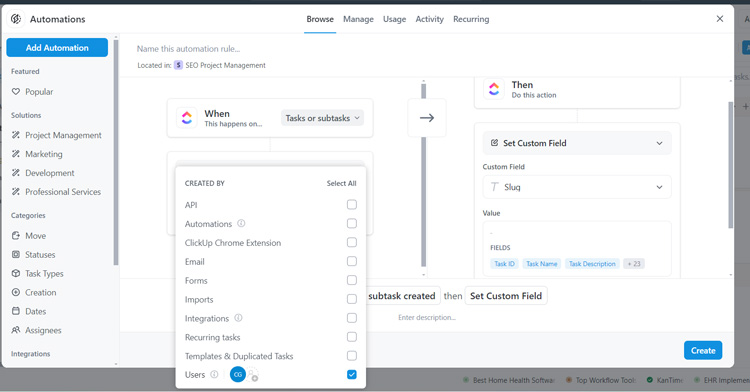
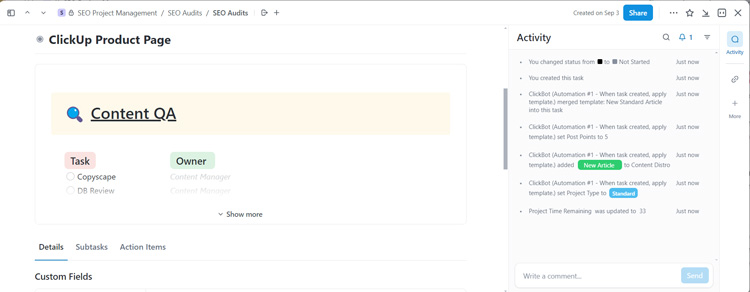
Next, I changed the action to apply a template, which I chose from my workspace, although you can use ClickUp’s templates as well.

After creating the automation, it was time to test it out. I created a dummy task, and the automation worked its magic. I thought it was particularly handy for filling out and creating custom fields.
For the second automation, I wanted to see how well it would handle two different actions. I used a status change as the trigger and added two actions: adding a comment and changing the due date.

Since I changed the status from in progress to on hold, I wanted assignees to explain why the task is on hold. I also wanted to remove the due date so it didn’t complicate reporting.
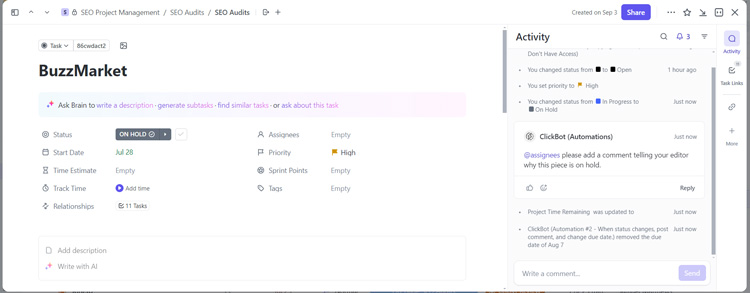
Both automations worked swimmingly. I appreciated the no-code approach and the drop-down menus for each trigger and action that allowed me to fully customize each automation without too much cognitive work.
## Cost of Ownership
Frequently asked questions regarding ClickUp pricing include:
**Q: What pricing model does ClickUp follow?**
A: ClickUp uses a subscription model that charges per user, per month.
**Q: How much does ClickUp cost?**
A: ClickUp offers four different pricing plans: Free Forever, Unlimited, Business and Enterprise. Unlimited starts at $7 per user, per month, Business is $12 per user, per month, both billed annually. Enterprise pricing requires a custom quote.
**Q: Is there any way to use ClickUp for free or get a discount?**
A: ClickUp has a freemium version with limited features if you’re on a budget. Additionally, they have discounts for [nonprofits](https://clickup.com/teams/non-profit), [educators and students](https://clickup.com/teams/student) and startups.
## Limitations
At the time of this review, these are the limitations according to user feedback:
- Too many features can be overwhelming.
- Occasional glitches and lags.
- Learning curve.
## Training Resources
- **Help Center:** Search through user guides, articles and webinars.
- **ClickUp University:** Enroll in courses to level up your skills and learn through live training, on-demand webinars, video courses or at your own pace.
- **User Community:** Interact with users across the globe and share tips and find the answers to common questions.
![Banner of Pricing guide for ClickUp]()
## Pricing & Cost Details
See the Price/User for the top project management software… plus the most important considerations and questions to ask when shopping.
See Pricing Details
## Compare Project Management Software
These are the top products most often compared.
Generating Scorecard... Compare to ClickUp
You can choose 4 products to compare
[![Wrike product logo]() Wrike](https://www.selecthub.com/p/project-management-software/wrike/)
[![monday.com product logo]() monday.com](https://www.selecthub.com/p/project-management-software/monday/)
[![Zoho Projects product logo]() Zoho Projects](https://www.selecthub.com/p/project-management-software/zoho-projects/)
[![Asana product logo]() Asana](https://www.selecthub.com/p/project-management-software/asana/)
[![Airtable product logo]() Airtable](https://www.selecthub.com/p/project-management-software/airtable/)
[![Smartsheet product logo]() Smartsheet](https://www.selecthub.com/p/work-management-software/smartsheet/)
[![Teamwork product logo]() Teamwork](https://www.selecthub.com/p/project-management-software/teamwork/)
[![Jira product logo]() Jira](https://www.selecthub.com/p/project-management-software/jira/)
[![ProofHub product logo]() ProofHub](https://www.selecthub.com/p/project-management-software/proofhub/)
Generating Scorecard... Compare to ClickUp
## Head-to-Head
Comparison

vs
- [5pm](https://www.selecthub.com/project-management-software/clickup-vs-5pm/)
- [AdaptiveWork](https://www.selecthub.com/project-management-software/clickup-vs-adaptivework/)
- [Adobe Workfront](https://www.selecthub.com/project-management-software/clickup-vs-adobe-workfront/)
- [Airtable](https://www.selecthub.com/project-management-software/airtable-vs-clickup/)
- [Asana](https://www.selecthub.com/project-management-software/asana-vs-clickup/)
- [Avaza](https://www.selecthub.com/project-management-software/clickup-vs-avaza/)
- [Backlog](https://www.selecthub.com/project-management-software/clickup-vs-backlog/)
- [Basecamp](https://www.selecthub.com/project-management-software/basecamp-vs-clickup/)
- [Celoxis](https://www.selecthub.com/project-management-software/clickup-vs-celoxis/)
- [Cerebro](https://www.selecthub.com/project-management-software/clickup-vs-cerebro/)
- [Clarity PPM](https://www.selecthub.com/project-management-software/clickup-vs-clarity-ppm/)
- [Cora PPM](https://www.selecthub.com/project-management-software/clickup-vs-cora-ppm/)
- [Daptiv](https://www.selecthub.com/project-management-software/clickup-vs-planview-daptiv/)
- [Freedcamp](https://www.selecthub.com/project-management-software/clickup-vs-freedcamp/)
- [GanttProject](https://www.selecthub.com/project-management-software/clickup-vs-ganttproject/)
- [Hive](https://www.selecthub.com/project-management-software/clickup-vs-hive/)
- [Jira](https://www.selecthub.com/project-management-software/jira-vs-clickup/)
- [MeisterTask](https://www.selecthub.com/project-management-software/clickup-vs-meistertask/)
- [Micro Focus](https://www.selecthub.com/project-management-software/clickup-vs-micro-focus/)
- [Microsoft Project](https://www.selecthub.com/project-management-software/clickup-vs-microsoft-project/)
- [monday.com](https://www.selecthub.com/project-management-software/clickup-vs-monday/)
- [nTask](https://www.selecthub.com/project-management-software/clickup-vs-ntask/)
- [OpenProject](https://www.selecthub.com/project-management-software/clickup-vs-openproject/)
- [Paymo](https://www.selecthub.com/project-management-software/clickup-vs-paymo/)
- [Planisware](https://www.selecthub.com/project-management-software/clickup-vs-planisware/)
- [Planview](https://www.selecthub.com/project-management-software/clickup-vs-planview/)
- [Planview ProjectAdvantage](https://www.selecthub.com/project-management-software/clickup-vs-planview-projectadvantage/)
- [Podio](https://www.selecthub.com/project-management-software/clickup-vs-podio/)
- [Primavera P6](https://www.selecthub.com/project-management-software/clickup-vs-primavera-p6/)
- [Prism PPM](https://www.selecthub.com/project-management-software/clickup-vs-prism-ppm/)
- [Project Insight](https://www.selecthub.com/project-management-software/clickup-vs-project-insight/)
- [Projectlibre](https://www.selecthub.com/project-management-software/clickup-vs-projectlibre/)
- [ProjectManager](https://www.selecthub.com/project-management-software/clickup-vs-projectmanager/)
- [Projecto](https://www.selecthub.com/project-management-software/clickup-vs-projecto/)
- [ProofHub](https://www.selecthub.com/project-management-software/clickup-vs-proofhub/)
- [Quickbase](https://www.selecthub.com/project-management-software/clickup-vs-quickbase/)
- [Redmine](https://www.selecthub.com/project-management-software/clickup-vs-redmine/)
- [SAP PPM](https://www.selecthub.com/project-management-software/clickup-vs-sap-ppm/)
- [ServiceNow SPM](https://www.selecthub.com/project-management-software/clickup-vs-servicenow-spm/)
- [Smartsheet](https://www.selecthub.com/work-management-software/smartsheet-vs-clickup/)
- [TaskRay](https://www.selecthub.com/project-management-software/clickup-vs-taskray/)
- [Teamwork](https://www.selecthub.com/project-management-software/clickup-vs-teamwork/)
- [Tempo Portfolio Manager](https://www.selecthub.com/project-management-software/clickup-vs-tempo-portfolio-manager/)
- [Trello](https://www.selecthub.com/project-management-software/trello-vs-clickup/)
- [Wimi](https://www.selecthub.com/project-management-software/clickup-vs-wimi-teamwork/)
- [WorkflowMax](https://www.selecthub.com/project-management-software/clickup-vs-workflowmax/)
- [Wrike](https://www.selecthub.com/project-management-software/clickup-vs-wrike/)
- [YouTrack](https://www.selecthub.com/project-management-software/clickup-vs-youtrack/)
- [Zenkit](https://www.selecthub.com/project-management-software/clickup-vs-zenkit/)
- [Zoho Projects](https://www.selecthub.com/project-management-software/clickup-vs-zoho-projects/)
## Awards
SelectHub research analysts have evaluated ClickUp and concluded it deserves the award for the Best Overall Project Management Software available today and earns best-in-class honors for Customizations, Dashboards and Reporting, Mobile Capabilities, Task Management and Platform Security. ClickUp stands above the rest by achieving an ‘Excellent’ rating as a User Favorite.


## Pricing for Project Management Software
![Banner of Pricing guide for Project Management Software]()
## Similar Products
Here are the most similar products to ClickUp.
[![Twproject product logo]() Twproject](https://www.selecthub.com/p/project-management-software/twproject/)
[![Lumeer product logo]() Lumeer](https://www.selecthub.com/p/project-management-software/lumeer/)
[![Skriv product logo]() Skriv](https://www.selecthub.com/p/project-management-software/skriv/)
[![Rukovoditel product logo]() Rukovoditel](https://www.selecthub.com/p/project-management-software/rukovoditel/)
[![Feng Office product logo]() Feng Office](https://www.selecthub.com/p/project-management-software/feng-office/)
[![Hassl product logo]() Hassl](https://www.selecthub.com/p/project-management-software/hassl/)
[![Upbase product logo]() Upbase](https://www.selecthub.com/p/project-management-software/upbase/)
[![Leantime product logo]() Leantime](https://www.selecthub.com/p/project-management-software/leantime/)
[![Gantter product logo]() Gantter](https://www.selecthub.com/p/project-management-software/gantter/)
[![Wimi product logo]() Wimi](https://www.selecthub.com/p/project-management-software/wimi-teamwork/)
## About the Contributors
The following expert team members are responsible for creating, reviewing, and fact checking the accuracy of this content.
[![Christina George]()](https://www.selecthub.com/author/christina-george/)
Written by
[Christina George](https://www.selecthub.com/author/christina-george/)
Technical Content Writer
An Associate Editor at SelectHub, Christina George creates and edits articles spanning project management, CPQ, CRM, marketing automation and home health software. As a Bachelor of Arts graduate with a triple major in Economics, Political Science and Sociology, her aim is to bring an integrated and simplified approach to long-form technical content. Formerly a food writer, copywriter, and social media sleuth, she has a soft spot for a quality pun. When not crafting articles and editing buyer's guides, you can find her attempting to score goals on the football field, binge-watching Curb Your Enthusiasm, or re-reading Pride and Prejudice for the nth time.
[See Full Bio](https://www.selecthub.com/author/christina-george/)
[![Dianna Dragonetti]()](https://www.selecthub.com/author/dianna-dragonetti/)
Edited by
[Dianna Dragonetti](https://www.selecthub.com/author/dianna-dragonetti/)
Content Editor
As an editor, Dianna Dragonetti leads a team of five writers in writing about a variety of software, with an emphasis on how these tools empower businesses. Categories include accounting, learning management systems, content management systems, supply chain management, and electronic data interchange.
[See Full Bio](https://www.selecthub.com/author/dianna-dragonetti/)
Your review has been submitted
and should be visible within 24 hours.
Review Title
Pros
Cons
Overall feedback
Your name
Your job title
Industry
Choose your main industry
- Accounting / CPA
- Advertising
- Aerospace & Defense
- Agriculture
- Apparel
- Architecture
- Auto Dealership
- Automotive
- Banking & Financial Services
- Banking & Mortgage
- Chemicals
- Construction & Engineering
- Construction / Contracting
- Consulting
- Consumer Products
- Distribution
- E-commerce
- Education
- Electronics
- Energy & Utilities
- Federal Government
- Field Maintenance
- Food & Beverage
- Healthcare / Social Services
- Hospitality / Gaming / Travel
- Human Resources
- Industrial Machinery
- Information Technology & High Tech
- Insurance
- Legal
- Maintenance / Field Service
- Manufacturing
- Marketing Services
- Media & Communications / Entertainment
- Mill Products
- Mining / Metals
- Mortgage
- Non-Profit
- Not Available
- Oil & Gas
- Other
- Other Services
- Payroll Provider
- Pharmaceuticals
- Professional Employer Organization
- Professional Services
- Property Management
- Public Sector
- Real Estate
- Recruiting Agency
- Religious Institutions
- Retail
- Sales & Marketing
- Semiconductors
- Software / IT
- Sports and Recreation
- Staffing Agency
- State & Local Government
- Telecommunications
- Third-Party Administrator
- Transportation & Logistics
- Wholesale Distribution
Company Size
Choose your company size
- 1 employee
- 2 to 9 employees
- 10 - 19 employees
- 20 - 49 employees
- 50 - 99 employees
- 100 - 499 employee
- 500 - 999 employees
- 1,000 - 2,499 employees
- 2,500 - 4,999 employees
- 5,000 - 9,999 employees
- 10,000 - 24,999 employees
- 25,000 - 49,999 employees
- 50,000 + employees
```json
{
"@context": "https://schema.org",
"@type": "BreadcrumbList",
"itemListElement": [
{
"@type": "ListItem",
"position": 1,
"name": "Home",
"item": "https://www.selecthub.com/"
},
{
"@type": "ListItem",
"position": 2,
"name": "Project Management",
"item": "https://www.selecthub.com/category/project-management/"
},
{
"@type": "ListItem",
"position": 3,
"name": "Project Management Software",
"item": "https://www.selecthub.com/c/project-management-software/"
},
{
"@type": "ListItem",
"position": 4,
"name": "ClickUp"
}
]
}
{
"@context": "http://schema.org",
"@type": "SoftwareApplication",
"name": "ClickUp",
"description": "ClickUp is an all-in-one cloud-based solution designed to help users streamline project cycles with collaboration, customization and visibility. It allows you to assign comments and tasks to specific team members or groups of team members and view time spent on those tasks. Other collaboration features include reminders, docs, calendars, goals, scheduling and an inbox.You can configure team-specific notifications, and if you use Agile, there’s a dashboard tailored to Agile projects. The platform sends alerts to relevant employees in a discussion thread while allowing them to edit and post comments.One of the most powerful features ClickUp offers is its flexibility. You can create a personalized workspace with no-code automations and ClickApps, and endless customizations are available for statuses, fields and views.Our research team scored ClickUp a 92 on 100, based on how well it supports 119 core project management features. It topped our project management leaderboard alongside Wrike. Top-scoring modules include customization, dashboards and reporting, mobile capabilities, platform security and task management.Users liked ClickUp’s easy-to-use interface, customization options and streamlined collaboration. Downsides included expensive renewal fees, a learning curve and too many notifications.Our Research Process for ClickUpFull disclosure, SelectHub has used ClickUp for the last several years. That said, although I wasn’t completely unfamiliar with the UX, I had only the bare minimum experience with what goes into managing the backend. To fully test the platform, I stepped into my manager’s shoes and created a dummy space with new workflows, task templates and automations.A few visits to the help center and copious hours spent watching YouTube videos rounded off my ClickUp education. Using our analyst scores, I compared ClickUp to Wrike, monday.com, Zoho Projects and Asana. To get a read on the barometer of user sentiment, I browsed software review sites and reached out to users past and present for their two cents.",
"review": {
"@type": "Review","reviewRating": {
"@type": "Rating",
"ratingValue": 92,
"bestRating": 100
},
"author": {
"@type": "Person",
"name": "Christina George",
"reviewBody": "ClickUp is touted as an all-in-one project management solution designed to help businesses in any industry optimize project cycles with a highly customizable interface, robust automation capabilities and extensive collaboration features. But does it live up to the hype? I took on the responsibility of testing their over 15 views, including options like Kanban boards, Gantt charts and calendars.Creating a personalized space was a piece of cake. I modified the privacy settings to just me (didn’t want to confuse the rest of the team) and got to work. I’d say the task management and customization are second to none when it comes to the variety of custom fields, attachments, formatting and in-card communication. For example, I could create a field with drop-down options for specific teams or with tags.I also loved the in-card time-tracking feature. Multiple users can track time on each card and you can add tags to each entry if you want subtask-specific details to improve the accuracy of task and project timelines. You can also manage workloads with an overview of hours and tasks users worked on weekly and monthly.As someone with a self-diagnosed mild fear of coding, I was relieved to see the no-code automations. I liked how simple it is to create multiple actions and pull from useful templates you can then modify to suit your workflow.However, ClickUp’s feature-rich platform can also be a pitfall with some reviewers noting a steep learning curve associated with mastering its various functionalities. Additionally, the platform's tiered pricing structure might be a concern for smaller teams or organizations with limited budgets.During our test run, ClickUp scored points for its easy automation, customization to the nth level, reporting views and collaborative tools. We found it incredibly easy to build custom workflows, implement templates for a new space and keep assignees accountable with the activity stream in each card.Overall, we think ClickUp is a fantastic option for businesses of all sizes, especially if you’re looking for a highly customizable and collaborative project management platform and don’t mind putting in the work when you set it up."
}
},
"image": "https://cdn.selecthub.com/products/5a2afca61e35f45a7dd44ca46e0225f4-59b07ff2857c728720f3a86d2004f9b5/resources/normal/logo.png?1726173961",
"aggregateRating": {
"@type": "AggregateRating",
"ratingValue": "93",
"bestRating": "100",
"worstRating": "1",
"ratingCount": "16059"
},
"offers": {
"@type": "Offer",
"priceSpecification": {
"@type": "priceSpecification",
"price": "7",
"priceCurrency": "USD"
}
},
"positiveNotes": {
"@type": "ItemList",
"itemListElement": [
{
"@type": "ListItem",
"position": 1,
"name": "Easy To Use: Reviewers appreciated how easy the solution was to use and set up, even without extensive training or customer support."
},
{
"@type": "ListItem",
"position": 2,
"name": "Customization: Extensive customization options like task views, priority levels, color coding, and automations to create a unique product for their specific team were a plus for many users."
},
{
"@type": "ListItem",
"position": 3,
"name": "Collaboration: Users liked how easy it is to collaborate by assigning tasks, subtasks, comments and due dates with automated email notifications."
}
]
},
"negativeNotes": {
"@type": "ItemList",
"itemListElement": [
{
"@type": "ListItem",
"position": 1,
"name": "Cost: Reviewers mentioned expensive renewal fees after the free trial and upselling."
},
{
"@type": "ListItem",
"position": 2,
"name": "Learning Curve: Users noted it takes time for new users to get familiarized with so many features and how its navigation and customization work."
},
{
"@type": "ListItem",
"position": 3,
"name": "Notifications: An influx of email notifications for every change can cause some important alerts to get lost, according to some users."
}
]
},
"applicationCategory": "Project Management Software"
}
```