---
description: Is monday.com the right solution for you? See where it's ranked among all Project Management Software. Read expert reviews, compare 2026 pricing, and explore top-rated features.
---
[Home](https://www.selecthub.com/) > [Project Management](https://www.selecthub.com/category/project-management/) > [Project Management Software](https://www.selecthub.com/c/project-management-software/) > monday.com
Categories:
- [Project Management Software](https://www.selecthub.com/c/project-management-software/)
- [Collaboration Software](https://www.selecthub.com/c/collaboration-software-tools/)
- [Construction Scheduling Software](https://www.selecthub.com/c/construction-scheduling-software/)
- [PPM Software](https://www.selecthub.com/c/ppm-software/)
- [PSA Software](https://www.selecthub.com/c/psa-software/)
- [Workflow Management Software](https://www.selecthub.com/c/workflow-management-software/)
- ...
## What Is monday.com?
**Industry Specialties:** Serves all industries
monday.com is a list-based project management solution designed to streamline processes with automation, customization and collaboration. You can build boards using templates or from scratch and customize fields, automations, colors and workflows.
Monitor projects using a mobile app, custom dashboards or multiple views: Kanban boards, Gantt charts and calendars. Stay on the same page with your team members via board discussions, updates and comments with mentions.
monday.com scored 90/100 for meeting our feature requirements for project management. According to our data, only ClickUp (92) and Wrike (92) deliver a more comprehensive feature set. monday’s project tracking and mobile capabilities stood out in our analysis as best in class.
Users were quick to praise monday’s user-friendly interface, collaboration capabilities and task management. On the downside, reviewers mentioned a learning curve and advanced features inflating costs.
monday.com offers a free forever plan for two users or fewer, with the paid plans starting at $9 per user per month if you pay annually.
**Our Research Process for monday.com**
Armed with a two-week free trial of the Pro plan, I replicated a complicated vacation itinerary to keep a group of friends on schedule and in sync, complete with tasks, automations and workflows. I was familiar with how monday operates thanks to a test of their CRM, so I only had to pay a few visits to the help center.
To zero in on monday.com’s unique benefits compared to [Zoho Projects](https://www.selecthub.com/c/project-management-software/#product-zoho-projects), [Wrike](https://www.selecthub.com/c/project-management-software/#product-wrike), [ClickUp](https://www.selecthub.com/c/project-management-software/#product-clickup) and [Asana](https://www.selecthub.com/p/project-management-software/asana/), I got a little help from our in-house software selection platform scores, based on research by our analysts. For user feedback, I used reviews from G2, Capterra and Software Advice, and reached out to users for quotes.
PRICE
$
$
$
$
$
COMPANY SIZE
S
M
L
DEPLOYMENT
PLATFORM
[Try Before You Buy. Request a Free Demo Today!Request Demo It's completely free!](https://pmo.selecthub.com/get-product-demo/?category=Project+Management+Software&product_name=monday.com&origin_url=https%3A%2F%2Fwww.selecthub.com%2Fp%2Fproject-management-software%2Fmonday%2F&product_logo=https%3A%2F%2Fcdn.selecthub.com%2Fproducts%2F785ca71d2c85e3f3774baaf438c5c6eb-8f743908579233c3f85dde0a0da561e9%2Fresources%2Fnormal%2Flogo.png%3F1728418032)
[Contributors](#view-contributors)
![Christina George]() Written by Christina George Technical Content Writer [Read Bio](https://www.selecthub.com/author/christina-george/)
![Dianna Dragonetti]() Edited by Dianna Dragonetti Content Editor [Read Bio](https://www.selecthub.com/author/dianna-dragonetti/)
User Sentiment i
![User satisfaction level icon: excellent]()
Based on 23434 reviews:
Add your rating:
![monday.com Alternatives]()![monday.com Pricing]()![monday.com Review]() ![Screenshots]()![Screenshots]()![Screenshots]()
Product Screenshots and Videos
## #3
monday.com is ranked #3 on the top 10 Project Management Software leaderboard based on a comprehensive analysis performed by SelectHub research analysts. Compare the leaders with our In-Depth Report.
[Get the Report Now](https://pmo.selecthub.com/request-custom-scorecard?category_slug=project-management-software&product_slug=monday&page_type=product&slug=monday&product_name=monday.com&category=Project+Management+Software&origin_url=https%3A%2F%2Fwww.selecthub.com%2Fp%2Fproject-management-software%2Fmonday%2F)
## monday.com Pricing
Based on our most recent analysis, monday.com pricing starts at $9 (Per User, Monthly, Freemium).
[Get Price Quote](https://pmo.selecthub.com/get-product-pricing/?category=Project+Management+Software&product_name=monday.com&origin_url=https%3A%2F%2Fwww.selecthub.com%2Fp%2Fproject-management-software%2Fmonday%2F&product_logo=https%3A%2F%2Fcdn.selecthub.com%2Fproducts%2F785ca71d2c85e3f3774baaf438c5c6eb-8f743908579233c3f85dde0a0da561e9%2Fresources%2Fnormal%2Flogo.png%3F1728418032&price=1)
- Price
-
$
$
$
$
$
i
- Starting From
- $9
- Pricing Model
- Per User, Monthly, Freemium
- Free Trial
- 14 Days - Request for Free
## Training Resources
monday.com is supported with the following types of training:
- Documentation
- In Person
- Live Online
- Videos
- Webinars
## Support
The following support services are available for monday.com:
- Email
- Phone
- Chat
- FAQ
- Forum
- Help Desk
- Knowledge Base
- Tickets
- Training
- 24/7 Live Support
## monday.com Benefits and Insights
Why use monday.com?
### Key differentiators & advantages of monday.com
- **Improve Data Protection:** With a score of 100 for platform security, monday.com tied with ClickUp and Wrike and beat out Asana (87) and Zoho Projects (87). Keep data safe with two-factor authentication, SSO, role-based permission, and data encryption at rest. I thought monday’s stand-out security feature is its IP address restriction so only pre-set approved locations or VPNs can access your account.
- **Access and Update Projects Remotely:** monday.com’s mobile capabilities scored 88, comfortably beating out Zoho Projects (75), Asana (69) and Wrike (69). Use the native app to change boards and check updates and alerts offline. Don’t feel like downloading another app? Log in from any device via web browsers.
- **Jumpstart Projects with Templates:** Use the template center to build boards suited to the project you’re working on. Accessing pre-built boards designed for marketing, sales, design, construction, customer service, product dev, nonprofits and more. I browsed through the dozens (at least) of templates for each industry and discovered that even if you can’t find the exact template you’re looking for, you can find something pretty close.
### Industry Expertise
monday.com is a project management solution designed for businesses of all sizes in a variety of industries ranging from construction and real estate to startups and marketing.
## monday.com Reviews
Based on our most recent analysis, monday.com reviews indicate a 'excellent' User Satisfaction Rating of 91% based on 23434 user reviews from 5 recognized software review sites.
![User satisfaction level icon: excellent]()
23434 reviews
91%
of users would recommend this product
### Synopsis of User Ratings and Reviews
Based on an aggregate of monday.com reviews taken from the sources above, the following pros & cons have been curated by a SelectHub Market Analyst.
#### Pros
- **Task Management:** Users appreciated how easy it is to monitor tasks with customized views, an activity feed and task updates.
- **Collaboration:** Instant messaging, integrations, board discussions and easy scheduling and planning were a plus for reviewers.
- **User-Friendly:** Reviewers said it was simple to set up and use for less tech-savvy users, and liked the attractive, colorful interface with helpful templates.
**What Users Like**
- **Project Tracking:** "The ability to customize columns and task dependencies lets us create a clear, tailored workflow." - Jeffery Zhou, CEO and Founder of [Fig Loans](https://www.figloans.com/)
- **Interface:** "The timeline and calendar views were particularly useful when we had multiple projects running alongside each other, helping everyone stay aligned without a lot of back-and-forth." - Rob Stevenson, Founder of [BackupVault](https://www.backupvault.co.uk/)
- **Notifications:** “The automation features were especially useful in notifying different people responsible at different steps of the journey while maintaining transparency and accountability with the rest of the team and building a frictionless and trust-based culture.” - Alok Jain, CEO of [Reveal](http://doreveal.com/)
#### Cons
- **Cost:** Reviewers noted that advanced features like customized notifications or time tracking required a plan upgrade which could become expensive.
- **Learning Curve:** It takes time to get used to the navigation and features according to users.
- **Mobile App:** Some users said the mobile app doesn’t have all the features available.
**What Users Dislike**
- **Complexity:** “\[monday.com] lacked some flexibility in handling complex, multi-step tasks that needed a lot of customization, which sometimes left us manually tracking those details elsewhere.” - Rob Stevenson, Founder of [BackupVault](https://www.backupvault.co.uk/)
- **Time-Based Automations:** “Creating an automation to notify a user three days after a certain date, for example, was more complex than it needed to be. We had to set up custom date columns to drive these instead of just being able to calculate it as a part of automation.” - Alok Jain, CEO of [Reveal](http://doreveal.com/)
#### Researcher's Summary:
monday.com is a cloud-based project management platform that caters to a wide range of industries thanks to its customization, user-friendly interface and templates. During my 14-day trial period, I enjoyed using the platform's pre-built templates and drag-and-drop feature to set up projects and reorganize tasks.
Starting off, onboarding was pretty smooth and narrowed down your use case (I chose project management), but you can also visit the template center to pick other template boards once you’re in. I liked its task creation since you can quickly add the fields you want to your task cards. For example, I wanted to add the due date and a file field for our content projects.
I thought the task management features were stellar. I was impressed by how easy it is to create custom groups for tasks, assign them to specific team members, and communicate using tools like comments, mentions and even board discussions — there’s really no excuse to get your wires crossed.
On the automation front, I successfully used the built-in automation engine, which comes with both pre-made templates and no-code customization options, to build a custom automation for status changes with little to no difficulty. I was also pretty excited to see what the AI-powered automations templates offered.
I created an automation to summarize the updates whenever a card changes status. You can choose the tone and whether you’d like the text to be brief or in-depth. I would have liked a bit more specificity — for example, getting a summary only when the task gets to the quality review status — but this still served its purpose. Note: most accounts only have 500 AI credits per month, across all users, so I imagine the status change trigger could use them up fairly quickly.
On the flip side, monday.com may have a slight learning curve for users who aren’t familiar with project management tools. Additionally, some advanced features, such as custom notifications and time tracking, need an upgrade to a higher pricing tier, which could become expensive for larger teams.
All in all, I think monday’s intuitive interface, customization options and no-code automations make it a great option for users without a ton of technical expertise, especially if they’re familiar with monday’s UX and have a flexible budget.
## Key Features
- **Custom Dashboard:** Build your own custom dashboard using built-in widgets and third-party integrations. Get a bird’s eye view of your boards and teams along with individual team member and board views. Monitor workload, timelines, feed activity and custom charts, like in-progress tasks, from a central location.
- **Multiple Views:** Track projects by switching between multiple project views, including Gantt charts, Kanban boards, calendar views and custom views. For example, I tested out the Kanban board and liked the drag-and-drop feature for tasks (also available via the list view). The project report view was also handy, with a nifty battery icon to denote progress, and 30 widgets you can add.
- **Task Management:** Create tasks under custom groups like To-Do, In-Progress, On-Hold, and Complete and add personalized fields, assignees, due dates, labels, statuses and priorities. Mention assignees, add comments, files, links and tables directly in the tasks using the Updates tab. Drag and drop tasks and groups to reorganize things.
- **Automations:** Streamline workflows with no-code automations using templates or building custom automations from scratch using conditions and actions. Apply automations to specific boards and save your custom automations as a template to use on other boards.
- **Templates:** Create boards suited to your project needs by accessing the template center and choosing from a range of templates, including marketing, project management, sales and CRM, design, software development, and HR.
- **Workflow Management:** Organize your processes by creating custom workflows. Search for the trigger you’re looking for and add it as a starting block. Build on those blocks by choosing from several options: action, if or else or delay. Select the board where you want the action to happen, add conditions and edit blocks. View active workflows and pause or edit workflows as processes change.
## See It In Action: No-Code Automations
Automations are the jam to the bread and butter of project management features. However, building custom automations can be easier said than done (AND require coding expertise). I decided to put monday.com’s no-code automations to the test and build my own basic automation with not one, but two actions.
Since I’m not a project manager by trade, I used a real world example of creating a trip itinerary for a jam-packed trip to Japan as my dummy project.
I kicked off my test with a visit to the succinctly-named automation center. Instead of choosing from a basic template, I decided to go rogue and step into the great unknown of building from scratch.

Luckily, monday didn’t leave me to do things entirely on my own. They provided a generic condition for me to riff off of. I used status as the main condition as I wanted a common automation.
I used the drop-down options to pick the status changes and the action I wanted to automate. The first action I chose was an alert. Although you can use code to add fields to the emails you can also auto-populate by scrolling down to the bottom and selecting the field you want. I picked a user name and typed in the rest of my email.

The second action I activated was a change of group. I didn’t want a stuck task messing up my in-progress reports, so I moved them to the Tentative group.

It was finally time for the moment of truth! I triggered the automation by changing the status and voila. Great success. monday’s automations came through.
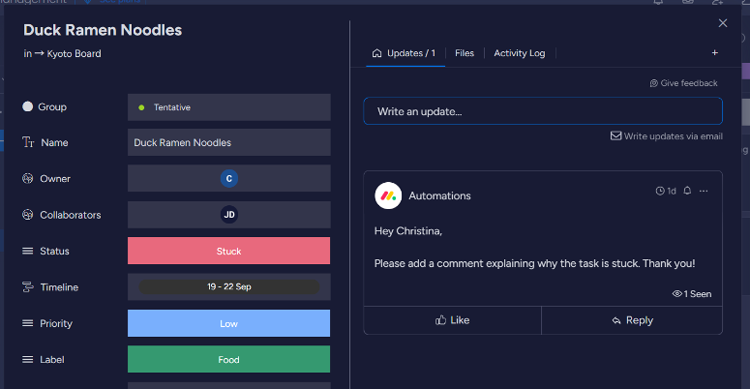
I liked that you can view custom fields and details completely by clicking on the task or get a shorthand synopsis using the list view.

Full disclosure, I’ve tested monday.com sales CRM before so I found it incredibly easy to create the automation. But, even then I didn’t have to use a tutorial video (or videos) to figure out how to set things up – a testament to the UX.
## Cost of Ownership
Frequently asked questions regarding monday.com pricing include:
**Q: Is there a free version of monday.com?**
Yes, monday.com offers a "Free Forever" plan that can be used by two users and includes basic features like three boards, over 200 templates and eight column types for customizations.
**Q: How much does monday.com cost?**
A: monday offers four different pricing plans: $9 for the Basic plan, $12 for the Standard plan and $19 for the Pro plan (all billed per user per month and more expensive if you pay monthly instead of annually). Pricing for the Enterprise plan requires a quote.
**Q: Can you pay for monday.com monthly?**
A: Yes, you can choose the monthly plan to pay per month. However, monday offers a subsidized plan for users who select the yearly plan, so you may miss out on savings in the grand scheme of things.
## Limitations
At the time of this review, these are the limitations according to user feedback:
- Limited features for cheaper pricing plans.
- Moderate learning curve.
## Training Resources
- **monday academy:** Learn at your own pace with free courses, webinars and live training.
- **Community:** Participate in platform discussions, get announcements for new features and join community events.
- **Knowledge Base:** Search through the article database to find answers to your questions.
![Banner of Pricing guide for monday.com]()
## Pricing & Cost Details
Includes Price/User and Minimum Commitment Terms for monday.com
See monday.com Pricing Details
## Compare Project Management Software
These are the top products most often compared.
Generating Scorecard... Compare to monday.com
You can choose 4 products to compare
[![ClickUp product logo]() ClickUp](https://www.selecthub.com/p/project-management-software/clickup/)
[![Wrike product logo]() Wrike](https://www.selecthub.com/p/project-management-software/wrike/)
[![Zoho Projects product logo]() Zoho Projects](https://www.selecthub.com/p/project-management-software/zoho-projects/)
[![Asana product logo]() Asana](https://www.selecthub.com/p/project-management-software/asana/)
[![Airtable product logo]() Airtable](https://www.selecthub.com/p/project-management-software/airtable/)
[![Smartsheet product logo]() Smartsheet](https://www.selecthub.com/p/work-management-software/smartsheet/)
[![Teamwork product logo]() Teamwork](https://www.selecthub.com/p/project-management-software/teamwork/)
[![Jira product logo]() Jira](https://www.selecthub.com/p/project-management-software/jira/)
[![ProofHub product logo]() ProofHub](https://www.selecthub.com/p/project-management-software/proofhub/)
Generating Scorecard... Compare to monday.com
## Head-to-Head
Comparison

vs
- [5pm](https://www.selecthub.com/project-management-software/monday-vs-5pm/)
- [AdaptiveWork](https://www.selecthub.com/project-management-software/monday-vs-adaptivework/)
- [Adobe Workfront](https://www.selecthub.com/project-management-software/monday-vs-adobe-workfront/)
- [Airtable](https://www.selecthub.com/project-management-software/airtable-vs-monday/)
- [Asana](https://www.selecthub.com/project-management-software/asana-vs-monday/)
- [Avaza](https://www.selecthub.com/project-management-software/monday-vs-avaza/)
- [Backlog](https://www.selecthub.com/project-management-software/monday-vs-backlog/)
- [Basecamp](https://www.selecthub.com/project-management-software/basecamp-vs-monday/)
- [Celoxis](https://www.selecthub.com/project-management-software/monday-vs-celoxis/)
- [Cerebro](https://www.selecthub.com/project-management-software/monday-vs-cerebro/)
- [Clarity PPM](https://www.selecthub.com/project-management-software/monday-vs-clarity-ppm/)
- [ClickUp](https://www.selecthub.com/project-management-software/clickup-vs-monday/)
- [Cora PPM](https://www.selecthub.com/project-management-software/monday-vs-cora-ppm/)
- [Daptiv](https://www.selecthub.com/project-management-software/monday-vs-planview-daptiv/)
- [Freedcamp](https://www.selecthub.com/project-management-software/monday-vs-freedcamp/)
- [GanttProject](https://www.selecthub.com/project-management-software/monday-vs-ganttproject/)
- [Hive](https://www.selecthub.com/project-management-software/hive-vs-monday/)
- [Jira](https://www.selecthub.com/project-management-software/jira-vs-monday/)
- [MeisterTask](https://www.selecthub.com/project-management-software/monday-vs-meistertask/)
- [Micro Focus](https://www.selecthub.com/project-management-software/monday-vs-micro-focus/)
- [Microsoft Project](https://www.selecthub.com/project-management-software/microsoft-project-vs-monday/)
- [nTask](https://www.selecthub.com/project-management-software/monday-vs-ntask/)
- [OpenProject](https://www.selecthub.com/project-management-software/monday-vs-openproject/)
- [Paymo](https://www.selecthub.com/project-management-software/monday-vs-paymo/)
- [Planisware](https://www.selecthub.com/project-management-software/monday-vs-planisware/)
- [Planview](https://www.selecthub.com/project-management-software/monday-vs-planview/)
- [Planview ProjectAdvantage](https://www.selecthub.com/project-management-software/monday-vs-planview-projectadvantage/)
- [Podio](https://www.selecthub.com/project-management-software/podio-vs-monday/)
- [Primavera P6](https://www.selecthub.com/project-management-software/monday-vs-primavera-p6/)
- [Prism PPM](https://www.selecthub.com/project-management-software/monday-vs-prism-ppm/)
- [Project Insight](https://www.selecthub.com/project-management-software/monday-vs-project-insight/)
- [Projectlibre](https://www.selecthub.com/project-management-software/monday-vs-projectlibre/)
- [ProjectManager](https://www.selecthub.com/project-management-software/monday-vs-projectmanager/)
- [Projecto](https://www.selecthub.com/project-management-software/monday-vs-projecto/)
- [ProofHub](https://www.selecthub.com/project-management-software/monday-vs-proofhub/)
- [Quickbase](https://www.selecthub.com/project-management-software/quickbase-vs-monday/)
- [Redmine](https://www.selecthub.com/project-management-software/monday-vs-redmine/)
- [SAP PPM](https://www.selecthub.com/project-management-software/monday-vs-sap-ppm/)
- [ServiceNow SPM](https://www.selecthub.com/project-management-software/monday-vs-servicenow-spm/)
- [Smartsheet](https://www.selecthub.com/work-management-software/smartsheet-vs-monday/)
- [TaskRay](https://www.selecthub.com/project-management-software/monday-vs-taskray/)
- [Teamwork](https://www.selecthub.com/project-management-software/monday-vs-teamwork/)
- [Tempo Portfolio Manager](https://www.selecthub.com/project-management-software/monday-vs-tempo-portfolio-manager/)
- [Trello](https://www.selecthub.com/project-management-software/trello-vs-monday/)
- [Wimi](https://www.selecthub.com/project-management-software/monday-vs-wimi-teamwork/)
- [WorkflowMax](https://www.selecthub.com/project-management-software/monday-vs-workflowmax/)
- [Wrike](https://www.selecthub.com/project-management-software/wrike-vs-monday/)
- [YouTrack](https://www.selecthub.com/project-management-software/monday-vs-youtrack/)
- [Zenkit](https://www.selecthub.com/project-management-software/monday-vs-zenkit/)
- [Zoho Projects](https://www.selecthub.com/project-management-software/monday-vs-zoho-projects/)
## Awards
SelectHub research analysts have evaluated monday.com and concluded it earns best-in-class honors for Mobile Capabilities and Platform Security. monday.com stands above the rest by achieving an ‘Excellent’ rating as a User Favorite.


## Relevant Articles
[Ultimate monday.com Review (Article)](https://www.selecthub.com/project-management/monday-com-review/) [Ultimate monday.com Review (Video)](https://www.youtube.com/watch?v=gwilKRyuVbs) [monday.com Pricing (Video)](https://www.youtube.com/watch?v=tFpjHdZX8es) [monday.com Alternatives (Video)](https://www.youtube.com/watch?v=0Dn7HPt8RWg) [monday.com](https://www.selecthub.com/company/monday-com/)
## Pricing for Project Management Software
![Banner of Pricing guide for Project Management Software]()
## Testimonials
monday.com eliminates so many human errors from the process of planning and significantly speeds up our throughput as a department.
\- Roee Adler
Head of Digital at WeWork
## Product Case Studies
[pdfThoughtWorks](https://cdn.selecthub.com/product_case_studies/28/study.pdf?X-Amz-Algorithm=AWS4-HMAC-SHA256&X-Amz-Credential=AKIAJBPSG65OJTMJV3TQ%2F20261016%2Fus-east-1%2Fs3%2Faws4_request&X-Amz-Date=20261016T040142Z&X-Amz-Expires=604800&X-Amz-SignedHeaders=host&X-Amz-Signature=cdfaf02fd98104c2c5c5087cfd5caaa2d417156ea54965569aec9851e75d1254)
## Product Publications
[pdf5 Ways Digital Work Management is Driving a New Productivity Revolution](https://www.selecthub.com/category/project-management/5-ways-digital-work-management-is-driving-a-new-productivity-revolution/)
## Similar Products
Here are the most similar products to monday.com.
[![Twproject product logo]() Twproject](https://www.selecthub.com/p/project-management-software/twproject/)
[![Lumeer product logo]() Lumeer](https://www.selecthub.com/p/project-management-software/lumeer/)
[![Skriv product logo]() Skriv](https://www.selecthub.com/p/project-management-software/skriv/)
[![Rukovoditel product logo]() Rukovoditel](https://www.selecthub.com/p/project-management-software/rukovoditel/)
[![Feng Office product logo]() Feng Office](https://www.selecthub.com/p/project-management-software/feng-office/)
[![Hassl product logo]() Hassl](https://www.selecthub.com/p/project-management-software/hassl/)
[![Upbase product logo]() Upbase](https://www.selecthub.com/p/project-management-software/upbase/)
[![Leantime product logo]() Leantime](https://www.selecthub.com/p/project-management-software/leantime/)
[![Gantter product logo]() Gantter](https://www.selecthub.com/p/project-management-software/gantter/)
[![Wimi product logo]() Wimi](https://www.selecthub.com/p/project-management-software/wimi-teamwork/)
## About the Contributors
The following expert team members are responsible for creating, reviewing, and fact checking the accuracy of this content.
[![Christina George]()](https://www.selecthub.com/author/christina-george/)
Written by
[Christina George](https://www.selecthub.com/author/christina-george/)
Technical Content Writer
An Associate Editor at SelectHub, Christina George creates and edits articles spanning project management, CPQ, CRM, marketing automation and home health software. As a Bachelor of Arts graduate with a triple major in Economics, Political Science and Sociology, her aim is to bring an integrated and simplified approach to long-form technical content. Formerly a food writer, copywriter, and social media sleuth, she has a soft spot for a quality pun. When not crafting articles and editing buyer's guides, you can find her attempting to score goals on the football field, binge-watching Curb Your Enthusiasm, or re-reading Pride and Prejudice for the nth time.
[See Full Bio](https://www.selecthub.com/author/christina-george/)
[![Dianna Dragonetti]()](https://www.selecthub.com/author/dianna-dragonetti/)
Edited by
[Dianna Dragonetti](https://www.selecthub.com/author/dianna-dragonetti/)
Content Editor
As an editor, Dianna Dragonetti leads a team of five writers in writing about a variety of software, with an emphasis on how these tools empower businesses. Categories include accounting, learning management systems, content management systems, supply chain management, and electronic data interchange.
[See Full Bio](https://www.selecthub.com/author/dianna-dragonetti/)
Your review has been submitted
and should be visible within 24 hours.
Review Title
Pros
Cons
Overall feedback
Your name
Your job title
Industry
Choose your main industry
- Accounting / CPA
- Advertising
- Aerospace & Defense
- Agriculture
- Apparel
- Architecture
- Auto Dealership
- Automotive
- Banking & Financial Services
- Banking & Mortgage
- Chemicals
- Construction & Engineering
- Construction / Contracting
- Consulting
- Consumer Products
- Distribution
- E-commerce
- Education
- Electronics
- Energy & Utilities
- Federal Government
- Field Maintenance
- Food & Beverage
- Healthcare / Social Services
- Hospitality / Gaming / Travel
- Human Resources
- Industrial Machinery
- Information Technology & High Tech
- Insurance
- Legal
- Maintenance / Field Service
- Manufacturing
- Marketing Services
- Media & Communications / Entertainment
- Mill Products
- Mining / Metals
- Mortgage
- Non-Profit
- Not Available
- Oil & Gas
- Other
- Other Services
- Payroll Provider
- Pharmaceuticals
- Professional Employer Organization
- Professional Services
- Property Management
- Public Sector
- Real Estate
- Recruiting Agency
- Religious Institutions
- Retail
- Sales & Marketing
- Semiconductors
- Software / IT
- Sports and Recreation
- Staffing Agency
- State & Local Government
- Telecommunications
- Third-Party Administrator
- Transportation & Logistics
- Wholesale Distribution
Company Size
Choose your company size
- 1 employee
- 2 to 9 employees
- 10 - 19 employees
- 20 - 49 employees
- 50 - 99 employees
- 100 - 499 employee
- 500 - 999 employees
- 1,000 - 2,499 employees
- 2,500 - 4,999 employees
- 5,000 - 9,999 employees
- 10,000 - 24,999 employees
- 25,000 - 49,999 employees
- 50,000 + employees
```json
{
"@context": "https://schema.org",
"@type": "BreadcrumbList",
"itemListElement": [
{
"@type": "ListItem",
"position": 1,
"name": "Home",
"item": "https://www.selecthub.com/"
},
{
"@type": "ListItem",
"position": 2,
"name": "Project Management",
"item": "https://www.selecthub.com/category/project-management/"
},
{
"@type": "ListItem",
"position": 3,
"name": "Project Management Software",
"item": "https://www.selecthub.com/c/project-management-software/"
},
{
"@type": "ListItem",
"position": 4,
"name": "Monday.com"
}
]
}
{
"@context": "http://schema.org",
"@type": "SoftwareApplication",
"name": "monday.com",
"description": "monday.com is a list-based project management solution designed to streamline processes with automation, customization and collaboration. You can build boards using templates or from scratch and customize fields, automations, colors and workflows.Monitor projects using a mobile app, custom dashboards or multiple views: Kanban boards, Gantt charts and calendars. Stay on the same page with your team members via board discussions, updates and comments with mentions.monday.com scored 90/100 for meeting our feature requirements for project management. According to our data, only ClickUp (92) and Wrike (92) deliver a more comprehensive feature set. monday’s project tracking and mobile capabilities stood out in our analysis as best in class.Users were quick to praise monday’s user-friendly interface, collaboration capabilities and task management. On the downside, reviewers mentioned a learning curve and advanced features inflating costs.monday.com offers a free forever plan for two users or fewer, with the paid plans starting at $9 per user per month if you pay annually.Our Research Process for monday.comArmed with a two-week free trial of the Pro plan, I replicated a complicated vacation itinerary to keep a group of friends on schedule and in sync, complete with tasks, automations and workflows. I was familiar with how monday operates thanks to a test of their CRM, so I only had to pay a few visits to the help center.To zero in on monday.com’s unique benefits compared to Zoho Projects, Wrike, ClickUp and Asana, I got a little help from our in-house software selection platform scores, based on research by our analysts. For user feedback, I used reviews from G2, Capterra and Software Advice, and reached out to users for quotes.",
"review": {
"@type": "Review","reviewRating": {
"@type": "Rating",
"ratingValue": 90,
"bestRating": 100
},
"author": {
"@type": "Person",
"name": "Christina George",
"reviewBody": "monday.com is a cloud-based project management platform that caters to a wide range of industries thanks to its customization, user-friendly interface and templates. During my 14-day trial period, I enjoyed using the platform's pre-built templates and drag-and-drop feature to set up projects and reorganize tasks.Starting off, onboarding was pretty smooth and narrowed down your use case (I chose project management), but you can also visit the template center to pick other template boards once you’re in. I liked its task creation since you can quickly add the fields you want to your task cards. For example, I wanted to add the due date and a file field for our content projects.I thought the task management features were stellar. I was impressed by how easy it is to create custom groups for tasks, assign them to specific team members, and communicate using tools like comments, mentions and even board discussions — there’s really no excuse to get your wires crossed.On the automation front, I successfully used the built-in automation engine, which comes with both pre-made templates and no-code customization options, to build a custom automation for status changes with little to no difficulty. I was also pretty excited to see what the AI-powered automations templates offered.I created an automation to summarize the updates whenever a card changes status. You can choose the tone and whether you’d like the text to be brief or in-depth. I would have liked a bit more specificity — for example, getting a summary only when the task gets to the quality review status — but this still served its purpose. Note: most accounts only have 500 AI credits per month, across all users, so I imagine the status change trigger could use them up fairly quickly.On the flip side, monday.com may have a slight learning curve for users who aren’t familiar with project management tools. Additionally, some advanced features, such as custom notifications and time tracking, need an upgrade to a higher pricing tier, which could become expensive for larger teams.All in all, I think monday’s intuitive interface, customization options and no-code automations make it a great option for users without a ton of technical expertise, especially if they’re familiar with monday’s UX and have a flexible budget."
}
},
"image": "https://cdn.selecthub.com/products/785ca71d2c85e3f3774baaf438c5c6eb-8f743908579233c3f85dde0a0da561e9/resources/normal/logo.png?1728418032",
"aggregateRating": {
"@type": "AggregateRating",
"ratingValue": "91",
"bestRating": "100",
"worstRating": "1",
"ratingCount": "23434"
},
"offers": {
"@type": "Offer",
"priceSpecification": {
"@type": "priceSpecification",
"price": "9",
"priceCurrency": "USD"
}
},
"positiveNotes": {
"@type": "ItemList",
"itemListElement": [
{
"@type": "ListItem",
"position": 1,
"name": "Task Management: Users appreciated how easy it is to monitor tasks with customized views, an activity feed and task updates."
},
{
"@type": "ListItem",
"position": 2,
"name": "Collaboration: Instant messaging, integrations, board discussions and easy scheduling and planning were a plus for reviewers."
},
{
"@type": "ListItem",
"position": 3,
"name": "User-Friendly: Reviewers said it was simple to set up and use for less tech-savvy users, and liked the attractive, colorful interface with helpful templates."
}
]
},
"negativeNotes": {
"@type": "ItemList",
"itemListElement": [
{
"@type": "ListItem",
"position": 1,
"name": "Cost: Reviewers noted that advanced features like customized notifications or time tracking required a plan upgrade which could become expensive."
},
{
"@type": "ListItem",
"position": 2,
"name": "Learning Curve: It takes time to get used to the navigation and features according to users."
},
{
"@type": "ListItem",
"position": 3,
"name": "Mobile App: Some users said the mobile app doesn’t have all the features available."
}
]
},
"applicationCategory": "Project Management Software"
}
```
