monday.com Reviews & Pricing

What Is monday.com?
Industry Specialties: Serves all industries
monday.com is a list-based project management solution designed to streamline processes with automation, customization and collaboration. You can build boards using templates or from scratch and customize fields, automations, colors and workflows.
Monitor projects using a mobile app, custom dashboards or multiple views: Kanban boards, Gantt charts and calendars. Stay on the same page with your team members via board discussions, updates and comments with mentions.
monday.com scored 90/100 for meeting our feature requirements for project management. According to our data, only ClickUp (92) and Wrike (92) deliver a more comprehensive feature set. monday’s project tracking and mobile capabilities stood out in our analysis as best in class.
Users were quick to praise monday’s user-friendly interface, collaboration capabilities and task management. On the downside, reviewers mentioned a learning curve and advanced features inflating costs.
monday.com offers a free forever plan for two users or fewer, with the paid plans starting at $12 per user per month.
Our Research Process for monday.com
Armed with a two-week free trial of the Pro plan, I replicated a complicated vacation itinerary to keep a group of friends on schedule and in sync, complete with tasks, automations and workflows. I was familiar with how monday operates thanks to a test of their CRM, so I only had to pay a few visits to the help center.
To zero in on monday.com’s unique benefits compared to Zoho Projects, Wrike, ClickUp and Asana, I got a little help from our in-house software selection platform scores, based on research by our analysts. For user feedback, I used reviews from G2, Capterra and Software Advice, and reached out to users for quotes.





monday.com Pricing
Based on our most recent analysis, monday.com pricing starts at $9 (Per User, Monthly).
- Price
- $$$$$
- Starting From
- $9
- Pricing Model
- Per User, Monthly
- Free Trial
- 14 Days (Request for Free)
Training Resources
monday.com is supported with the following types of training:
- Documentation
- In Person
- Live Online
- Videos
- Webinars
Support
The following support services are available for monday.com:
- Phone
- Chat
- FAQ
- Forum
- Help Desk
- Knowledge Base
- Tickets
- Training
- 24/7 Live Support
monday.com Benefits and Insights
Key differentiators & advantages of monday.com
- Improve Data Protection: With a score of 100 for platform security, monday.com tied with ClickUp and Wrike and beat out Asana (87) and Zoho Projects (87). Keep data safe with two-factor authentication, SSO, role-based permission, and data encryption at rest. I thought monday’s stand-out security feature is its IP address restriction so only pre-set approved locations or VPNs can access your account.
- Access and Update Projects Remotely: monday.com’s mobile capabilities scored 88, comfortably beating out Zoho Projects (75), Asana (69) and Wrike (69). Use the native app to change boards and check updates and alerts offline. Don’t feel like downloading another app? Log in from any device via web browsers.
- Jumpstart Projects with Templates: Use the template center to build boards suited to the project you’re working on. Accessing pre-built boards designed for marketing, sales, design, construction, customer service, product dev, nonprofits and more. I browsed through the dozens (at least) of templates for each industry and discovered that even if you can’t find the exact template you’re looking for, you can find something pretty close.
Industry Expertise
monday.com Reviews
Based on our most recent analysis, monday.com reviews indicate a 'excellent' User Satisfaction Rating of 91% based on 23434 user reviews from 5 recognized software review sites.

23434 reviews
Synopsis of User Ratings and Reviews
Based on an aggregate of monday.com reviews taken from the sources above, the following pros & cons have been curated by a SelectHub Market Analyst.
Pros
What Users Like
Cons
What Users Dislike
Researcher's Summary:
monday.com is a cloud-based project management platform that caters to a wide range of industries thanks to its customization, user-friendly interface and templates. During my 14-day trial period, I enjoyed using the platform's pre-built templates and drag-and-drop feature to set up projects and reorganize tasks.
Starting off, onboarding was pretty smooth and narrowed down your use case (I chose project management), but you can also visit the template center to pick other template boards once you’re in. I liked its task creation since you can quickly add the fields you want to your task cards. For example, I wanted to add the due date and a file field for our content projects.
I thought the task management features were stellar. I was impressed by how easy it is to create custom groups for tasks, assign them to specific team members, and communicate using tools like comments, mentions and even board discussions — there’s really no excuse to get your wires crossed.
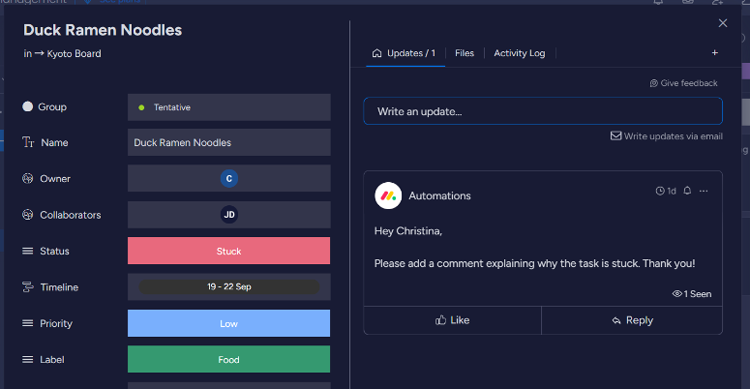
On the automation front, I successfully used the built-in automation engine, which comes with both pre-made templates and no-code customization options, to build a custom automation for status changes with little to no difficulty. I was also pretty excited to see what the AI-powered automations templates offered.
I created an automation to summarize the updates whenever a card changes status. You can choose the tone and whether you’d like the text to be brief or in-depth. I would have liked a bit more specificity — for example, getting a summary only when the task gets to the quality review status — but this still served its purpose. Note: most accounts only have 500 AI credits per month, across all users, so I imagine the status change trigger could use them up fairly quickly.
On the flip side, monday.com may have a slight learning curve for users who aren’t familiar with project management tools. Additionally, some advanced features, such as custom notifications and time tracking, need an upgrade to a higher pricing tier, which could become expensive for larger teams.
All in all, I think monday’s intuitive interface, customization options and no-code automations make it a great option for users without a ton of technical expertise, especially if they’re familiar with monday’s UX and have a flexible budget.
Key Features
- Custom Dashboard: Build your own custom dashboard using built-in widgets and third-party integrations. Get a bird’s eye view of your boards and teams along with individual team member and board views. Monitor workload, timelines, feed activity and custom charts, like in-progress tasks, from a central location.
- Multiple Views: Track projects by switching between multiple project views, including Gantt charts, Kanban boards, calendar views and custom views. For example, I tested out the Kanban board and liked the drag-and-drop feature for tasks (also available via the list view). The project report view was also handy, with a nifty battery icon to denote progress, and 30 widgets you can add.
- Task Management: Create tasks under custom groups like To-Do, In-Progress, On-Hold, and Complete and add personalized fields, assignees, due dates, labels, statuses and priorities. Mention assignees, add comments, files, links and tables directly in the tasks using the Updates tab. Drag and drop tasks and groups to reorganize things.
- Automations: Streamline workflows with no-code automations using templates or building custom automations from scratch using conditions and actions. Apply automations to specific boards and save your custom automations as a template to use on other boards.
- Templates: Create boards suited to your project needs by accessing the template center and choosing from a range of templates, including marketing, project management, sales and CRM, design, software development, and HR.
- Workflow Management: Organize your processes by creating custom workflows. Search for the trigger you’re looking for and add it as a starting block. Build on those blocks by choosing from several options: action, if or else or delay. Select the board where you want the action to happen, add conditions and edit blocks. View active workflows and pause or edit workflows as processes change.
See It In Action: No-Code Automations



Cost of Ownership
Limitations
- Limited features for cheaper pricing plans.
- Moderate learning curve.
Training Resources
- monday academy: Learn at your own pace with free courses, webinars and live training.
- Community: Participate in platform discussions, get announcements for new features and join community events.
- Knowledge Base: Search through the article database to find answers to your questions.
Compare Project Management Software
Head-to-Head
Comparison
vs
- 5pm
- AdaptiveWork
- Adobe Workfront
- Airtable
- Asana
- Avaza
- Backlog
- Basecamp
- Celoxis
- Cerebro
- Clarity PPM
- ClickUp
- Cora PPM
- Daptiv
- Freedcamp
- GanttProject
- Hive
- Jira
- LiquidPlanner
- MeisterTask
- Micro Focus
- Microsoft Project
- nTask
- OpenProject
- Paymo
- Planisware
- Planview
- Podio
- Primavera P6
- Project Insight
- Projectlibre
- ProjectManager
- Projecto
- ProofHub
- Quickbase
- Redmine
- SAP PPM
- Sciforma
- ServiceNow SPM
- Smartsheet
- TaskRay
- Teamwork
- Trello
- Wimi
- WorkflowMax
- WorkOtter
- Wrike
- YouTrack
- Zenkit
- Zoho Projects
Awards
SelectHub research analysts have evaluated monday.com and concluded it earns best-in-class honors for Mobile Capabilities and Platform Security. monday.com stands above the rest by achieving an ‘Excellent’ rating as a User Favorite.
Relevant Articles
Pricing for Project Management Software

Testimonials
monday.com eliminates so many human errors from the process of planning and significantly speeds up our throughput as a department.
Product Case Studies
ThoughtWorksProduct Publications
5 Ways Digital Work Management is Driving a New Productivity RevolutionSimilar Products
Here are the most similar products to monday.com.






Christina George

Dianna Dragonetti