SAP Analytics Cloud Reviews & Pricing

What Is SAP Analytics Cloud?
Industry Specialties: Serves all industries.
SAP Analytics Cloud (SAC) is a software-as-a-service built on the SAP Business Technology Platform. It’s the driving force behind SAP’s data services, especially its financial planning and consolidation offerings and makes the cut for the top ten products on our leaderboard.
The platform provides accessible dashboards that meet WCAG 2.1 standards, AI-powered forecasting with Smart Predict and natural-language querying through conversational insights. It also simplifies data prep with automated joins and smart data typing, and helps you understand what’s driving your numbers with key driver analysis and smart discovery.
SAP Analytics Cloud connects to Apache Hive, Spark, Informatica, Marketo, Pardot, Eloqua, MailChimp, SurveyMonkey, PayPal, Stripe, Square, SQL Server, MySQL and PostgreSQL. SAP Analytics uses ERP, eCommerce, CRM, marketing, project management, SEO and NoSQL data by relying on partner integrations.
The SAP Business Intelligence plan is for you if simple reporting is what you need. The vendor prices it at $36 per user monthly.
You can boost sales by identifying underperforming products and regions and improve products and services by analyzing customer behavior and purchasing trends.
You can opt for the Planning edition to create realistic budgets with accurate predictions at a cost of $14,100 per user annually. Allocating resources where they’re needed cuts down costs, and improved inventory management helps prevent unpleasant surprises, like extra overhead, due to stockouts or overstocking.
The Digital Boardroom is what it sounds like — a meeting-style presentation module with a responsive design and compelling dashboards. It’ll cost extra even if you have the enterprise edition.
The vendor offers a 30-day trial extendable up to 60 additional days, though you won’t be able to test its AI features unless you upgrade. Usage statistics are available to administrators on the Analytics Hub.
A mobile app is available, though browser access on mobile isn’t supported, except for Safari on iOS.
User reviews praise SAP Analytics for its visual storytelling and analytics, though most people say they need tech support for complex data modeling tasks and generating reports.
Our Research Process for SAP Analytics
I relied on the free trial to test SAC’s story and data analyzer modules. My focus areas included key buyer concerns, such as ease of use, data visualization and insight sharing. I also referred to the BI data in our selection platform to see how SAP Analytics Cloud compared to other top BI products, including Tableau, Spotfire, Cognos Analytics and SAS Visual Analytics.
YouTube videos were my primary go-to’s. Also, I used in-house data compiled from in-depth market research, RFIs, user reviews, vendor outreach and product documentation.


SAP Analytics Cloud Pricing
Based on our most recent analysis, SAP Analytics Cloud pricing starts at $36 (Per User, Monthly).
- Price
- $$$$$
- Starting From
- $36
- Pricing Model
- Per User, Monthly
- Free Trial
- 30 Days (Request for Free)
Training Resources
SAP Analytics Cloud is supported with the following types of training:
- Documentation
- In Person
- Live Online
- Videos
- Webinars
Support
The following support services are available for SAP Analytics Cloud:
- Phone
- Chat
- FAQ
- Forum
- Help Desk
- Knowledge Base
- Tickets
- Training
- 24/7 Live Support
SAP Analytics Cloud Benefits and Insights
Key differentiators & advantages of SAP Analytics Cloud
- Embedded Analytics: SAP Analytics Cloud, with a score of 100, is among the top five BI tools for embedded capabilities. It handles bidirectional filtering between your app and the embedded content, supports secure multi-tenant deployments, and lets you write back directly to SAP BW/4HANA through OData. Tableau can’t do that without extra tools, and SAS doesn’t support it at all.
- Mobile Capabilities: SAP Analytics Cloud (90) ranks ahead of Spotfire (84) and Qlik Sense (79) for mobile functionality. You can stay informed with push notifications, collaborate using in-app discussions, and make decisions on any device, thanks to a responsive design.
Industry Expertise
SAP Analytics Cloud Reviews
Based on our most recent analysis, SAP Analytics Cloud reviews indicate a 'great' User Satisfaction Rating of 84% based on 2054 user reviews from 5 recognized software review sites.

2054 reviews
Synopsis of User Ratings and Reviews
Based on an aggregate of SAP Analytics Cloud reviews taken from the sources above, the following pros & cons have been curated by a SelectHub Market Analyst.
Pros
Cons
Researcher's Summary:
SAC acts as a hub for your myriad SAP modules, pulling together business planning and consolidation, finance, ERP and supply chain management. While all these SAP products are giants in their own right, SAC gives you, the user, a unified platform to make sense of your data with in-app data modeling and analytics.
I spent time working with SAP analytics with the 30-day trial, which includes access to SAP Datasphere (formerly SAP Data Warehouse), and while the back-end capabilities are there, I hit snags early. The AI assistant built into Datasphere couldn’t launch any tutorials, and I had to fall back on YouTube just to understand basic tasks. This wasn’t a one-off — the native help content repeatedly broke, leaving the first mile experience more frustrating than it should’ve been.
Once inside, I found the data integration impressive. You can pull from Excel, CSV and even Google Sheets. Performance was solid when working with SAP data, but I noticed sluggishness even with smaller file uploads, suggesting scale may become a bottleneck outside the SAP ecosystem. That matches what around 85% of enterprise users have reported in reviews.
Most users who reviewed data integration said the tool handles large amounts of data seamlessly, and SAP scores a perfect 100 in our analysis for data management, at par with MicroStrategy and Power BI.
Lacking a data dictionary, the platform allows you to manage source metadata within your projects. This could be why some reviews wished for greater versatility in data modeling.
Many users who reviewed visualization appreciated the platform for its rich graphics libraries and templates, and I agree. In our analysis, SAP Analytics Cloud earned a score of 100 for dashboarding and data visualization. In this aspect, it leaves behind stalwarts like Power BI and Oracle Analytics Cloud. Reviewing functionality, most people liked its versatility and scalability.
Its predictive and augmented analysis capabilities had many fans among reviewers, with most praising the platform for strong planning and business analytics. Our analysts give SAP Analytics a 93 score for reporting insights, alerts, auto-scheduling and natural language results.
As an example, Juniper Networks, an AI-driven networking platform, eliminated 100% of its manual planning, budgeting and forecasting in Excel by moving to data modeling in SAP Analytics Cloud.
But quite a few people said there’s scope for improvement in live data analytics. Around 85% of reviewers discussing performance said it struggles at the enterprise level and when offline, though quite a few noted that it performs exceedingly well within the SAP ecosystem.
Overall, SAP Analytics Cloud is for organizations already locked into the SAP ecosystem, especially if you’re looking for a financial planning and consolidation tool. If you’re looking for a BI and predictive analytics tool, there are better options.
Key Features
- Accessible Dashboards: SAP Analytics supports screen readers, speech recognition, color contrast and alternative text for images to help meet accessibility standards such as WCAG 2.1.
- Smart Predict: Forecast events using SAP’s machine learning algorithms on your data. Predict whether a customer will buy a product, and anticipate order value, sales figures and campaign impact with classification, regression and time-series analysis.
- Conversational Insights: Click on Just Ask on the toolbar, pick a model, add it to your session and type your question using the available data. SAP Analytics auto-completes your queries and suggests questions for further analysis.
- Augmented Data Prep: Automatically identifies metrics, dimensions, dates, locations and hierarchies. SAP Analytics uses statistics and heuristics to assign data types, then links related tables with Auto Data Joins.
- Key Driver Analysis: Spot the key drivers of critical metrics and understand variances and correlations with Smart Insights. Take corrective action by identifying outliers, thanks to Smart Discovery.
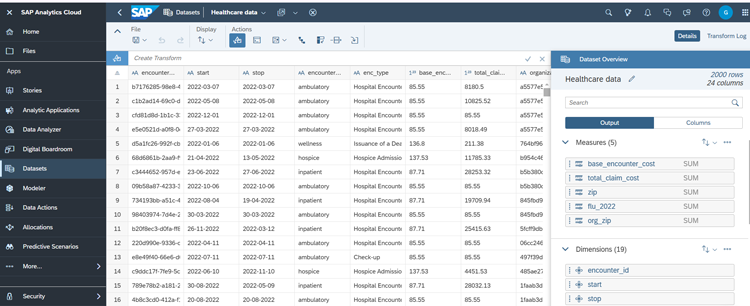
See It In Action

Limitations
- Doesn’t offer built-in statistical functions for financial market analysis.
- Lacks automated data model deployment and monitoring capabilities.
- Doesn’t support voice-based NLP.
Compare Business Intelligence Tools
Head-to-Head
Comparison
vs
- BusinessObjects
- Clear Analytics
- Cognos Analytics
- CRM Analytics
- datacube
- Datameer
- Domo
- Dundas BI
- eazyBI
- Fractal
- GoodData
- IBM Watson Analytics
- Infor Birst
- InfoZoom
- KNIME
- Knowi
- Looker
- Mathematica
- Metabase
- Mode
- Oracle Business Intelligence
- Panintelligence
- Phocas
- Power BI
- Pyramid Analytics
- Qlik Sense
- QuickSight
- SAP Business Data Cloud
- SAS Business Analytics
- Sigma Computing
- Strategy One
- Tableau
- TARGIT
- Yellowfin BI
- Zoho Analytics
Awards
SelectHub research analysts have evaluated SAP Analytics Cloud and concluded it earns best-in-class honors for Embedded Analytics Capabilities.
Pricing for Business Intelligence Tools
Similar Products
Here are the most similar products to SAP Analytics Cloud.


Ritinder Kaur

Dianna Dragonetti