---
description: Is Tableau the right solution for you? See where it's ranked among all Business Intelligence Tools. Read expert reviews, compare 2026 pricing, and explore top-rated features.
---
[Home](https://www.selecthub.com/) > [Business Intelligence](https://www.selecthub.com/category/business-intelligence/) > [Business Intelligence Tools](https://www.selecthub.com/c/business-intelligence-tools/) > Tableau
Categories:
- [Business Intelligence Tools](https://www.selecthub.com/c/business-intelligence-tools/)
- [Big Data Analytics Tools](https://www.selecthub.com/c/big-data-analytics-tools/)
- [Business Analytics Tools](https://www.selecthub.com/c/business-analytics-tools/)
- [Embedded Analytics Tools](https://www.selecthub.com/c/embedded-analytics-tools/)
- [Enterprise Reporting Software](https://www.selecthub.com/c/enterprise-reporting-system/)
- [Statistical Analysis Software](https://www.selecthub.com/c/statistical-analysis-software/)
- ...
## What Is Tableau?
**Industry Specialties:** Serves all industries.
Tableau is a data visualization and analytics solution known for its versatile graphics. Though many other tools have overtaken it in visual analytics, the platform is still popular and, according to our research, a user favorite for data visualization. But, it’s not only about pretty pictures. Tableau also wins the best-in-class honors for advanced analytics on our selection platform.
According to our research, Tableau provides 80% of core BI features out of the box, which include extensive data connectivity. With its long list of sources, there’s a high chance you won’t need to look elsewhere to connect to your preferred platforms.
Files, cloud sources and servers — Tableau works with them all, but it works best with structured data. The platform has basic data prep and an optional data interpreter to clean it up. However, we advise investing in [Tableau Prep](https://www.selecthub.com/p/business-intelligence-tools/tableau-prep/), a separate data preparation module, to get the most out of Tableau.
The platform has connectors for [Salesforce](https://www.selecthub.com/p/crm-software/salesforce/), Google Analytics, Excel, [Google BigQuery](https://www.selecthub.com/p/big-data-analytics-tools/bigquery/), [Amazon Redshift](https://www.selecthub.com/p/data-warehouse-tools/redshift/), Azure Data Lake, [IBM Db2](https://www.selecthub.com/p/relational-databases/ibm-db2/), MongoDB and [PostgreSQL](https://www.selecthub.com/p/relational-databases/postgresql/). You can even connect private networks to live data sources via Tableau Cloud using something called the Tableau Bridge.
Additionally, the platform has kept up with the times through Tableau Pulse, an intelligent technology for prescribing the next-best action using AI and [Einstein Analytics](https://www.selecthub.com/p/business-intelligence-tools/einstein-analytics/).
Software, healthcare, manufacturing, banking, financial services and retail companies benefit from Tableau’s visualization and analysis capabilities. Whether it’s operations or line-of-business decisions, you can do it all, though reporting isn’t that sophisticated. But, we must remember that the platform was never meant for it.
Pricing starts at $15 monthly, and you can opt for the [Cloud](https://www.selecthub.com/p/business-analytics-tools/tableau-online/) or [Server](https://www.selecthub.com/p/business-intelligence-tools/tableau-server/) version. User reviews appreciated the platform for its visualization capabilities and ease of use, but some people found it pricey and said performance lagged when data volumes increased significantly.
**Our Research Approach for Tableau**
As part of the free trial, I tested Tableau Desktop for data visualization, dashboarding, localization, auto-charting and geospatial analytics. My review of Tableau’s key features is based on our research team’s analysis of the BI software market and industry, which includes buyer information, RFIs, product manuals, technical documentation and user reviews.
I also referred to the BI data in our selection platform to see how Tableau compares to other top BI products like [MicroStrategy](https://www.selecthub.com/p/business-intelligence-tools/microstrategy/), [Oracle Analytics](https://www.selecthub.com/p/business-intelligence-tools/oracle-analytics-cloud/), [Qlik Sense](https://www.selecthub.com/p/business-intelligence-tools/qlik-sense/) and [Domo](https://www.selecthub.com/p/business-intelligence-tools/domo/).
Besides product documentation and video tutorials, product reviews on sites such as Gartner, Capterra, G2 and Reddit helped me form an informed assessment.
PRICE
$
$
$
$
$
COMPANY SIZE
S
M
L
DEPLOYMENT
PLATFORM
[Try Before You Buy. Request a Free Demo Today!Request Demo It's completely free!](https://pmo.selecthub.com/get-product-demo/?category=Business+Intelligence+Tools&product_name=Tableau&origin_url=https%3A%2F%2Fwww.selecthub.com%2Fp%2Fbusiness-intelligence-tools%2Ftableau%2F&product_logo=https%3A%2F%2Fcdn.selecthub.com%2Fproducts%2Fcee631121c2ec9232f3a2f028ad5c89b-9ada8357f60426e1426cbe26339b2329%2Fresources%2Fnormal%2Flogo.png%3F1743433661)
[Contributors](#view-contributors)
![Ritinder Kaur]() Written by Ritinder Kaur Senior Technical Content Writer [Read Bio](https://www.selecthub.com/author/ritinder-kaur/)
![Dianna Dragonetti]() Edited by Dianna Dragonetti Content Editor [Read Bio](https://www.selecthub.com/author/dianna-dragonetti/)
User Sentiment i
![User satisfaction level icon: great]()
Based on 10994 reviews:
Add your rating:
![Screenshots]()![Screenshots]()![Screenshots]()![Screenshots]()
Product Screenshots and Videos
## #7
Tableau is ranked #7 on the top 10 Business Intelligence Tools leaderboard based on a comprehensive analysis performed by SelectHub research analysts. Compare the leaders with our In-Depth Report.
[Get the Report Now](https://pmo.selecthub.com/bi-report-pd-vers?category_slug=business-intelligence-tools&product_slug=tableau&page_type=product&slug=tableau&product_name=Tableau&category=Business+Intelligence+Tools&origin_url=https%3A%2F%2Fwww.selecthub.com%2Fp%2Fbusiness-intelligence-tools%2Ftableau%2F)
## Tableau Pricing
Based on our most recent analysis, Tableau pricing starts at $15 (Per User, Monthly).
[Get Price Quote](https://pmo.selecthub.com/get-product-pricing/?category=Business+Intelligence+Tools&product_name=Tableau&origin_url=https%3A%2F%2Fwww.selecthub.com%2Fp%2Fbusiness-intelligence-tools%2Ftableau%2F&product_logo=https%3A%2F%2Fcdn.selecthub.com%2Fproducts%2Fcee631121c2ec9232f3a2f028ad5c89b-9ada8357f60426e1426cbe26339b2329%2Fresources%2Fnormal%2Flogo.png%3F1743433661&price=2)
- Price
-
$
$
$
$
$
i
- Starting From
- $15
- Pricing Model
- Per User, Monthly
- Free Trial
- 14 Days - Request for Free
## Training Resources
Tableau is supported with the following types of training:
- Documentation
- In Person
- Live Online
- Videos
- Webinars
## Support
The following support services are available for Tableau:
- Email
- Phone
- Chat
- FAQ
- Forum
- Help Desk
- Knowledge Base
- Tickets
- Training
- 24/7 Live Support
## Product Information and Resellers
Product Information
Reseller - WIA Business Systems
## Tableau Benefits and Insights
Why use Tableau?
### Key differentiators & advantages of Tableau
- **Advanced Analytics:** Our analysts gave Tableau a score of 95, better than MicroStrategy (94) and Oracle Analytics (88). It won this honor for providing the latest in advanced analytics, namely, streaming data, sentiment, text, time-series, IoT, regression and cohort analysis.
- **Mobile Capabilities:** Tableau earned a score of 95, ranking among the top three tools on our BI leaderboard. The platform allows sharing content, including maps, from anywhere on Android and iOS devices. Push notifications help you stay on top of status updates, tagged comments and shared content.There’s also a mobile layout for dashboards.
- **Track License Usage:** View license information in detail, such as the number of active licenses and the last used date/time. Once you’ve configured the registry key on every computer with a Tableau Desktop instance, it’ll start sending usage reports to the Tableau Server.
### Industry Expertise
Tableau is implemented in a wide range of industries. These include communications, healthcare, financial services, staffing and recruiting, retail, government, higher education and many more.
## Tableau Reviews
Based on our most recent analysis, Tableau reviews indicate a 'great' User Satisfaction Rating of 88% based on 10994 user reviews from 5 recognized software review sites.
![User satisfaction level icon: great]()
10994 reviews
88%
of users would recommend this product
### Synopsis of User Ratings and Reviews
Based on an aggregate of Tableau reviews taken from the sources above, the following pros & cons have been curated by a SelectHub Market Analyst.
#### Pros
- **Data Visualization:** Almost 98% of users who reviewed its visual capabilities praised the platform for its dashboards and the freedom to play around with data and modify charts as desired.
- **User-Friendly:** According to 93% of users who mentioned ease of use, it makes data accessible with its easy user actions and handy tooltips.
- **Data Connectivity:** About 92% of users who discussed data sourcing praised its ability to pull data from disparate systems.
**What Users Like**
- “As a Tableau Certified Partner since 2015, we’ve seen that Tableau scores over Power BI in organizations with a more disparate architecture – perhaps a mixture of Apple, Linux, and Windows products. Tableau is primarily focused on data visualization and analytics. Its drag-and-drop builder is a bit more modern than Power BI, which is also a plus for organizations not invested in the Azure ecosystem.” - [Rafael Estrada](https://www.linkedin.com/in/rafael-estrada-1261a91/), President, Estrada Consulting
#### Cons
- **Pricing:** Around 90% of the users citing cost found it expensive.
- **Speed:** About 71% of the users who discussed performance found it slow when processing large data volumes.
- **Onboarding Woes:** Approximately 67% of the users who reviewed the platform's adoption said there was a steep learning curve.
**What Users Dislike**
- “Tableau supports a large variety of data sources – including Microsoft products – but connectivity isn’t going to be as plug-and-play with Azure as Power BI is. In some cases, data preparation and transformation requires third-party software before Tableau can make the best use of it.” - Rafael Estrada, President, Estrada Consulting
#### Researcher's Summary:
Tableau Desktop is a BI solution for data visualization, dashboarding and location analysis. In online reviews, users said they found its drag-and-drop charting a boon for creating charts and maps. Regarding customization, many users praised the platform for its various labeling and design options.
[EMD Serono](https://www.emdserono.com/us-en) relies on Tableau to provide timely patient access to therapies for infertility, multiple sclerosis and cancer. Tableau Pulse keeps sales reps informed with AI-driven physician insights, helping them act fast in the field.
Market penetration analysis and patient data visualization enable sales KPI tracking. Moreover, Tableau helps the Serono team keep patient care front and center by tracking the turnaround time from referral to drug delivery.
My experience with Tableau gave me a window into its ad hoc capabilities. I could visualize data within minutes using its drag-and-drop builder and automatic graphic suggestions. Though Microsoft users are generally skewed toward Power BI, Tableau is great for instant data analysis, with Tableau Pulse offering next-action insights on demand.
One hiccup to note: I couldn’t schedule report exports, which is understandable as it’s not a reporting tool at its core. It’s still inconvenient and a limitation to consider. But I could subscribe to dashboards and receive static screenshots.
As a CTO looking for a reporting tool, don’t dismiss Tableau just yet. Many organizations have found a happy medium, combining Excel’s spreadsheet capabilities with Tableau’s live updates, extensive connections and advanced analytics.
One-fourth of the users discussing adoption said there was a steep learning curve. Tableau relies on Python and R scripts for statistics in its visualizations. It's where the named licenses can prove to be a blessing, as you can opt to train upcoming Creators and Explorers. We recommend factoring in training if you want to hit the ground running.
Some reviewers felt discounted packages for business editions should be available, similar to the free student licenses. At $70 per user, the Creator license can seem costly when compared to Power BI ($9.99 per user) and Qlik Sense ($30 per user).
Here's the good news, though. Its built-in user management acts as a permissions layer for your organization — users can only access the relevant content. Plus, an organization will have very few Creators and a greater number of Viewers and Explorers, and the license fee reduces from Creator to Explorer to Viewer.
We recommend opting for a wise license combination to get the most out of the product.
On the upside, the vendor constantly releases new features, the latest one being Einstein CoPilot in beta.
Overall, Tableau is a competitive BI solution, but if the pricing seems inflexible, quite a few other solutions offer live insights and advanced analytics out of the box.
## Key Features
- **AI:** Einstein Analytics is the force behind Tableau’s AI capabilities. Tableau Pulse enables independent data exploration and open-ended questions. Explain Data provides text explanations, and Einstein CoPilot uses generative AI to uncover hidden trends and enables relevant follow-up questions like having a conversation with a human being.
- **Tableau Prep:** Clean and transform data of all types, including survey results, feedback data and social media posts. Shape and combine it with Tableau Prep, which is available with the paid edition only.
- **Data Stories:** Convey your message with compelling narratives to get stakeholder buy-in. Drag and drop sheets onto the storyboard to show the growth, decline or stability of critical metrics.
- **Animations:** Explain how data changes over time with animated charts and customize them to include graphics, labels and colors.
- **Filtering:** Focus on the data that matters; it’s as easy as dragging and dropping desired fields to the Filter shelf. Specify a value range, set a condition or choose the top values to display.
- **User-Based Licenses:** Opt for Creator licenses for report authoring and data governance capabilities. The Explorer license costs $42 per user per month, billed annually and doesn’t include governance. The Viewer license costs $15 per user per month and is meant for report consumers.
## See It In Action: Healthcare Data Analysis
Tableau Cloud includes Prep Builder and Data Management modules. Otherwise, you need separate licenses for them.
Tableau Server allows deploying dashboards on your on-premises servers, but be ready to invest in at least four cores, 16 GB of RAM and 15 GB of storage. Its more feature-rich than the cloud version and more robust regarding data security and large data volumes.
My trial was the individual one on Tableau Desktop version 2024.1.3. The interface is intuitively organized, and drag-and-drop actions enable self-serve data visualization.
What I loved was the speed of data processing and the wide variety of visualizations. For simpler use cases, Tableau is incredibly user-friendly and fast, though user reviews mention an infrequent lag at higher volumes.
Though Tableau spans a wide spectrum of industries, I tested it for healthcare data. My dataset included details of patients and insurers and hospital visits by patient.
One use case was to find the total claim settlement amount. As I dragged and dropped the **Total Claims Cost** and **Payer** fields to the column and row shelves, Tableau gave me a bar graph.
Tableau recommends visualizations for the selected data, but you can change it if desired. The toolbar had single-click options for sorting data from increasing to decreasing values or the other way around. Switching between horizontal and vertical bar graphs or selecting a different view was a matter of a few clicks.
To view the number of encounters by payer, I dragged the **Payer** field to the row shelf and used the **SUM(ROW\_COUNT())** function on the column shelf. A chart popped up with more visualization and layout options.
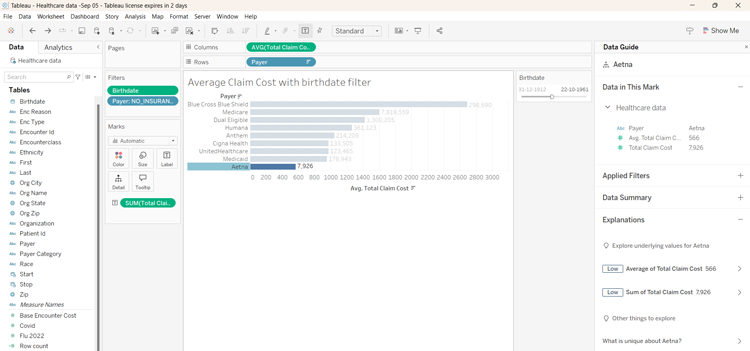
To view the average claim cost by birthdate, I wanted an interactive filter. I dragged the **Birthdate** field to the **Filters** shelf and right-clicked on it to set the end date as October 22, 1961. Selecting **Show Filter** added a slider conveniently to the right of my visualization. I could see the data for people born before October 22, 1961, and if required, I could change the end date to include a broader age group.
Another use case was viewing how many people were inpatients, outpatients or those who needed emergency care. I dragged and dropped the **Total Claims Cost** and **Payer** fields into columns and rows, respectively. Similarly, I dropped **Encounterclass** (type of hospital visit) into the Filters shelf and clicked on **Show Filter** to enable a checkbox menu for filtering the data by visit type.

While Tableau excels in many areas, it does have limitations, especially when it comes to conditional formatting and charting. Though Tableau is an industry favorite for visualization, I think limited formatting might make buyers move on to other platforms that offer more flexibility in this regard.
## Limitations
Some of the product limitations include:
- Explain Data doesn’t work with blended or cube data sources.
- The free edition doesn't support live source connections.
- It can’t automatically predict trends and doesn’t support voice searches.
![Banner of Pricing guide for Tableau]()
## Pricing & Cost Details
See the Price/User for the top business intelligence tools… plus the most important considerations and questions to ask when shopping.
See Pricing Details
## Value-Added Benefits
### How WIA Business Systems adds value to Tableau
- **Flexible Deployment:** Deploy anywhere - on-premise, in the cloud or go hybrid — by leveraging Microsoft Azure and Amazon Web Services (AWS).
- **Customization:** Personalize applications by customizing the features and configurations that align with your business requirements. Or, opt to enhance your existing tool’s functionality with dedicated technical assistance, saving your company’s valuable time and effort.
- **Troubleshooting Issues:** The reseller maintains its own support environment for issue resolution that mirrors the live environment with the latest test data.
- **Code Maintenance:** They release regular updates as well as patches for defects that need immediate redressal and don’t have workarounds. Records of all customizations and any subsequent updates and patches provided by the reseller are maintained rigorously.
### Industry Expertise
WIA Business Systems provides analytics solutions to clients in multiple industries throughout the USA, Canada, UK, UAE & Asia. These sectors include manufacturing, engineering, construction, retail, transportation and logistics, equipment, infrastructure, telecom, energy, aerospace and defense.
## Support and Services
**Advice:** Get support for all customization-related issues and core updates implemented by the reseller.
**Consulting:** Talk to certified consultants to gain domain and product knowledge at any stage of the implementation process.
**Engineering:** Call 1-877-942-7978 or email info@wiasystems.com for more information on their services or reach out to them on their website through the Contact page. Get access to trained support professionals Monday through Friday or round-the-clock for a fee.
**Implementation:** Get dedicated implementation support with project management and project reporting tools to gain visibility into the status of your deployment.
**Training:** Sign up for customized training that includes onsite, individual, and classroom training, video tutorials and courses.
## Compare Business Intelligence Tools
These are the top products most often compared.
Generating Scorecard... Compare to Tableau
You can choose 4 products to compare
[![Strategy One product logo]() Strategy One](https://www.selecthub.com/p/business-intelligence-tools/strategy-one/)
[![Oracle Analytics Cloud product logo]() Oracle Analytics Cloud](https://www.selecthub.com/p/data-analytics-software/oracle-analytics-cloud/)
[![Qlik Sense product logo]() Qlik Sense](https://www.selecthub.com/p/business-intelligence-tools/qlik-sense/)
[![Domo product logo]() Domo](https://www.selecthub.com/p/business-intelligence-tools/domo/)
[![Power BI product logo]() Power BI](https://www.selecthub.com/p/business-intelligence-tools/power-bi/)
[![SAP Analytics Cloud product logo]() SAP Analytics Cloud](https://www.selecthub.com/p/business-intelligence-tools/sap-analytics-cloud/)
[![Spotfire product logo]() Spotfire](https://www.selecthub.com/p/data-visualization-tools/spotfire/)
[![SAS Visual Analytics product logo]() SAS Visual Analytics](https://www.selecthub.com/p/data-visualization-tools/sas-visual-analytics/)
[![Cognos Analytics product logo]() Cognos Analytics](https://www.selecthub.com/p/business-intelligence-tools/cognos-analytics/)
Generating Scorecard... Compare to Tableau
## Head-to-Head
Comparison

vs
- [BusinessObjects](https://www.selecthub.com/business-intelligence-tools/tableau-vs-businessobjects/)
- [Clear Analytics](https://www.selecthub.com/business-intelligence-tools/tableau-vs-clear-analytics/)
- [Cognos Analytics](https://www.selecthub.com/business-intelligence-tools/tableau-vs-cognos-analytics/)
- [CRM Analytics](https://www.selecthub.com/business-intelligence-tools/tableau-vs-crm-analytics/)
- [datacube](https://www.selecthub.com/business-intelligence-tools/tableau-vs-datacube/)
- [Datameer](https://www.selecthub.com/business-intelligence-tools/tableau-vs-datameer/)
- [Domo](https://www.selecthub.com/business-intelligence-tools/tableau-vs-domo/)
- [Dundas BI](https://www.selecthub.com/business-intelligence-tools/tableau-vs-dundas-bi/)
- [eazyBI](https://www.selecthub.com/business-intelligence-tools/tableau-vs-eazybi/)
- [Fractal](https://www.selecthub.com/business-intelligence-tools/tableau-vs-fractal-analytics/)
- [GoodData](https://www.selecthub.com/business-intelligence-tools/tableau-vs-gooddata/)
- [IBM Watson Analytics](https://www.selecthub.com/business-intelligence-tools/tableau-vs-ibm-watson-analytics/)
- [Infor Birst](https://www.selecthub.com/business-intelligence-tools/tableau-vs-birst/)
- [InfoZoom](https://www.selecthub.com/business-intelligence-tools/tableau-vs-infozoom/)
- [Klipfolio](https://www.selecthub.com/business-intelligence-tools/tableau-vs-klipfolio/)
- [KNIME](https://www.selecthub.com/business-intelligence-tools/tableau-vs-knime/)
- [Knowi](https://www.selecthub.com/business-intelligence-tools/tableau-vs-knowi/)
- [Mathematica](https://www.selecthub.com/business-intelligence-tools/tableau-vs-mathematica/)
- [Metabase](https://www.selecthub.com/business-intelligence-tools/tableau-vs-metabase/)
- [Mode](https://www.selecthub.com/business-intelligence-tools/tableau-vs-mode-analytics/)
- [Oracle Business Intelligence](https://www.selecthub.com/business-intelligence-tools/tableau-vs-oracle-bi/)
- [Panintelligence](https://www.selecthub.com/business-intelligence-tools/tableau-vs-panintelligence/)
- [Phocas](https://www.selecthub.com/business-intelligence-tools/tableau-vs-phocas/)
- [Power BI](https://www.selecthub.com/business-intelligence-tools/tableau-vs-power-bi/)
- [Pyramid Analytics](https://www.selecthub.com/business-intelligence-tools/tableau-vs-pyramid-analytics/)
- [Qlik Sense](https://www.selecthub.com/business-intelligence-tools/tableau-vs-qlik-sense/)
- [QuickSight](https://www.selecthub.com/business-intelligence-tools/tableau-vs-quicksight/)
- [SAP Analytics Cloud](https://www.selecthub.com/business-intelligence-tools/tableau-vs-sap-analytics-cloud/)
- [SAP Business Data Cloud](https://www.selecthub.com/business-intelligence-tools/tableau-vs-sap-business-data-cloud/)
- [SAS Business Analytics](https://www.selecthub.com/business-intelligence-tools/tableau-vs-sas-business-analytics/)
- [Sigma Computing](https://www.selecthub.com/business-intelligence-tools/tableau-vs-sigma-computing/)
- [Strategy One](https://www.selecthub.com/business-intelligence-tools/tableau-vs-strategy-one/)
- [TARGIT](https://www.selecthub.com/business-intelligence-tools/tableau-vs-targit/)
- [Yellowfin BI](https://www.selecthub.com/business-intelligence-tools/tableau-vs-yellowfin-bi/)
- [Zoho Analytics](https://www.selecthub.com/business-intelligence-tools/tableau-vs-zoho-analytics/)
## Awards
SelectHub research analysts have evaluated Tableau and concluded it earns best-in-class honors for Advanced Analytics.

## Relevant Articles
[Spotfire vs Tableau](https://www.selecthub.com/business-intelligence-tools/spotfire-vs-tableau/) [Pentaho vs Tableau](https://www.selecthub.com/business-intelligence/pentaho-vs-tableau/) [Looker vs Tableau](https://www.selecthub.com/business-intelligence/looker-vs-tableau-bi-tools/) [Microstrategy vs Tableau](https://www.selecthub.com/business-intelligence/tableau-vs-microstrategy/) [Cognos vs Tableau](https://www.selecthub.com/business-intelligence-tools/cognos-analytics-vs-tableau/)
## Pricing for Business Intelligence Tools
![Banner of Pricing guide for Business Intelligence Tools]()
## Product Publications
[pdfTableau vs QlikView vs Power BI Comparison Report](https://www.selecthub.com/category/business-intelligence/tableau-vs-qlikview-vs-power-bi-comparison-report/)
## Similar Products
Here are the most similar products to Tableau.
[![Actionable Intelligence Platform product logo]() Actionable Intelligence Platform](https://www.selecthub.com/p/business-intelligence-tools/actionable-intelligence-platform/)
[![Revintel product logo]() Revintel](https://www.selecthub.com/p/business-intelligence-tools/revintel/)
[![Style Intelligence product logo]() Style Intelligence](https://www.selecthub.com/p/business-intelligence-tools/style-intelligence/)
[![Panintelligence product logo]() Panintelligence](https://www.selecthub.com/p/business-intelligence-tools/panintelligence/)
[![Dundas BI product logo]() Dundas BI](https://www.selecthub.com/p/business-intelligence-tools/dundas-bi/)
[![Zoomdata product logo]() Zoomdata](https://www.selecthub.com/p/business-intelligence-tools/zoomdata/)
[![Phocas product logo]() Phocas](https://www.selecthub.com/p/business-intelligence-tools/phocas/)
[![Klipfolio product logo]() Klipfolio](https://www.selecthub.com/p/business-intelligence-tools/klipfolio/)
[![Mode product logo]() Mode](https://www.selecthub.com/p/business-intelligence-tools/mode-analytics/)
[![Qlik Sense product logo]() Qlik Sense](https://www.selecthub.com/p/business-intelligence-tools/qlik-sense/)
## About the Contributors
The following expert team members are responsible for creating, reviewing, and fact checking the accuracy of this content.
[![Ritinder Kaur]()](https://www.selecthub.com/author/ritinder-kaur/)
Written by
[Ritinder Kaur](https://www.selecthub.com/author/ritinder-kaur/)
Senior Technical Content Writer
Ritinder Kaur is a Senior Technical Content Writer at SelectHub and has ten years of experience writing about B2B software and quality assurance. She has a Masters degree in English language and literature and writes about Business Intelligence and Data Science. Her articles on software testing have been published on Stickyminds.
[See Full Bio](https://www.selecthub.com/author/ritinder-kaur/)
[![Dianna Dragonetti]()](https://www.selecthub.com/author/dianna-dragonetti/)
Edited by
[Dianna Dragonetti](https://www.selecthub.com/author/dianna-dragonetti/)
Content Editor
As an editor, Dianna Dragonetti leads a team of five writers in writing about a variety of software, with an emphasis on how these tools empower businesses. Categories include accounting, learning management systems, content management systems, supply chain management, and electronic data interchange.
[See Full Bio](https://www.selecthub.com/author/dianna-dragonetti/)
Your review has been submitted
and should be visible within 24 hours.
Review Title
Pros
Cons
Overall feedback
Your name
Your job title
Industry
Choose your main industry
- Accounting / CPA
- Advertising
- Aerospace & Defense
- Agriculture
- Apparel
- Architecture
- Auto Dealership
- Automotive
- Banking & Financial Services
- Banking & Mortgage
- Chemicals
- Construction & Engineering
- Construction / Contracting
- Consulting
- Consumer Products
- Distribution
- E-commerce
- Education
- Electronics
- Energy & Utilities
- Federal Government
- Field Maintenance
- Food & Beverage
- Healthcare / Social Services
- Hospitality / Gaming / Travel
- Human Resources
- Industrial Machinery
- Information Technology & High Tech
- Insurance
- Legal
- Maintenance / Field Service
- Manufacturing
- Marketing Services
- Media & Communications / Entertainment
- Mill Products
- Mining / Metals
- Mortgage
- Non-Profit
- Not Available
- Oil & Gas
- Other
- Other Services
- Payroll Provider
- Pharmaceuticals
- Professional Employer Organization
- Professional Services
- Property Management
- Public Sector
- Real Estate
- Recruiting Agency
- Religious Institutions
- Retail
- Sales & Marketing
- Semiconductors
- Software / IT
- Sports and Recreation
- Staffing Agency
- State & Local Government
- Telecommunications
- Third-Party Administrator
- Transportation & Logistics
- Wholesale Distribution
Company Size
Choose your company size
- 1 employee
- 2 to 9 employees
- 10 - 19 employees
- 20 - 49 employees
- 50 - 99 employees
- 100 - 499 employee
- 500 - 999 employees
- 1,000 - 2,499 employees
- 2,500 - 4,999 employees
- 5,000 - 9,999 employees
- 10,000 - 24,999 employees
- 25,000 - 49,999 employees
- 50,000 + employees
```json
{
"@context": "https://schema.org",
"@type": "BreadcrumbList",
"itemListElement": [
{
"@type": "ListItem",
"position": 1,
"name": "Home",
"item": "https://www.selecthub.com/"
},
{
"@type": "ListItem",
"position": 2,
"name": "Business Intelligence",
"item": "https://www.selecthub.com/category/business-intelligence/"
},
{
"@type": "ListItem",
"position": 3,
"name": "Business Intelligence Tools",
"item": "https://www.selecthub.com/c/business-intelligence-tools/"
},
{
"@type": "ListItem",
"position": 4,
"name": "Tableau"
}
]
}
{
"@context": "http://schema.org",
"@type": "SoftwareApplication",
"name": "Tableau",
"description": "Tableau is a data visualization and analytics solution known for its versatile graphics. Though many other tools have overtaken it in visual analytics, the platform is still popular and, according to our research, a user favorite for data visualization. But, it’s not only about pretty pictures. Tableau also wins the best-in-class honors for advanced analytics on our selection platform.According to our research, Tableau provides 80% of core BI features out of the box, which include extensive data connectivity. With its long list of sources, there’s a high chance you won’t need to look elsewhere to connect to your preferred platforms.Files, cloud sources and servers — Tableau works with them all, but it works best with structured data. The platform has basic data prep and an optional data interpreter to clean it up. However, we advise investing in Tableau Prep, a separate data preparation module, to get the most out of Tableau.The platform has connectors for Salesforce, Google Analytics, Excel, Google BigQuery, Amazon Redshift, Azure Data Lake, IBM Db2, MongoDB and PostgreSQL. You can even connect private networks to live data sources via Tableau Cloud using something called the Tableau Bridge.Additionally, the platform has kept up with the times through Tableau Pulse, an intelligent technology for prescribing the next-best action using AI and Einstein Analytics.Software, healthcare, manufacturing, banking, financial services and retail companies benefit from Tableau’s visualization and analysis capabilities. Whether it’s operations or line-of-business decisions, you can do it all, though reporting isn’t that sophisticated. But, we must remember that the platform was never meant for it.Pricing starts at $15 monthly, and you can opt for the Cloud or Server version. User reviews appreciated the platform for its visualization capabilities and ease of use, but some people found it pricey and said performance lagged when data volumes increased significantly.Our Research Approach for TableauAs part of the free trial, I tested Tableau Desktop for data visualization, dashboarding, localization, auto-charting and geospatial analytics. My review of Tableau’s key features is based on our research team’s analysis of the BI software market and industry, which includes buyer information, RFIs, product manuals, technical documentation and user reviews.I also referred to the BI data in our selection platform to see how Tableau compares to other top BI products like MicroStrategy, Oracle Analytics, Qlik Sense and Domo.Besides product documentation and video tutorials, product reviews on sites such as Gartner, Capterra, G2 and Reddit helped me form an informed assessment.",
"review": {
"@type": "Review","reviewRating": {
"@type": "Rating",
"ratingValue": 84,
"bestRating": 100
},
"author": {
"@type": "Person",
"name": "SelectHub",
"reviewBody": "Tableau Desktop is a BI solution for data visualization, dashboarding and location analysis. In online reviews, users said they found its drag-and-drop charting a boon for creating charts and maps. Regarding customization, many users praised the platform for its various labeling and design options.EMD Serono relies on Tableau to provide timely patient access to therapies for infertility, multiple sclerosis and cancer. Tableau Pulse keeps sales reps informed with AI-driven physician insights, helping them act fast in the field.Market penetration analysis and patient data visualization enable sales KPI tracking. Moreover, Tableau helps the Serono team keep patient care front and center by tracking the turnaround time from referral to drug delivery.My experience with Tableau gave me a window into its ad hoc capabilities. I could visualize data within minutes using its drag-and-drop builder and automatic graphic suggestions. Though Microsoft users are generally skewed toward Power BI, Tableau is great for instant data analysis, with Tableau Pulse offering next-action insights on demand.One hiccup to note: I couldn’t schedule report exports, which is understandable as it’s not a reporting tool at its core. It’s still inconvenient and a limitation to consider. But I could subscribe to dashboards and receive static screenshots.As a CTO looking for a reporting tool, don’t dismiss Tableau just yet. Many organizations have found a happy medium, combining Excel’s spreadsheet capabilities with Tableau’s live updates, extensive connections and advanced analytics.One-fourth of the users discussing adoption said there was a steep learning curve. Tableau relies on Python and R scripts for statistics in its visualizations. It's where the named licenses can prove to be a blessing, as you can opt to train upcoming Creators and Explorers. We recommend factoring in training if you want to hit the ground running.Some reviewers felt discounted packages for business editions should be available, similar to the free student licenses. At $70 per user, the Creator license can seem costly when compared to Power BI ($9.99 per user) and Qlik Sense ($30 per user).Here's the good news, though. Its built-in user management acts as a permissions layer for your organization — users can only access the relevant content. Plus, an organization will have very few Creators and a greater number of Viewers and Explorers, and the license fee reduces from Creator to Explorer to Viewer.We recommend opting for a wise license combination to get the most out of the product.On the upside, the vendor constantly releases new features, the latest one being Einstein CoPilot in beta.Overall, Tableau is a competitive BI solution, but if the pricing seems inflexible, quite a few other solutions offer live insights and advanced analytics out of the box."
}
},
"image": "https://cdn.selecthub.com/products/cee631121c2ec9232f3a2f028ad5c89b-9ada8357f60426e1426cbe26339b2329/resources/normal/logo.png?1743433661",
"aggregateRating": {
"@type": "AggregateRating",
"ratingValue": "88",
"bestRating": "100",
"worstRating": "1",
"ratingCount": "10994"
},
"offers": {
"@type": "Offer",
"priceSpecification": {
"@type": "priceSpecification",
"price": "15",
"priceCurrency": "USD"
}
},
"positiveNotes": {
"@type": "ItemList",
"itemListElement": [
{
"@type": "ListItem",
"position": 1,
"name": "Data Visualization: Almost 98% of users who reviewed its visual capabilities praised the platform for its dashboards and the freedom to play around with data and modify charts as desired."
},
{
"@type": "ListItem",
"position": 2,
"name": "User-Friendly: According to 93% of users who mentioned ease of use, it makes data accessible with its easy user actions and handy tooltips."
},
{
"@type": "ListItem",
"position": 3,
"name": "Data Connectivity: About 92% of users who discussed data sourcing praised its ability to pull data from disparate systems."
}
]
},
"negativeNotes": {
"@type": "ItemList",
"itemListElement": [
{
"@type": "ListItem",
"position": 1,
"name": "Pricing: Around 90% of the users citing cost found it expensive."
},
{
"@type": "ListItem",
"position": 2,
"name": "Speed: About 71% of the users who discussed performance found it slow when processing large data volumes."
},
{
"@type": "ListItem",
"position": 3,
"name": "Onboarding Woes: Approximately 67% of the users who reviewed the platform's adoption said there was a steep learning curve."
}
]
},
"applicationCategory": "Business Intelligence Tools"
}
```
