---
description: Is Qlik Sense the right solution for you? See where it's ranked among all Business Intelligence Tools. Read expert reviews, compare 2026 pricing, and explore top-rated features.
---
[Home](https://www.selecthub.com/) > [Business Intelligence](https://www.selecthub.com/category/business-intelligence/) > [Business Intelligence Tools](https://www.selecthub.com/c/business-intelligence-tools/) > Qlik Sense
Categories:
- [Business Intelligence Tools](https://www.selecthub.com/c/business-intelligence-tools/)
- [Big Data Analytics Tools](https://www.selecthub.com/c/big-data-analytics-tools/)
- [Business Analytics Tools](https://www.selecthub.com/c/business-analytics-tools/)
- [Embedded Analytics Tools](https://www.selecthub.com/c/embedded-analytics-tools/)
- [Enterprise Reporting Software](https://www.selecthub.com/c/enterprise-reporting-system/)
- ...
## What Is Qlik Sense?
**Industry Specialties:** Serves all industries
Qlik Sense is a self-service analytics solution with interactive dashboards and reports and embedded analytics. An associative engine establishes data links behind the scenes, displaying them on demand, and a cognitive engine (as in QlikView) accepts natural language queries.
With an analyst rating of 87, Qlik Sense is currently ranked third on our BI leaderboard after [MicroStrategy](https://www.selecthub.com/p/business-intelligence-tools/microstrategy/) and [Oracle Analytics Cloud](https://www.selecthub.com/p/business-intelligence-tools/oracle-analytics-cloud/). The platform offers 83% of key BI features out of the box, one of which is extensive source connectivity.
Qlik Sense offers connectors for several popular data sources, including [SQL Server](https://www.selecthub.com/p/relational-databases/sql-server/), [MySQL](https://www.selecthub.com/p/relational-databases/mysql/), Oracle, AWS, Azure, and Excel, XML and CSV files. JavaScript APIs enable custom visualizations, embedding and extensions. The platform has a sentiment analysis API to integrate with MeaningCloud. Text analytics is built in.
Many organizations rely on [Qlik Talend Data Integration](https://www.selecthub.com/p/etl-tools/qlik-talend-data-integration/) to deliver ready data in cloud environments, which is separate from Qlik Data Integration. This module automates data preparation tasks, including real-time streaming, refinement, cataloging and publishing.
If your data loads are predictable, the cloud-based, hosted Enterprise version with Qlik Advanced Analytics may be a good fit. The vendor offers flexible billing options, charging for either the amount of data transferred or the volume of data analyzed.
As for OS, Qlik Sense deploys on Windows, Mac, Linux and any phone device. By contrast, [Tableau](https://www.selecthub.com/p/business-intelligence-tools/tableau/) runs on Windows, Mac and mobile devices, while [Power BI](https://www.selecthub.com/p/business-intelligence-tools/power-bi/) is available only on Windows and Android devices.
Thanks to the free trial, I could get an insider peek at the product prices. A subscription to Qlik Sense Business International comes at a price of $31 per user monthly. The Enterprise SaaS edition offers two license types — Professional and Analyzer — at a cost of $72.50 and $41.25 per user monthly, respectively.
The vendor provides volume discounting — the price per seat decreases if you sign up more users. Based on user reviews, 87% of the users would recommend Qlik Sense.
To learn more, visit our [Qlik company page](https://www.selecthub.com/company/qlik-software/).
**Our Research Approach for Qlik Sense**
I signed up for the free trial to test the Data Load Editor, Data Model Viewer, Data Manager, Recommended Associations and visualizations. Besides, I checked out the Insight Advisor for conversational insights. I also relied on in-house data compiled from in-depth market research, historical RFIs, user reviews, vendor outreach and product manuals.
I also referred to the BI data in our selection platform to see how Qlik Sense compares to other top BI products like [Tableau](https://www.selecthub.com/p/business-intelligence-tools/tableau/), MicroStrategy, [Cognos Analytics](https://www.selecthub.com/p/business-intelligence-tools/cognos-analytics/) and [Logi Symphony](https://www.selecthub.com/p/embedded-analytics-tools/logi-symphony/).
Additionally, I based my research on key buyer concerns that include performance, data views and insight sharing. I also reviewed vendor documentation and watched YouTube videos to inform my assessment.
PRICE
$
$
$
$
$
COMPANY SIZE
S
M
L
DEPLOYMENT
PLATFORM
[Try Before You Buy. Request a Free Demo Today!Request Demo It's completely free!](https://pmo.selecthub.com/get-product-demo/?category=Business+Intelligence+Tools&product_name=Qlik%2BSense&origin_url=https%3A%2F%2Fwww.selecthub.com%2Fp%2Fbusiness-intelligence-tools%2Fqlik-sense%2F&product_logo=https%3A%2F%2Fcdn.selecthub.com%2Fproducts%2Fcd0b43eac0392accf3624b7372dec36e-dafb46ccbc34410f1e66d4389201cef5%2Fresources%2Foriginal%2Flogo.svg%3F1743089188)
[Contributors](#view-contributors)
![Ritinder Kaur]() Written by Ritinder Kaur Senior Technical Content Writer [Read Bio](https://www.selecthub.com/author/ritinder-kaur/)
![Dianna Dragonetti]() Edited by Dianna Dragonetti Content Editor [Read Bio](https://www.selecthub.com/author/dianna-dragonetti/)
User Sentiment i
![User satisfaction level icon: great]()
Based on 3456 reviews:
Add your rating:
![Screenshots]()![Screenshots]()![Screenshots]()![Screenshots]()![Screenshots]()![Screenshots]()![Screenshots]()![Screenshots]()![Screenshots]()![Screenshots]()![Screenshots]()![Screenshots]()![Screenshots]()![Screenshots]()
Product Screenshots and Videos
## #3
Qlik Sense is ranked #3 on the top 10 Business Intelligence Tools leaderboard based on a comprehensive analysis performed by SelectHub research analysts. Compare the leaders with our In-Depth Report.
[Get the Report Now](https://pmo.selecthub.com/bi-report-pd-vers?category_slug=business-intelligence-tools&product_slug=qlik-sense&page_type=product&slug=qlik-sense&product_name=Qlik+Sense&category=Business+Intelligence+Tools&origin_url=https%3A%2F%2Fwww.selecthub.com%2Fp%2Fbusiness-intelligence-tools%2Fqlik-sense%2F)
## Qlik Sense Pricing
Based on our most recent analysis, Qlik Sense pricing starts at $31 (Per User, Monthly).
[Get Price Quote](https://pmo.selecthub.com/get-product-pricing/?category=Business+Intelligence+Tools&product_name=Qlik%2BSense&origin_url=https%3A%2F%2Fwww.selecthub.com%2Fp%2Fbusiness-intelligence-tools%2Fqlik-sense%2F&product_logo=https%3A%2F%2Fcdn.selecthub.com%2Fproducts%2Fcd0b43eac0392accf3624b7372dec36e-dafb46ccbc34410f1e66d4389201cef5%2Fresources%2Foriginal%2Flogo.svg%3F1743089188&price=2)
- Price
-
$
$
$
$
$
i
- Starting From
- $31
- Pricing Model
- Per User, Monthly
- Free Trial
- 30 Days - Request for Free
## Training Resources
Qlik Sense is supported with the following types of training:
- Documentation
- In Person
- Live Online
- Videos
- Webinars
## Support
The following support services are available for Qlik Sense:
- Email
- Phone
- Chat
- FAQ
- Forum
- Help Desk
- Knowledge Base
- Tickets
- Training
- 24/7 Live Support
## Product Information and Resellers
Product Information
Reseller - Copley Consulting Group
Reseller - CHAMPS Analytics
## Qlik Sense Benefits and Insights
Why use Qlik Sense?
### Key differentiators & advantages of Qlik Sense
- **Link Datasets Automatically:** Save time defining how data tables relate with its intelligent suggestions, something Tableau and Power BI lack. Bubbles represent data tables and color-coded rings — green, orange and red — inside them indicate the possibility of links between the tables.
- **Use Qlik Add-Ons:** As a Qlik Sense user, you access Qlik add-ons for advanced analytics, machine learning (AutoML) and printing services (Qlik NPrinting). Modules dedicated to a specific functionality are likely to be more robust than a jack-of-all-trades platform. Qlik also offers a geoanalytics module for location analytics.
### Industry Expertise
Whether you're in retail, financial services, electronics or automotive industries, Qlik Sense can help you make sense of your data. At the team level, marketing and salespeople can link datasets, build models and get sales, revenue and campaign information in less time. Additionally, many manufacturing and consumer goods companies are among Qlik Sense users.
## Qlik Sense Reviews
Based on our most recent analysis, Qlik Sense reviews indicate a 'great' User Satisfaction Rating of 85% based on 3456 user reviews from 5 recognized software review sites.
![User satisfaction level icon: great]()
3456 reviews
85%
of users would recommend this product
### Synopsis of User Ratings and Reviews
Based on an aggregate of Qlik Sense reviews taken from the sources above, the following pros & cons have been curated by a SelectHub Market Analyst.
#### Pros
- **Integrations:** Approximately 86% of users reviewing data sources were satisfied with its wide connectivity.
- **Ease of Use:** About 84% of users who cited usability praised the platform for self-service BI.
- **Functionality:** Around 80% of the reviews that mentioned features praised it for ETL and data visualization.
- **Data Visualization:** About 66% of the users discussing dashboards were satisfied with its interactive displays that allowed them to dig deep.
#### Cons
- **Cost:** About 87% of users who mentioned pricing found the tool expensive.
- **Performance:** Around 86% of users citing speed said it lagged when processing large and complex datasets.
- **Training:** Approximately 69% of users who discussed adoption said there was a significant learning curve.
- **Customization:** Around 65% of users who mentioned the freedom to design dashboards said the tool offered limited options.
#### Researcher's Summary:
Qlik Sense focuses on independent data analysis for enterprises with advanced tools that include AI, natural language processing and automation. The platform’s shining feature is an associative engine that successfully links related data sets to uncover meaningful insights.
[Intuit](https://www.qlik.com/us/solutions/customers/customer-stories/intuit), the technology leader, relies on Qlik Sense to drive a company-wide portal that eliminates reporting inconsistency due to data silos. As a result, over a third of their workforce actively uses the portal for real-time analytics, with a 10X adoption increase within two years.
Its Intelligent dataset-linking functionality gets my vote as the most significant differentiator since it makes data modeling seamless and saves time. It was the highlight of my product trial as I could view and establish dataset associations between multiple tables at the onset, and it was a welcome change from creating data models from scratch.
On that note, the master list of fields was a lifesaver, allowing me to study data from any of the uploaded tables as a dashboard or standalone visualization by combining it with data from other tables. When stuck, I could rely on the Insight Advisor for explanations and deeper questions.
In comparison, manually linking tables in Tableau and Power BI felt like a huge task when I took them for a test drive.
Qlik has ready-to-go modules for analytics, automation and printing, which Qlik Sense uses extensively, so keeping it lean is a smart vendor move. Factor in the cost of these additional modules when budgeting.
Qlik Sense SaaS is multi-cloud, so unless the admin assigns separate workspaces, your users won’t be able to create personal dashboards — everything is shared otherwise. Some users said the platform slowed when processing large workloads, which is a common issue with many other platforms. Assess your need for speed before committing to a purchase.
If upgrading from QlikView, you’ll need to create new objects initially, as both platforms have different architectures. However, the vendor assists in seamless migration with the Qlik Analytics Modernization program.
Overall, Qlik Sense is an efficient platform that offers many analysis capabilities worth considering. We recommend checking it out if you’re looking for an alternative to Power BI, entrenched in Microsoft technology, or Tableau, with its emphasis on visualization.
## Key Features
- **IoT Analytics:** The Qlik Associative Engine enables edge analytics in various applications, from smart sensor technology in home devices to internet-connected pacemakers in healthcare. Other use cases include gathering environmental data for farming and tracking equipment for fleet management and manufacturing.
- **Qlik AutoML:** Qlik Sense offers key driver analysis, automated forecasts and contextual insights using Qlik’s machine learning component. The Insight Advisor lets you ask questions and get answers in plain text or graphics.
- **Live Connections:** When loading data into memory, Qlik Sense can leave some data out and still use it in dashboards and queries. When you ask for the data, the platform fetches it directly from the source and shows the real-time data in the chart. It updates the data in memory only if you apply calculations or filters.
- **AI Integration:** Ask and answer questions in natural language and automate processes using OpenAI and H2O.ai. Feed massive datasets to the LLM and watch as it summarizes the insight for you. Move beyond traditional analysis by working with the IBM Watson API for natural language.
- **Qlik Sense Management Console:** Develop apps, manage tasks and connections, and track performance. With QMC, create content and consume data insights.
- **Reporting Service:** Keep partners and clients on the same page by sending reports to everyone involved, even non-Qlik users. Download reports, subscribe to charts and sheets, or automate report delivery with its Reporting Service, available with Qlik Sense Enterprise SaaS.
- **Apps:** Create interactive dashboards and visualizations for separate tasks within Qlik Sense. An organization can use hundreds of Qlik Sense apps in its tech stack.
## See It In Action
My trial version was Qlik Sense Desktop May 2024 Patch 3 124.187.7 Business edition. The interface is well-organized, and navigating between menu options is straightforward. Your team might take some time to get used to the hierarchy of spaces, collections, apps and sheets.
Apps are files that you store within spaces, and collections are folders for organizing projects. Here’s a view of the homepage.
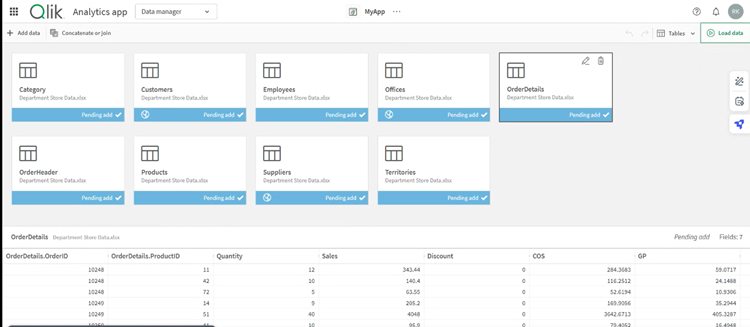
Data connectivity is on point — you can upload files from virtually any source, including from your computer.
A mobile app complements the SaaS version. You’ll need automated reporting services — they’re packaged with the Enterprise version at no extra cost. You get up to 5,000 automation runs monthly, data refreshes, notifications to subscribed users and integration with productivity tools like [Slack](https://www.selecthub.com/p/collaboration-software-tools/slack/).
Your data teams will find uploading and profiling data straightforward, though people new to data tools might have a slight learning curve.
Associative recommendations are a differentiator — load the data files into Qlik Sense and watch as it establishes dataset relationships. It should save your teams a considerable amount of time, especially if your data volumes are routinely high.
I was impressed by the master list of all the uploaded data fields, which allowed me to link, blend, filter and aggregate datasets as desired.

Another reason why you would want Qlik Sense would be the Insight Advisor. It not only recommends visualizations based on the selected data but also suggests questions to ask.
Whether it’s sales figures, campaign performance data or the number of hospital readmissions in the past quarter, an AI assistant empowers your teams and senior stakeholders to ask open-ended questions.
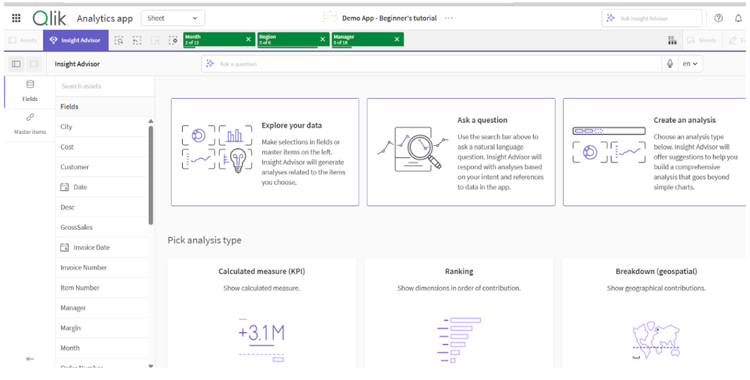
Sign up for alerts from individual visualizations, or subscribe to email alerts. Find value in a visualization and want to save it for later? Take a snapshot, and it’ll show up in your story collection.
You might want to consider the Enterprise version for advanced functionality. This high-end version lets you schedule reloads, share files and configure access permissions.
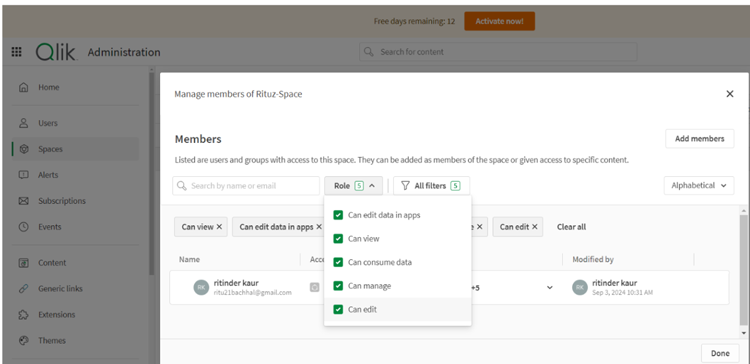
According to user reviews, the documentation is inadequate for all use cases newbies might encounter.
## Limitations
At the time of this review, these are the limitations according to user feedback:
- Qlik Sense SaaS doesn’t support Qlik NPrinting.
- Applying transformations can slow down the data reading speed in QVD files.
## Cost of Ownership
| License/Subscription Cost | On-Premise:- License fees include an upfront fee to own the software, plus IP for a fixed term, installation, customization and integration costs
- Enterprise Edition is offered on-premise and is based on a token system
- Based on a combination of server, user, document and application-based licensing
Cloud-Based/SaaS:- Based on recurring subscription-based model: $X per user, per month
Cost may vary depending on the Qlik Sense Pricing plan selected:- Cloud Basic, Cloud Business, Desktop, Enterprise Edition or Personal Edition
|
| --- | --- |
| Maintenance Cost | On-Premise: Maintenance cost is over and above the upfront fee Cloud-Based/SaaS: Maintenance cost is included in the service fees charged at the time of purchase |
| Installation/Implementation Cost | On-Premise: Included in the upfront cost/subscription cost Cloud-Based/SaaS: None |
| Customization Cost | For both on-premise and cloud-based/SaaS, customization costs vary depending on the product and pricing tier chosen, and the level of customization required. Costs will vary depending on the package selected |
| Recurring/Renewal Costs | On-Premise: Annual recurring fees to be paid over and above the upfront cost include annual renewal, upgrades and ongoing support Cloud-Based/SaaS: A recurring monthly fee is charged, which typically includes maintenance, monitoring, upgrades, training and support |
![Banner of Pricing guide for Qlik Sense]()
## Pricing & Cost Details
See the Price/User for the top business intelligence tools… plus the most important considerations and questions to ask when shopping.
See Pricing Details
## Valued-Added Benefits
### How Copley Consulting Group adds value to Qlik Sense
- **Depth of Experience:** Copley’s business analytics expertise focuses solely on Qlik, including Qlik Sense. The reseller has received the highest accreditation from Qlik as an Elite Partner and offers decades of experience in leveraging Qlik’s platform to accelerate business value with data and drive data transformation for their clients.
- **Flexible Implementation Options:** The Copley Consulting Group collaborates closely with clients in developing their deployment strategies. It helps clients structure an individualized implementation approach that works best for them, including self-managed, full turnkey and hybrid options.
- Structured Deployment Methodology: Provides a blueprint for success through a personalized, structured deployment methodology, using Qlik to deliver answers to their clients’ problems.
- Program Management: Copley helps develop a formalized approach to program management, execution and reporting based on detailed budgets, scheduled tasks and activities specifically developed for each engagement.
- **Vertical and Micro-Vertical Focus:** The Copley Consulting Group brings its demonstrated competencies in specific vertical market sectors and micro-vertical segments, such as its State, Local and Education (SLED) practice which has achieved great success in a variety of state agencies such as those in Departments of Health, Human Services, Transportation and more, as well as K-12 and higher education institutions.
- Data Transparency: Copley's SLED clients are able to promote data transparency through embedded, interactive analytics that allow interested parties to query data on public websites.
- **Technical Excellence:** Copley’s team of data specialists makes their technical acumen accessible to their clients, assisting them in understanding how to unify, cleanse and secure their data, building a stable foundation for accessing and mining data. The reseller helps customers evaluate their platform’s data source integrations, implementation, data security and more, and ultimately understand how to maximize the value of their data investment.
### Industry Expertise
The Copley Consulting Group has a 30-year history of serving clients in diverse public and private sectors, with experience in deploying Qlik for mission-critical applications in life science, aerospace and defense, high tech and general manufacturing operations, among others. The reseller has assisted hundreds of companies, ranging from startups to Fortune 500 enterprises, in digitally transforming their data.
## Support and Services
**Data Strategies:** Copley offers consulting and advisory services to help Qlik clients with program management, the definition of critical business needs, increasing productivity and developing strategies for data integration, big data, data lakes and the security and governance of data.
**Qlik Help Desk and Support:** For technical support, users may fill out the support ticket on Copley's support page, call 855-884-5305 or email qliksupport@copleycg.com. Copley provides Help Desk and Support Services to their clients, offering resources and timely answers regarding functional and technical questions as they arise during and after deployment. With their expertise in Qlik, the reseller serves as the initial support vehicle for any challenges their clients face and has priority access to vendor support to augment and resolve client issues.
**Advice:** Copley’s Qlik-certified team of instructors aims to empower users with self-sufficiency in Qlik Analytics through formalized, on-site classroom training, virtual online training, hands-on workshops or customized training programs.
**Hosting & Managed Services:** In addition to supporting the SaaS-based Qlik offerings, the reseller offers hosting and managed services for those operations desiring to off-load IT responsibilities to a third party.
## Value-Added Benefits
### How CHAMPS Analytics adds value to Qlik Sense
- **Cost Savings:** Reduce wastage with a clear view of spending and profit margins through live reporting and analytics. Build client trust by consistently providing reliable data.
- **SaaS Deployment:** Deploy securely and reliably in the cloud with high availability.
- **Data Aggregation:** Derive actionable intelligence from workforce management, scheduling, ERP and inventory systems. Optimize work schedules by consolidating large data volumes from CMMS systems.
- **Business Predictions:** Gain visibility into company data by collecting it in one place. Perform demand planning, sales and operations forecasting with data you can trust.
- **Focus on Action:** Effectively target leads with in-depth insights. Track company sales performance by keeping KPIs front and center. Train employees using the achievement metrics of top performers.
### Industry Expertise
CHAMPS Analytics provides Qlik deployments to clients in many industries in North America and globally. These include nuclear power, energy, farm equipment, wastewater treatment, medical devices, processed foods manufacturers, aerospace, defense, semiconductors and manufacturing.
## Support and Services
**Training:** Foundation-level training with certification is available.
**Post-implementation Support:** The vendor offers remote and onsite support after deployment.
## Compare Business Intelligence Tools
These are the top products most often compared.
Generating Scorecard... Compare to Qlik Sense
You can choose 4 products to compare
[![Strategy One product logo]() Strategy One](https://www.selecthub.com/p/business-intelligence-tools/strategy-one/)
[![Oracle Analytics Cloud product logo]() Oracle Analytics Cloud](https://www.selecthub.com/p/data-analytics-software/oracle-analytics-cloud/)
[![Domo product logo]() Domo](https://www.selecthub.com/p/business-intelligence-tools/domo/)
[![Power BI product logo]() Power BI](https://www.selecthub.com/p/business-intelligence-tools/power-bi/)
[![SAP Analytics Cloud product logo]() SAP Analytics Cloud](https://www.selecthub.com/p/business-intelligence-tools/sap-analytics-cloud/)
[![Tableau product logo]() Tableau](https://www.selecthub.com/p/business-intelligence-tools/tableau/)
[![Spotfire product logo]() Spotfire](https://www.selecthub.com/p/data-visualization-tools/spotfire/)
[![SAS Visual Analytics product logo]() SAS Visual Analytics](https://www.selecthub.com/p/data-visualization-tools/sas-visual-analytics/)
[![Cognos Analytics product logo]() Cognos Analytics](https://www.selecthub.com/p/business-intelligence-tools/cognos-analytics/)
Generating Scorecard... Compare to Qlik Sense
## Head-to-Head
Comparison

vs
- [BusinessObjects](https://www.selecthub.com/business-intelligence-tools/qlik-sense-vs-businessobjects/)
- [Clear Analytics](https://www.selecthub.com/business-intelligence-tools/qlik-sense-vs-clear-analytics/)
- [Cognos Analytics](https://www.selecthub.com/business-intelligence-tools/cognos-analytics-vs-qlik-sense/)
- [CRM Analytics](https://www.selecthub.com/business-intelligence-tools/qlik-sense-vs-crm-analytics/)
- [datacube](https://www.selecthub.com/business-intelligence-tools/qlik-sense-vs-datacube/)
- [Datameer](https://www.selecthub.com/business-intelligence-tools/qlik-sense-vs-datameer/)
- [Domo](https://www.selecthub.com/business-intelligence-tools/domo-vs-qlik-sense/)
- [Dundas BI](https://www.selecthub.com/business-intelligence-tools/qlik-sense-vs-dundas-bi/)
- [eazyBI](https://www.selecthub.com/business-intelligence-tools/qlik-sense-vs-eazybi/)
- [Fractal](https://www.selecthub.com/business-intelligence-tools/qlik-sense-vs-fractal-analytics/)
- [GoodData](https://www.selecthub.com/business-intelligence-tools/qlik-sense-vs-gooddata/)
- [IBM Watson Analytics](https://www.selecthub.com/business-intelligence-tools/qlik-sense-vs-ibm-watson-analytics/)
- [Infor Birst](https://www.selecthub.com/business-intelligence-tools/qlik-sense-vs-birst/)
- [InfoZoom](https://www.selecthub.com/business-intelligence-tools/qlik-sense-vs-infozoom/)
- [Klipfolio](https://www.selecthub.com/business-intelligence-tools/qlik-sense-vs-klipfolio/)
- [KNIME](https://www.selecthub.com/business-intelligence-tools/knime-vs-qlik-sense/)
- [Knowi](https://www.selecthub.com/business-intelligence-tools/qlik-sense-vs-knowi/)
- [Mathematica](https://www.selecthub.com/business-intelligence-tools/mathematica-vs-qlik-sense/)
- [Metabase](https://www.selecthub.com/business-intelligence-tools/qlik-sense-vs-metabase/)
- [Mode](https://www.selecthub.com/business-intelligence-tools/qlik-sense-vs-mode-analytics/)
- [Oracle Business Intelligence](https://www.selecthub.com/business-intelligence-tools/qlik-sense-vs-oracle-bi/)
- [Panintelligence](https://www.selecthub.com/business-intelligence-tools/qlik-sense-vs-panintelligence/)
- [Phocas](https://www.selecthub.com/business-intelligence-tools/qlik-sense-vs-phocas/)
- [Power BI](https://www.selecthub.com/business-intelligence-tools/power-bi-vs-qlik-sense/)
- [Pyramid Analytics](https://www.selecthub.com/business-intelligence-tools/qlik-sense-vs-pyramid-analytics/)
- [QuickSight](https://www.selecthub.com/business-intelligence-tools/quicksight-vs-qlik-sense/)
- [SAP Analytics Cloud](https://www.selecthub.com/business-intelligence-tools/qlik-sense-vs-sap-analytics-cloud/)
- [SAP Business Data Cloud](https://www.selecthub.com/business-intelligence-tools/qlik-sense-vs-sap-business-data-cloud/)
- [SAS Business Analytics](https://www.selecthub.com/business-intelligence-tools/qlik-sense-vs-sas-business-analytics/)
- [Sigma Computing](https://www.selecthub.com/business-intelligence-tools/qlik-sense-vs-sigma-computing/)
- [Strategy One](https://www.selecthub.com/business-intelligence-tools/strategy-one-vs-qlik-sense/)
- [Tableau](https://www.selecthub.com/business-intelligence-tools/tableau-vs-qlik-sense/)
- [TARGIT](https://www.selecthub.com/business-intelligence-tools/qlik-sense-vs-targit/)
- [Yellowfin BI](https://www.selecthub.com/business-intelligence-tools/qlik-sense-vs-yellowfin-bi/)
- [Zoho Analytics](https://www.selecthub.com/business-intelligence-tools/qlik-sense-vs-zoho-analytics/)
## Relevant Articles
[Top Cloud Analytics Platforms](https://www.selecthub.com/business-intelligence/selecting-best-cloud-analytics-platform/) [Best BI Tools for Healthcare](https://www.selecthub.com/business-intelligence/bi-software-healthcare/) [Power BI vs Tableau vs QlikView](https://www.selecthub.com/business-intelligence/tableau-vs-qlikview-vs-microsoft-power-bi/) [Types of Business Intelligence Tools](https://www.selecthub.com/business-intelligence/key-types-business-intelligence-tools/)
## Pricing for Business Intelligence Tools
![Banner of Pricing guide for Business Intelligence Tools]()
## Product Publications
[pdfProduct Certification Report](https://cdn.selecthub.com/product_publications/534/publication.pdf?X-Amz-Algorithm=AWS4-HMAC-SHA256&X-Amz-Credential=AKIAJBPSG65OJTMJV3TQ%2F20261007%2Fus-east-1%2Fs3%2Faws4_request&X-Amz-Date=20261007T040158Z&X-Amz-Expires=604800&X-Amz-SignedHeaders=host&X-Amz-Signature=1cd2a7fd6778624d485ea810a7d69c9fd3c6f20dc2e6dd59cf0147da700c0527)
## Similar Products
Here are the most similar products to Qlik Sense.
[![Actionable Intelligence Platform product logo]() Actionable Intelligence Platform](https://www.selecthub.com/p/business-intelligence-tools/actionable-intelligence-platform/)
[![Revintel product logo]() Revintel](https://www.selecthub.com/p/business-intelligence-tools/revintel/)
[![Style Intelligence product logo]() Style Intelligence](https://www.selecthub.com/p/business-intelligence-tools/style-intelligence/)
[![Panintelligence product logo]() Panintelligence](https://www.selecthub.com/p/business-intelligence-tools/panintelligence/)
[![Dundas BI product logo]() Dundas BI](https://www.selecthub.com/p/business-intelligence-tools/dundas-bi/)
[![Zoomdata product logo]() Zoomdata](https://www.selecthub.com/p/business-intelligence-tools/zoomdata/)
[![Phocas product logo]() Phocas](https://www.selecthub.com/p/business-intelligence-tools/phocas/)
[![Klipfolio product logo]() Klipfolio](https://www.selecthub.com/p/business-intelligence-tools/klipfolio/)
[![Mode product logo]() Mode](https://www.selecthub.com/p/business-intelligence-tools/mode-analytics/)
[![Tableau product logo]() Tableau](https://www.selecthub.com/p/business-intelligence-tools/tableau/)
## About the Contributors
The following expert team members are responsible for creating, reviewing, and fact checking the accuracy of this content.
[![Ritinder Kaur]()](https://www.selecthub.com/author/ritinder-kaur/)
Written by
[Ritinder Kaur](https://www.selecthub.com/author/ritinder-kaur/)
Senior Technical Content Writer
Ritinder Kaur is a Senior Technical Content Writer at SelectHub and has ten years of experience writing about B2B software and quality assurance. She has a Masters degree in English language and literature and writes about Business Intelligence and Data Science. Her articles on software testing have been published on Stickyminds.
[See Full Bio](https://www.selecthub.com/author/ritinder-kaur/)
[![Dianna Dragonetti]()](https://www.selecthub.com/author/dianna-dragonetti/)
Edited by
[Dianna Dragonetti](https://www.selecthub.com/author/dianna-dragonetti/)
Content Editor
As an editor, Dianna Dragonetti leads a team of five writers in writing about a variety of software, with an emphasis on how these tools empower businesses. Categories include accounting, learning management systems, content management systems, supply chain management, and electronic data interchange.
[See Full Bio](https://www.selecthub.com/author/dianna-dragonetti/)
Your review has been submitted
and should be visible within 24 hours.
Review Title
Pros
Cons
Overall feedback
Your name
Your job title
Industry
Choose your main industry
- Accounting / CPA
- Advertising
- Aerospace & Defense
- Agriculture
- Apparel
- Architecture
- Auto Dealership
- Automotive
- Banking & Financial Services
- Banking & Mortgage
- Chemicals
- Construction & Engineering
- Construction / Contracting
- Consulting
- Consumer Products
- Distribution
- E-commerce
- Education
- Electronics
- Energy & Utilities
- Federal Government
- Field Maintenance
- Food & Beverage
- Healthcare / Social Services
- Hospitality / Gaming / Travel
- Human Resources
- Industrial Machinery
- Information Technology & High Tech
- Insurance
- Legal
- Maintenance / Field Service
- Manufacturing
- Marketing Services
- Media & Communications / Entertainment
- Mill Products
- Mining / Metals
- Mortgage
- Non-Profit
- Not Available
- Oil & Gas
- Other
- Other Services
- Payroll Provider
- Pharmaceuticals
- Professional Employer Organization
- Professional Services
- Property Management
- Public Sector
- Real Estate
- Recruiting Agency
- Religious Institutions
- Retail
- Sales & Marketing
- Semiconductors
- Software / IT
- Sports and Recreation
- Staffing Agency
- State & Local Government
- Telecommunications
- Third-Party Administrator
- Transportation & Logistics
- Wholesale Distribution
Company Size
Choose your company size
- 1 employee
- 2 to 9 employees
- 10 - 19 employees
- 20 - 49 employees
- 50 - 99 employees
- 100 - 499 employee
- 500 - 999 employees
- 1,000 - 2,499 employees
- 2,500 - 4,999 employees
- 5,000 - 9,999 employees
- 10,000 - 24,999 employees
- 25,000 - 49,999 employees
- 50,000 + employees
```json
{
"@context": "https://schema.org",
"@type": "BreadcrumbList",
"itemListElement": [
{
"@type": "ListItem",
"position": 1,
"name": "Home",
"item": "https://www.selecthub.com/"
},
{
"@type": "ListItem",
"position": 2,
"name": "Business Intelligence",
"item": "https://www.selecthub.com/category/business-intelligence/"
},
{
"@type": "ListItem",
"position": 3,
"name": "Business Intelligence Tools",
"item": "https://www.selecthub.com/c/business-intelligence-tools/"
},
{
"@type": "ListItem",
"position": 4,
"name": "Qlik Sense"
}
]
}
{
"@context": "http://schema.org",
"@type": "SoftwareApplication",
"name": "Qlik Sense",
"description": "Qlik Sense is a self-service analytics solution with interactive dashboards and reports and embedded analytics. An associative engine establishes data links behind the scenes, displaying them on demand, and a cognitive engine (as in QlikView) accepts natural language queries.With an analyst rating of 87, Qlik Sense is currently ranked third on our BI leaderboard after MicroStrategy and Oracle Analytics Cloud. The platform offers 83% of key BI features out of the box, one of which is extensive source connectivity.Qlik Sense offers connectors for several popular data sources, including SQL Server, MySQL, Oracle, AWS, Azure, and Excel, XML and CSV files. JavaScript APIs enable custom visualizations, embedding and extensions. The platform has a sentiment analysis API to integrate with MeaningCloud. Text analytics is built in.Many organizations rely on Qlik Talend Data Integration to deliver ready data in cloud environments, which is separate from Qlik Data Integration. This module automates data preparation tasks, including real-time streaming, refinement, cataloging and publishing.If your data loads are predictable, the cloud-based, hosted Enterprise version with Qlik Advanced Analytics may be a good fit. The vendor offers flexible billing options, charging for either the amount of data transferred or the volume of data analyzed.As for OS, Qlik Sense deploys on Windows, Mac, Linux and any phone device. By contrast, Tableau runs on Windows, Mac and mobile devices, while Power BI is available only on Windows and Android devices.Thanks to the free trial, I could get an insider peek at the product prices. A subscription to Qlik Sense Business International comes at a price of $31 per user monthly. The Enterprise SaaS edition offers two license types — Professional and Analyzer — at a cost of $72.50 and $41.25 per user monthly, respectively.The vendor provides volume discounting — the price per seat decreases if you sign up more users. Based on user reviews, 87% of the users would recommend Qlik Sense.To learn more, visit our Qlik company page.Our Research Approach for Qlik SenseI signed up for the free trial to test the Data Load Editor, Data Model Viewer, Data Manager, Recommended Associations and visualizations. Besides, I checked out the Insight Advisor for conversational insights. I also relied on in-house data compiled from in-depth market research, historical RFIs, user reviews, vendor outreach and product manuals.I also referred to the BI data in our selection platform to see how Qlik Sense compares to other top BI products like Tableau, MicroStrategy, Cognos Analytics and Logi Symphony.Additionally, I based my research on key buyer concerns that include performance, data views and insight sharing. I also reviewed vendor documentation and watched YouTube videos to inform my assessment.",
"review": {
"@type": "Review","reviewRating": {
"@type": "Rating",
"ratingValue": 87,
"bestRating": 100
},
"author": {
"@type": "Person",
"name": "SelectHub",
"reviewBody": "Qlik Sense focuses on independent data analysis for enterprises with advanced tools that include AI, natural language processing and automation. The platform’s shining feature is an associative engine that successfully links related data sets to uncover meaningful insights.Intuit, the technology leader, relies on Qlik Sense to drive a company-wide portal that eliminates reporting inconsistency due to data silos. As a result, over a third of their workforce actively uses the portal for real-time analytics, with a 10X adoption increase within two years.Its Intelligent dataset-linking functionality gets my vote as the most significant differentiator since it makes data modeling seamless and saves time. It was the highlight of my product trial as I could view and establish dataset associations between multiple tables at the onset, and it was a welcome change from creating data models from scratch. On that note, the master list of fields was a lifesaver, allowing me to study data from any of the uploaded tables as a dashboard or standalone visualization by combining it with data from other tables. When stuck, I could rely on the Insight Advisor for explanations and deeper questions.In comparison, manually linking tables in Tableau and Power BI felt like a huge task when I took them for a test drive.Qlik has ready-to-go modules for analytics, automation and printing, which Qlik Sense uses extensively, so keeping it lean is a smart vendor move. Factor in the cost of these additional modules when budgeting.Qlik Sense SaaS is multi-cloud, so unless the admin assigns separate workspaces, your users won’t be able to create personal dashboards — everything is shared otherwise. Some users said the platform slowed when processing large workloads, which is a common issue with many other platforms. Assess your need for speed before committing to a purchase.If upgrading from QlikView, you’ll need to create new objects initially, as both platforms have different architectures. However, the vendor assists in seamless migration with the Qlik Analytics Modernization program.Overall, Qlik Sense is an efficient platform that offers many analysis capabilities worth considering. We recommend checking it out if you’re looking for an alternative to Power BI, entrenched in Microsoft technology, or Tableau, with its emphasis on visualization."
}
},
"image": "https://cdn.selecthub.com/products/cd0b43eac0392accf3624b7372dec36e-dafb46ccbc34410f1e66d4389201cef5/resources/original/logo.svg?1743089188",
"aggregateRating": {
"@type": "AggregateRating",
"ratingValue": "85",
"bestRating": "100",
"worstRating": "1",
"ratingCount": "3456"
},
"offers": {
"@type": "Offer",
"priceSpecification": {
"@type": "priceSpecification",
"price": "31",
"priceCurrency": "USD"
}
},
"positiveNotes": {
"@type": "ItemList",
"itemListElement": [
{
"@type": "ListItem",
"position": 1,
"name": "Integrations: Approximately 86% of users reviewing data sources were satisfied with its wide connectivity."
},
{
"@type": "ListItem",
"position": 2,
"name": "Ease of Use: About 84% of users who cited usability praised the platform for self-service BI."
},
{
"@type": "ListItem",
"position": 3,
"name": "Functionality: Around 80% of the reviews that mentioned features praised it for ETL and data visualization."
}
]
},
"negativeNotes": {
"@type": "ItemList",
"itemListElement": [
{
"@type": "ListItem",
"position": 1,
"name": "Cost: About 87% of users who mentioned pricing found the tool expensive."
},
{
"@type": "ListItem",
"position": 2,
"name": "Performance: Around 86% of users citing speed said it lagged when processing large and complex datasets."
},
{
"@type": "ListItem",
"position": 3,
"name": "Training: Approximately 69% of users who discussed adoption said there was a significant learning curve."
}
]
},
"applicationCategory": "Business Intelligence Tools"
}
```
