Manage your client relationships like a master realtor, acting as a digital assistant to track all your contacts and conversations, so you never miss a lead.
Last Updated: Mar 05th, 2026
Our Review Process:
Our content and analyst teams reviewed 23 real estate CRM software.
We use a rigorous research process and test products where possible to provide unbiased,
data-backed recommendations so you can select software faster and with confidence.
30+
Analysts
9,095
Overall Products
Researching Since
2015
What is Real Estate CRM Software?
Real estate CRM software acts as a digital mission control for real estate professionals, centralizing all client and property data. It solves the critical problems of manual lead tracking and inconsistent communication, which often lead to lost opportunities. Key functionalities include lead scoring, automated follow-ups, and transaction management. Emerging AI-powered features are now offering predictive analytics to identify the most promising leads. Real estate agents, brokers, and teams benefit most. While the steep learning curve for advanced features can be a limitation, its ability to boost efficiency and close deals faster provides an invaluable value proposition.
What Are The Key Benefits of Real Estate CRM Software?
Our real estate CRM software analysts evaluate solutions using a comprehensive,
multi-source approach designed to give you an objective view of
what's available in the market. Here's how it works:
Our Research Process
Our teams gather data from multiple angles to ensure complete coverage,
including a combination of user reviews, product documentation, case studies,
technical specifications, and overall popularity.
This multi-source approach helps eliminate bias and gives you the full picture.
The result: A ranked list of the top products in real estate CRM software that reflects real-world popularity,
usability and comprehensive feature coverage, helping you make confident software decisions faster.
Best Real Estate CRM Software Overall
Based on the latest available data collected by SelectHub for 23 solutions,
we determined the following solutions are the best Real Estate CRM Software overall:
Based on user reviews collected from popular reviews sites.
Top Producer offers CRM capabilities for the real estate industry, including client management, website development and free MLS integration. It helps streamline tasks via workflows and enables users to align tasks and goals using business process management tools. However, many reviewers found it difficult to use and not intuitive. It’s also missing important third-party integrations, and reviewers felt it needs more features to justify the cost. Real estate professionals may find it useful to enhance their operations, but there are enough drawbacks that buyers should look into other solutions as well.
Workflow: 60% of reviews on this feature said the platform’s streamlined workflows makes it easier to use.
Customer Support: Top Producer’s customer service helps users through everything from product queries to understanding the features, leading to a better experience, according to 50% of reviews about support.
Business Management: 58% of reviewers mentioning this feature indicated that they were able to align work processes and manage tasks without any difficulty.
Integration: 62% of reviews about integration mentioned the platform lacks basic integrations such as texting features, support for Google Voice and an email interface.
Syncing: Problems syncing the calendar and contacts, along with duplicate contacts, forced users to spend time manually removing extra data, as noted by 55% of reviews on the topic.
Not User-Friendly: 65% of users referring to usability asserted that the platform is complex, difficult to use and outdated.
Not Intuitive: 70% of users referring to this aspect said the software lacks intuitive functionality and is clunky.
Lack of Features: There aren’t enough features for the price charged, according to 66% of users who mention this element.
Easily Create a Website: Take the hassle out of creating an agent website with prebuilt designs, easy-to-use tools and an intuitive interface.
Connect With Leads: Ensure leads don’t fall through the cracks by leveraging real-time engagement guidance to follow up promptly.
Keep Clients Informed of Market Changes: Stay on top of the latest price reductions, new job listings and sold properties via connection with MLS sources.
Drive More Leads: Increase the number of leads by integrating Zapier automatically for importing leads generated from Google forms, Facebook ads and other sources outside the CRM.
Obtain Free Assistance: The support team provides coaching, and will assist with website setup if needed.
Database: This feature keeps contacts organized and makes it easy to track down information with rich profiles that give a complete view of each lead, including the history of interactions. It also simplifies data entry by offering import and export options that retain tags and notes attached to the contact.
Follow Up Coach: Streamline the follow-up process with real-time reminders to contact leads. Receive recommended discussion topics and suggestions on the best time to reach out.
Email Marketing: Boost open and click-through rates with prebuilt templates and performance insights.
Mobility: A responsive design for mobile and tablets increases productivity through the option to access the system no matter where or what device is used.
Communication Tools: Connect with leads more effectively by sending relevant messages based on their stage. In-platform email and text apps further aid and streamline communication.
kvCORE is an all-in-one platform designed specifically for the real estate industry. It provides AI-powered tools to automate lead nurturing and identify high-potential prospects. Realtors can optimize lead generation through customizable IDX websites and capture leads from various sources. Additionally, the platform automates repetitive tasks such as email follow-ups and lead scoring, while the mobile app enhances accessibility for on-the-go management.
User reviews generally highlight the platform's strengths in client engagement, lead management, organized information storage, and user-friendliness. Some areas for improvement, include customer support response times, occasional technical glitches, and slow loading speeds. Overall, kvCORE offers a comprehensive suite of features designed to streamline real estate CRM workflows for larger teams as small teams and sole realtors may find pricing is cost-prohibitive.
Client Engagement: Reviewers who mention this feature enjoyed the automated follow-ups and ability to send bulk emails and texts.
Lead Management: Users referencing this feature noted the software’s efficiency in generating, categorizing, tracking and nurturing leads.
Organized Information: The software helps keep information organized in a central repository with a updated dashboard making it easy to see SOI information, search for contacts and track communication activity.
Ease of Use: A majority of the reviews about usability approve of how user-friendly and easy-to-navigate the platform is.
Customer Support: A majority of the reviewers who mention this feature felt support response times need improvement.
Technical Glitches: The interface has some small technical issues, and users get logged out frequently, particularly with the mobile app.
Slow Process: Every user who references this aspect noted that the system is slow to load at times.
Utilize AI: Leverage AI tools to automate lead nurturing and identify the hottest prospects. Combine AI and behavioral insights to engage prospects with personalized messages and content.
Optimize Lead Generation: Capture leads from various sources and centralize them using a unified pipeline. Design high-performing websites with customizable IDX features to keep potential buyers and sellers engaged and boost inquiries.
Automate Repetitive Tasks: Give sales reps more time to build one-on-one relationships by automating tasks like email follow-ups, lead scoring, and transaction management.
Enhance Accessibility: Access contact lists, make calls, and manage tasks on the go with the mobile app. Log notes and assign future follow-ups,
Increase Efficiency: Use a central location to manage and promote all listings, including off-market properties. Generate automated social media posts and leverage mass-texting capabilities to maximize listing exposure.
Lead Generation: Turn the company website into a lead magnet with IDX squeeze pages and landing pages. Gather valuable contact information from potential buyers and sellers automatically. Use a built-in poster to share content to social media platforms.
Customizable Websites: Design a professional, mobile-friendly website that reflects a unique company brand. Showcase listings, capture leads with strategic CTAs, and boost credibility through compelling content.
Contact Validation: Ensure follow up with leads is based on the right information. Use ongoing contact validation to confirm contact information and build a comprehensive client profile from additional sources.
AI-Driven Tools: Identify the hottest prospects based on behavioral insights and automate lead nurturing campaigns. Send AI-gnerationed automated texts and personalized follow-ups to boost engagement
Mobile App: Stay connected on the go. View daily call lists, access a power dialer, receive notification and manage tasks directly from your phone or tablet.
Based on user reviews collected from popular reviews sites.
Lone Wolf Relationships fits well for individuals and agencies looking for end-to-end lead management. The user-friendly platform is highly customizable and offers a unique video recording feature that aids direct communications. Per user feedback, the customer service and price range aren’t the best, and the system lacks some useful integrations. However, it can streamline work and save time via workflows and automation. Real estate professionals who are involved with prospect and client interaction and need features like lead and campaign management, client/property matching, contact management, email marketing, property alerts, tracking and segmentation would find this software useful.
Workflow: 100% of users mentioning this feature said Lone Wolf Relationships’ workflow is reliable, aiding proper flow of tasks without obstruction.
Business Management: All reviews referring to this feature said its capabilities — lead follow up, task reminders, transaction management and database segmentation — make business management easy.
User-Friendly: It’s easy to organize customer information, create email templates, upload contacts, and track activities and tasks, according to 64% of users who reviewed this feature.
Automation: 66% of reviews mentioning this feature noted it saves time and increases productivity by automating tasks, texts and contacts.
Customization: 50% of users referencing this aspect felt the platform offers fit-to-use customizations.
Interface: The beta version has the same features but the dashboard style and design make the interface difficult to navigate, and the video recording option is missing, as noted by 62% of reviews about the interface.
Integration: 57% of users mentioning this feature said Lone Wolf Relationships doesn’t efficiently integrate with RealGeeks and other general applications that track website activities.
Customer Support: 66% of users who reviewed customer support stated they lack product understanding and are not very efficient at resolving issues.
Not Budget-Friendly: The software is overpriced for the features offered and has some limitations in terms of sharing information, as observed by 55% of reviews mentioning cost.
Work Anywhere: Access from both iOS and Android devices for on-the-go functionality.
Stay on Task: Stay organized, create every day to-do lists and update calendar events, all on a user-friendly interface that provides access to all needed information.
Reach More People: Boost efficiency and increase the number of connections by using features like bulk email and text.
Use Free for 30 Days: Ensure the product adequately fits user requirements with a free trial that lasts twice the duration provided by similar products like Realvolve and Contactually.
Connect With Clients: Incorporate videos in text messages and emails to build personal connections with leads and customers.
Property Management: Tracks the details of all properties in one place including closed deals, deadlines and tasks.
Contact Management: Provides contact details so it’s clear where to focus efforts. Features include lead scoring, status and filters.
Lead Import: Saves time by automatically adding leads from Realtor.com, Zillow, Trulia and Zip Realty.
Pipeline Management: Simplifies the work process of tracking and managing leads, making the most relevant information easy to see. The single screen provides a complete view of the pipeline by showing which stage individual deals are in as well as total pipeline data.
Video Email and Texting: This built-in feature makes it easy to record videos and then send them via text or email.
Based on user reviews collected from popular reviews sites.
How do you "boss up" your real estate game? User reviews from the past year suggest Follow Up Boss might be the answer, particularly for teams and brokerages looking to streamline their operations and boost agent productivity. Users rave about its intuitive interface and robust features, making it a breeze to manage leads, track communications, and automate workflows. For instance, the platform's ability to automatically capture leads from various sources, like Zillow and Realtor.com, and instantly route them to the appropriate agent based on pre-set criteria is a major time-saver, according to reviewers. This level of automation, they say, ensures no lead falls through the cracks and agents can focus on building relationships instead of chasing down information.
However, some users point out that while Follow Up Boss excels in lead management and team collaboration, its reporting and analytics features could be more comprehensive. Some find the reporting interface a tad clunky and wish for more in-depth insights into team performance and marketing ROI. This limitation might make it less suitable for larger brokerages or those heavily reliant on data-driven decision-making. Overall, Follow Up Boss emerges as a powerful ally for real estate professionals who value efficiency and automation in their daily grind. Its user-friendly design, coupled with powerful lead management and communication tools, makes it a top contender in the real estate CRM arena.
Pipeline Management: Users praise the platform's intuitive visual layout for sales pipelines, which allows them to easily track deals and monitor progress from initial contact to closing.
Automation: The platform's marketing automation features, such as automated email sequences and task reminders, free up time for agents to focus on high-value activities like client interactions.
Reporting and Analytics: Users appreciate the robust reporting and analytics features, which provide valuable insights into team performance, lead sources, and marketing campaign effectiveness. This data-driven approach helps them make informed decisions and optimize their strategies.
Mobile App: The availability of a mobile app is frequently commended as it allows agents to manage their business on the go. They can respond to leads, update information, and track deals from anywhere, ensuring they never miss an opportunity.
Clunky Interface: Some users have expressed that the platform's design feels outdated, leading to a steeper learning curve and slower adoption by some team members.
Limited Reporting Functionality: A number of users have pointed out that the reporting features lack depth, making it difficult to extract and analyze key performance data, especially for larger teams or those with more complex reporting requirements.
Email Marketing Limitations: Several users have indicated that the built-in email marketing features are not as robust as they would prefer, particularly when it comes to automation and segmentation capabilities for targeted campaigns.
Complete Visibility: Users can get complete visibility into their operations from a centrally-managed database. These collections include customers and agent information, communication histories, sales and after-sales services. This way, users can stay organized and maintain priorities.
Central Data Management: Follow Up Boss maintains a central log of all contacts, leads, prospects and customers for easy access and management.
Increased Conversion Rate: With Follow Up Boss, agents and salespersons can increase their response rate and virtually engage with a lead without being tied to their desks. Improved response and engagement rates subsequently lead to an increased conversion rate and more closed deals.
Seamless Collaboration: The software facilitates two-way communication and better collaboration within teams through a team inbox, shared calendar, collaborator additions, contacts and customers.
Integrations: Follow Up Boss has over 30 out-of-the-box integrations for seamless operations. It also has an open API that lets users build integrations to better suit their business practices.
Contact Management: Follow Up Boss aggregates and manages contacts like leads, prospects and customers in a central location. Contact details and communication history are easily accessible for more organized engagement and follow up.
Lead Aggregation: The application integrates with over 200 real estate lead providers such as Zillow, Realtor.com, Homes.com, and Ylopo. Users can receive leads directly through the system without having to manage multiple platforms and communications afterward.
Lead Management: It segregates leads into new and hot leads, and prepares call lists and referrals so that agents and salespersons can prioritize their activities. It also facilitates improved communications with pre-formatted text messages and emails.
Lead Scoring: With lead scoring that defines hot, cold and new leads, users can analyze and pursue their most engaged leads to close more deals and improve their conversion rate.
Lead Routing: Users can manage and distribute leads in a unified manner using advanced lead flow rules. This ensures that agents get the leads they are best suited to handle.
Based on user reviews collected from popular reviews sites.
Want to close more deals and build better relationships? Cloze might be the missing piece of the puzzle.
Cloze has garnered a reputation as a robust relationship management tool, but how does it stack up against the competition? User reviews from the past year highlight both the strengths and weaknesses of this popular platform. Cloze shines in its ability to centralize communication, pulling together emails, calls, meetings, and social media interactions into a single, unified interface. This comprehensive view allows users to stay on top of their interactions and nurture relationships more effectively. The platform's AI-powered features, such as automated reminders and contact suggestions, further enhance productivity by streamlining workflows and ensuring that no opportunity falls through the cracks. However, some users find the interface overwhelming, particularly those new to CRM systems. The learning curve can be steep, and navigating the various features may require some initial investment of time and effort. Additionally, while Cloze offers integrations with popular business tools, some users report limitations in the depth and flexibility of these integrations.
So, who is Cloze best suited for? Its comprehensive features and AI capabilities make it ideal for businesses and individuals with a high volume of contacts and a need for efficient relationship management. Sales teams, entrepreneurs, and professionals in relationship-driven industries can particularly benefit from Cloze's ability to streamline communication and provide valuable insights. However, those seeking a simpler, more intuitive CRM solution may find other options on the market more suitable.
Centralized Communication: Cloze automatically logs emails, calls, meetings, and messages, providing a comprehensive view of all interactions with each contact. This eliminates the need to manually update records and ensures that everyone on the team has access to the latest information.
Automated Data Entry: Cloze can automatically capture and populate contact information, saving users time and effort. This includes details such as names, email addresses, phone numbers, and social media profiles.
Relationship Management: Cloze helps users stay on top of their relationships by providing reminders and suggestions for follow-up actions. This ensures that no important contacts fall through the cracks and that relationships are nurtured over time.
Pipeline Management: Cloze provides tools for managing sales pipelines, including the ability to track deals, set reminders, and forecast revenue. This helps sales teams stay organized and efficient.
Limited Customization: Users express frustration with the lack of flexibility in customizing Cloze to fit their specific workflows and preferences, especially when compared to more established CRM solutions.
Learning Curve: The AI-driven features, while powerful, can present a steep learning curve for new users accustomed to traditional CRM systems. This can lead to a longer onboarding process and potential resistance from teams.
Mobile App Limitations: The mobile app's functionality is reported to be less comprehensive than the web version, hindering productivity for users who rely on mobile access to their CRM data.
Pricing Structure: Some users find the pricing structure, particularly for larger teams or those requiring advanced features, to be less competitive compared to alternative CRM options.
AI-Driven Productivity: Eliminates the need for manual data entry, ensures timely follow-ups and sends alerts on action reminders. It also finds and keeps a track of milestones to strengthen motivation and boost the productivity of the team.
Visibility Through Analytics: Understand where most of the time is being spent in a business through activity analytics. Pipeline analytics offers insights for spotting deals and projects while lead analytics provides input on the movement of leads and where engagement is low.
Templates Library: Offers image-rich, customizable, and pixel-perfect templates. Provides control over themes, styles, brand content, layouts and more. Customize templates to fit business needs and branding, and then send them via email and text.
Business-Grade Email: Provides the ease of seamless email marketing with built-in support and GDPR compliance. Offers email scheduling, email mergers for scalability, templates and reports on sent and opened emails.
Automated CRM: Eliminates the need for manual data entry and questions of what to do next by automatically capturing data and sending alerts, reminders and next action steps in the pipeline. Automatically creates to-do lists, agendas, meetings and follow-ups. Assists with generating sales forecasts, drive engagement, tracks activity, and provides insights via analytics.
Automated Lead Capture: Automatically captures leads from various sources, instantly pushes them to the appropriate agent’s phone and allows them to accept and follow-up with the leads — all from one dashboard. Allow employees to compete on the lead through a lead pond. Automatically sends alerts and notifications on the arrival of new leads.
Relationship Tracking: Track lead follow-ups, the source of truth in communications, lead engagement analytics and the team leaderboard for coaching and mentoring. Sends alerts for business anniversaries, policy reminders, as well as references for efficient follow-ups and relationship tracking.
Personal Assistant: Detects action items in messages, sends reminders, keeps contacts up-to-date and assists in designating the next action step.
Cloze Business: Benefits teams, individuals and administrators by giving records of employee activities, contact allotment and follow-up prompt. Streamlines administrative tasks such as easy onboarding, day-to-day workflow, user and team management. Addresses and takes care of security and more.
Add-ons and Accessibility: Provides access to any webpage through extensions. Syncs calls and texts to the cloud account for ease of access. Includes access anytime, from anywhere via its mobile app for iOS and Android.
Based on user reviews collected from popular reviews sites.
Realvolve has been making waves in the CRM world, and for good reason. Users rave about its user-friendly interface, making it a breeze for even the least tech-savvy folks to navigate. The software's ability to integrate with other platforms is a major plus, saving you time and effort by eliminating the need to juggle multiple systems. But where Realvolve truly shines is in its powerful workflow automation. Users can create customized workflows that streamline tasks and ensure nothing falls through the cracks. This is especially beneficial for real estate professionals, who can automate client communication, transaction management, and more.
However, no software is perfect. Some users find Realvolve's pricing to be a bit steep compared to competitors. Additionally, while the software offers a wide range of features, it may lack some specialized functionalities that certain businesses require. Realvolve's customer support has received mixed reviews, with some users praising their responsiveness and others experiencing delays or difficulties reaching a live person. Despite these drawbacks, Realvolve remains a top choice for businesses seeking a robust and adaptable CRM solution. Its intuitive interface, extensive integrations, and powerful automation capabilities make it ideal for teams looking to streamline their operations and boost productivity. If you're ready to take your business to the next level, Realvolve might just be the missing piece of the puzzle.
Workflow Automation: Realvolve's strength lies in its ability to automate repetitive tasks, saving users time and effort. Users can create intricate workflows that trigger actions based on specific events, such as sending follow-up emails or scheduling appointments, ensuring no lead falls through the cracks.
Customization: The platform's flexibility allows users to tailor it to their unique business needs. From custom fields and tags to personalized dashboards and reports, Realvolve empowers users to organize and manage their data in a way that aligns with their workflows.
Relationship Management: Realvolve goes beyond basic contact management by focusing on building and nurturing relationships. Users can track interactions, set reminders for important dates, and gain insights into their network, fostering stronger connections with clients and prospects.
Steep Learning Curve: The platform's interface can be overwhelming for new users due to its extensive customization options and complex workflows. This complexity can lead to a longer onboarding process and require additional training resources.
Mobile App Limitations: The mobile app currently lacks some of the features and functionality available on the desktop version, which can hinder productivity for users who rely on mobile access to their CRM data.
Integrations: While Realvolve offers integrations with various third-party tools, the available options may not cover all the specific needs of every business. Users may find themselves needing to utilize workarounds or additional software to achieve their desired level of integration.
Automated Communication: Streamline the process of staying in touch with clients. Log and send incoming and outgoing emails, posts and messages; create and edit templates for mail merge; customize and send bulk email to contacts; select what information to share; and assign tasks and collaborate.
Scalability: Designed to fit evolving business needs, it’s built to grow and scale alongside changing requirements.
Accountability: Account owners can coach and consult team members effectively with the ability to log in.
Smarter Work: Receive guidance on activities through actionable insights and predict impact on business.
Enhanced Relationships: Gain a deep understanding of clients and nurture them in order to develop strong customer relationships.
Automated Workflow: Handles common as well as sophisticated processes. It also offers conditional workflows that help brokerages or personal practices work more efficiently and productively.
Contact Management: Improve the organization and management of contacts by recording personal and professional information, as well as keeping a journal of notes and correspondence. Maintain a collection of files for every individual; send SMS, email and social media messages directly from the application; and track lead and referral sources.
Property and Transaction Management: Capabilities include performed services recording for seller reporting, net commissions calculation and tracking of important events like closing dates and listing expirations. Also helps:
Stay on top of properties and transactions.
List parties that participate in the sale or purchase process of a property.
Based on user reviews collected from popular reviews sites.
Is Firepoint the match you've been searching for in the world of CRMs? Firepoint CRM is generally well-regarded for its user-friendly design and robust features, making it a popular choice among real estate professionals. Users consistently praise its intuitive interface, which is easily navigable even for those who aren't tech-savvy. One user, a verified reviewer on Capterra, stated that "even agents who don't like CRMs or technology in general can navigate the system relatively easily." This ease of use is a key differentiating factor for Firepoint, as many competing CRMs are often criticized for their clunky interfaces and steep learning curves. Firepoint also stands out for its extensive customization options, allowing users to tailor the platform to their specific workflows and needs.
However, Firepoint is not without its drawbacks. The pricing, starting at $499 per month, is a common concern, particularly for smaller teams or individual agents. Some users have also expressed that the lead generation feature could be further enhanced. While Firepoint offers a comprehensive suite of tools, its strengths lie in its user-friendliness and customization options, making it an ideal choice for larger real estate teams or brokerages seeking a powerful and adaptable CRM solution. For instance, a reviewer on Software Advice noted, "Firepoint monthly fee is on par with their competition. Their product is not." This suggests that while the price is comparable to competitors, the user found Firepoint's features and functionality to be superior.
Ease of Use: Firepoint is known for its user-friendly interface, making it easy for real estate professionals to adopt, even those who aren't tech-savvy.
Centralized Communication: The platform offers a comprehensive communication suite, allowing agents to call, email, and text clients from one place, streamlining communication and keeping all interactions organized.
Lead Management: Firepoint helps agents manage their leads effectively with features like lead tracking, activity history, and customizable tags, enabling them to prioritize and nurture leads efficiently.
Lead Quality: Some users have found that the leads generated by Firepoint are not always high-quality, leading to wasted time and effort.
Pricing: Firepoint is considered expensive compared to some other real estate CRM options, particularly for smaller teams or individual agents.
Lack of Features: Users have pointed out missing features such as the inability to add client photos, lack of automatic email syncing, and the absence of document storage.
Website Design Limitations: The website design templates offered by Firepoint have been described as outdated, with limited options for tracking website metrics.
Automation: Delegate work more intelligently using lead distribution, text drip campaigns and custom emails. Use auto-text follow-ups, the round-robin method with lead rip-a-way, and task workflows with or without drip campaigns. Auto-enroll campaigns with video emails and texts, and assign additional team lead roles such as loan officers and ISAs.
Enhanced Communication: Reach out to customers efficiently using a complete communication suite that includes calling, emailing and texting from a centralized platform without paying any additional fees. Insert images and videos into texts and emails, create and edit templates, and send bulk texts and emails. Leverage automated email and a dialer with call recording.
Enables Data-Driven Decision-Making: Make smarter business decisions quickly based on real-time insights. Monitor key metrics and crucial areas of business like company revenue with higher data visibility.
Compact Lead Promotion: Build brand awareness and earn more leads by leveraging SEO- and mobile-optimized websites, saved searches with polygon map searching, a seller’s suite and property valuation tools. Send property alert emails. Integrate with Facebook, Zillow, Realtor and more to develop third-party lead sources, and use Google Premier Partner for PPC management.
Integrations: Leverage integrations with Google Tag Manager, Facebook, Zapier, Zendesk Chat, Mojo, Trulia and more.
Lead Management: Utilize time more efficiently by tracking information through individual agent dashboards, checking recent lead activities and recognizing new and active leads. Organize leads by status or custom tags and create personalized search results for leads.
Lead Ponds: Utilize an intuitive CRM module to group unassigned leads so that agents and teams can immediately identify and invest in the most promising ones. Reach leads faster with instant notifications.
Facebook Ad Tool: Create Facebook ads in less than 60 seconds and use professionally written, tested and proven ads to attract more customers.
Reporting and Analytics: In-depth reports analyze crucial data like point of entry and conversion time, and help track costs to understand actual ROI. Monitor team activities, call recordings, emails and texts; track transaction dates and deadlines, and receive insights on company overview, revenue and GCI. Check reports on lead sources, ROI and cash conversion cycles.
Based on user reviews collected from popular reviews sites.
Is Wise Agent a wise choice for managing commercial real estate? User reviews from the past year suggest that Wise Agent is a solid option for real estate professionals, particularly those working in the fast-paced world of commercial real estate. Users consistently praise its user-friendly interface, making it easy to navigate even for those who aren't tech-savvy. The platform's robust contact management system, coupled with its automated email and text drip campaigns, helps agents stay organized and maintain consistent communication with their clients, a crucial aspect of commercial real estate transactions. Moreover, Wise Agent's seamless integration with various platforms, such as Google Calendar and Mailchimp, streamlines daily tasks and enhances productivity.
However, some users have pointed out that while Wise Agent frequently updates its features, it sometimes falls short in effectively communicating these changes to its users. This lack of transparency can be frustrating for agents who rely on the platform's consistent functionality. Despite this drawback, Wise Agent's strengths lie in its user-friendliness, comprehensive features, and exceptional customer support, making it a valuable asset for real estate professionals.
Wise Agent is best suited for individual agents and teams, especially those who value a user-friendly interface, robust features, and top-notch customer support. Its affordability, coupled with its comprehensive suite of tools, makes it an attractive option for agents looking to streamline their operations and enhance client interactions without breaking the bank.
Contact Management: User reviews praise Wise Agent's contact management system for its ease of use and ability to store a large amount of client information, including notes, important dates, and communication history.
Lead Automation: The platform's drip campaigns, customizable landing pages, and AI chatbot are valuable for nurturing leads and improving engagement, a crucial aspect of commercial real estate.
Transaction Management: User reviews highlight Wise Agent's transaction management features, such as templates, checklists, and property lists, which streamline the often complex commercial real estate transaction process.
Customer Support: Wise Agent is recognized for its excellent customer support, including 24/7 availability and a personalized onboarding call, ensuring users can maximize the platform's capabilities.
Limited Communication on Updates: User reviews mention a lack of communication regarding feature updates, which could be disruptive for users accustomed to existing functionalities.
Dated Interface Design: User reviews highlight that while the platform is functional, the interface appears outdated, which might be a drawback for users who prefer a more modern and visually appealing experience.
Email Sending Limits: Some users have expressed frustration with limitations on the number of emails that can be sent at once, impacting their ability to efficiently communicate with a large client base.
Enhanced Client Relationships: Wise Agent allows for detailed client profiles, enabling personalized communication and fostering stronger client relationships.
Streamlined Task Management: The software offers task automation and reminders, ensuring that no important deadlines or follow-ups are missed.
Efficient Lead Tracking: With its robust lead management system, Wise Agent helps prioritize and track leads, improving conversion rates.
Centralized Communication: Integrates email and phone communication, allowing for seamless interaction with clients and team members from a single platform.
Improved Team Collaboration: Offers shared calendars and task lists, facilitating better coordination and collaboration among team members.
Contact Management: Efficiently organize and track client interactions with detailed contact profiles and activity logs.
Email Marketing: Create and send personalized email campaigns with customizable templates and automated follow-ups.
Lead Automation: Automatically capture and distribute leads from various sources, ensuring timely follow-up and engagement.
Transaction Management: Streamline deal processes with task lists, document storage, and deadline tracking for each transaction.
Calendar Integration: Sync appointments and tasks with popular calendar apps to keep your schedule organized and up-to-date.
Based on user reviews collected from popular reviews sites.
iHomefinder has been a mainstay in the real estate industry for over two decades, boasting a large user base and a reputation for reliability. Recent user reviews paint a picture of a product with both strengths and weaknesses. On the one hand, users appreciate its user-friendly interface and its ability to streamline task management, making their lives easier. On the other hand, some users find the feature set lacking compared to competitors and feel the price tag is a bit steep.
What sets iHomefinder apart is its tight integration with IDX property search and marketing automation tools, creating a comprehensive solution for real estate professionals. This integration allows agents to seamlessly manage leads, track interactions, and automate follow-up campaigns, ultimately boosting their conversion rates. However, some users have noted that the learning curve can be a bit steep, especially for those new to CRM systems.
Overall, iHomefinder appears to be a good fit for established real estate agents and teams who value a user-friendly CRM with robust marketing automation capabilities. If you're a tech-savvy agent looking for a comprehensive solution to manage your business, iHomefinder might be worth checking out. However, if you're on a tight budget or require a more extensive feature set, you may want to explore other options. Keep in mind that the software landscape is constantly evolving, so it's always a good idea to compare the latest offerings before making a decision.
Lead Generation: iHomefinder offers IDX websites and widgets that capture leads directly, eliminating the need for manual data entry.
Email Marketing: The platform provides tools for creating and sending email campaigns, including drip campaigns and market reports, to nurture leads and stay connected with clients.
Contact Management: iHomefinder helps organize and manage contacts efficiently, allowing users to track interactions, schedule appointments, and set reminders.
Reporting and Analytics: Users can gain insights into their website traffic, lead generation, and marketing campaign performance through comprehensive reporting and analytics tools.
Limited Customization: Users have expressed frustration with the lack of flexibility in customizing the platform to fit their specific branding and workflow needs. For example, customizing email templates or integrating with other business tools can be challenging.
Usability Challenges: Some users find the interface to be clunky and outdated, leading to a steeper learning curve and decreased efficiency. Navigating through different features and finding specific information can be time-consuming.
Mobile App Limitations: The mobile app's functionality is reportedly limited compared to the desktop version, hindering agents who rely on mobile access for managing leads and properties on the go.
Customer Support Concerns: There have been reports of slow response times and difficulty reaching customer support, which can be frustrating for users who need timely assistance with technical issues or other inquiries.
Attract Prospects: Gain a competitive edge by ensuring easy search, sharing insights of local markets, highlighting selected listings with images and promoting active and sold listings.
Increase User Engagement: Let buyers and sellers discover the business by using indexed IDX content. Boost SEO through social media sharing and backlinks. Supply consistent visitor flow using an optional website traffic service.
Build Loyalty: Offer personalized content, including real-time market activity reports and statistics to educate customers, boosting trust. Keep subscribers updated with the latest price changes and sold listings. Send emails with customized content.
Enhance Conversion: Convert search results and listings into lead capture opportunities by sending new and sold listing alerts, saving favorite searches for quick access, requesting listing information and property valuation, scheduling showings, and embedding contact us forms.
Optimize Opportunities: Import and forward leads to streamline opportunities. Build a leads pipeline by entering contact details in device and email campaigns for easy follow up. Optimize marketing strategies by identifying traffic sources that generate conversions.
Property Search: Ensure an easy search experience using advanced lead capture technology.
Eureka Search: Included with Premium and Premium Plus plans. Search properties by address, location and MLS ID, with the option to refine results by features or locations. Define a custom search location by drawing polygons as well.
Virtual Tours: Enable buyers to explore virtual content for listings. Highlight specific properties in search results and feature virtual tour links on listing details pages. View videos on YouTube, Matterport and Vimeo directly. Display scheduled virtual open house events such as livestream open houses on search result pages. Enable visitors to locate listings using the virtual tour search option, offer email subscriptions and display galleries.
Analytics and Insights: Use lead activities such as searches, email clicks and listing views to prioritize and plan follow-up tasks. Track lead sources to learn which marketing channels are producing leads.
Registration Prompts: Trigger customized pop-up forms throughout the search experience with controlled settings.
Gated Content: Collect new leads from selected website content or file downloads by adding a registration form shortcode. Available only in WordPress websites.
Eureka Search: Included with Premium and Premium Plus plans. Search properties by address, location and MLS ID, with the option to refine results by features or locations. Define a custom search location by drawing polygons as well.
Virtual Tours: Enable buyers to explore virtual content for listings. Highlight specific properties in search results and feature virtual tour links on listing details pages. View videos on YouTube, Matterport and Vimeo directly. Display scheduled virtual open house events such as livestream open houses on search result pages. Enable visitors to locate listings using the virtual tour search option, offer email subscriptions and display galleries.
Analytics and Insights: Use lead activities such as searches, email clicks and listing views to prioritize and plan follow-up tasks. Track lead sources to learn which marketing channels are producing leads.
Registration Prompts: Trigger customized pop-up forms throughout the search experience with controlled settings.
Based on user reviews collected from popular reviews sites.
Get ready to "IXACTly" what you've been looking for in a CRM: IXACT Contact has been making waves in the real estate industry, and for good reason. Users consistently rave about its ease of use, praising the intuitive interface and straightforward navigation. This user-friendliness is a major draw, especially for those transitioning from other platforms or who may not be tech-savvy.
But IXACT Contact isn't just a pretty face. It packs a punch with a comprehensive suite of features, including contact management, email marketing, and lead generation tools. Users particularly appreciate the automated keep-in-touch system, which helps them stay connected with clients and nurture leads without breaking a sweat. The platform also offers social media marketing tools and website integration, making it a one-stop shop for real estate professionals' marketing needs.
While IXACT Contact receives high marks across the board, some users note that its customization options could be more robust. Additionally, the platform's focus on real estate means it may not be the best fit for businesses outside of that industry. However, for real estate agents and brokers looking for an affordable, easy-to-use CRM with powerful marketing automation features, IXACT Contact is a top contender. It's like having a personal assistant who handles all your client communication and marketing tasks, allowing you to focus on what you do best – closing deals.
Keeps You Organized: IXACT Contact helps you keep track of all your contacts and their important information in one place. You can easily segment your contacts into groups, such as buyers, sellers, or past clients, and then send targeted communications to each group.
Automates Your Marketing: IXACT Contact can help you automate your marketing tasks, such as sending out email newsletters, birthday greetings, and holiday cards. This can save you a lot of time and effort, and it can help you stay in touch with your contacts more regularly.
Boosts Your Productivity: IXACT Contact can help you be more productive by providing you with tools to manage your time, tasks, and appointments. You can also use IXACT Contact to track your progress towards your goals.
Limited Customization: Users express frustration with the inability to tailor the platform to their specific workflows, particularly regarding custom fields and reporting options.
Mobile App Shortcomings: The mobile app's functionality is reportedly limited compared to the desktop version, hindering on-the-go productivity for agents who rely on mobile access.
Learning Curve: New users may find the interface somewhat complex and require time to become proficient, potentially impacting adoption rates within a team.
Develop Relationships: Nurture leads, stay on top of hot prospects’ minds and build loyal referral relationships with past clients. Set up automated reminders for birthdays and move-in anniversaries through a keep-in-touch dashboard. Send monthly e-newsletters, assign appropriate email marketing plans and stay in contact through keep-in-touch calls. Receive recommendations on the best prospects based on pipeline position and communication history.
Achieve Goal: Set a gross commission goal and determine how many listing presentations and buyer sales are required to achieve the goal. Get referrals, meet new contacts and make calls and pop-bys by setting goals. Track progress with insightful charts and graphs to identify the key activities that drive success.
Leverage Concierge Support Team: Simplify customer support and take advantage of the concierge team’s assistance with tasks like uploading contact lists and setting up monthly e-newsletters, establishing strategies to stay in touch with customers, and automating lead capture and nurturing, among others. Access unlimited phone, email and chat support, Monday through Friday, 9 a.m. to 8 p.m. EST.
Strengthen Brand: Establish a strong brand presence using a robust and fully customizable marketing automation engine. It helps send automated birthday and move-in anniversary e-cards, customize monthly newsletters, and nurture leads through targeted marketing plans.
Coordinate Teams: Ensure top-notch team performance and maximum client satisfaction by assigning listing and closing related tasks to the appropriate members, making everyone fully responsible and accountable.
Online Personal Assistant: Serves as a personal assistant 24/7, helping in lead conversions, relationship management, staying updated and active business management and marketing automation.
Contact Database: Organize all contact data together in an easily manageable database, upload data using a free concierge setup service and sync all the information through a mobile app using Google Sync.
Mobile App: Respond to leads, stay in touch with key contacts and stay on top of the tasks and appointments from anywhere through a mobile app. Make calls, send emails or texts, take notes and create follow-up tasks with a few taps.
Contact Intelligence: Build rich contact profiles that include referral history, phone numbers, email addresses, birthdays and move-in anniversaries, work and home addresses, details of their spouse or partner, children and other family members, communication history and mortgage and property details.
Pipeline View: Take a glance at sales pipeline data through charts and visual graphs. Customize and prioritize data to focus on, and choose which widgets to pull into the dashboard. Monitor the pipeline health, see what’s happening and make quick and intelligent business decisions.
Compare the Best Real Estate CRM Software
Select up to 2 products from the
list
below to compare.
Top Producer offers a set of cloud-based solutions tailored for the real estate industry, enabling brokers and agents to be more effective with their marketing and sales efforts. A tiered pricing model provides flexibility based on an agency’s needs.It’s mainly used by small businesses but can support larger companies as well. Capabilities include a client database, contact profiles, website builder, lead generation, automated email marketing, reports, lead management and integrations.
kvCORE is a cloud-based, suite solution designed to optimize growth and streamline operations for real estate agencies. It provides users with workflow automation, centralized data and AI-powered tools to boost efficiency. Realtors can build comprehensive client profiles using validated data, manage leads and SOI from a central dashboard and share contact profiles with other stakeholders. The mobile app offers additional accessibility with features like a power dialer, remote communication and task management. Users can improve extensibility with Zapier integrations.
Lone Wolf Relationships delivers cloud-based marketing and sales tools tailored to professionals in the real estate industry. Suitable for individuals, teams and brokerages, it provides a single place to manage client relationships.It helps import leads from other sources, organize information, manage processes, connect with clients, boost closed deals and track tasks. Capabilities include contact management, property management, video emails and texts, pipeline management, automation, and marketing campaigns.
Follow Up Boss is a sophisticated software solution designed to streamline customer relationship management (CRM) tasks, particularly for commercial real estate professionals. It excels in organizing and automating follow-ups, tracking leads, and managing client interactions, ensuring that no opportunity slips through the cracks. The platform is particularly well-suited for real estate agents and brokers who need a robust system to handle high volumes of client data and communications efficiently.
One of the standout benefits of Follow Up Boss is its ability to integrate seamlessly with various lead sources, providing a centralized hub for all client information. This integration capability, combined with features like automated follow-ups, detailed reporting, and customizable workflows, makes it an invaluable tool for enhancing productivity and client engagement.
Users often praise its intuitive interface and the significant time savings it offers. Compared to similar products, Follow Up Boss is noted for its user-friendly design and comprehensive feature set. Pricing typically falls within a moderate range, often based on the number of users and billed monthly or annually, making it accessible for both small teams and larger enterprises.
Cloze serves as a personal assistant to help businesses build and nurture customer relationships. It offers automated, smart and proactive customer engagement services that drive growth. It focuses on automatically keeping track of phone calls, emails, text messages, meeting schedules, documents and social media alerts. It assists in organizing customer data based on contacts, company information, meetings, communication and more, allowing organizations to carry out operations effortlessly.The platform’s algorithm uses artificial intelligence to understand and adapt to the needs of the company and its employees.
Realvolve is a comprehensive software platform designed to empower real estate agents in managing their businesses effectively. Its primary purpose is to streamline operations and boost productivity through a suite of features, including CRM, lead generation, marketing, and accounting functionalities. Realvolve caters to real estate agents seeking an all-encompassing solution to optimize their workflows. The platform's user-friendly interface and customization options make it adaptable to individual needs.
Notable benefits of Realvolve include its robust CRM system for tracking leads and managing contacts, diverse lead generation tools encompassing email marketing and social media engagement, and a comprehensive accounting system for monitoring income and expenses. Realvolve's standout feature lies in its advanced automation capabilities, enabling agents to automate repetitive tasks and save valuable time. Pricing for Realvolve is considered to be on the higher end of the market; however, its extensive features and time-saving automation may offer a compelling value proposition for real estate professionals seeking a comprehensive solution.
Firepoint is a compact CRM and lead conversion platform, designed exclusively for real estate agents. It caters to the needs of team leads, brokers and loan officers. Users can glean performance insights, manage client relationships and keep teams connected and productive. It’s suitable for single agents as well as firms that deal with hundreds of transactions per year. Brand promotion, PPC management, third-party integrations, lead distribution, simplified communication and business optimization are some of its notable inclusions.
Wise Agent is a comprehensive software solution designed to streamline the complexities of Commercial Real Estate CRM. It offers robust tools for managing contacts, tracking transactions, automating marketing campaigns, and organizing tasks, making it an invaluable asset for real estate professionals. Ideal for individual agents, brokerage firms, and commercial real estate companies, Wise Agent caters specifically to the unique demands of the real estate industry by providing customizable workflows and detailed reporting features. Users appreciate its intuitive interface, seamless integration with various platforms, and reliable customer support, which collectively enhance productivity and client relationship management. Compared to similar products, Wise Agent stands out for its real estate-centric functionalities and flexibility, allowing users to tailor the system to their specific needs effectively. Pricing details may vary based on individual requirements, so it is recommended to contact SelectHub for a personalized quote.
Designed for real estate professionals, iHomeFinder is a sales and marketing platform that offers efficient IDX property search and technology-driven functionalities. The offerings include email marketing, lead capture and nurturing, analytical stats, insightful reports, vast integrations, and more. Users can attract opportunities, find new prospects, bring in leads, close deals and ensure repeat business.
IXACT Contact helps manage online presence, communications, active business and contact information. It’s an integrated solution that includes powerful email marketing and mobile-friendly agent websites. It helps real estate agents build strong customer relationships, deal with listings and manage active buyers at an affordable price. The vendor offers a five-week free trial.
ClientLook is a specialized software designed to streamline customer relationship management (CRM) tasks, making it an ideal solution for professionals seeking to enhance their client interactions and manage their business operations more efficiently. It is particularly well-suited for real estate professionals who require a tailored approach to managing their contacts, deals, and properties. One of the key benefits of ClientLook is its ability to consolidate various tasks into a single platform, offering features such as deal tracking, project collaboration, and integrated email marketing. Users appreciate its user-friendly interface and the efficiency it brings to managing client data and communications. When compared to similar products, ClientLook stands out for its focus on the real estate sector, providing specific tools and functionalities that cater to the unique needs of this industry. Pricing considerations for ClientLook involve a subscription model, with costs typically based on the number of users, making it a scalable option for businesses of different sizes. Payment is usually required on a monthly or annual basis, allowing for flexibility based on budget and usage needs.
zBuyer offers a sophisticated Real Estate CRM solution designed to streamline and enhance the management of real estate tasks. This software is particularly well-suited for real estate professionals and agencies seeking to optimize their client relationship management processes. It provides unique benefits such as efficient lead management, automated follow-ups, and insightful analytics, which are crucial for maintaining a competitive edge in the real estate industry. Users appreciate its intuitive interface and robust features, which include customizable workflows and seamless integration capabilities. Compared to similar products, zBuyer stands out for its user-friendly design and comprehensive functionality, making it a preferred choice for many in the real estate sector. Pricing details are not explicitly available, so it is advisable for potential users to contact SelectHub for a personalized quote that aligns with their specific requirements. This ensures that users receive a tailored solution that meets their business needs effectively.
Referral Maker is a cloud-based solution that helps businesses manage leads, client feedback, databases, performance tracking and more from a central location. With features like a Dashboard and Priority Action Center, it boosts productivity and lead-to-close ratio.
Suited for businesses of all sizes, it maximizes sales efficiency and expands operations through relational marketing.
Chime CRM is an all-in-one suite designed to serve small, mid-sized and large real estate companies. It offers a wide range of capabilities, including lead generation, relationship cultivation, lead closure, process automation, reporting, improved organization and more.It helps engage and satisfy customers with optimized marketing, responsive CRM and an IDX website. Different customizable packages are available to choose from — Breakthrough, Essential and Domination.
Big Purple Dot offers a comprehensive CRM solution tailored for real estate professionals and mortgage lenders. The software excels in managing leads, automating follow-ups, and streamlining communication between team members and clients. Users appreciate its intuitive interface, which simplifies tracking interactions and nurturing client relationships. Key features include lead management, automated marketing campaigns, and robust reporting tools that provide actionable insights.
One of the standout benefits is its ability to integrate seamlessly with various third-party applications, enhancing its functionality and user experience. This makes it particularly suitable for real estate agents and mortgage brokers who need a centralized platform to manage their client interactions efficiently. Users often highlight the software's ease of use and the significant time savings it offers.
Pricing for Big Purple Dot typically falls within a mid-range bracket, with costs varying based on the number of users and specific features required. Payment is usually on a monthly or annual basis, providing flexibility for different business sizes. Compared to similar products, Big Purple Dot is praised for its user-friendly design and effective customer support, making it a preferred choice for those in the real estate and mortgage industries.
Propertybase is a sophisticated Real Estate CRM and marketing platform designed to streamline operations for real estate professionals. It is particularly well-suited for real estate agencies, brokers, and agents who require a comprehensive tool to manage client relationships, automate marketing efforts, and oversee transactions. The platform offers unique benefits such as seamless integration with MLS data, robust lead management, and customizable workflows. Users appreciate its intuitive interface and powerful features like automated follow-ups and detailed reporting capabilities. Compared to similar products, Propertybase stands out for its scalability and adaptability to various business sizes. Pricing details are not publicly disclosed, so potential users are encouraged to contact SelectHub for a personalized quote. Overall, Propertybase is praised for enhancing productivity and providing a centralized solution for real estate operations.
RealtyJuggler is a comprehensive real estate CRM designed to streamline the daily operations of real estate professionals. It excels in managing client relationships, tracking leads, and organizing tasks, making it particularly suitable for real estate agents, brokers, and property managers. The software's robust features include automated follow-ups, appointment scheduling, and transaction management, which enhance productivity and client engagement. Users appreciate its intuitive interface and the ability to integrate with various email and calendar systems, which simplifies communication and scheduling. RealtyJuggler stands out for its affordability, offering a cost-effective solution with an annual subscription model, though specific pricing details are best obtained directly from SelectHub for tailored quotes. Compared to similar products, RealtyJuggler is praised for its user-friendly design and efficient customer support, making it a favored choice for those seeking a reliable and straightforward CRM solution in the real estate industry.
llage Software and OBS.
Rethink CRM is a sophisticated software solution designed to streamline customer relationship management tasks, particularly for real estate professionals. It offers a comprehensive suite of features including lead management, deal tracking, and automated workflows, which enhance productivity and client engagement. The platform is particularly well-suited for commercial real estate brokers and agents due to its industry-specific functionalities, such as property and transaction management tools.
Users appreciate the intuitive interface and robust analytics capabilities, which provide actionable insights into client interactions and market trends. The software's integration with other business tools further amplifies its utility, making it a versatile choice for firms looking to consolidate their operations. Pricing typically falls within a mid-range bracket, often structured on a per-user, per-month basis, making it accessible for both small teams and larger enterprises.
Compared to similar products, Rethink CRM stands out for its tailored approach to real estate, offering a more specialized experience that resonates well with its target audience. This focus on industry-specific needs, combined with positive user feedback, underscores its effectiveness in enhancing CRM processes.
Crexi Pro is an advanced software solution designed to streamline lead management and customer relationship management (CRM) tasks, making it particularly beneficial for professionals in the commercial real estate industry. It offers a comprehensive suite of features that facilitate efficient tracking and nurturing of leads, enhancing user productivity and engagement. The platform's robust analytics and reporting tools provide valuable insights, enabling users to make informed decisions. Unique benefits include its user-friendly interface and seamless integration capabilities, which simplify complex processes. Users often praise its intuitive design and the ability to customize workflows to suit specific business needs. While pricing details are not explicitly available, potential users are encouraged to contact SelectHub for a tailored quote. Crexi Pro stands out for its specialized focus on real estate, offering a competitive edge in lead management and CRM compared to more generic solutions.
SharpLaunch is a sophisticated software solution designed to streamline commercial real estate marketing. It is particularly well-suited for real estate professionals, property managers, and marketing teams within the commercial real estate industry. The platform offers a comprehensive suite of tools that facilitate property listing management, lead generation, and marketing analytics. Users benefit from its intuitive interface, which simplifies the creation and distribution of marketing materials, enhancing efficiency and effectiveness. Notable features include customizable property websites, email marketing capabilities, and detailed performance tracking. Users appreciate its ability to centralize marketing efforts, saving time and resources. Compared to similar products, SharpLaunch is praised for its user-friendly design and robust functionality. Pricing details are not publicly available, so it is advisable to contact SelectHub for a personalized quote. Overall, SharpLaunch stands out for its targeted approach to commercial real estate marketing, offering a unique blend of features tailored to industry needs.
Based on user reviews collected from popular reviews sites.
<
1
2
>
Pricing Guide
See the Price/User for the top CRM for Commercial Real Estate… plus the most important considerations and questions to ask when shopping.
Real Estate CRM Software Buyer's Guide
Commercial Real Estate CRM Software is All About Providing Dynamic Tools to Help Realtors Meet Targets
By Manogna Matta, Technical Writer at SelectHub
Rome wasn’t built in a day. Even Ash Ketchum took 25 years to win his first ever Pokémon world championship. Similarly, it’s unlikely for realtors to close client deals in a single interaction. They need to engage customers over multiple conversations, respond to queries, track timelines and consistently follow up to make a sale. Commercial real estate CRMs help with everything realtors need during this process to maximize sales and revenue.
Looking for a way to streamline your team communication or improve lead and pipeline management? A commercial real estate CRM might be right for you. In this buyer’s guide, we’ll go over what it is, how it could help your business and how to pick the best solution.
Executive Summary
Commercial real estate CRMs help optimize lead management, client interactions, and sales and marketing teams’ performance.
Key features include contact management, follow-ups, transaction management, marketing tools, reporting and analytics.
Be sure to create a list of requirements and ask potential vendors specific questions about the software before making a purchase.
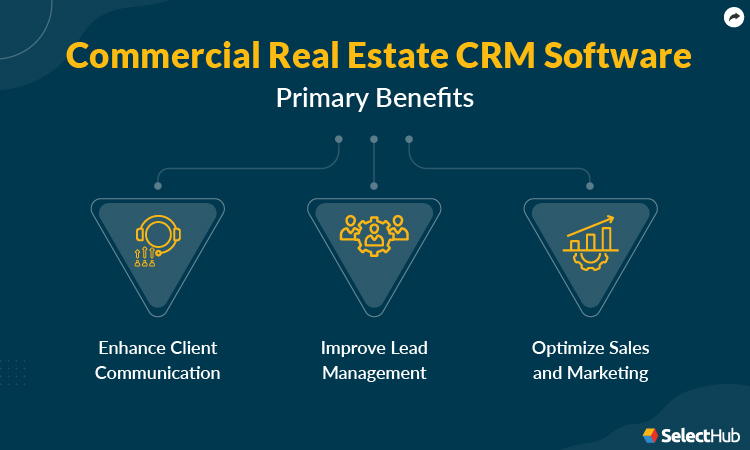
Commercial real estate CRM solutions come with various tools designed to boost the quality and quantity of your sales. Let’s take a look at how they can benefit you below:
Enhance Client Communication
Top commercial real estate CRMs allow you to create a custom local database. They let you seamlessly import existing customer data and connect clients with properties.
Many realtors use multiple channels for client interaction, including email, texts, calls, social media and in-person. The system helps streamline all communication in a centralized platform, thereby improving team collaboration who can refer to a single source of data.
The platform comes with capabilities for tracking properties, records, documents and interactions. You can also track client information such as neighborhoods of interest, budget or preferred locations. This feature helps realtors personalize customer communication and increases the chances of a purchase.
Realtors need to consistently engage in multiple client interactions before they can seal the deal. With tools for follow-up, reminders and scheduled communication, a commercial real estate CRM helps engage and nurture leads. It reduces time spent on customer conversations while enhancing their efficiency.
Improve Lead Management
Commercial real estate CRM platforms come with robust pipeline management capabilities that provide a bird’s-eye view of the sales timeline. You can identify bottlenecks in the process and track where leads are in the funnel. This ensures no deals slip through the cracks and allows teams to make improvements in real time.
The solution paves the way for better and easier lead segmentation. You can import leads from internal or external sources and auto-assign them to agents. Prioritize and segment leads based on parameters like budget, location, timeline or even zip code. Visualization tools enable you to view properties on a map that help improve clarity and eliminate delays during lead interactions.
Optimize Sales and Marketing
With tools for creating and evaluating the success of targeted campaigns, you can boost team productivity. Smart reporting tools, forecasting and analytics allow you to anticipate and stay ahead of client needs. It provides a clear picture of customers and where you need to be to meet your revenue targets.
By tracking and measuring sales and marketing departments’ performance, commercial real estate CRMs ensure your teams stay accountable. You can also integrate the platform with several third-party apps to extend its capabilities. This allows your teams to customize the system to their unique needs and get more done in less time.
Key Features & Functionality
Contact Management
By organizing customer data, you speed up communication and have information readily available at your fingertips. This feature manages client and property details, including emails, phone numbers, photographs, a list of properties and more.
The automation capabilities update new client information as it comes in and record valuable customer data in a single place.
Follow-ups and Reminders
Another noteworthy tool that helps schedule communication so leads don’t slip through the cracks. Automatic messages, reminders and follow-up emails enable proper lead nurturing and keep deals moving through the pipeline.
You can track and manage transactions, contracts and lease agreements. Your teams can be on the same page by sharing relevant information, asking for updates and adding notes to query transactions.
The centralized platform enables you to view activities at a single glance — be it for monitoring transaction progress or tracking down missing or overdue payments.
Email Management
You can optimize your email campaigns and email marketing. The solution lets you personalize emails so you don’t lose deals due to generic and non-targeted interactions. By tracking and recording responses, commercial real estate CRM software provides detailed insights into campaign performance.
Reporting and Analytics
This feature enables you to view customer data in a highly visual, customized and engaging manner. You can track your teams’ productivity and monitor various KPIs, like the length of sales cycles, where a deal is likely to fall through and which activities get you the best results.
Marketing Tools
The system offers various integrations to track activities and create strategies to market commercial properties. With tools for building mass email campaigns, generating branded marketing collateral and integrating social media, you can launch effective marketing campaigns to maximize revenue.
Mobile Platforms
CRE reps and agents are always on the run. It’s critical to have a CRM that you can access anywhere — on Mac, PC, smartphone or tablet. Update and access vital customer data in real time to close more high-quality client deals.
Software Comparison Strategy
While many commercial real estate CRM systems have similar features, it can be overwhelming to decide which solution is actually best for your business.
Start by evaluating your current platform. How well does it meet your business needs? Where is it satisfactory, and where does it fall short? Make a list of requirements to help guide your software selection process. Which features would best suit your business? Tools for marketing and property database integration are a must.
You can ask your peers for recommendations. Industry guides and online reviews on Quora and Reddit are also good sources of information.
Define the budget, time and resources you can dedicate to implementing the software. Many vendors offer free trials or less advanced software versions free of cost. Test drive such options before committing to a purchase.
Take a deeper look at how your team collaborates. Do you have remote or hybrid teams? In that case, a cloud CRM solution will serve you better than an on-premise one. Cloud CRMs provide mobile platforms that are useful when your team is on the road. It’s a plus if you can update data offline and operate the system during spotty connectivity.
Which apps do you use on a daily basis? Check with your vendor about the integrations they offer. Many solutions also integrate seamlessly with realtor websites and allow you to track interactions from various touchpoints.
How customizable is the software? Customizability options and templates enable your teams to tailor the platform to their unique needs. Take note of how scalable the software is so you don’t risk outgrowing your software capabilities as your business expands.
Take into account how the software interface looks and feels. It should be easy to navigate, intuitive and visually appealing.
Another aspect to consider is vendor support. How quickly and effectively do they respond to queries? Do they have knowledge bases or a 24/7 live chat option in place? Thoroughly evaluate the security measures they provide and how often they back up data.
Cost & Pricing Considerations
Commercial real estate CRM solutions come in all shapes and sizes. Most vendors offer monthly, quarterly, half-yearly or annual subscriptions. Many of them charge based on the number of users per month. The price can range from $8 per user/month for an entry-level system to hundreds of dollars per user/month for an advanced solution.
There are a few vendors who charge a flat fee per month regardless of the number of users. These platforms are, however, usually expensive but can be a good investment for large businesses with many employees. Some solutions only reveal their prices upon request.
Many solutions offer free trials, demos or less advanced software versions free of cost. The final cost varies depending on features, storage, customizability and scalability options you need. It’s necessary to keep in mind hidden costs such as training or installation fees. If you pick an on-premise platform, you need to set aside a budget for a dedicated IT team.
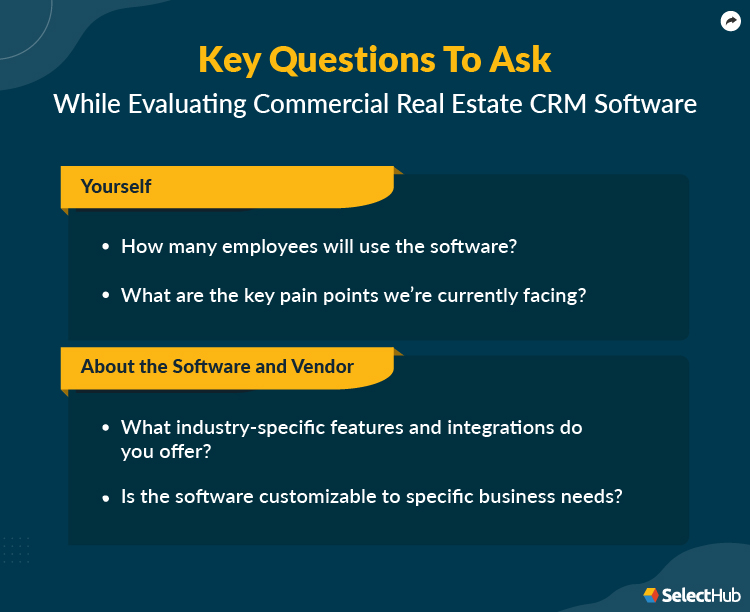
Questions To Ask
To get started, it’s vital to understand your business requirements and what features would be the most useful to you. Use the following questions as a starting point.
Here’s a list of questions to guide internal conversations:
How many employees will use the software?
What are the key pain points we’re currently facing?
What features would help solve those pain points?
What apps do we use on a daily basis?
Is our team remote/hybrid? Do we have real estate reps on the road?
Here’s a list of questions to ask vendors to help you learn more about the software and vendor:
What industry-specific features and integrations do you offer?
Do you have experience working with businesses in our industry?
Is the software customizable to specific business needs?
How does your technical support team handle help requests?
Do you assist in the onboarding and implementation process?
Next Steps
With tools for contact management, analytics, transaction management, follow-ups and marketing, a commercial real estate CRM is a real asset for realtors. It helps enhance team collaboration, pipeline management and lead segmentation. The solution has a dynamic range of features that enable you to solve bottlenecks in the funnel with ease.
Still feeling overwhelmed in your product search? Get started today with our comparison report to gain insight into top software leaders.
Manogna Matta was a Technical Content Writer at SelectHub who delivered content for CRM, mental health, marketing and fundraising. An alum of the University of Hyderabad, Manogna did Communication and Psychology courses in her B.A. and M.A. She's also an avid coin collector and a fashion enthusiast. When not typing away on the keyboard, Manogna plays mother hen to her tiny birds, watches sitcoms and makes bad-quality dad jokes.
Sukanya completed her MBA in marketing at St. Xavier's College. She has been part of the SelectHub team since 2021 and has experience with HR, EHR and CRM categories.
Joan Akash, a Senior Research Analyst at SelectHub, holds a Post-Graduate Diploma in Management with a specialization in Marketing. Her expertise as a researcher and reviewer spans diverse software categories, including Project Management, Customer Relationship Management, Live Chat, and Help Desk. Beyond her professional pursuits, Joan is spiritually driven, with a passion for teaching children and a penchant for reading biblical blogs and crafting poetry.
Manan is a native of Tezpur, Assam (India), who currently lives in Kolkata, West Bengal (India). At SelectHub, he works on categories like CRM, HR, PPM, BI, and EHR. He has a Bachelor of Technology in CSE from The Gandhi Institute of Engineering and Technology, a Master of Technology from The Institute of Engineering and Management IT, and an MBA in Finance from St. Xavier's College. He's published two research papers, one in a conference and the other in a journal, during his Master of Technology.
Pooja Verma is a Content Editor and Technical Content Writer at SelectHub. She has over 5 years of experience covering software categories like CRM, marketing automation, supply chain management and endpoint security. Pooja earned a literature degree from Miranda House, DU and also holds a Master’s in Journalism from Symbiosis Institute of Media and Communication in India.