The Best EHR Software is All About Providing Greater Care and Utilizing Patient Information By Kashish Arora, Technical Content Writer at SelectHub

Like most professions, medical providers were once trapped in endless mazes of paper charts, test results and treatment profiles. Moving them around within a practice was scattered enough, but getting them to a new provider was a monumental task. Luckily, EHR systems turned this labyrinthine method of patient care around and pushed pen-and-paper records into the digital environment.
Electronic health records (EHR) bring numerous benefits, features and advantages to medical providers around the globe. However, choosing the perfect EHR program for your practice is a daunting task with numerous considerations to keep in mind. We created this article hoping to guide interested parties toward a successful EHR software solution while answering any lingering questions about these powerful suites you may have.
Executive Summary
- Help health care organizations increase revenue and traffic.
- Facilitate better health care on individual and group scales.
- Handle a variety of tasks, freeing up more time to focus on patients.
EHR vs. EMR
These two different software systems often get used interchangeably in conversation. They both reduce pen-and-paper documentation by digitizing and compiling patient charts into an accessible system. However, there are some key distinctions between the two:
- EMR systems can digitize patient records for a single practice, while EHR systems can share files with other providers and specialists in multiple external locations.
- EHR systems cover a broader spectrum of patient health information. Electronic medical records are often more narrow, location-based reports.
- EHRs usually include extra features like e-prescribing and communication tools.
- EMR platforms let patients see their data without edit access. EHR systems boost patient engagement by giving them limited control over portions of their information.
- While EMRs primarily focus on patient treatment, electronic health records leverage analytics to improve patient treatment, communication and research.
Deployment Methods
While the debate between cloud-based or on-premise deployment strategies is seeing significant victories going toward the cloud, medical providers have a more challenging choice to make. Instead of worrying about sensitive business information being inaccessible or targeted, medical professionals deal with personal, private data requiring a specialized touch. There are a few different flavors of deployment to consider, like hybrid, hosted, SaaS and more.
Cloud-Based
Adopting the cloud comes with numerous benefits, especially for those looking to digitize their practices fully:
- You do not require lengthy in-house installation for a system based in the cloud. Instead of interrupting the daily flow of your practice with a crew of technicians and making room for an on-site IT department, your software has things taken care of online.
- Smaller practices can often benefit from monthly subscription-based payments instead of the large upfront investments that on-premise systems require.
- Instead of dragging charts around to each patient, cloud-based EHR systems provide robust mobile options. Bring everything you need to every visit on a single tablet or access patient notes from a smartphone with mobile apps.
- Security has been a concern for cloud-hosted systems because the provider has to store your vital information over active internet connections. However, as the cloud has gained popularity, security concerns have shrunk as providers continue to innovate and implement better security measures.
As you can see, the cloud’s popularity is well earned. However, there are a few downsides to keep in mind, especially when it comes to an EHR system:
- Monthly subscriptions are great, but these payments can add up over time. If you’re considering sticking with an EHR system for a long period of time, make sure that you don’t end up losing money down the line.
- You can customize on-premise systems to fit your practice’s unique needs. Since the hardware is on-site, a professional can change features and processes to your liking.
- No internet connection is required to access the information in these EHR systems. Your ISP dropping out won’t cripple your operations and slow down your daily processes.
On-Premise
On-premise deployments, sometimes known as physician-hosted systems, are seeing less use by small- to medium-sized practices and are more common among larger health care providers, but they do have some advantages to mention:
- If security is a top concern, on-premise systems keep your electronic health records data stored in a central location without passing through multiple internet-enabled devices.
- On-premise systems can be customized to fit your practice’s unique needs. Since the hardware is on-site, a professional can physically change features and processes to your liking.
- There is no internet connection required to access the information located in these EHR systems. Your ISP dropping out won’t cripple your operations and slow down your daily processes.
When it comes to sensitive information, on-premise systems provide a stable, secure and reliable platform to ensure consistent uptime. Just like its cloud-based counterpart, this deployment strategy does have drawbacks:
- Customization and better security are great, but maintaining, installing and supporting these EHR systems requires expensive in-house IT professionals.
- Large, up-front investments are tough for small businesses to swallow. Not only that, but some updates that aren’t present in current versions could cost more time and money to implement after the fact.
- Setting up space for infrastructure, like servers, can be difficult for small practices without the physical space required.
- While data is safe from external attacks, physical harm to servers and backup hardware can put critical information at risk in the event of a disaster.
At the end of the day, your practice should discuss which method can provide you with the EHR system you need at a price point you can handle.
EHR Software Systems Report Expert recommendations and analysis of the top EHR systems
Get free access now
Primary Benefits
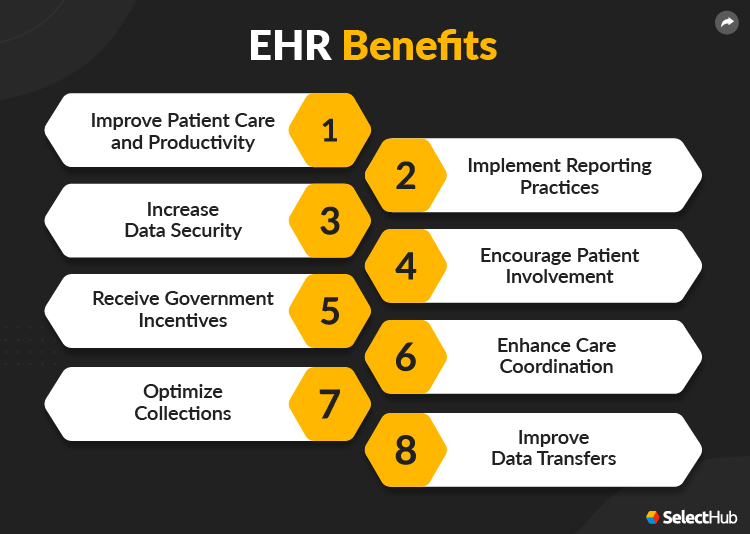
Adopting EHR programs comes with significant advantages:
Improved Patient Care and Productivity
The main focus of EHR platforms, outside of digitizing physical files, is strengthening patient care. Features like decision support, e-prescribing, lab orders and real-time reports let providers do their jobs as optimally as possible.
They also make patients’ lives easier by cutting down on the paperwork they have to deal with, providing helpful portals that display their information and letting them self-schedule appointments.
Implement Reporting Practices
Moving a patient’s medical history to an electronic environment gives health care providers critical information in an organized environment to identify early warning signs and involve their patients in their recoveries.
Stronger reporting can also identify common medical trends within groups or individuals and then track them. Organizations or practices looking to leverage Medicare programs require reporting tools, additionally.
Increased Data Security
Instead of dedicating an entire room to securely storing documents, EHR platforms protect the user and practice data by restricting access to sensitive information. Only those with security clearance can access important documents that contain patient data.
If your EHR system is cloud-based, your service provides the security measures to protect your information. On-premise EHR systems require their own security measures but avoid internet-based threats.
Encourage Patient Involvement
Getting patients actively involved with their treatments is vital to achieving the best outcomes. Patient portals give them a secure location to read their medical reports, view provider notes, schedule appointments and submit questions.
These tools also help drive patient loyalty by opening up communication channels between patients and their doctors. Instead of feeling like an isolated medical chart, patients can openly communicate with their providers and foster open relationships.
Receive Government Incentives
As we said earlier, electronic health records software can open up various doors regarding government-based incentives. Sometimes, simply adopting and implementing an EHR platform is enough to qualify for rewards.
Remaining compliant with meaningful use standards lines your organization up for valuable rewards while also ensuring that you aren’t penalized for missing technology requirements.
Enhance Care Coordination
Every patient has limited interactions with numerous providers throughout their treatment cycles. Specialists, nurses and primary care providers deal with different aspects of a patient’s care, and coordination features help bring these disparate pieces together for quick analysis and referral.
About 6 in 10 patients used online portals to exchange texts with their physicians in 2020. This reflects a 10% increase in the module’s usage since 2017.
Electronic systems also speed up document transfers between locations instead of waiting for mailed or faxed paperwork.
Optimized Collections
Provide insurance companies with complete documentation to reduce rejected claims. Included coding features ensure correct coding of visits and billing items.
Improve Data Transfers
Patients create a lot of paperwork as they seek treatment and move through medical programs. Electronic health records systems let you organize, digitize and transfer (depending on interoperability) vital patient charts.
EHR platforms take the physical inconsistencies out of patient charting to avoid damage, loss, theft and more while enabling you to transfer documents within the practice or to external sources quickly.
Pitfalls and Limitations
No solution is perfect, and EHR systems come with their own problems.
Security and Privacy Concerns
Data privacy is a major concern these days, and EHR platforms handle some of the most sensitive information out there. Everything from personal medical information to valuable billing data for the numerous patients that cycle in and out requires extensive protection. Your EHR system vendor needs to be on top of their game while adhering to all compliance requirements to ensure that confidential data is safe.
Accurate Documentation
While they offer automation to help curtail this a bit, EHR systems still suffer if you enter inaccurate information into them. Some EHR platforms can disseminate the information you enter throughout other necessary sections of the system to prevent multiple instances of manual entry, but they can’t prevent every single human error. Enter information with accuracy to ensure that the right data attaches to each patient.
EHR Software Report Expert recommendations and analysis on the top electronic health records software
Get free access now
Implementation Goals
Your current weaknesses are one of the first things to consider before adopting an EHR system or any software system. Your new EHR system should address any inefficiencies in your processes while improving your daily operations. Sure, you know the advantages EHR platforms bring to the table, but what should your concrete goals be for implementing a new system?
Below are some of the most common goals that EHR software has helped health care organizations achieve. While every facility is different, it’s a good idea to keep these particular goals in mind when implementing electronic health records.
| Goal 1
Accurate Diagnosis & Treatment
|
Electronically documenting medical information gives your clinicians the full medical history of a given patient, making a more accurate diagnosis more achievable the first time around.
Enable health analytics and health population capabilities to keep track of a group of patients and compare data. A patient's health patterns can be recognized and used to provide a predicted diagnosis and recommend the proper treatment automatically.
|
| Goal 2
Increased Productivity & Efficiency
|
In addition to helping provide more accurate diagnoses and treatment, electronic health records have also helped health organizations increase the number of patients they can treat. When you combine these things, you get happier patients and customers.
You can increase your revenue by increasing your health facility's overall daily traffic. Automating tedious tasks such as scheduling, billing and payment enables you to focus more on the patient. Health facilities can increase their profits without sacrificing their quality of treatment or service.
|
| Goal 3
More Patient Involvement
|
Introduce patient portals to enable swift communication between physicians and patients through instant messaging or even face-to-face video calls in real time. Additionally, patients can schedule appointments, view lab and test results, and make payments online.
Physicians can send out notifications and reminders to alert patients of any upcoming appointments, prescription updates or payments due. Giving the patient more access and involvement helps give them more control over their entire health treatment process.
|
Implementing the first software you come across is not a very effective way to achieve these goals — you’ll have to do extensive research and requirements gathering before choosing an EHR program to ensure the software you choose properly fits your specific health organization.
EHR Platform Implementation Best Practices
Having a list of goals and requirements is a great start on the path to a successful implementation. Ensuring this success requires some best practices:
-
Open Communication: Depending on the timetable for your implementation, you could be spending a stretch of time thrown into some confusion. As things move around and get set up for future use, you’ll need to stay on top of talking to your staff and patients to keep things organized.
-
Data Migrations: Medical practices come with vast amounts of documentation related to internal processes and patient care. Making this process efficient, accurate and successful is vital to retaining patients and ensuring their care goes uninterrupted.
-
Teaching Your Teams: Another significant implementation time-sink involves getting your teammates and staff comfortable with their new EHR platform. Everyone who interacts with the solution needs to spend a good amount of time familiarizing themselves with everything.
Throughout the rest of this article, we’ll discuss the core and secondary electronic health records features you’ll need and the most important questions to ask yourself and vendors during the selection process.
EHR Software Systems Report Expert recommendations and analysis on the top EHR programs
Get free access now
Basic Features & Functionality
While various helpful tools are offered with EHR programs, knowing which ones you’ll need your electronic health records software to include can be tricky. However, there are certain features that your health care organization will not want to be without. When deciding between potential providers, the following features are essential for virtually any health care organization, regardless of size or treatment specialty.
| Charting and Documentation |
Swapping old pen-and-paper charting with a single, digitized location to store all of a patient’s health information streamlines the caregiving process.
When paired with mobile applications, providers can keep all of their patients’ information with them on a single tablet. Depending on the EHR program, many of these digital forms can be customized and retuned to fit your practice’s needs.
|
| Patient Scheduling |
Handle every aspect of a health care facility’s scheduling, from patient appointments to the staff work schedule.
Dynamic scheduling automates and color-codes the schedule of employees, specialty equipment, exam rooms and more. For example, many health facilities have a limited amount of specialty equipment. Smart scheduling helps coordinate the necessary equipment with the proper physician, exam room and appointment time. This eliminates the chance of specialty equipment being assigned to multiple physicians simultaneously, leading to fewer delays.
Scheduling using patient portals (which we’ll discuss next), enables clients to book appointments from their mobile devices. At any time of the day, not just during business hours, patients can select an appointment time that fits their schedule as well as meets their physician's availability.
|
| Patient Portals |
Patient portals are patient-accessible modules that lead to more patient participation and involvement and help give patients more control over their health in general.
In addition to appointment scheduling, patients can view lab results, update payment information and send messages to physicians.
Both physicians and patients can also use the patient portal to communicate with one another in real time, either through instant messaging or face-to-face video calls. Patients can even schedule online doctor appointments.
|
| Interoperability |
Larger health care organizations, such as hospitals with multiple departments, store a patient’s information in one department and then enable others to access it.
This helps streamline patient operations and provides clinicians with the patient’s full medical history throughout the facility.
|
| E-Prescribing |
With e-prescribing, patients can manage their medication, request refills and make payments electronically. Physicians can send out prescription requests to several pharmacies around the U.S. and track whether the patient has picked up a prescription. To reduce prescription drug abuse in the U.S., especially the recent opioid epidemic, many states have implemented (or are soon implementing) laws mandating the electronic prescription of medications. While some states may only require e-prescribing for controlled substances, others require all prescription drugs to be prescribed electronically.
Before filling out a prescription, pharmacists can check for any drug-to-drug or drug-to-allergy interactions. There is also no risk of a pharmacist prescribing the wrong medication due to legibility issues with handwritten scripts.
According to a recent study, 93% of clinicians stated that online patient portals have helped improve communication among staff, pharmacies, lab technicians and patients.
|
| Decision Support |
Patients come with a lot of information, and clinical decision support (CDS) features help providers sift through all of that data and highlight dangerous medical interactions, missed information and potential treatment issues.
These features require well-thought-out integrations to ensure that a constant barrage of unhelpful notifications doesn’t desensitize users.
|
| Computerized Provider Order Entry |
More commonly known as order entry, this feature helps providers enter in and order treatments, medications and tests for their patients. They also help ensure that orders are standardized, complete and error-free.
When integrated with practice management, these tools can help highlight anything that requires pre-approval to cut down on rejected claims.
|
| Speech Recognition |
Voice recognition technology removes the inefficiency of old dictation and translates short, trained codes into accurate notes and documentation. These features also completely remove the need for expensive transcription services.
Speech recognition makes a provider’s life easier by eliminating hundreds of clicks when filling out manual exam notes.
|
| Compliance Support |
EHR systems should help you keep up with the various compliance regulations in place throughout the medical industry. Ensuring that you stay compliant, safe and accurate protects your practice from costly errors while providing your patients with the care they require.
|
EHR Software Systems Report Expert recommendations and analysis on the top EHR platforms
Get free access now
Advanced Features & Functionality
While you’ll want to be sure the system you choose has all the features mentioned above, there are several additional tools and functionalities that are also worth considering. These secondary features will vary depending on the service you choose (some of these features are included in EHRs while others will require integration or even an additional cost), so it’s key that you do your research beforehand and find out which tools you will and won’t need.
| Medical Billing |
Generate billing statements as well as customized billing templates automatically.
Physicians can review a patient’s payment information in addition to sending out alerts and notifications. Similarly, patients can access billing statements, update insurance information and make payments online.
Patients can set up payment plans or enroll in auto-pay to simplify statement management. They can also receive reminders for upcoming and due payments.
|
| Claim Management |
Before you submit an insurance claim, this tool looks over and scrubs claims of any NCCI, HIPAA or LCD errors — these errors often prevent insurance claims from being accepted. Sequentially, this leads to higher first-time acceptance rates, allowing your health care facility to get paid faster while avoiding the loss of earnings due to unqualified or unsolved claims.
These systems automatically verify insurance as well as alert you if a particular coverage is not permitted.
|
| Customizable Templates |
Patients and physicians can use customization tools to track health and treatment progress. Customizable health templates enable users to tailor a treatment plan to a specific patient. Additionally, users are able to create and edit custom billing templates. Depending on the type of treatment your clinic provides, you can customize templates to fit your health care organization’s unique needs.
|
One way to help determine which additional or secondary features you might need is to develop a list of EHR software systems requirements. Remember, the features you require should be specific to your health care organization and might not be included with all EHR programs.
EHR Software Report Expert recommendations and analysis on the top EHR systems
Get free access now
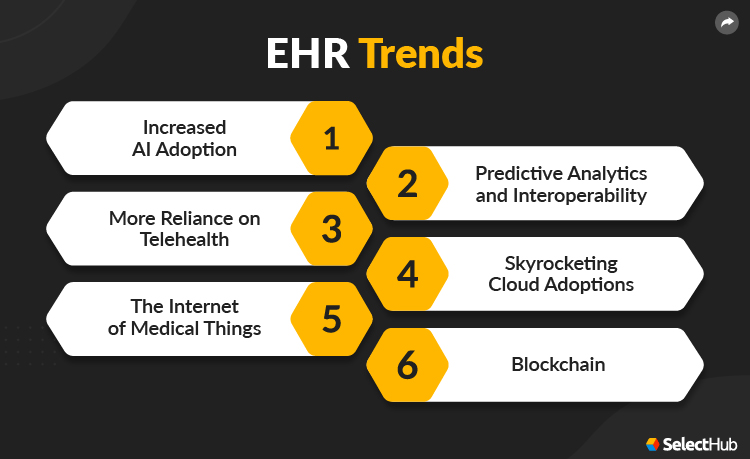
Current & Upcoming Trends
By 2027, the global market for electronic health records software is expected to rise to nearly $40 billion.
As the medical world continues to be bombarded by life in a post-pandemic environment, services will find ways to innovate and strengthen their platforms.
EHR systems have become critical in a disaster-prone world; here are some trends to keep an eye on for the future of electronic health records:
AI Adoption
Many industries are seeing a boom in artificial intelligence integration, most often due to the efficiency-boosting automation techniques these features provide. While far more exciting robotic enhancements are going on in the world of medicine, AI-assisted voice recognition is poised to make a big difference.
In the near future, developers hope to let doctors ask for specific information from their EHR software. For example, a physician could ask about a patient’s various mineral and vitamin levels and receive a detailed response as well as how healthy their values are.
Predictive Analytics & Interoperability
Various industries are rapidly adopting predictive analytics tools, and the medical EHR software systems market is no different. These features help take clinical decision support algorithms to the next level and combine information from separate applications into a single location. The challenge of passing data between external providers and organizations to meet interoperability standards can also benefit from predictive analytics integration.
Keeping up with ISA standards is an important part of an EHR system and is critical for maintaining data transfers between external organizations. As more and more services include robust interoperability tools, the creation of valuable health information networks is sure to follow.
Telehealth
Creating a safe environment for employees and patients has led to many providers switching to video or phone-based appointments for minor questions and checkups. Safe communication with patients will require robust telehealth features as hospitals and practices adapt to an increasingly virtual world.
It has already been shown that adding tools to increase the flow of communication between physician and patient and boosting engagement increases patient satisfaction. Instead of feeling isolated, patients can leverage their EHR features to schedule a telehealth visit, speak to their physician and gain peace of mind.
Cloud Adoption
The cloud is experiencing a boom of popularity in most industries these days, but even more so for medically focused businesses. Maintaining physical space for servers and storage is a huge drain on resources, but cloud computing removes the need for all of that wasted space and capital.
Keeping a locally-hosted EHR system up-to-date with in-house IT experts ready to put out fires requires large amounts of resources that could be better used elsewhere. Removing these variables can open up rooms for more treatment, storage or office space.
The Internet of Medical Things
The Internet of Things is seeing massive expansion in nearly every industry globally, and for a good reason. New technologies continue to develop that strengthen flagging processes with devices that can transmit, analyze and gather data through shared network connections.
In the world of medical software, these devices include wearable commercial and clinic-based items that help monitor vitals, integrated systems, and networks that make data transmission quick and easy.
According to a recent Deloitte study, the IoMT market is growing toward an overall market value of nearly $158 billion by 2022.
Especially today, thanks to the ongoing pandemic, hospitals need all the help they can get to avoid becoming overwhelmed. Patients can leverage these devices to stay on top of chronic conditions without having to risk continually returning for in-person checkups. Their providers can leverage the data sent to the practice from these at-home devices to keep tabs on their at-risk patients while keeping patient flows to a minimum.
Blockchain
While the usage of blockchain in EHR systems is still in its first stages, it is starting to see more use throughout the medical world. Blockchain technology helps boost accountability and security, important factors that often plague EHR platforms. Using blockchain in medical settings provides concrete transaction data to help reduce instances of insurance fraud, and it also provides a decentralized location to store critical information with helpful time stamps.
EHR Software Report Expert recommendations and analysis on the top EHR programs
Get free access now
Software Comparison
When comparing electronic health records software, there are a few key things to look for when creating your shortlist of vendors:
- Documentation and Clinical Workflows
- Billing Support
- Available Deployments
- Compatibility
- Interoperability
- Data Migration Needs
- Population Health Management
The best EHR systems should also integrate with the other vital platforms that keep your practice running. Before settling on a vendor, go over which software integrations they support so that you guarantee your current holdover solutions can still function properly. Some electronic health records systems are constructed for specialty-specific work, so be sure to ask questions about what types of workflows they support.
Breakdown by Application
Your practice may not need the whole package when it comes to new EHR systems, and some offer piecemeal options that can resolve your pain points for a smaller price tag. Here is a quick breakdown of the different applications EHR systems can offer:
-
Administrative: Admin features focus on relationship management between provider and patient while also handling things like scheduling for checkups and other visits. Administrative applications also help manage the numerous documents related to patients and their treatment.
-
Financial: As you’d probably expect, financial applications take care of billing processes like insurance and invoicing.
- Research: It leverages vast amounts of data to discover treatment effectiveness and run trials. Research applications help gather this information in a centralized area for study.
-
Clinical: Improving patient care is a key piece of any EHR system, and clinical modules boost treatment. Clinical applications gather up all relevant patient information to give health care providers deep visibility into their medical histories.
-
Reporting: These tools help practices gauge the overall effectiveness of their practice or institution. They also help measure important metrics and patient behaviors to ensure things run as smoothly as possible.
Cost & Pricing Considerations
When it comes to price, things can vary depending on your requirements and your deployment strategy of choice. We’ve already talked about some of the differences between cloud-based and on-premise systems, but here are some more variables to consider:
- How many users do you require? Many SaaS options charge by the user — an EHR system may sound cheap until you add up how many people need access.
- Implementation costs are another addition to consider. If you’re adding physical hardware to your organization, expect much higher implementation costs than leveraging something a service hosts.
- How much are upgrades, and does it come with everything you need out of the box? Finding out that the system is missing a feature you require can leave you open to unexpected charges.
- Your patient data migration needs and panel size can also affect the final price tag of your new application purchase.
Price Guide for EHR Software See prices for the top EHR programs... Plus get important questions to ask.
Get Prices Now
Questions To Ask Yourself
Before you start putting together a provider shortlist, take some time to ask yourself and your team members some of the following questions:
- What do your staff/users want out of an EHR?
- What are your business goals? How do you want to fulfill them through this purchase?
- Do you have previously built templates that you’d like to leverage for future use?
- Do your providers wish to use speech recognition software?
- Which additional/secondary features do you require?
Questions To Ask Vendors
Before signing up with a service, be sure to ask them some of the following questions:
About the Software
- Is the EHR system customizable?
- What integration options are available?
- Can the EHR system scale with my practice/organization?
- Is your EHR system ONC certified?
- Do all modules function ideally?
About the Vendor
- What size of organizations do you work with?
- What support options do you offer?
- How do you handle individual users’ data security?
- What are your strengths as application vendors?
- How often do you launch updates?
EHR Software Systems Report Expert recommendations and analysis on the top EHR systems
Get free access now
In Conclusion
Adopting new EHR systems is a big choice, but the journey to finding the perfect software is a daunting task. Make sure you spend ample time discovering your requirements and talking to your teams to guarantee you get the features they need. We hope that this guide can help get you started on the path to finding a successful product.