Streamline your practice's operations, acting as a tireless digital assistant to manage patient records, appointments, and billing so you can focus on providing great care.
Last Updated: Dec 17th, 2025
Our Review Process:
Our content and analyst teams reviewed 163 medical software.
We use a rigorous research process and test products where possible to provide unbiased,
data-backed recommendations so you can select software faster and with confidence.
30+
Analysts
9,095
Overall Products
Researching Since
2015
What is Medical Software?
Medical software is like a clinic's central nervous system, automating and centralizing all patient and administrative data. It solves the costly, risky problem of manual records, which are prone to human error and are often difficult to manage. Key functionalities include electronic health records, appointment scheduling, and billing. Emerging features like AI-powered diagnostics and telehealth are transforming patient care. Hospitals, clinics, and private practices benefit the most. While a key limitation can be the complexity of data migration, its ability to boost efficiency and improve patient outcomes is an invaluable value proposition.
Our medical software analysts evaluate solutions using a comprehensive,
multi-source approach designed to give you an objective view of
what's available in the market. Here's how it works:
Our Research Process
Our teams gather data from multiple angles to ensure complete coverage,
including a combination of user reviews, product documentation, case studies,
technical specifications, and overall popularity.
This multi-source approach helps eliminate bias and gives you the full picture.
The result: A ranked list of the top products in medical software that reflects real-world popularity,
usability and comprehensive feature coverage, helping you make confident software decisions faster.
Best Medical Software Overall
Based on the latest available data collected by SelectHub for 163 solutions,
we determined the following solutions are the best Medical Software overall:
Have you ever spent 10 minutes looking for a single patient file, only to find it in the one place you were sure it wasn’t?
AdvancedMD fixes that by:
Centralizing everything: patient records, lab results, prescriptions and medical histories.
Offering customizable templates (because typing the same thing 600 times a day is a one-way ticket to burnout).
Providing useful flowsheets so you can spot patient trends instantly, instead of sifting through pages of notes like you're deciphering hieroglyphs.
Oklahoma Otolaryngology Associates switched to AdvancedMD because they were tired of cookie-cutter documentation. Now, each provider can tweak templates to fit their workflow, making charting faster and way less frustrating.
Oh, and did I mention the dashboard has donut charts? Yes, colorful little donut-shaped task trackers — click on one, and all related tasks will appear, so you can knock them out quickly. (Still waiting for a feature that delivers real donuts, though. Priorities.)
You know how some patients are chronically surprised by their own appointments?
“Wait, I had an appointment today?”
Yes, Sharon. You scheduled it three months ago.
AdvancedMD helps eliminate those "Oops, I forgot" moments with:
Automated reminders via text or email (no carrier pigeon yet).
A patient portal where people can pay bills, message you and check test results without calling 17 times.
Billing? Oh, AdvancedMD has this on lock. It helps you automate billing, track payments and even send reminders to patients, so you can rest easy knowing you’ll get paid. Plus, it checks insurance for you, helping you reduce those annoying claim denials.
At Oklahoma Otolaryngology Associates, they cut their accounts receivable days from 45-50 days down to the 30s after implementing AdvancedMD. They also used AdvancedMD’s claim scrubber to catch errors before submission, saving staff time and cutting down on manual reviews.
Meanwhile, over at The Center for Balanced Health, billing turnaround was a nightmare before AdvancedMD. Medicare reimbursements took six months or more. After switching, billing tasks went from hours per day to just minutes — and payments actually started coming in on time!
You know those spreadsheets that feel like they were made by someone who’s never tried to analyze information in their life? Yeah, AdvancedMD doesn’t do that. It turns your data into something actually useful, with charts and graphs that make things like cash flow and patient trends easy to follow. No more squinting at boring numbers — just clear, colorful visuals that make the whole analytics thing way less of a drag.
Of course, there are a few limitations.
Based on our internal data, AdvancedMD scored just 69 for telehealth, falling behind competitors like CureMD (85) and NextGen Enterprise (81). It’s missing some key features like a clinician directory where patients can find providers based on profiles, photos and services.
While it lets you schedule appointments and send invites via email or text, it doesn’t support secure recording of patient encounters for review — a must for maintaining quality care. If telehealth is a priority for you, this platform might not be the best fit.
It lacks barcode/QR code scanning, offline mobile access, a dose calculator and FIPS 140-2 compliance. So if those things are make-or-break for you, just know it might not be the one.
If you’re looking for a system that makes your day-to-day tasks like charting patient records, managing appointments, processing claims and tracking payments, AdvancedMD is worth considering.
And hey, if they ever add that real donut delivery feature, I’m signing up immediately.
Customized Specialty Workflows: Some EMRs come with templates and workflows designed for specific fields like dermatology, cardiology or mental health, so you’re not stuck using a one-size-fits-all system.
Better Claim Submission & Faster Reimbursements: Many EMRs have built-in tools that check for errors before you submit a claim, which means fewer denials and faster payments. Some even use AI to catch mistakes before they happen.
Interoperability with Labs: Instead of manually entering lab results, some EMRs enable you to access real-time updates, reducing duplicate tests and improving patient care coordination. Some systems also provide AI-powered image analysis for radiology and pathology reports.
Enhanced Patient Engagement: Certain EMRs enable patients to log in to an online portal to view their health records, lab results, prescriptions and appointment histories, promoting transparency and engagement in their own care.
Too Many Clicks: Some EMRs require too many clicks to do simple tasks like updating records or prescribing medication. This can slow down workflows and frustrate you. Pop-ups and unnecessary alerts can also distract you from patient care.
Extra Costs for Basic Features: Many EMRs seem affordable at first, but important features like ePrescribing, lab integration and telehealth often cost extra. Some vendors also charge additional fees for third-party software connections.
Limited Mobile Access: While many EMRs offer mobile apps, they often don’t include key features like prescribing medication or updating charts. Some apps are also slow, hard to navigate or have extra security steps that make them difficult to use on the go.
Slow Updates and Fixes: Some EMR vendors take too long to fix bugs or improve their systems. This can cause slow performance, security risks and inefficiencies that could disrupt your daily operations.
Reduce Charting Time: In our analysis, AdvancedMD scored extremely well for features that help you chart faster by keeping everything — encounters, vitals, lab results and patient history — neatly organized in one place, so you’re not wasting time searching for information. Flowsheets make it easy to track health trends over time and pre-screening questionnaires ensure you have key patient details before an appointment.
Automate Billing: AdvancedMD earned a perfect score of 100 in our analysis for features that let you automate billing, track payments and send reminders to patients. It also checks insurance eligibility, helping you reduce claim denials.
Improve Patient Engagement: Another feature that earned a perfect score of 100 from our analysts is patient engagement capabilities (better than Oracle Ambulatory EHR and Tebra EHR at 89). These tools help you communicate with patients, reduce no-shows and organize your schedule. Automated reminders, a patient portal and digital check-in make it easy for patients to manage their visits.
Handle Patient Payments: AdvancedMD scored a perfect 100 in patient payment management capabilities, making it a top choice over competitors like CureMD (88) and DrChrono (81). It supports credit/debit cards, and digital wallets like Apple Pay and Google Pay. You can create and send detailed patient statements, set up automated reminders for upcoming or overdue payments, and easily track payment history.
Customizable Templates: Modify pre-built templates by adding, removing or rearranging fields to fit your documentation needs. Set up pre-filled templates for common patient visits, saving time and ensuring consistency. Capture Meaningful Use and regulatory data without requiring you to change your existing templates with field mapping capabilities.
Task Donuts: The dashboard has colorful donut charts that show your tasks. Each donut represents a different job like labs, refills or messages. Click on a donut, and all related tasks pop up, so you can finish them without wasting time searching.
Dashboard: Stay on top of your workload with a prioritized to-do list that gives you an overview of pending tasks. You can check in patients, mark no-shows, change appointments and manage rooms without opening extra tabs. Instantly see urgent issues such as abnormal lab results, unread messages or pending prescription refills.
Scheduling: Use the quick-add function to find open slots, check appointment history and book a visit all from one screen. Hover over an appointment on the calendar to see patient contact info, clinical notes and appointment details. Use waitlist management to add patients to open slots automatically. Schedule recurring appointments in just a few clicks.
ePrescribing: Send prescriptions to patients' preferred pharmacies. Submit prior authorization requests electronically. See real-time pricing at different pharmacies before sending the prescription to help patients choose the most affordable option. Integrate with the PDMP database to review a patient’s prescription history directly from your dashboard, reducing medication abuse.
Based on user reviews collected from popular reviews sites.
How do you "redux" the complexity of EMR integration? Redox EMR software is often lauded for its ability to simplify the often-byzantine process of EHR integration, acting as a Rosetta Stone for disparate healthcare systems. Its strengths lie in its comprehensive documentation, a knowledgeable support team, and reliable uptime, ensuring a smooth user experience. Redox excels at integrating with a wide array of systems, making it a versatile choice for healthcare providers seeking to enhance data flow and interoperability. This broad compatibility is crucial in today's healthcare landscape, where data silos often hinder efficient care coordination.
However, some users have voiced concerns regarding the repeatability and flexibility of the solution, suggesting that it may not be as plug-and-play as advertised. This disconnect between expectation and reality can lead to frustration, especially for teams anticipating a seamless integration process. While Redox boasts a robust API and a strong track record, its reliance on pre-built connections can sometimes limit customization options for users with unique integration needs. This limitation highlights the importance of thoroughly evaluating specific requirements before committing to any integration solution, ensuring it aligns with the organization's long-term goals.
In conclusion, Redox is best suited for healthcare providers seeking a reliable and established solution to streamline basic EHR integration tasks. Its strengths lie in its broad compatibility, comprehensive documentation, and reliable performance, making it a suitable choice for organizations looking to improve data flow and interoperability. However, potential users should carefully assess their specific needs and consider the potential limitations in terms of customization and flexibility before making a decision.
Improved Patient Experience: User reviews highlight Redox's ability to enhance patient experience, suggesting smoother data flow leads to benefits like reduced wait times.
Reliable Integration Engine: Redox is praised for its reliability and minimal downtime, essential for maintaining consistent data exchange between healthcare systems.
Strong Documentation and Support: Users commend Redox's comprehensive documentation and knowledgeable support team, facilitating efficient integration and troubleshooting.
Usability Concerns: Some users have reported that the platform's dashboard could be more intuitive and user-friendly.
Flexibility Limitations: User reviews indicate that Redox could benefit from enhanced flexibility to accommodate diverse integration needs more effectively.
Inconsistent Implementation: There have been concerns raised about the professional services offered, particularly in the area of implementation management, which has caused frustration for some users.
Account Management Issues: Frequent changes in account managers have been reported, leading to confusion and potentially impacting the continuity of support.
Streamlined Integration: Redox simplifies the process of connecting disparate healthcare systems, allowing for seamless data exchange between Electronic Medical Records (EMR) and other applications.
Enhanced Interoperability: By using standardized APIs, Redox ensures that different healthcare software can communicate effectively, reducing the risk of data silos and improving patient care coordination.
Scalability: As healthcare organizations grow, Redox can easily scale to accommodate increased data flow and additional integrations, ensuring consistent performance without the need for extensive reconfiguration.
Improved Data Accuracy: Automated data transfer reduces the likelihood of human error, ensuring that patient information is accurate and up-to-date across all connected systems.
Time Efficiency: By automating routine data entry and management tasks, Redox frees up healthcare professionals to focus on patient care rather than administrative duties.
Interoperability: Facilitates seamless data exchange between different healthcare systems, ensuring that patient information is accessible across various platforms.
Scalability: Designed to handle the needs of both small clinics and large hospital networks, allowing for growth without system limitations.
API-Driven Integration: Utilizes a robust API framework to connect with a wide range of electronic health record (EHR) systems, enhancing connectivity and data flow.
Data Normalization: Standardizes data formats to ensure consistency and accuracy, making it easier to analyze and share information.
Security Compliance: Adheres to industry standards such as HIPAA, ensuring that patient data is protected and privacy is maintained.
What's the deal with ZOLL emsCharts? Is it a chart-topper or a chart-buster? ZOLL emsCharts is a cloud-based electronic patient care reporting (ePCR) software solution that aims to streamline documentation workflows for EMS agencies, fire departments, and healthcare organizations. Users rave about its highly customizable interface, which allows administrators to tailor the system to their specific needs. This flexibility extends to quality assurance, with configurable PCR review rules that enable efficient and targeted review processes. The software also boasts a streamlined documentation process, allowing for quick patient care report completion. This, in turn, frees up more time for patient care, a key selling point for busy medical professionals.
However, some users have expressed concerns about the software's learning curve, which can be steep for those unfamiliar with ePCR systems. Additionally, while the software offers a wide range of features, some users have found that certain functionalities are not as intuitive as they could be. Despite these drawbacks, ZOLL emsCharts remains a popular choice for organizations seeking a comprehensive and customizable ePCR solution.
ZOLL emsCharts is best suited for EMS agencies, fire departments, and healthcare organizations that prioritize efficient documentation, customizable workflows, and robust reporting capabilities. The software's ability to streamline documentation processes, meet compliance requirements, and generate insightful reports makes it a valuable tool for organizations seeking to improve their operational efficiency and patient care outcomes.
Easy to Use: Users appreciate the intuitive interface, making it simple to navigate and find the information they need quickly, even during stressful situations.
Comprehensive Documentation: The system offers a wide range of documentation options, including detailed patient charts, medication records, and vital sign tracking, providing a complete picture of patient care.
Streamlined Workflow: Users find the system helps them streamline their workflow, saving time and reducing errors by automating tasks like medication administration and documentation.
Strong Reporting Capabilities: The system provides robust reporting features, allowing users to generate detailed reports on patient outcomes, trends, and performance metrics, which is valuable for quality improvement initiatives.
Excellent Customer Support: Users praise the responsive and helpful customer support team, who are available to assist with any technical issues or questions.
Limited Customization: Some users find the lack of customization options frustrating, especially when it comes to report generation and data visualization. For example, they may want to create specific reports for their needs, but the software doesn't allow for the necessary flexibility.
Steep Learning Curve: The software can be complex to learn, especially for users who are not familiar with electronic medical records systems. This can lead to frustration and a longer time to become proficient with the system.
Technical Glitches: Some users have reported experiencing technical glitches, such as slow loading times or data entry errors. These issues can disrupt workflow and lead to delays in patient care.
Integration Challenges: Integrating emsCharts with other medical software systems can be challenging, leading to data duplication and potential errors. This can be a major issue for organizations that rely on multiple systems to manage patient care.
Improved Data Accuracy: ZOLL emsCharts minimizes human error by automating data entry and validation, ensuring precise and reliable patient records.
Enhanced Compliance: The software helps meet regulatory requirements by providing built-in compliance checks and standardized reporting formats.
Streamlined Workflow: By integrating various EMS tasks into a single platform, ZOLL emsCharts reduces administrative burden and speeds up the documentation process.
Real-Time Data Access: EMS teams can access patient information and incident data in real-time, facilitating quicker decision-making and better patient care.
Customizable Reporting: Users can generate tailored reports to meet specific organizational needs, aiding in performance analysis and operational improvements.
Real-Time Data Collection: Capture patient information and vital signs on-the-go with mobile devices.
Customizable Forms: Tailor data entry forms to meet specific agency requirements and protocols.
Integrated CAD Interface: Seamlessly connect with Computer-Aided Dispatch systems for efficient data transfer.
Advanced Reporting Tools: Generate detailed reports for quality assurance, compliance, and operational insights.
Secure Cloud Storage: Store patient records and operational data securely in the cloud, ensuring easy access and compliance with HIPAA regulations.
Based on user reviews collected from popular reviews sites.
CentralReach provides a robust suite of business management tools that most users find useful for their practice. Its features support critical management tasks that help users organize and streamline their processes. Its scheduling feature is quite useful for a majority of the users. However, users have to go through many steps to get to the feature they want. It does not let users create notifications for documents about to expire. Users have to frequently readjust appointments as it doesn’t always save entered notes.
User Friendly: The system is easy to use and intuitive, as noted by approximately 78% of users who mention the system’s usability.
Functionality: CentralReach offers a robust suite of successful business management tools, as reported by 52% of the users who mention the product’s functionality.
Customizations: About 83% of users noted that this system is easy to customize as per their business’s needs.
Support: Support for the system can be slow, with some users noting that their support can be time-consuming, as reported by 60% of users who mention support.
User Interface: About 78% of users who mentioned the platform’s interface noted that it was easy to navigate through.
Reporting: Nearly 40% of the users who mention the reporting feature said it is very not very useful and does not make them efficient.
Learning Curve: The learning curve is quite steep and can be difficult, according to 83% of reviewers who mention learning how to use this software.
Downtime: Almost 100% of the users who mentioned software downtime and updates state that the downtime is quite frequent, and data cannot be accessed during updates and maintenance, slowing down productivity.
Advanced Features: The advanced features of CentralReach have many problems and slow processes down, as mentioned by 87% of the users who talked about advanced offerings.
Accurate Scheduling: Easily books appointments, matching clinical, staff and clinician availability and calendars for accurate scheduling.
Billing Efficiently: Streamlines billing from start to finish, converting every appointment to a timesheet for easy invoicing, payroll and claim processing.
Documentation of Clinical Data: Comes equipped with customizable forms to document clinical session summary and reports, and electronically collect patient’s signatures on the spot.
Payroll Accuracy: Tracks worked hours and assigns pay rates to accurately manage and process payroll.
Document Management: Manages and tracks all employee onboarding documentation, and keeps clinicians’ credentials up to date.
Human Resources: Effectively manages employees and tracks time-off requests, benefits and distributed assets.
Secure Communication: Helps healthcare professionals securely communicate with staff members and clients through an internal electronic mail system and chat messenger.
Improve Client Experience: Enhances client-provider communication, giving clients access to an account to view their clinical records, schedule, invoices and more.
Viewing Options for Appointments: Allows viewing of exactly what you need with integrated systems. Syncs clients and staff in one simple view tool.
Integration with Payroll and Billing: Coded appointments make billing and claims an effortless process. Once an appointment is converted to a timesheet, the payroll and claims process has already begun.
Based on user reviews collected from popular reviews sites.
How do you say "hello" in OhMD language? OhMD is a highly regarded HIPAA compliant messaging software designed for patient communication. Users consistently praise its user-friendly interface, which allows healthcare providers to easily engage with patients through two-way SMS and RCS chat without requiring patients to download an app. For instance, one user on G2 stated, "I like that OhMD Is very easy to use and I would 100% recomend to every provider who is looking to brimg inovative change into their offices." This ease of use is a significant strength compared to competitors like Artera, which, while still highly rated, has received feedback that its communication features could be more intuitive.
OhMD's commitment to HIPAA compliance is another major differentiating factor. Users appreciate the peace of mind that comes with knowing their patient communications are secure and meet industry standards. One user on the App Store shared, "I used regular texts before but privacy was a big issue so I always felt like I should delete conversations with my doctor...OhMD is a great solution." This focus on security is paramount in healthcare, and OhMD excels in providing a platform where sensitive information can be shared without compromising patient privacy.
Overall, OhMD is best suited for healthcare providers of all sizes who are looking for a user-friendly, HIPAA-compliant messaging solution to enhance patient communication and streamline workflows. Its intuitive interface, robust features, and commitment to security make it a valuable tool for modern medical practices.
Improved Communication Efficiency: User reviews highlight OhMD's ability to significantly reduce time spent on phone calls and streamline communication with patients through two-way texting.
Enhanced Patient Engagement: The user-friendly interface, likened to popular messaging apps, makes it easy for patients to communicate with their providers, leading to better engagement and adherence to care plans.
Streamlined Workflows: Features like intake forms, surveys, and image sharing simplify patient interactions and reduce administrative burden, allowing healthcare providers to focus on delivering quality care.
HIPAA Compliance: OhMD prioritizes the secure exchange of protected health information (PHI) and offers a Business Associate Agreement (BAA) to ensure compliance with HIPAA regulations, a crucial aspect for healthcare providers.
Android App Issues: User reviews indicate potential issues with the Android version of the OhMD app, as evidenced by its significantly lower rating compared to the iOS version.
Enhanced Patient Communication: OhMD facilitates seamless, secure messaging between healthcare providers and patients, improving engagement and satisfaction.
Streamlined Workflow: By consolidating communication channels, OhMD reduces the need for phone calls and voicemails, allowing staff to focus on patient care.
HIPAA Compliance: Ensures all communications are encrypted and secure, protecting patient information and maintaining compliance with healthcare regulations.
Improved Appointment Management: Patients can easily confirm, reschedule, or cancel appointments via text, reducing no-shows and optimizing scheduling efficiency.
Increased Patient Accessibility: Patients can reach out to their healthcare providers at their convenience, fostering a more responsive and patient-centered care experience.
Based on user reviews collected from popular reviews sites.
Have users gone deep on whether DeepScribe is a 'scribe' worth its salt? Recent user reviews on DeepScribe paint a mixed picture. While many appreciate its ability to accurately transcribe medical conversations, saving them valuable time and reducing documentation burdens, some have voiced concerns. A common thread among positive reviews is the praise for DeepScribe's accuracy in interpreting complex medical terminology, which directly translates to less time spent editing and correcting notes. However, some users have pointed out occasional inconsistencies with speaker identification, especially in noisy environments, leading to transcription errors that require manual correction. A standout feature is its integration with popular Electronic Health Records (EHR) systems, streamlining workflows and eliminating the need for manual data entry. This integration, however, is not without its hiccups, with some users reporting occasional syncing issues.
DeepScribe seems best suited for healthcare professionals who engage in high volumes of patient consultations and are comfortable with technology. Its ability to efficiently handle medical jargon makes it particularly valuable for specialists. However, those working in consistently noisy environments or who require flawless speaker identification might find its limitations frustrating.
Time Savings: Users report that DeepScribe significantly reduces the time spent on documentation, allowing them to focus more on patient care. For example, one user mentioned that they were able to see an additional 2-3 patients per day after implementing DeepScribe.
Improved Accuracy: DeepScribe's AI-powered transcription is highly accurate, minimizing the need for manual corrections and ensuring that patient records are complete and reliable. One user noted that they rarely have to make any edits to the generated transcripts, saving them valuable time and effort.
Enhanced Workflow: DeepScribe seamlessly integrates with existing EHR systems, streamlining the documentation process and eliminating the need for separate transcription software. Users appreciate the ease of use and the ability to access transcripts directly within their workflow.
Reduced Burnout: By automating documentation tasks, DeepScribe helps reduce physician burnout and improve job satisfaction. One user shared that they feel less stressed and more engaged in their work since implementing DeepScribe.
Transcription Accuracy: Some users have reported that DeepScribe's transcription accuracy can be inconsistent, especially when dealing with complex medical terminology or accents. This can lead to errors in patient records and potentially impact patient care.
Integration Issues: Integrating DeepScribe with existing electronic health record (EHR) systems can be challenging for some users. This can create workflow disruptions and make it difficult to seamlessly incorporate transcribed notes into patient charts.
Limited Customization: DeepScribe's customization options may be limited for some users, making it difficult to tailor the software to specific medical specialties or workflows. This can lead to frustration and a less efficient experience.
Cost: DeepScribe can be expensive, especially for smaller practices or individual providers. This cost barrier may prevent some users from adopting the software, particularly if they are already using other transcription services.
Increased Efficiency: DeepScribe automates the documentation process, allowing healthcare providers to focus more on patient care and less on paperwork.
Enhanced Accuracy: By leveraging advanced AI, DeepScribe minimizes the risk of human error in medical records, ensuring more precise and reliable documentation.
Time Savings: Physicians can save hours each week by reducing the time spent on manual note-taking, leading to a more balanced work-life schedule.
Improved Patient Interaction: With less time spent on documentation, doctors can engage more meaningfully with patients, enhancing the overall patient experience.
Streamlined Workflow: DeepScribe integrates seamlessly with existing Electronic Health Record (EHR) systems, simplifying the workflow and reducing administrative burdens.
AI-Powered Transcription: Utilizes advanced natural language processing to convert doctor-patient conversations into structured medical notes.
Real-Time Documentation: Automatically generates notes during patient visits, allowing physicians to focus on patient care rather than manual data entry.
Seamless EHR Integration: Integrates with major Electronic Health Record (EHR) systems to streamline workflows and ensure data consistency.
Customizable Templates: Offers a variety of templates that can be tailored to fit different medical specialties and individual physician preferences.
HIPAA Compliance: Ensures that all patient data is handled in accordance with HIPAA regulations, maintaining confidentiality and security.
Based on user reviews collected from popular reviews sites.
Is your organization compliant, or are you just grouping along? User reviews from the last year indicate that Compliancy Group's software is a robust and valuable tool for healthcare organizations seeking to navigate the complex world of HIPAA compliance. Users consistently praise the software's comprehensive and informative nature, highlighting its usefulness in meeting compliance requirements. The platform's user-friendly interface, coupled with features like pre-built templates and automated reminders, simplifies the compliance process, making it accessible even for users without prior experience. For instance, one user, a Director of Operations, stated that "the software is extremely easy to use," highlighting the platform's user-friendliness.
However, some users, particularly those representing larger organizations, find the pricing structure to be a significant drawback. Additionally, while the software offers a good range of features, some users desire more extensive customization options. Despite these limitations, Compliancy Group's software stands out for its exceptional customer support, with users consistently praising the responsiveness and helpfulness of the support team. This high level of support is crucial for users navigating the complexities of compliance. Overall, Compliancy Group's software is best suited for small to medium-sized healthcare organizations seeking a comprehensive, user-friendly, and well-supported solution for their compliance needs. Larger organizations may find the pricing and limited customization options to be a barrier.
User-Friendly Design: The platform is designed for ease of use, regardless of prior compliance experience, making navigation and implementation straightforward.
Strong Customer Support: Responsive and helpful customer support ensures assistance is readily available when needed.
Valuable Tools and Templates: Provides access to templates, training materials, risk assessment tools, and incident reporting mechanisms, streamlining compliance tasks.
Positive Industry Standing: Recognized by G2 and Gartner as a leader in healthcare compliance, indicating a strong reputation and industry trust.
Limited Scope: While Compliancy Group excels in HIPAA compliance, its features might not comprehensively cover other regulatory needs beyond HIPAA.
Learning Curve for Advanced Features: Some users have reported a learning curve associated with the platform's advanced features, potentially posing challenges for those seeking to utilize the software's full capabilities.
Streamlined Compliance: Compliancy Group simplifies the complex process of healthcare compliance by providing a clear, step-by-step framework that guides organizations through necessary regulations, reducing the risk of non-compliance.
Time Efficiency: By automating routine compliance tasks, the software frees up valuable time for healthcare professionals, allowing them to focus more on patient care rather than administrative duties.
Cost Reduction: Avoid costly fines and penalties associated with non-compliance by ensuring all regulatory requirements are met efficiently and effectively through the software's comprehensive compliance management tools.
Enhanced Security: Protect sensitive patient information with robust security measures that help prevent data breaches and ensure compliance with HIPAA and other healthcare regulations.
Audit Preparedness: Be ready for audits at any time with organized documentation and reporting features that provide a clear audit trail, demonstrating compliance efforts and outcomes.
HIPAA Compliance Tracking: Monitors and manages compliance with HIPAA regulations through a centralized dashboard.
Security Risk Assessment: Conducts thorough evaluations to identify potential security vulnerabilities within healthcare organizations.
Document Management System: Organizes and stores compliance-related documents securely, ensuring easy access and retrieval.
Employee Training Modules: Provides comprehensive training programs to educate staff on compliance requirements and best practices.
Audit Support: Offers tools and resources to prepare for and manage compliance audits effectively.
Based on user reviews collected from popular reviews sites.
Is Provation MD a proven solution for your procedure documentation needs? Users consistently praise Provation MD for its intuitive design and specialty-specific features, making it a favorite among healthcare professionals, particularly in gastroenterology.
Users find Provation MD's customizable templates and guided workflows to be major strengths, allowing for efficient and standardized documentation. One user, a seasoned consultant in a large hospital network, highlighted the software's user-friendliness and specialty-specific focus as key differentiators, emphasizing how these factors contribute to streamlined workflows and improved accuracy in medical records. However, some users expressed a desire for Provation MD to expand its specialty support. A recurring theme in positive reviews is the seamless integration with major EMR systems like Epic, which enhances interoperability and data exchange capabilities. This integration, as experienced by a medical assistant, minimizes double entry and streamlines data flow, saving valuable time and reducing the potential for errors. Users also appreciate the robust reporting and analytics tools, which provide valuable insights into clinical data, supporting quality improvement initiatives and informed decision-making.
Provation MD is best suited for ambulatory surgery centers and hospitals, especially those specializing in gastroenterology, seeking to enhance their clinical documentation processes, improve coding accuracy, and optimize revenue cycle management.
Seamless Integration: Provation MD integrates with leading EMR systems such as Epic, Cerner, and Allscripts, facilitating smooth data exchange and collaboration.
GI Specialty Focus: Provation MD is highly regarded in gastroenterology, trusted by top GI hospitals, and offers specialized features and templates for this field.
Customizable Templates: Users value the software's customizable templates, which can be tailored to specific physician preferences and streamline the documentation process.
Limited Customization: Some executives have expressed a desire for more customization options to tailor the software to their specific needs.
Lack of Mobile Version: The absence of a mobile version makes it difficult for employees to use the portal while on the go, potentially hindering productivity during patient visits.
Limited Data Analysis Capabilities: Provation MD lacks robust big data analysis features, which are becoming increasingly important in healthcare for identifying trends and improving patient care.
System Updates Can Cause Lag: System updates, while intended to improve the software, can sometimes lead to lag in existing features, potentially disrupting workflow.
No Free Trial or Version: The lack of a free trial or version makes it difficult for potential customers to evaluate the software's suitability for their needs before making a purchase decision.
Improved Accuracy: Provation MD minimizes human error by providing structured templates and automated data entry, ensuring precise and consistent documentation.
Enhanced Efficiency: The software streamlines the documentation process, allowing healthcare professionals to complete reports faster and focus more on patient care.
Regulatory Compliance: Provation MD helps maintain compliance with industry standards and regulations by incorporating up-to-date guidelines and best practices into its workflow.
Customizable Templates: Users can tailor documentation templates to fit specific procedural needs, improving relevance and usability for different medical specialties.
Seamless Integration: The software integrates smoothly with existing electronic health record (EHR) systems, facilitating easy access to patient data and reducing redundant data entry.
Procedure Documentation: Comprehensive tools for documenting clinical procedures with precision and efficiency.
Template Customization: Ability to create and modify templates to fit specific procedural needs and preferences.
Image Integration: Seamless incorporation of images and videos into procedure notes for enhanced clarity and detail.
Electronic Health Record (EHR) Integration: Smooth interoperability with various EHR systems to ensure consistent and accurate data flow.
Clinical Decision Support: Built-in guidelines and best practices to assist clinicians in making informed decisions during procedures.
Based on user reviews collected from popular reviews sites.
Is Infor Cloverleaf the real deal or just a four-leaf clover without the luck? User reviews from the past year paint a mixed picture of Infor Cloverleaf, a software that helps healthcare organizations manage the exchange of clinical data. While some users praise its robust features and ability to handle complex interoperability challenges, others express frustration with its steep learning curve and lack of user-friendliness.
One of the most common strengths cited by users is Cloverleaf's ability to seamlessly integrate with various healthcare systems, including electronic health records (EHRs), laboratory information systems (LISs), and other applications. This integration capability allows healthcare organizations to streamline data exchange and improve the efficiency of their operations. For example, one user highlighted how Cloverleaf enabled their organization to easily share patient data between different departments, reducing the need for manual data entry and minimizing errors. This is a significant advantage, as it can save time and resources, while also improving patient care.
However, users also point out some weaknesses. A recurring theme is the complexity of the software, which can be challenging for users to learn and navigate. Some users have expressed frustration with the lack of intuitive user interfaces and the need for extensive training to fully utilize the software's capabilities. This can be a major hurdle for organizations with limited IT resources or staff who are not familiar with complex integration software. For example, one user mentioned that the software's interface was "clunky" and required significant effort to understand, which made it difficult for their team to effectively use the software. This can be a major drawback, as it can lead to delays in implementation and ongoing support issues.
Despite these challenges, Infor Cloverleaf remains a popular choice for healthcare organizations seeking to improve their data exchange capabilities. Its robust features and ability to handle complex interoperability challenges make it a valuable tool for organizations that need to manage large volumes of clinical data. However, it is important to note that the software's complexity can be a significant barrier to adoption, and organizations should carefully consider their IT resources and staff training needs before implementing Cloverleaf. Infor Cloverleaf is best suited for large healthcare organizations with dedicated IT teams and a strong commitment to data integration. These organizations are likely to have the resources and expertise to overcome the software's complexity and fully leverage its capabilities.
Robust Data Integration: Cloverleaf excels at seamlessly connecting various healthcare systems, including electronic health records (EHRs), lab systems, and pharmacy systems. This allows for efficient data exchange and eliminates the need for manual data entry, saving time and reducing errors.
Flexible Mapping Capabilities: Cloverleaf's flexible mapping capabilities allow users to easily transform data from one format to another, ensuring compatibility between different systems. This is particularly useful for integrating legacy systems with newer technologies.
Comprehensive Data Transformation: Cloverleaf offers a wide range of data transformation tools, enabling users to clean, validate, and enrich data before it is transferred to other systems. This ensures data quality and accuracy, which is crucial for clinical decision-making.
Real-Time Data Flow: Cloverleaf supports real-time data flow, allowing for immediate updates and access to the latest information. This is essential for time-sensitive clinical workflows, such as patient monitoring and emergency care.
Scalability and Reliability: Cloverleaf is designed to handle large volumes of data and can be scaled to meet the needs of growing healthcare organizations. Its robust architecture ensures high availability and reliability, minimizing downtime and disruptions to critical operations.
Limited Customization: Users have reported difficulty customizing Cloverleaf to meet their specific needs, especially when it comes to complex workflows or integrations with legacy systems. This can lead to workarounds and inefficient processes.
Steep Learning Curve: Cloverleaf's interface and functionality can be challenging to learn, especially for users without prior experience with similar platforms. This can lead to increased training costs and slower adoption rates.
Limited Reporting Capabilities: Some users have found Cloverleaf's reporting capabilities to be limited, making it difficult to generate the insights needed for data-driven decision-making. This can hinder efforts to improve efficiency and patient care.
Lack of Mobile Functionality: Cloverleaf's lack of mobile functionality can be a major drawback for healthcare providers who need to access patient data on the go. This can lead to delays in care and communication issues.
High Cost of Ownership: Cloverleaf can be expensive to implement and maintain, especially for smaller healthcare organizations. This can be a significant barrier to entry for some providers.
Improved Data Interoperability: Facilitates seamless data exchange between disparate healthcare systems, ensuring that patient information is consistently up-to-date and accessible across platforms.
Enhanced Patient Care: By providing real-time access to comprehensive patient data, healthcare providers can make more informed decisions, leading to better patient outcomes.
Streamlined Workflow: Automates routine data management tasks, reducing administrative burden and allowing healthcare professionals to focus more on patient care.
Regulatory Compliance: Ensures that data exchange processes adhere to industry standards and regulations such as HL7, HIPAA, and FHIR, minimizing the risk of non-compliance penalties.
Scalability: Easily adapts to the growing needs of healthcare organizations, whether expanding services or integrating new technologies, without significant additional investment.
Cloverleaf Wizard: Use a browser-based interface to access business analytics with fewer technical resource requirements.
JSON: Create internal apps and connect to external ones using JavaScript Object Notation for FHIR- and API-based integrations.
Global Variable: Configure interfaces with user-defined parameters.
Databases: Manage errors with a UX designed to behave like a SharePoint Migration Assessment Management Tool (SMAT). Access application, system and BI statistics to generate reports and drive informed decision-making.
DTC: Define message and event frameworks using a distributed transaction controller.
Based on user reviews collected from popular reviews sites.
User reviews for Ready Doc in the past year are overwhelmingly positive, with users praising its simplicity and user-friendliness as its most significant strengths. One user, a medical staff services coordinator, raved about how Ready Doc's intuitive design and ease of use saved them time and streamlined their credentialing processes. They particularly appreciated the platform's clean interface and customization options, which allowed them to tailor the software to their specific needs. Another user highlighted the software's accessibility and navigation, stating that learning the platform was a "breeze." Users also noted the responsiveness and helpfulness of Ready Doc's customer support team.
However, some users pointed out that as a rapidly growing platform, Ready Doc could benefit from faster implementation of new features. One user expressed a desire for quicker rollout of features currently under development. Another user suggested integrating authentication servers like Active Directory to streamline user logins and eliminate the need for multiple passwords.
What sets Ready Doc apart, according to users, is its focus on simplicity and user-friendliness without compromising on essential features. Users who had previously tried or considered alternatives like CredentialMyDoc and Modio Health ultimately chose Ready Doc for its cleaner interface, greater customization options, and built-in validation tools.
In conclusion, Ready Doc appears to be best suited for healthcare providers and facilities of all sizes looking for a user-friendly and efficient solution for managing medical credentialing. Its intuitive design, robust features, and responsive customer support make it a valuable tool for streamlining credentialing processes and freeing up time for patient care. However, users seeking highly sophisticated features or integrations might need to consider whether the platform's current development pace aligns with their requirements.
Time Savings: Ready Doc expedites the credentialing process, enabling providers to start treating patients sooner and boosting revenue by reducing the time spent on credentialing, privileging, and payer enrollment.
Reduced Compliance Risk: The platform offers automated alerts for expiring documents, such as medical credentials and malpractice insurance, helping providers maintain compliance and avoid penalties.
Centralized Document Management: Users can upload, manage, organize, and share credential documents within the platform, streamlining the verification process and improving efficiency.
Enhanced Security: Ready Doc utilizes distributed ledger technology (DLT) to assign unalterable and secure timestamps to uploaded documents, ensuring their reliability and security.
Limited Customization: Some users desire more customization options, like separate tabs for clinics, to tailor the software to their specific workflows.
Evolving Features: As a rapidly developing platform, users may desire quicker releases of new features to meet their evolving needs.
Time Efficiency: Automates repetitive tasks like document verification, freeing up staff to focus on patient care.
Enhanced Accuracy: Reduces human error in credentialing processes by using standardized digital forms and automated checks.
Improved Compliance: Keeps track of regulatory changes and ensures all credentials meet current standards, minimizing legal risks.
Streamlined Communication: Centralizes communication channels, making it easier for teams to collaborate and share updates in real-time.
Data Security: Utilizes advanced encryption methods to protect sensitive medical and personal information from unauthorized access.
Automated Credentialing: Streamlines the credentialing process by automatically verifying and updating physician credentials.
Document Management: Centralizes storage of all necessary documents, making it easy to upload, access, and manage files.
Compliance Tracking: Monitors compliance with industry standards and regulations, ensuring that all credentials are up-to-date.
Real-Time Notifications: Sends alerts and reminders for expiring credentials, upcoming renewals, and other critical updates.
Secure Messaging: Facilitates encrypted communication between healthcare professionals, ensuring confidentiality and data security.
Compare the Best Medical Software
Select up to 2 products from the
list
below to compare.
AdvancedMD is a cloud-based medical solution that helps you manage everything from patient records to billing in one place. With tools for scheduling, charting and reporting, your medical teams can focus more on patient care and less on administrative tasks. One of its standout features is its charting capabilities. Everything — patient history, lab results, vitals and notes — is stored in a central location, making it easy for you to find information without clicking through endless tabs. On the billing side, AdvancedMD automates payments, sends reminders and even runs insurance eligibility checks to help reduce claim denials. Additionally, it lets you connect with apps like ChartRequest, DAX Copilot, DeepScribe, Doctorsoft, InstaMed, LeadSquared, NextPatient and more. However, it lacks a built-in dose calculator and barcode scanning. Plus, its mobile app doesn’t work offline, and there’s no group messaging feature for team communication. The vendor offers flexible pricing plans tailored to your budget. Our Research Process for AdvancedMD I dug into our internal data and compared the product with competitors like NextGen Enterprise, CureMD, DrChrono, Tebra EHR, Oracle Ambulatory EHR and athenaOne. After reviewing the scores for each feature, I was able to pinpoint what really sets this platform apart. To get a more complete understanding, I checked out case studies to see how other companies are using the system in their workflows. I also explored product sheets, demo videos and infographics to wrap up my research.
Redox serves as a robust integration platform tailored for the healthcare sector, facilitating seamless connections between electronic medical records (EMR) systems and various healthcare applications. It is particularly well-suited for hospitals, clinics, and health technology providers seeking to streamline data exchange and enhance interoperability. One of its standout benefits is the ability to simplify complex integrations, reducing the technical burden on healthcare organizations and enabling them to focus on patient care.
Among its powerful features are comprehensive API capabilities, real-time data synchronization, and strong security protocols that ensure compliance with healthcare regulations. Users appreciate its intuitive interface and reliable performance, which often surpasses similar solutions in terms of ease of use and scalability. While specific pricing details are not publicly disclosed, potential clients are encouraged to reach out to SelectHub to obtain a customized quote that aligns with their unique requirements.
ZOLL emsCharts is a comprehensive software solution designed to streamline the management of emergency medical services (EMS) operations. It is particularly well-suited for EMS agencies, fire departments, and hospitals that require efficient data collection, patient care reporting, and operational oversight. The software offers significant benefits, including improved accuracy in patient documentation, enhanced compliance with regulatory standards, and better resource management.
Popular features of ZOLL emsCharts include real-time data entry, customizable reporting templates, and integration with other healthcare systems. Users appreciate its user-friendly interface and the ability to access data from any device, which facilitates seamless communication and coordination among medical teams. Compared to similar products, ZOLL emsCharts is often praised for its robust functionality and reliability in critical situations.
Pricing for ZOLL emsCharts typically varies based on the size of the organization and the specific features required, with options for monthly or annual payment plans. This flexibility allows agencies to choose a pricing model that best fits their budget and operational needs.
CentralReach is a single one-stop solution to organize all practice requirements from scheduling to billing to authorization and claims management. It increases the productivity of the practice by bringing all the ABA critical workflows in one place.
It has different offerings tailor-made for new and small practices and large and multi-site practices. It is specifically designed for behavioral health, speech therapy, speech therapy, multi-specialty and PK-12 education industries.
OhMD offers a robust platform designed to streamline healthcare communication through HIPAA-compliant messaging, appointment scheduling, and patient engagement tools. It is particularly well-suited for medical practices, clinics, and healthcare providers who prioritize secure and efficient interactions with patients. The software stands out with its intuitive interface, seamless integration with electronic health records, and automated reminders, enhancing both patient satisfaction and operational efficiency. Users appreciate its reliable security measures and customizable features that cater to diverse clinical workflows. Compared to similar solutions, OhMD is often praised for its user-friendly design and dedicated customer support, which contribute to a smoother implementation and ongoing usage experience. Pricing details are not publicly listed, so interested parties are encouraged to contact SelectHub to receive a tailored quote based on their specific requirements.
DeepScribe is an advanced AI-powered software designed to streamline medical documentation by transcribing patient-physician conversations into comprehensive clinical notes. This tool is particularly well-suited for healthcare professionals who seek to reduce the administrative burden of note-taking, allowing them to focus more on patient care. By leveraging natural language processing, DeepScribe captures and organizes medical information accurately and efficiently.
Key benefits include significant time savings, improved accuracy in documentation, and enhanced patient interaction. Popular features encompass real-time transcription, seamless integration with electronic health records (EHR) systems, and customizable templates to fit various medical specialties. Users often highlight the software's ease of use and the reduction in after-hours documentation as major advantages.
Compared to similar products, DeepScribe is praised for its intuitive interface and reliable performance. Pricing typically varies based on the number of users and specific needs, with options for monthly or annual subscriptions, making it a flexible choice for practices of different sizes.
Compliancy Group offers a robust software solution designed to streamline healthcare compliance management. It is particularly well-suited for healthcare providers, medical practices, and organizations that handle sensitive patient information. The software simplifies the complex process of adhering to regulations such as HIPAA by providing comprehensive tools for risk assessments, policy management, and employee training. Users appreciate its intuitive interface and the peace of mind it brings by ensuring compliance with industry standards. Unique features include automated reminders for compliance tasks and a dedicated compliance coach for personalized guidance. Compared to similar products, users often highlight its user-friendly design and effective support system. Pricing details are not publicly disclosed, so potential users are encouraged to contact SelectHub for a tailored quote. Overall, Compliancy Group stands out for its ability to make compliance management less daunting and more efficient for healthcare-related industries.
Provation MD is a sophisticated software solution designed to streamline procedure documentation and enhance clinical workflows. It is particularly well-suited for healthcare providers, including hospitals and outpatient facilities, that require precise and efficient documentation of medical procedures. This software excels in creating detailed, accurate records, which can significantly improve patient care and operational efficiency.
Key benefits of Provation MD include its ability to reduce documentation time, improve compliance with regulatory standards, and enhance the overall quality of patient records. Popular features include customizable templates, intuitive user interfaces, and seamless integration with electronic health records (EHR) systems. Users often praise its reliability and the depth of its documentation capabilities compared to similar products.
Pricing for Provation MD can vary based on factors such as the size of the facility and specific needs, so it is advisable to contact SelectHub for a tailored quote. This ensures that potential users receive accurate pricing information that aligns with their unique requirements.
The Infor Cloverleaf Integration Suite is a data integration platform for healthcare companies. Its engine allows the synthesizing of data from both internal and external data sources, data translation and reporting through a browser-based user interface with widgets and dashboards. It uses API and web connectors to integrate with databases like SQL Server and web applications like Java scripts. It supports cloud-based or on-premise deployment.It is deployable on Windows and Linux systems, with mobile apps that provide access to its global monitor for reporting. It promotes secure interoperability and data formatting at scale using industry standards such as HL7 FHIR. It lays the groundwork to integrate clinical operations among providers, HIEs, ACOs, medical labs, ISVs and OEMs.
Ready Doc is a comprehensive software solution designed to streamline medical credentialing, communication, and collaboration within healthcare organizations. It is particularly well-suited for hospitals, clinics, and medical practices that require efficient management of credentialing processes and seamless communication among staff. The platform offers significant benefits, including reducing administrative burdens, ensuring compliance, and enhancing operational efficiency. Popular features include automated credentialing workflows, secure messaging, document management, and real-time collaboration tools.
Users have praised Ready Doc for its intuitive interface and robust functionality, which simplifies complex tasks and improves overall productivity. Compared to similar products, Ready Doc stands out for its user-friendly design and comprehensive feature set tailored to the healthcare industry. Pricing details are not readily available, and it is recommended that users contact SelectHub for a customized pricing quote based on their specific needs. This ensures that organizations receive a solution that fits their budget and requirements.
HiDoctor is a versatile medical task management software designed to optimize operations within healthcare environments. It is ideally suited for clinics, hospitals, and private practices seeking to streamline their scheduling, patient records, and administrative workflows. The platform offers a range of unique benefits, including a highly intuitive interface, seamless integration with existing medical systems, and customizable features that adapt to specific organizational requirements. Users often highlight its robust performance and reliable support, which enhance overall efficiency and patient care. HiDoctor boasts powerful features such as real-time data synchronization, automated reminders, and comprehensive reporting tools, setting it apart from other solutions in the market.
In comparison to similar products, HiDoctor is frequently praised for its ease of use and flexibility, making it a preferred choice among medical professionals. Pricing details are not readily available; potential users are encouraged to contact SelectHub for a customized quote tailored to their individual needs.
CareCloud Central is a comprehensive system that helps medical practices manage their finances and day-to-day operations efficiently. It offers quick access to patient records, simplifying clinical documentation and ensuring secure data management. The system automates claims submissions, reducing errors and providing real-time insights into your practice's financial health. AI tools like Cirrus AI Guide and Cirrus AI Notes are also integrated to further streamline tasks like documentation and billing. CareCloud Central works with other popular healthcare platforms like PrecisionBI, TriZetto, Surescripts, Relatient, ChartLogic and NextPatient, ensuring you can cover all your practice’s needs. While there weren’t enough user reviews to get a true sense of what specific challenges users face, as with any electronic medical record system, it's worth considering potential hurdles like customization fees and data migration. Pricing is tailored to each practice's needs, so you'll need to contact CareCloud directly for a personalized quote. Our Research Process for CareCloud Central I explored the platform through a mix of resources. I took a product tour to check out its interface and features like appointment scheduling, billing and reporting. Video tutorials that showed the system in action gave me a clear sense of how it works. I also dug into examples from practices like Corpus Christi Urology and Island Endoscopy Center to see the real-world results. Using our internal data, I stacked CareCloud Central up against competitors like athenaOne, CollaborateMD and Oracle Ambulatory EHR to pinpoint its standout features and potential limitations.
NueMD is a comprehensive software solution designed to streamline various administrative and clinical tasks for healthcare providers. It excels in managing electronic health records (EHR), medical billing, and practice management. This software is particularly well-suited for small to mid-sized medical practices, as it offers an intuitive interface and robust functionality that can handle the complexities of healthcare administration without overwhelming users.
One of the key benefits of NueMD is its ability to improve workflow efficiency, thereby allowing healthcare professionals to focus more on patient care. Popular features include customizable templates, real-time claim tracking, and integrated scheduling. Users often highlight its ease of use and the quality of customer support as significant advantages.
In terms of pricing, NueMD typically operates on a subscription model, with costs varying based on the number of users and specific features required. This makes it a flexible option for practices of different sizes and needs. Compared to similar products, NueMD is frequently praised for its user-friendly design and comprehensive feature set, making it a strong contender in the EHR market.
Eyefinity Practice Management is a robust software solution tailored for medical practice management, facilitating the seamless handling of administrative and clinical tasks. It is ideally suited for healthcare providers such as clinics, private practices, and specialized medical facilities that aim to enhance operational efficiency and patient care. The platform offers unique benefits, including comprehensive integration with electronic health records, streamlined appointment scheduling, and efficient billing processes. Users particularly value its intuitive interface, customizable reporting tools, and secure patient data management, which collectively contribute to a more organized and productive practice environment. Compared to similar products, Eyefinity Practice Management stands out for its reliability and user-friendly design, which are frequently highlighted in user experiences. Pricing details are not readily available; interested individuals are encouraged to contact SelectHub for a personalized quote based on their specific needs.
Cliniko is a comprehensive medical practice management software that streamlines scheduling, patient records, billing, and reporting for healthcare providers. It offers secure storage for sensitive information and integrates seamlessly with other healthcare tools, enhancing operational efficiency. Ideal for small to medium-sized practices in sectors like physiotherapy, chiropractic, and counseling, Cliniko's user-friendly interface and customizable features cater to practitioners seeking to improve administrative workflows without needing extensive technical skills.
Notable benefits include robust appointment scheduling, automated billing processes, and insightful analytics. Powerful features such as online booking, client portals, and secure messaging enhance both practitioner and patient experiences, distinguishing Cliniko from other solutions. Users often praise its intuitive design, reliable performance, and exceptional customer support, making it a preferred choice for effective medical practice management.
Pricing varies based on specific practice needs and the number of users. For accurate pricing information, it is recommended to contact SelectHub to receive a personalized quote suited to individual requirements.
HelloNote offers a comprehensive solution for Medical Practice Management, streamlining administrative and clinical tasks with precision. Designed for healthcare providers, it caters specifically to medical offices, clinics, and private practices, ensuring seamless operations. The platform stands out with its intuitive scheduling, patient record management, billing automation, and secure communication features, enhancing both efficiency and patient care. Users appreciate its customizable interface and robust reporting tools, which provide valuable insights and facilitate informed decision-making. Compared to similar offerings, HelloNote is praised for its user-friendly design and reliable performance, making it a preferred choice among medical professionals. Pricing details are tailored to individual requirements, so prospective users are encouraged to reach out to SelectHub for a personalized quote. Overall, HelloNote delivers a dynamic and reliable management experience, tailored to the unique needs of the medical industry.
PracticeSuite is a fully integrated cloud-based tool that lets users provide end-to-end patient care, connect, collaborate, collect, be compliant, prevent cyberattacks and build credibility. It supports two-way messaging with patients and staff, pre-built templates for specialties and maintains audit trails. It also provides single-screen charting, concierge revenue cycle management and billing services. Users can access clinical documents from devices like laptops, tablets or phones. Its video chat tool is HIPAA compliant.
Compatible with Windows 7, 8 and 10 and Mac OS, it is suitable for single physician and multi-specialty practices. It helps lower costs, improves operational efficiency and increases revenue.
TotalMD is a medical practice management solution that helps small, U.S.-based practices reduce administrative burdens, get paid faster, enhance patient experience and improve financial performance. It provides billing, claims management, scheduling, analytics, telehealth and ePrescribing tools. There aren’t many user reviews to draw from, but some common pros of such systems include task automation, improved scheduling and actionable analytics. On the flip side, these solutions come with a learning curve and higher setup costs, which might be tougher for smaller practices to manage. Pricing begins at $139/month for in-office systems and $129/month for cloud-based plans, with additional fees for optional modules. Extensive training resources like live walkthroughs help you make the most of the system. Our Research Process for TotalMD We couldn’t get trial access to the software, so we did the next best thing: we went through the vendor’s knowledge base to gain deeper insights into the system’s overall capabilities. This included reviewing documentation on appointment scheduling, billing, claims management, reporting and other key tools. We also watched several video tutorials uploaded by the vendor to get a sense of how the interface functions. And to get an even better idea of how it works in real life, we spoke with medical professionals who use the system. They told us what they like and where the software could improve.
Harmony Medical offers a comprehensive Medical Practice Management software designed to streamline administrative and clinical tasks within healthcare settings. This solution is particularly well-suited for small to medium-sized medical practices, including family physicians, specialists, and multi-location clinics, due to its scalability and adaptability to various medical environments. Users appreciate its intuitive interface, robust scheduling capabilities, and integrated billing system, which enhance operational efficiency and reduce administrative burdens. Unique benefits include customizable workflows, real-time reporting, and seamless integration with electronic health records, providing a unified platform for practice management. Customers have noted its reliability and user-friendly design, distinguishing it from other offerings in the market by delivering consistent performance and excellent customer support. Pricing details are not readily available; interested parties are encouraged to contact SelectHub for a tailored pricing quote based on their specific requirements.
MediFusion offers a comprehensive cloud-based platform that seamlessly integrates medical practice management with electronic health records (EHR). Designed primarily for small to medium-sized healthcare providers, it caters to a variety of specialties, including behavioral health, ensuring streamlined operations and enhanced patient care. The software stands out with its intuitive scheduling, robust billing solutions, and a user-friendly patient portal that fosters better patient engagement. Additionally, MediFusion provides advanced reporting tools and customizable workflows, enabling practices to optimize their administrative and clinical processes effectively. Users appreciate its reliability and the ability to easily navigate between different functionalities, which enhances overall productivity. Compared to similar solutions, MediFusion is often praised for its flexibility and exceptional customer support, making it a preferred choice for practices seeking a unified management system. Pricing details are typically tailored to individual needs, so prospective users are encouraged to contact SelectHub for a personalized quote.
Based on user reviews collected from popular reviews sites.
<
1
2
3
..
9
>
Medical Software Buyer's Guide
Medical Software is All About Patient Care and Efficiency
By Samikshan Sarkar, Content Editor and Market Analyst at SelectHub
Medical software is the digital cornerstone of health care. It encompasses many medical technologies, such as EHR and EMR solutions, admin solutions, and more.
These help care providers manage patient care and general operations within their practice. With the right tool, you can improve the patient experience, streamline appointment scheduling and even ensure you’re staying HIPAA compliant.
Just like medical practices, medical software comes in all shapes and sizes, which makes choosing difficult. Despite this, it’s an essential addition to practices of all sizes, regardless of specialty, as long as you select the right one.
If you plan to start a practice, or even if you’ve already established one, you’ll want to keep this guide handy. This guide will cover a broad range of topics, including critical features you’ll want to watch for, a few of our favorite solutions and pricing considerations.
Executive Summary
Medical software frees up valuable time for providers and office workers, putting the focus back on patients.
Implementing software can be a challenging task — you’ll need a team to work through the project.
From EHR to medical billing, there are many tools to choose from. Knowing your requirements will help you select which type of medical software is right for your practice.
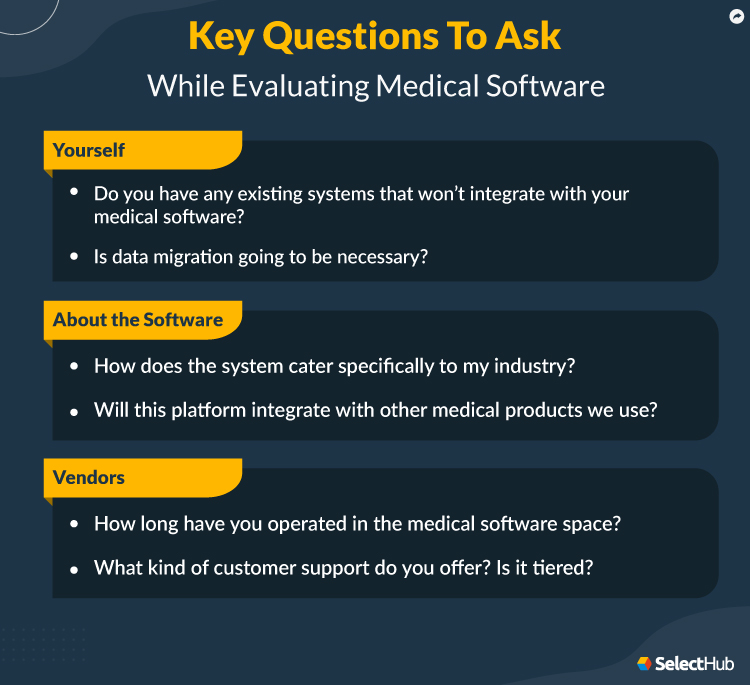
Prepare a list of must-have features and brainstorm questions for vendors to ensure you choose a solution that will add value to your business practices.
Before we go any further, it’s important to understand the different types of available tools. While they may all seem similar on the surface, each type of solution offers different functionalities.
Electronic health records provide medical professionals with an accurate picture of patient information, improve communication at all levels and streamline charting. Though there are a variety of EHR features these systems come armed with, the primary function of an EHR product is to document a patient’s medical history.
What makes an EHR stand out as special against the other tools in this list is that an EHR typically houses information from a patient’s entire medical history, including records from different doctor visits or even trips to the hospital.
A good EHR allows doctors in different practices to communicate about a single patient. These systems can store information like:
Small practices or practices that want to ensure patient privacy might opt for an EMR in lieu of an EHR. The primary goal of an EMR is to provide internal tracking and storage of patient data. Electronic medical records, similar to electronic health records, track and store patient data.
However, the difference between EMR and EHR is more than just a single, pesky letter. While an EHR allows providers to share patient information with care providers in other practices, an EMR makes this much more difficult.
While some EMR tools allow for inter-practice communication, it is not a guaranteed feature of these solutions. One way to think of it is that EMRs record information of a patient’s single visit, creating a record of care over time.
EHRs, on the other hand, house information regarding a patient’s full medical history, whether they visit your practice, make a trip to the emergency room or see a specialist in another field.
Leaving nothing to the imagination, medical billing software does exactly what its name implies — streamlines the financial processes of your practice.
Its main goal is to improve efficiency in the billing and reimbursement cycle of the practice. This software can handle things like payment reminders, claim reconciliation, remittance alerts and even denial management.
It’s partly responsible for those little slips you get in the mail reminding you to pay off a bill and is doubly responsible for online bill payment systems.
Another often-overlooked benefit of medical billing software is that it allows you to manage cash flow and track revenue.
EMR and EHR systems focus on the patient — their health and their care — while medical practice management handles the administrative portion of owning a clinic or a hospital.
This highly specialized software isn’t unlike other management solutions, such as warehouse management software, and actually handles a number of similar functions.
At the end of the day, this software’s job is to assist doctors and practitioners so they can spend more time healing and less time administrating. That’s where medical practice management software comes in.
In the hands of a skilled front-end assistant or manager, this software takes the pain out of the ordinary (and daily) struggle of booking patient appointments, fielding phone calls and more. Practice management software helps businesses run at maximum efficiency.
It combines several functions — like charting, billing and scheduling — into one convenient interface. It can also reduce physician fatigue, which is a major consideration in keeping your skilled doctors and nurses at your practice.
Though sometimes overlooked, patient scheduling software can be vital to a medical practice’s success. From creating referrals to facilitating follow-ups and even generating custom reports, this software provides a variety of tools to help automate and streamline the scheduling process, benefitting the practice overall.
However, there are still plenty of practices that may be content with old-fashioned scheduling methods — but they shouldn’t be, as these outdated practices leave room for costly human error.
A recent report on patient no-shows found that a single missed appointment increases needless costs and affects employee productivity. While not every no-show results from poor scheduling practices, improving the overall scheduling process can reduce the number of missed appointments.
By implementing a medical scheduling tool, your practice can automate many key steps to ensure patients show up for their appointments at the correct time. A few key patient scheduling features that help to facilitate this include:
With any software purchase, it’s important to consider base aspects of the solution, such as where and how users access the system. When it comes to protecting sensitive patient information, how you choose to deploy your medical software can be a big decision.
In the following sections, we’ll go over the three most common deployment methods so you can make an informed decision about which one will be best for your practice.
Cloud-based
As the name suggests, cloud deployment refers to software deployed through the cloud, providing users with access via the internet.
One of the most common options, this type of deployment comes with a handful of advantages:
Accessibility: Access cloud-based software from any internet-connected device. Many of these solutions provide native iOS and Android apps, providing greater functionality and usability.
Cost Savings: Many cloud solutions offer monthly subscription plans for payment, making it a more affordable option, with costs split up over many months rather than paying for everything upfront.
Automatic Updates: Rely on the vendor to update the platform, ensuring that you’re always using the most up-to-date version of the system.
If you’re considering cloud deployment, the one major factor your practice will need to consider is security. Typically, with these types of solutions, the vendor will accept responsibility for the security of any data housed within the system.
However, some practices may prefer the peace of mind that comes with in-house security protocols to ensure that all patient data remains private.
Cloud-based enterprise medical software is an excellent option for both smaller practices looking for an affordable solution and larger practices drawn to the mobility of these platforms.
However, regardless of your clinic, you should thoroughly vet any vendors you consider to fulfill your security needs.
On-premise
Contrary to cloud deployment, on-premise solutions are stored on in-house servers and are accessible via the practice’s servers. Rather than paying a monthly subscription fee, these platforms typically require you to purchase a license for the product.
This is usually a one-time purchase; however, system upgrades throughout the software’s lifetime can come with additional costs.
While the licensing fee may seem like a smaller investment, this is not always the case, as your practice will be responsible for maintaining the system, requiring that you have dedicated IT staff to troubleshoot any problems and keep the software running smoothly.
Similar to cloud solutions, on-premise solutions come with their own security concerns. Rather than relying on the vendor for security, on-premise solutions leave security to you and your IT team.
This can be a significant benefit for practices in highly regulated specialties as you have complete control over data security and can rest easy with the peace of mind that you know precisely about the safety of patient data.
On-premise solutions are ideal for practices with security concerns and the resources to employ in-house IT.
In addition to control over security, these platforms provide greater control over the system itself and can be a great option if you’re looking to implement a solution that your business can rely on for many years to come.
Hybrid
Cloud and on-premise deployment options both come with their benefits and downfalls, which can make it challenging to know which one is right for your business. While not the most common, hybrid deployment can be a happy medium for some buyers.
So, what is hybrid deployment? Just like the other deployments we’ve discussed, a hybrid deployment is precisely what you might expect: a combination of both cloud and on-premise deployment methods.
Hybrid infrastructure consists of on-premises data centers, private clouds and/or public clouds.
This method can look different for each practice that implements it, depending on their needs. Hybrid deployments provide users with the benefits of both on-premise and cloud deployments, but be aware that it comes with drawbacks from both.
A hybrid deployment is an excellent option for practices that need to balance a need for on-site data servers with the mobility and accessibility that comes with cloud deployment.
If you find yourself leaning towards this deployment strategy, consider meeting with your IT department early in your selection journey. They’ll be able to provide valuable insights into how well this type of software can work with your existing workflows.
As we said earlier, medical software is the cornerstone of medical practices, hospitals or any location that treats patients. It’s an all-encompassing term for the different facets of medical technology, including electronic health record (EHR), electronic medical record (EMR), practice management and billing software.
These solutions help lower overall costs for practices and improve the overall quality of patient care by maintaining medical records, facilitating appointment scheduling and streamlining administrative workflows, just to name a few of the core capabilities.
In the following sections, we’ll provide an in-depth guide to the essential features to pay attention to and the specific benefits this software offers.
Improve Data Security
Does information security relate to health care software? Yes, it does — and more than you might think. According to IBM’s Cost of a Data Breach Report 2021, unlike nearly every other industry, the cost of health care data breaches is on the rise.
Data breaches grew by more than 29.5% between 2020 and 2021. A health care data breach can cost as much as $9.23 million.
Compared to pen-and-paper methods of storing patient data, medical software provides a clear benefit: data security. Previously, we saw volumes and volumes of patient information stored in large rooms, filing cabinets and more.
With the advent of digital medical software, large rooms of easily misplaced/stolen data became a thing of the past.
With patient data now digital, many users have concerns about the efficacy of digital safety protocols. After all, don’t leaks and breaches happen?
Luckily, with most EHR/EMR apps, that data is pre-encrypted before it goes to any server, meaning that even if there’s a data leak, it’s effectively useless without the encryption key.
You can also assign admins to facilitate user control and set who has access to certain information. For example, front-office workers won’t need access to sensitive medical records.
Reduce Errors and Strengthen Patient Care
Regardless of specialty, the primary focus of your practice is providing high-quality patient care. Unfortunately, even the smallest human error can be detrimental to not just your practice but to your patients as well.
While a minor error is often easily addressed in other industries, even the smallest oversight can become a matter of life and death in the medical field. Fortunately, artificial intelligence tools and other capabilities provided by medical software can help eliminate this concern.
In the past, manual documentation was riddled with errors, from handwriting discrepancies to inaccurately entered (then shipped) patient health data. With accurate medical records and recording, you can expect more physicians to get it right on their first go.
Better, more accurate treatment means the patient leaves satisfied, and you can boost both revenue and practice traffic.
Participate in Government Incentive Programs
Interoperability incentives make buying and maintaining medical software a lot easier. Facilities and practices can qualify for monetary rewards if they properly implement an EHR system.
If they meet meaningful use standards, they can get even more in the way of rewards (sometimes upwards of tens of thousands of dollars).
That said, failing to meet these standards can incur equal penalties.
Before you decide on which medical software to buy, it’s important that you create a list of goals that you hope to meet during a successful implementation.
If you’ve purchased software before, you know that the process can quickly get out of hand or over budget, so these goals should help you keep everything straight along the way.
Goal 1
Move Away From Paper Records
It’s no secret that paper records are stale, inefficient and liable to get lost or stolen. The humble charting features of EMRs/EHRs offer one simple solution: move paper records to digital records.
The benefits of paperless records are numerous. They’re transferable and can be searched and stored, making retrieval a breeze.
One reason people implement medical software is that it has interoperability with other systems, including hospitals and other emergency care centers, streamlining patient health and improving outcomes.
Goal 2
Enhance Communication
Improving communication in the medical world is always a benefit, whether you’re the care provider or the patient. Handle poor handwriting effectively with records easily transferred and shared across practices.
Ultimately, this results in other practices getting a more holistic understanding of a patient’s medical history.
Goal 3
Streamline Staff Workflows
Remember, these are unified systems transporting a patient’s medical history across different practices and treatment centers. This can make adding to or appending a user’s charts a simple task.
And it means the patient gets consistent care regardless of where they go.
Goal 4
Measure Practice Performance
Most medical software offers some degree of business intelligence capabilities that you can use to track and measure practice performance. Overall, BI functionality provides detailed data about your operations, providing insight into organizational trends and patterns.
Leveraging this type of data allows you to see how the practice is doing and helps identify where there is room for improvement.
Goal 5
Automate Processes
These apps allow you to automate crucial parts of the billing and management cycles, including sending out reminders, scanning health records and more.
Streamlining and automating key processes helps free up medical professionals to focus on their patients rather than being bogged down with administrative tasks.
Goal 6
Ensure Compliance
Compliance is key when it comes to medical technology. You want to make sure your patients’ privacy is under consideration at all times — which is why medical software takes steps to help you stay HIPAA compliant.
Goal 7
Achieve Interoperability
One of the most highly-coveted features of an EMR/EHR system is portable records. One department in your clinic can store a patient’s name and medications, and another department can process the prescription and billing.
Medical software can also send that information across clinics, meaning that a customer’s data is secure from prying eyes yet accessible when needed by doctors, nurses and those with authorization.
So, what are the most important features to look for when shopping for a medical solution? You’re not going to like this answer, but medical software has a wide range of basic features and functionalities, so it’s hard to narrow this list down to just a few.
However, at a basic level, there are a handful of core functionalities you should make sure are offered by any solutions you’re considering.
Charting & Documentation
Charting and documenting medical data is one of the most important components of medical software.
While some tools, like an EMR, are solely dedicated to this, most medical software helps you record and store patient data like current medication, patient history and more.
Improving data accuracy is another function of medical software. Often, data can get lost due to inefficiencies in pen-and-paper record keeping. Sometimes, records of visits are lost simply due to a doctor’s poor handwriting, so ensuring accurate data entry is key.
E-prescribing
E-prescribing is a modern convenience that can significantly improve the quality of service for the patient by putting their information and important notifications back in their hands.
E-prescribing systems can send out alerts on prescription refills and manage prescriptions and payments — all from a patient’s mobile device.
On the physician’s side of things, doctors can quickly update prescription information and refill dates before sending that information electronically. In the pharmacy itself, clinicians can dispense medication in the appropriate doses and check for any potential interactions based on a patient’s current prescriptions.
Scheduling
You can’t have a practice without any patients, and you can’t have any patients if you don’t schedule any of them.
Medical practice software often comes equipped with a technology known as “smart scheduling,” which efficiently schedules patients into rooms with the correct tools and equipment for the appointment.
Patients also benefit from choosing the dates and times for their appointments by using a mobile application or web app.
Billing & Payment
Billing is one of the cardinal features of, you guessed it, medical billing software.
Almost every EHR system integrates with a billing platform, meaning you can automatically create billing statements based on procedure and visitation, as well as make custom billing templates.
Good billing features should also distinguish between patients who are on government insurance, those who have purchased additional coverage and those who are on private insurance.
One of the most highly-coveted features for an EMR/EHR system is portable records. One department in your clinic can store a patient’s name and medications, and another department can process the prescription and billing.
Medical software can also send that information across clinics, meaning that a customer’s information is secure from prying eyes yet accessible when needed by doctors, nurses and those with authorization.
If it wasn’t a priority already, treating more and more patients as well as generating more and more revenue is becoming the standard goal across practices — and medical software can help you meet that goal.
Aside from the bevy of standard medical software features, your organization should also consider looking into these advanced features to help your practice stand apart from the competition.
Below are some sought-out features outside of the standard set.
Patient Portals
Patient portal software is a way for your patients to get involved in the digital side of their health journeys. They give patients access to their health records, appointments, prescriptions and more.
Population Health Monitoring
Population health monitoring is a practice management tool that accomplishes quite a lot.
It identifies patients to be billed and then schedules them for their routine and, if necessary, follow-up moments of care. One of its cardinal features is its ability to keep people in the system for routine health checks and holistically monitor large populations of clients.
Insurance Verification
Insurance verification is an advanced feature that helps practices verify insurance coverage for certain procedures. It collects insurance information, validates it and then sends it to payment administrators in the network to assess eligibility.
With insurance verification, you can avoid denied claims and reimbursement troubles by determining who’s responsible for payment and clearly communicating payment responsibilities to patients before treatments.
In addition to its numerous functionalities, here are a few key considerations to take into account when you’re dealing with medical software as a whole:
Workflow Integration: When picking out medical software, it’s important to think about which component you will opt for (EMR, EHR, practice management or billing) and how that software will integrate into your practice’s workflow.
Customization: How customizable is the product? Will it let you design and generate templates (for billing, medical charting and scheduling), and does it come with any pre-installed templates for you to take advantage of?
Compliance: Is the software going to ensure HIPAA compliance and provide adequate patient privacy? Will the information be kept on a need-to-know basis, given the rise of data breaches and malware exploiting privacy?
Scalability: This is defined by how well the software “grows” with your practice and how well it meets your demands. Medical practices aren’t static entities; they’re dynamic. Scalable enterprise medical software can meet the needs of a growing business, your practice included.
Interoperability: Medical records are portable. It's important to consider how the software can send and receive important files and other information from different products or practices. When selecting medical software, pay close attention to the integration and compatibility features section.
Current & Upcoming Trends
When you begin your software search, you’ll likely begin by assessing your medical practice and identifying what key functionalities you need. However, it’s also important to consider what capabilities you’ll need in the future.
This will require that you consider future growth plans. However, it also requires knowing where the enterprise medical software industry is going. We’ll provide a brief overview of a few health care technology trends you’ll want to keep an eye on in the following sections.
Rise of Telehealth
Telehealth has been around for decades, but not in the manner we think of it now. The dawn of digitalization saw the growth of telehealth worldwide. However, the COVID-19 pandemic played a significant role in propelling telehealth to the limelight.
In response, the telehealth market is expected to reach $285.7 billion by 2027, growing at a CAGR of 26.6%.
Additionally, telehealth’s rise reflects another growing trend in health care software: home-based care models.
Shift To Home-based Care
With the emergence of mHealth applications, patients want care delivery at their doorstep. This caused a new home-based care trend to catch traction.
In addition, the COVID-19 pandemic and the government-imposed mass lockdowns helped patients and clinics to embrace home-based care as the new normal.
However, for a large number of individuals with chronic health concerns, home-based care became an essential modification to their lives.
Fortunately, transitioning to this new reality was relatively seamless, thanks to advancements in health care technology throughout the last decade.
With the growing popularity of artificial intelligence and virtual reality, medical software has been able to expand what care options are available even when an in-person visit isn’t.
Today, in-person visits are back up yet patients are seeking more and more remote care options for all kinds of health issues.
If your practice hopes to provide a high level of care, then this is a trend you’ll want to pay attention to — especially if you treat patients who may benefit from a home-based care plan.
Cloud Computing for Outsourced Billing
One aspect plaguing the medical industry is the shortage of workers. During the COVID-19 pandemic, staff shortages reached an all-time high and they haven’t gone down. The labor shortage affected a lot of medical processes. However, the billing and invoicing activities were hit the hardest.
According to Grand View Research, the global cloud computing for outsourced billing market has reached an astounding $368.97 billion in 2021 and is growing at 15.7% CAGR. In 2023, it’s expected that most major hospitals and clinics will purchase the software and automate billing.
Addition of New Technologies
In the last decade, artificial intelligence has become central to much of our technology. From auto-scheduling appointments to streamlining data entry, there’s no shortage of ways that AI can help to improve medical practices.
However, medical software has recently begun branching into other AI applications, such as virtual assistants.
But artificial intelligence isn’t the only addition to medical software that you’ll see in the next few years. While often associated with cryptocurrency, blockchain technology is another valuable addition to health care software.
Though still a relatively new tool in medicine, some EHRs already see success using blockchain to help ensure security.
Selecting medical software can be an uphill battle. After all, there seem to be a million different factors to consider. We’ll go over those in detail so you can make an informed decision on what software is right for your type of business.
Identify Key Stakeholders and Solicit Input
You’ll want to get opinions from those who will use the software. This includes nurses, doctors, clinicians and back-office staff. Clinicians will primarily use EMR/EHR software, while back-office staff will concern themselves with practice management, billing and scheduling.
Assess Billing Needs
Billing is, understandably, a crucial feature of medical software. You’ll want to look at your practice’s patient volume and traffic, demographic needs, and most common insurance types.
It’s helpful to record all of your current expenses and the billing habits of your customers. This way, you can better anticipate any costs that might come up in the future and spend less time navigating difficult financial landscapes.
Assess Performance
It’s vital to understand how your practice already performs when it comes to handling patient volume and quality of care. Then you should ask yourself if, based on the features and benefits of your chosen medical software, you can improve on that performance (and how).
Software Comparison Strategy
After you’ve narrowed your software selection to just the top two or three vendors, it’s important to request a demo. Seeing your potential software in action should help you envision how your practice will use it and if it’ll meet your diverse needs.
However, you don’t rely solely on your vendor’s word for how the software will perform. Ask questions that specifically relate to your needs and wants, and gather as much intel from the vendor as possible.
See if you can find a practice that uses your chosen software and ask your questions. Be candid when asking — don’t shy away from asking about positives and negatives. A few good questions to ask are:
Do you like the medical software you use?
What do you like about it the most?
What do you dislike about it the most?
Has the vendor been helpful in supporting you during implementation and post-implementation?
What did your system cost you, and how did you implement it?
Cost & Pricing Considerations
While medical software is a valuable addition to any practice, it does come at a cost. Before you begin your software comparison, it’s a good idea to assess what your budget will be.
The cost of medical software can vary greatly depending on what you’re looking for, so keep in mind that you often get what you pay for when buying software.
This probably has you wondering: what factors can affect the cost of medical software?
It’s an excellent question. While we can’t tell you the exact price of each specific functionality, we can tell you what could affect the price.
Deployment methods influence software price. An on-premise solution will require you to buy the software’s license upfront, typically a large upfront payment. Some solutions may require you to re-license the software annually.
Conversely, cloud-based solutions typically have a lower cost-to-entry but often rely on a subscription model for payment. This means that you won’t have to worry about the large upfront costs. The downside is that you’ll need to continue to pay for the system if you want to access it.
You’ll also want to consider how many users will need to access the platform, as some medical software companies may factor this into the price.
When it comes to features, the base functionality you’re looking for will determine the solution’s price. However, if you’re planning on integrating your new software with existing systems, then be prepared for small fees that may be associated.
Finally, depending on what software you select, you may need to consider the cost of technical support. This may come in the form of a support package offered by the vendor, or it might take the form of hiring a technical support expert to maintain your software in-house.
Price Guide for Medical Software
See prices for the top Medical Software... Plus get important questions to ask.
Sometimes you’ve got to ask the tough questions. Before you make a final software selection, you should talk to your key stakeholders and draft a list of questions to ensure you’re getting everything you need out of a potential solution. Some important questions to consider are:
What type of deployment will you need? On-premise, cloud or hybrid?
What type of customization (if any) will you need for your software?
Do you have any existing systems that won’t integrate with your medical software?
Do you anticipate needing support, and if so, what kind of support options are available to you?
Is data migration going to be necessary?
Questions To Ask Vendors
You’re going to be investing in a long-term software installation potentially, so don’t be shy about asking medical software vendors these crucial questions.
About the Software
How does the system cater specifically to my industry?
What type of reports can this system generate?
How customizable is the system, and will customizing it result in additional charges?
Will this platform integrate with other medical products we use?
Will it receive future upgrades, or will be replaced by a new system entirely?
About the Vendor
How long have you operated in the medical software space?
How are you HIPAA compliant?
What have other customers said about your product?
What is the typical installation time for your product, and can we expect any downtime?
What kind of customer support do you offer? Is it tiered?
Final Thoughts
Medical software is a term that describes a broad range of applications and platforms that do a lot of different things in the medical IT space. As such, picking the right software is no easy task. You’ll want the help of your entire team — and not just the office staff, but your clinical staff as well.
Make sure you cover all of your bases — from the EMR/EHR side of things to billing and scheduling features.
As a technical writer and market analyst at SelectHub, Samikshan creates content for construction takeoff, medical EMR, EHR and ambulatory niches. He is a bibliophile and an ardent football fan with an unquenchable thirst for adventure. Outside business hours, one can find him on the football pitch or in his room, listening to metal music and patting his cat, Newton.
Sagardeep is a Senior Research Analyst at SelectHub, specializing in diverse technical categories. His expertise spans Business Intelligence, Analytics, Big Data, ETL, Cybersecurity, artificial intelligence and machine learning, with additional proficiency in EHR and Medical Billing. Holding a Master of Technology in Data Science from Amity University, Noida, and a Bachelor of Technology in Computer Science from West Bengal University of Technology, his experience across technology, healthcare, and market research extends back to 2016. As a certified Data Science and Business Analytics professional, he approaches complex projects with a results-oriented mindset, prioritizing individual excellence and collaborative success.
Akshay is a highly analytical and detail-oriented Software Research Analyst with a proven track record of generating industry-standard templates for RTs, RFIs, pricing guides, LTSRs, and more across software categories like Big Data Analytics, BI, ETL, EDI, EHR, Endpoint Security and Medical Billing. He holds a Bachelor of Technology in Computer Science Engineering and an MBA in Marketing and Analytics from IBS Hyderabad. He loves to spend time exploring spirituality, reading books, and watching sports, especially cricket, tennis, MMA, and boxing.
Ryan McElroy is a Content Editor and Senior Market Analyst at SelectHub who writes and edits content on various software types, along with their broader concepts and the industries they serve, including medical, construction, CMMS, supply chain management and legal. He studied at the University of Missouri (Mizzou) and earned his BA in Journalism in 2016. During his free time, you’ll find Ryan playing video/card/board games, sipping coffee and reading speculative fiction, or listening to music his loved ones often describe as “headache-inducing.”