


Whether you’re a first-time buyer or upgrading an outdated system, identifying your EHR/EMR requirements is key. It helps you select a system tailored to your practice’s specific needs, whether it’s streamlining appointment scheduling, ensuring accurate billing, or boosting patient engagement and care coordination.
Check out the table below for a summary of the must-have requirements to include in your EMR/EHR checklist.
Top EHR/EMR Requirements
Empower patients with self-service tools like online appointment booking, automated reminders, a patient portal for managing records and payments, and in-clinic tracking to enhance their experience and reduce no-shows.
Learn more
Streamline prescription workflows with ePrescribing, EPCS for controlled substances, drug-allergy alerts and medication cost transparency to enhance safety, compliance and patient convenience.
Learn more
Combine patient data into easily accessible charts with vitals, labs, medications and allergies summaries.
Learn more
Simplify documentation with customizable clinical note templates, auto note generation and progress tracking.
Learn more
Integrate billing with real-time insurance verification, charge capture, claims management, and patient payment tools to bridge clinical care and revenue workflows.
Learn more
Digitize and organize records with scanning capabilities, a secure document repository and CDS tools that flag potential risks and offer actionable recommendations for better decision-making.
Learn more
Offer convenient care with virtual consultations, virtual waiting rooms, secure recordings, screen sharing and on-demand visits, ensuring patient satisfaction and accessibility.
Learn more
Enable healthcare on the go with native Android and iOS mobile apps, speech-to-text dictation, offline access and push notifications.
Learn more
Track practice performance with custom and pre-built reports, real-time dashboards and automated scheduling to monitor financial health, productivity and patient trends.
Learn more
Streamline workflows with customizable processes, group messaging, document sharing, global search and branding options to enhance collaboration and practice efficiency.
Learn more
Ensure data security with HIPAA compliance, two-factor authentication, encryption, audit trails and interoperability standards like HL7 and FHIR for seamless data exchange.
Learn more
Connect with third-party applications supporting formats like HTML, CSV and PDF.
Learn more
Get our EHR/EMR Software Requirements Template
We’ve onboarded over 100,000 users into our software selection platform. This has given us a wealth of insights into their usage patterns based on industry, company size and user persona. By leveraging this data, we’ve identified key requirements you should consider to minimize the risk of selecting the wrong software.
Our goal is to empower you to benefit from the collective experience of your peers who’ve embarked on the same journey before you.
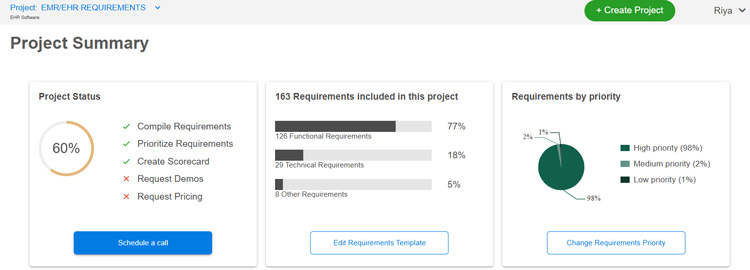
Just a heads-up: The case studies I’ve included show how systems can help solve common challenges like documenting patient information more effectively. I’m not endorsing any specific software — they’re just examples to give you a clearer picture of what’s possible. We aim to keep things unbiased and help you make the best decision for your needs.

1. Patient Engagement
Choosing the right EMR/EHR system isn’t just about managing records — it’s about creating a better experience for your patients and your team.
Most systems offer online patient registration, which allows patients to input their medical history, insurance details and consent forms ahead of time.
Here’s what else you should look for:
- Tools that let patients book, reschedule or prepay for appointments online.
- A patient portal where patients can manage appointments, view prescriptions, make payments and access educational materials like dosage instructions or health tips.
- Follow-up tracking tools to send patients reminders for routine check-ups, screenings or vaccines, keeping them on top of their medical needs.
- In-clinic patient tracking, so you can monitor their journey during a visit and avoid delays or confusion.
- Features like color-coded appointment calendars to quickly see appointment status — whether they’re upcoming, canceled or completed.
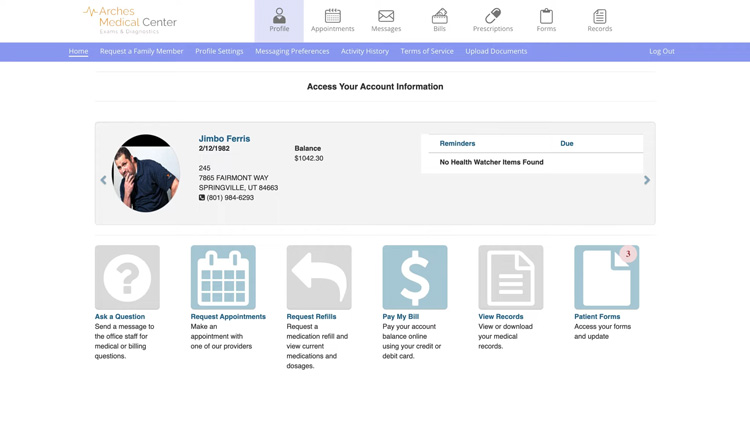
Enable patients to request appointments, pay bills, view records, complete forms and communicate with healthcare providers with AdvancedMD’s patient portal. Source
Dr. Jeffry Anderson, Practice Manager at the Colorado Dermatology Institute shared how AdvancedMD helped them boost patient engagement:
Our patients are able to get information more quickly and we’ve become more efficient at scheduling and making sure the patient is roomed in a short amount of time. We don’t want any patient sitting in our waiting room for more than 15 minutes, and we meet that goal about 90 percent of the time. (Source)
2. Electronic Prescriptions
How often do handwritten prescriptions lead to errors or frustrated calls from pharmacies? That’s where ePrescription steps in, letting you send prescriptions directly to pharmacies with no guesswork or miscommunication.
For practices that deal with controlled substances, EPCS is non-negotiable. It provides a secure way to prescribe, track and manage these medications, ensuring compliance with regulatory requirements.
And safety? That’s non-negotiable. Features like drug-allergy interaction (DAI) alerts help avoid dangerous situations by flagging potential allergic reactions or drug conflicts before the prescription is sent.
Another requirement you should look for is medication price transparency, which gives providers access to real-time cost details based on a patient’s insurance and formulary. This helps you choose medications that aren’t only effective but also affordable for your patients.
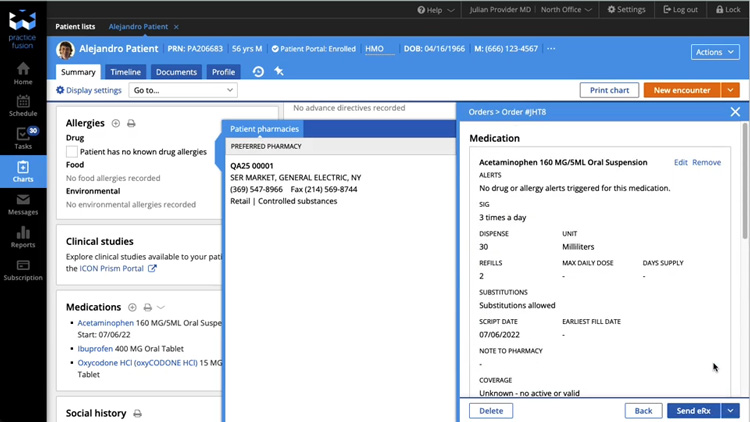
Send prescriptions to the patient’s preferred pharmacy with Practice Fusion. Source
The Mental Mediator’s (a behavioral health practice) story shows how beneficial ePrescription features can be. Before switching to Valant, their virtual patients had to make an extra trip to pick up prescriptions.
Using ePrescribing capabilities, providers can now prescribe directly from clinical notes, check for drug interactions and send prescriptions straight to patients’ desired pharmacies. Patients even get automated alerts when their prescriptions are ready. (Source)
3. Clinical Charts
Managing patient information shouldn’t feel like a never-ending hunt for details, but that’s often the reality with clunky systems. That’s why features like patient charts are essential. They pull everything — medications, allergies, labs, vitals — into one easy-to-access summary, so you don’t waste time piecing things together.
Tracking patient vitals is just as important. The EMR/EHR system you consider should let you easily record and monitor critical measurements like blood pressure and heart rate, ensuring nothing gets overlooked.
If you want deeper insights, look for a platform that provides a flowsheet to visualize health data, track lab results and flag any abnormal values for follow-up.
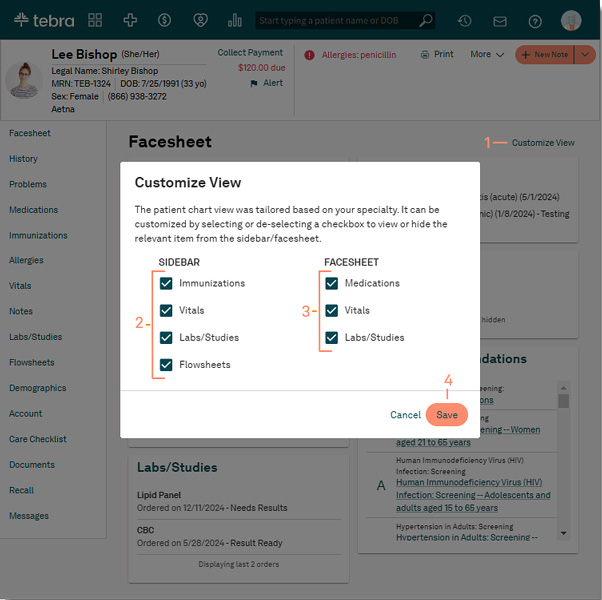
Customize your patient chart view with Tebra EHR. Source
4. Notes and Templates
If documentation feels like a chore, you should look for systems that offer prebuilt and customizable clinical notes and templates.
With custom templates, you can set up formats for SOAP notes, prescriptions, lab orders and more, tailored to fit your workflows perfectly.
Need to send customized updates or reminders to patients? Then, message templates should be on your list. They let you create personalized responses in seconds, saving time while keeping communication professional and consistent.
For tracking patient progress, progress notes provide a clear, structured way to document symptoms, diagnoses, treatments and progress toward goals using familiar formats like SOAP or BIRP.
Don’t forget to check if the system offers an auto-note feature. It’ll help you automatically generate detailed notes based on the information entered during a patient visit, reducing manual documentation and keeping everything organized.
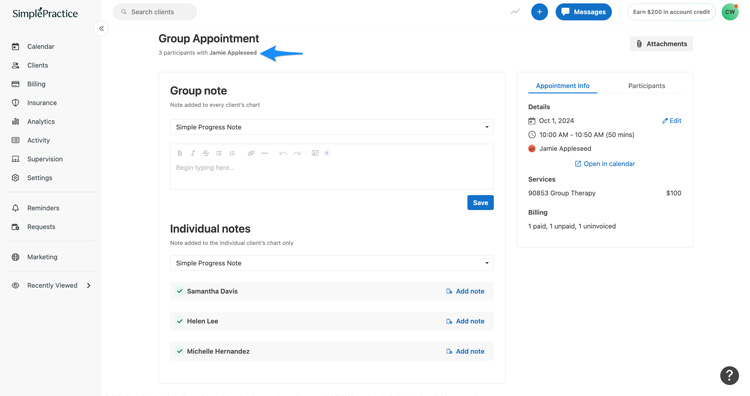
Add progress notes with Simple Practice. Source
NextGen Enterprise’s customizable templates allowed Vision Care of Maine to tailor documentation for each specialty, such as retina care, where providers see ocular health data organized chronologically. This streamlined their workflows, ensured quick access to relevant information, and supported efficient, informed decision-making. (Source)
5. Medical Billing
Want help with the financial side of your practice? If yes, look for systems with medical billing tools. Integrating billing into your EHR/EMR platform helps you bridge the gap between clinical care and revenue.
See whether the solution allows you to check a patient’s primary and secondary coverage in real time or before appointments. This helps you avoid delays and ensures you know exactly what’s covered before providing services.
Another must-have is charge capture, which ensures that every procedure, service and supply is recorded accurately, so nothing is left out when billing.
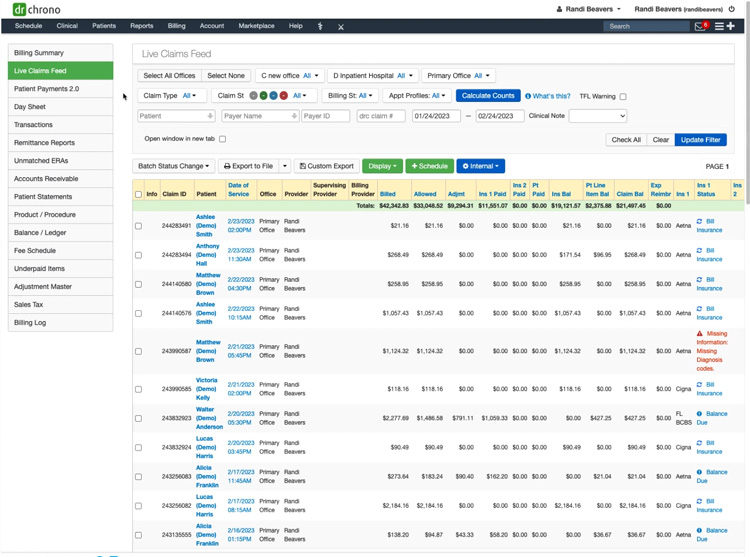
DrChrono’s live claims feed. Source
Finally, don’t overlook claims management modules. They help you automatically generate and submit claims to insurance payers. You can also track claim statuses and resubmit denied claims directly from the system.
New Day Therapy, a mental health practice, saw 100% of claims paid within 60 days with DrChrono’s live claims feed and payment analysis report.
6. Clinical Documentation
If you’re dealing with paper records, scanning and digitization capabilities are a must. They let you scan documents directly into the system, keeping all your records organized and accessible.
Pair them with a document repository, which stores everything from charts to X-rays in one secure location, and you’ll never waste time searching for files again.
Don’t overlook clinical decision support (CDS) capabilities. These tools enable you to handle routine tasks like flagging drug interactions or allergies and recommending diagnostic tests or treatments, freeing you to focus on patient care.
To stay on top of vaccines, look for immunization reporting modules. They help you track doses and connect with registries, keeping everything compliant and up-to-date.
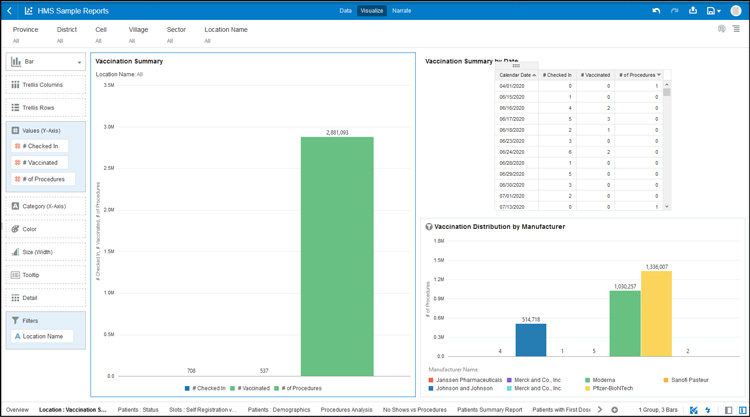
Access vaccination summary with Oracle Public Health solutions. Source
Get our EMR/EHR Software Requirements Template
7. Telehealth
With patients expecting more convenient and accessible care options, you definitely need an EHR with telehealth capabilities.
But not all telehealth-enabled EHRs are created equal. Here are the requirements you want on your checklist:
- On-Demand Visits: Patients value immediacy, which is why on-demand care features like virtual walk-ins or urgent care queues are crucial. These tools allow patients to request consultations on short notice, making your practice more accessible and responsive to their needs.
- Communication Tools: Whether it’s video for face-to-face consultations, phone for quick chats or text for simple updates, patients love having choices. So, look for an EHR that offers robust communication capabilities.
- Virtual Waiting Rooms: Want your patients to check in, fill out forms, review consents and even make payments — all before you even say “hello.” Virtual waiting rooms make that possible, saving everyone time and creating a smoother start to every session.
- Screen Sharing: Explaining a diagnosis or treatment plan? Screen sharing makes it simple to show patients exactly what you’re talking about, whether it’s lab results, X-rays or educational materials.
- Recordings: HIPAA-compliant session recordings are more than just nice to have. They let you revisit key moments, bookmark important details and stay on top of follow-ups — all while keeping patient data secure.
- Clinician Directory: It helps patients find and connect with you more easily. By showcasing your specialties, services and practice details, you build trust and make it easier for patients to confidently schedule visits.
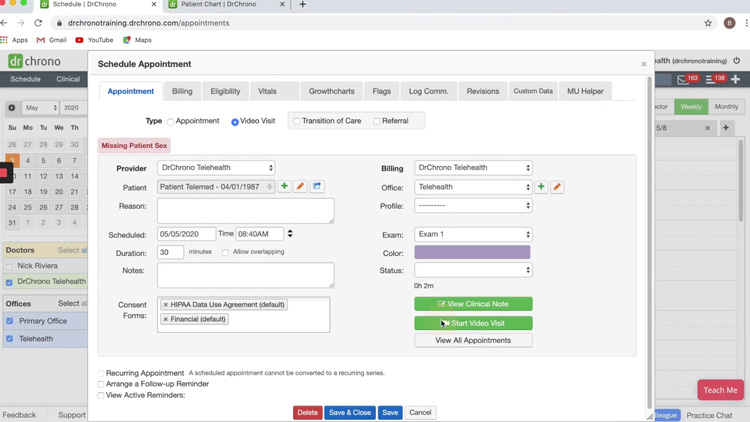
Conduct video visits with DrChrono. Source
8. Mobile Capabilities
Healthcare doesn’t fit into the usual 9-to-5 schedule. It’s unpredictable. That’s why you should look for an EHR with mobile features.
Mobile apps help you access patient records, document visits and stay on top of tasks from anywhere. Confirm with vendors whether their apps are compatible with Android, iOS or both to avoid any compatibility hiccups down the road.
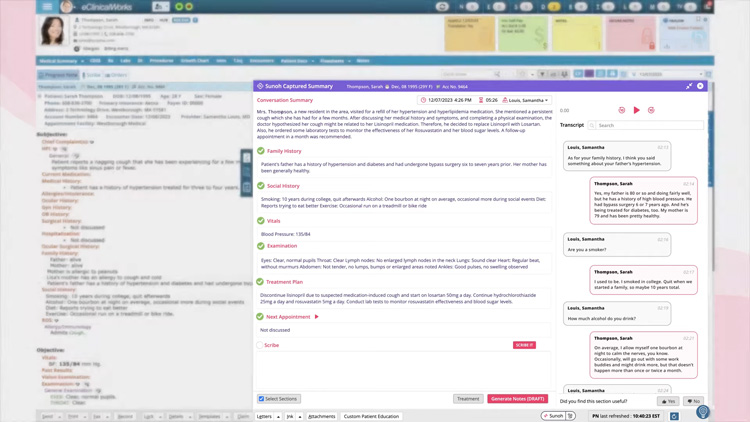
eClinicalWorks’ speech-to-text functionality. Source
Typing up patient notes after every encounter is exhausting and it eats into time you could spend focusing on care. That’s where speech-to-text dictation capabilities come in. With this feature, you can dictate notes as you go, cutting documentation time significantly and reducing errors in the process.
As Michael Farrell, CEO of St. Croix Regional Family Health Center, shares:
With eClinicalWorks’ Sunoh AI technology, our providers can save up to two hours daily, improving work-life balance and reducing stress, resulting in more detailed and accurate patient documentation. (Source)
How often do missed messages or slow responses delay patient care? With push notifications, your patients will never miss a critical update — whether it’s a reminder for an appointment or a payment alert.
If you’re worried about spotty Wi-Fi derailing your workflow, you should consider an application that provides offline access. It’ll help you create tasks, update records and add comments without an internet connection, and everything will sync once you’re back online.
9. Dashboards and Reporting
One essential capability to look for is custom reporting. No two practices are the same, so why settle for cookie-cutter reports? Custom reports lets you zero in on what matters most to your team, whether it’s tracking provider productivity, analyzing patient demographics or monitoring financial health.
Pair this with real-time dashboards, and you’ll have a bird’s-eye view of your practice’s key performance indicators (KPIs), reimbursement trends and outstanding balances — all in one place.
For example, Peachtree Orthopedics streamlined its reporting processes using athenaOne’s MIPS dashboard. When one provider wasn’t meeting their ePrescribing goals, they identified the issue — non-compliance with ePrescribing for controlled substances — and resolved it quickly. (Source)
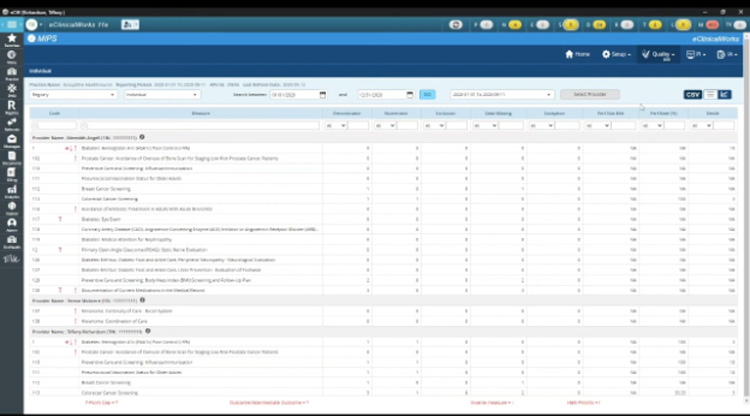
eClinicalWorks’ MIPS dashboard. Source
Recurring reports can be a hassle but auto-scheduling takes the work out of it. Set your reports to run automatically, so you always have up-to-date data without the manual effort.
On the clinical side, medication reconciliation reports are a critical safety capability. They list all medications a patient is taking, helping you detect potential drug interactions or allergic reactions.
10. Platform Capabilities
The right messaging and workflow tools make everything from patient interactions to team collaboration effortless. Here’s what to look for:
- Customizable Workflows: Tailor your EHR to your needs. This includes triggering actions like follow-up alerts, flagging lab results or automating patient communication based on specific events.
- File Transfer: Share documents like lab results, diagnostic images and prescriptions in multiple formats (PDF, JPEG, TXT, etc).
- Group Messaging and @Mentions: Allow care team members to collaborate on patient cases in one thread. Help team members quickly flag tasks or request input with @mentions.
- Custom Branding: Adding your logo, a custom URL or unique system colors to enhance your practice’s professional appearance.
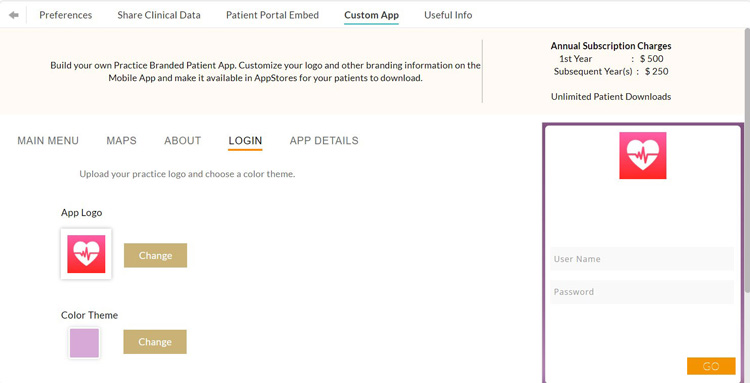
Build your own branded patient app with Charm Health. Source
11. Platform Security and Compliance
When it comes to choosing an EHR, interoperability and security requirements are non-negotiable.
Health Information Exchange (HIE) is a must, enabling clinical data to flow effortlessly between different systems. This ensures you have the information you need to deliver coordinated care.
Compliance with HIPAA is critical for protecting sensitive patient information, while two-factor authentication and data encryption at rest add extra layers of security.
To keep track of system activity, audit trails record every action like logins and data changes, ensuring accountability and transparency.
Standards like HL7 and FHIR are also essential, allowing your EHR to integrate with other systems, mobile apps and portals for a connected healthcare experience.
12. Integrations and Extensibility
EHR systems should work seamlessly with the tools and platforms your practice relies on daily. It should let you import and export patient reports in formats like HTML, Excel, CSV or PDF, ensuring data accessibility.
Look for an EHR application that offers the following integrations:
Get our EMR/EHR Software Requirements Template
FAQs
A certified EHR system ensures your practice meets essential regulatory standards for:
- Delivering high-quality patient care.
- Enabling secure health data exchange.
- Promoting patient engagement.
Additionally, certification is a mandatory requirement for qualifying for financial incentives like Meaningful Use.
A user-friendly EHR/EMR system reduces training time, minimizes errors and improves staff efficiency. Look for systems with:
- Clear navigation.
- Intuitive workflows that align with your practice’s needs.
- Minimal clicks for common tasks such as charting or prescription ordering.
Yes, a mobile-friendly EHR lets you access patient records, update information and manage workflows anytime, anywhere. It’s perfect for providers working on the go or offering telehealth, making your practice more efficient and improving patient care.
Next Steps
Now that you know what to look for in an EHR/EMR solution, you can begin building your EMR/EHR requirements checklist. Get a head start with our free requirements template. You can easily pick the most important modules and features so it’s tailored to your needs and helps you find products that are the best match.
Did we miss any EMR requirements in our checklist? Which capabilities do you think are the most crucial for EHR/EMR providers to include in their platforms? Let us know in the comments!


Conversation (4)
PandaInfosoft - June 4, 2021
It manages the overall finance of the organization and keeps them going on a daily basis. Several organizations are involved in the process but offering revenue cycle management services is a responsible task and needs to be done with careful and utmost perfection.
Ranya - April 22, 2021
Excellent article, thank you for explaining in such detail!
Top 5 PPC advertising company USA - September 18, 2019
I found this post while searching for some related information on a blog search. It’s a good post. Keep posting and update the information.
Evan Heier - September 19, 2019
Glad you enjoyed the article. We tend to update our posts periodically as the industry makes changes.
Thanks,
Evan