Vacation Rental Software is All About Streamlining Marketing, Management and Maintenance of Short-Term Rental Properties By Riddhiman Roy, Market Analyst at SelectHub

Owning a property in a hot tourist spot is a very profitable venture in 2022. 59% of people want a two-week vacation, and 30% are likely to go on a sabbatical for extended stays, according to a survey. With this increasing demand, misfit vacation rental software is like riding a Rolls Royce with a clumsy chauffeur. Regardless of how good your properties are, your business won’t be profitable if you don’t manage it correctly.
A reliable vacation rental solution can help you market, manage and maintain your short-term rental properties and identify new opportunities for scaling. This guide covers the primary benefits of the system, key features, pricing and comparison strategies, and more. Let’s start.
Executive Summary
- Vacation rental software offers multiple features like a channel manager, payment processing, booking engine, maintenance and housekeeping, and accounting. It helps businesses lower costs, streamline marketing and ensure accuracy and accountability.
- Due to various solutions available in the market, it’s crucial to devise a personalized requirements checklist and create a budget before starting your selection process.
- Asking the right questions can help you identify your requirements and understand the product dynamics better.
What This Guide Covers:
Primary Benefits
Improve Marketing Efforts
You can design and launch personalized property websites with brand colors and logos. Most systems offer a native channel manager for syncing real-time property information and pricing across listing channels.
Expand your audience, track engagement, launch campaigns and provide a secure environment to boost brand goodwill.
Lower Costs
Vacation rental software comes with a native reservation system, allowing you to take bookings directly from your website and avoid paying commissions to third-party channels.
The pricing engine automatically reduces vacancy prices to encourage reservations and minimize lost revenue.
Streamline Accounting
You can accept bookings and payments from a centralized platform with a seamless connection between booking and invoicing processes. For managers with bigger portfolios, integrated accounting modules can also help separate personal and business finances and track tax information.
Enhance Guest Experience
Guests get an intuitive and guided booking experience. They can choose from multiple payment options and initiate cancellations. Some solutions offer email automation to set up customized messages throughout the guest journey.
You can collect guest data to create personalized experiences, resulting in good reviews and returning customers.
Ensure Accuracy and Accountability
The cloud calendar ensures accurate information across every listing channel, avoiding double bookings, incorrect entries and other manual errors. Maintain guest timeline records, including payment, stay, reviews and more.
The platform provides a centralized view of every maintenance task, vendors assigned, progress made and more. You can record every transaction and interaction with guests, vendors and staff for smooth audits.
Key Features & Functionality
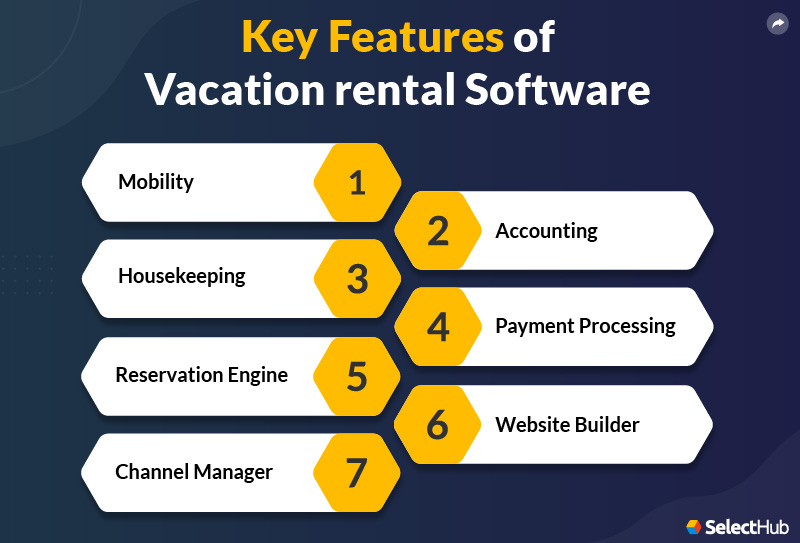
In this section, we’ll look at some of the basic features essential in vacation rental software:
| Channel Manager | Deliver accurate and consistent property availability and pricing data across multiple sales channels with a few clicks. The platform lets you track and analyze engagement, rent structures and occupancy rates. |
| Website Builder | You can design integrated websites using drag-and-drop content blocks and unique templates. Market website link on sales channels to take bookings via a native reservation engine. |
| Reservation Engine | Use a single interactive calendar across channels to make bookings and update data. The engine should also make corporate policies, terms and conditions, and CTAs visible. Advanced platforms offer integrated pricing engines for automatically updating property information across channels based on seasons, occupancies, customer profiles and other personalized metrics. |
| Payment Processing | Some platforms provide native payment processors, while others offer connections with popular payment gateways for you to accept fees, fines, deposits and more. Look for PCI-compliant solutions for secure payment environments. |
| Housekeeping and Administration | You can schedule housekeeping and maintenance tasks and sync them with your master calendar. Allow staff and vendors to access the platform, interact with managers, send invoices and receive payments. Most systems offer unique guest portals to pay fees, issue maintenance tickets and interact with managers and staff. |
| Accounting | Track unit, property and guest-specific ledgers, automate transaction recording and save time by auto-filling double or triple entries with smart modules designed for property-specific accounting. Most vacation rental solutions offer integrations with QuickBooks and other external accounting suites. |
| Mobility | Choosing mobile-centric software is important because customers no longer visit websites only via PCs and laptops. Your website, booking engine and payment gateways should be mobile-optimized to deliver a smooth customer experience. A few advanced systems offer mobile apps for managers to track marketing and management metrics, monitor reservations, and communicate with team members and guests from remote locations. |
Software Comparison Strategy
The vacation rental industry is booming. Its demand grew by 22.4% in 2021 compared to pre-pandemic levels and is expected to rise by 14.1% in 2022, according to a survey.
Consequently, the vacation rental software market size is increasing, forecasted to grow at 12.7% CAGR and reach $468.6 million by 2028.
Due to this incredible demand, the vacation rental software market has many variants, each with unique features and selling points. It’s important to understand that there isn’t a single best vacation rental software that fits every type and size of business.
You need to devise a personalized requirements checklist to compare products based on required features and strike out every option not providing them.
Here are a few pointers you should keep in mind while creating your checklist:
-
Business Scale: A system that can handle booking and invoicing and connects with major listings channels can suffice the needs of independent owners and managers with smaller portfolios. But larger property businesses will need robust software that can manage complex accounting, customer experiences, CRM, business analytics and more.
-
Deployment Option: You can choose between SaaS and on-premise deployment based on your business’s technical expertise and IT infrastructure.
-
Legal Compliance: Housing and property laws are constantly changing, so make sure the software of your choice can help you maintain compliance at local and national levels.
-
Accounting: Based on the size of your portfolio, annual revenue and net profit, choose a solution that can streamline your accounting needs. Most systems offer 1099-MISC eFilings, and a few are certified for trust accounting.
- Marketing Channels: Make sure your software can connect with every sales and marketing channel your business operates on.
-
Integrations: Your vacation rental software should integrate with your existing software stack for seamless data flow. It’s also helpful to identify the platforms your business might use in the future and look for vacation rental solutions that can connect with those platforms.
After designing your requirements checklist, we advise you to consult your peers, test product demos and research reviews to understand how the product works. For a data-driven approach, consider our in-depth comparison report detailing the top vendors and their efficiencies and drawbacks.
Cost & Pricing Considerations
Generally, property management solutions come with a per unit, per month pricing model. A lot of free, open-source vacation rental platforms are also available that you can use to get a feel of the system. But free software offers limited features, and you need to shift to paid plans for more robust functionalities.
Paid plans usually start from $5 per unit monthly and go up to $150+ per unit. The more expensive the software gets, the richer its feature libraries are. However, the most feature-rich software isn’t necessarily the best for your business.
To find an ideal solution, prepare a budget, identify products offering all (or most) features in your requirements checklist and refer to our questions to ask section to start conversations with vendors.
You should consider these additional factors while preparing your budget:
- Installation and configuration costs
- Product training
- Onboarding team members
- Adding new sales channels, ILS and OTAs
- Additional support
Questions to Ask
Asking the right questions is necessary. Going in blind can negatively impact your business. Now that you have a fair idea of vacation rental software and its intricacies, it’s time to start conversations within your team and with the vendor.
Use these questions to start an internal discussion:
- What are the pain points in your business workflows?
- How can you use the software to solve existing problems?
- What features does your business require?
- What is your overall and additional budget for the product and advanced features, respectively?
- How many marketing channels do you use and intend to use in the future?
- What is your preferred payment mode?
- What level of reportage does your business need?
- Which software would need integration with your vacation rental software?
Use these questions to start a conversation with the vendor:
- Can you scale and customize the solution?
- Does it offer mobile capabilities?
- What are the additional features and their cost?
- Can the software support your marketing and integration needs?
- What training and support options are available?
- Does the vendor offer migration and onboarding support?
In Conclusion
Choosing the best vacation rental software for your business can be tricky. Be meticulous while identifying your requirements and preparing your budget. Don’t shy away from asking the vendor probing questions and shortlist an ideal system based on your needs and conditions. Hopefully, this buyer’s guide can direct concerned professionals towards a suitable solution that adds value to their business operations and enhances customer engagement.