Become a master inventory manager for all your company's tech, acting as a digital librarian that tracks every piece of hardware and software from purchase to retirement.
Last Updated: Aug 19th, 2025
Our Review Process:
Our content and analyst teams reviewed 28 IT asset management software.
We use a rigorous research process and test products where possible to provide unbiased,
data-backed recommendations so you can select software faster and with confidence.
30+
Analysts
9,094
Overall Products
Researching Since
2015
What is IT Asset Management Software?
IT asset management software serves as a company's digital inventory clerk, providing a complete, real-time record of all technology. It solves the costly problem of lost or underutilized assets and a lack of license compliance. Key functionalities include asset discovery, lifecycle management, and license tracking. Emerging features like predictive analytics and AI are optimizing procurement decisions. IT departments and finance teams in sectors like technology and government benefit the most. While the initial setup can be complex and requires a significant data input, the software's ability to boost financial efficiency and reduce security risks is a crucial value proposition.
What Are The Key Benefits of IT Asset Management Software?
Our IT asset management software analysts evaluate solutions using a comprehensive,
multi-source approach designed to give you an objective view of what's available in the market.
Here’s how it works:
Our Research Process:
Our analyst team gathers data from multiple angles to ensure complete coverage,
including SelectHub Analyst Briefings, direct vendor interviews, user reviews,
product documentation, case studies, and technical specifications.
This multi-source approach helps eliminate bias and gives you the full picture.
Our Scoring Methodology:
The proprietary scoring engine in our selection platform analyzes the data to compute the Analyst Score.
We evaluate how much functionality you get out of the box vs.
what requires additional modules or third-party integrations — because we know implementation complexity
and hidden costs matter to your decision.
The result: Data-driven scores for the best products in IT asset management software that reflects real-world
usability and comprehensive feature coverage, helping you make confident software decisions faster.
For our IT asset management software analysis, we scored the following feature groups:
Asset Discovery and Inventory
Asset Lifecycle Management
Hardware Asset Management
IT Asset Dashboard and Reports
Platform Capabilities
We also scored these technical capabilities:
Integrations
Security
We use the scale below to rate each feature and integration capability in our platform:
Level of Support
Score
Description
Fully Supported Out of the Box
100
This feature comes built-in with industry-leading capabilities and works right after installation.
No extra modules, integrations, or custom development needed.
Moderately Supported Out of the Box
85
This feature is included out of the box and ready to use, though with more limited capabilities.
No extra modules, integrations, or custom development needed.
Supported with Workarounds
70
This feature isn’t offered directly, but you can achieve similar results using other built-in features
or workarounds at no extra cost.
Supported with Additional Modules
60
This feature is only available through additional vendor modules or products,which come at an extra cost.
Supported with Partner Integrations
50
You’ll need to use a third-party integration, plugin, or app from the vendor’s marketplace at an extra cost.
Supported with Custom Development
25
This feature isn’t built in or available through add-ons or integrations,
but it can be custom-developed using the software’s supported APIs and frameworks. Costs may vary.
Not Supported
0
This feature isn’t supported.
Best IT Asset Management Software Overall
Our Research Analysts evaluated 28 solutions and
determined the following solutions are the best IT asset management software overall:
Sort by
Overall
Score
i
Our Overall analyst rating for IT Asset Management Software products is based on scores in
our selection platform for 35
functional requirements, 14
technical requirements and 8
analyst verification questions. Each functional and technical requirement is scored on
a scale of 0 (not supported) to 100 (fully supported out of the box).
The analyst verification questions are scored as Yes (100) or No (0).
Based on user reviews collected from popular reviews sites.
Analyst Score
i
Our Overall analyst rating for IT Asset Management Software products is based on scores in
our selection platform for 35
functional requirements, 14
technical requirements and 8
analyst verification questions. Each functional and technical requirement is scored on
a scale of 0 (not supported) to 100 (fully supported out of the box).
The analyst verification questions are scored as Yes (100) or No (0).
Is BMC Helix ITSM the "remedy" for your IT service management woes? User reviews from the past year paint a somewhat complicated picture. While BMC Helix ITSM is praised for its robust features, particularly its automation capabilities and integration options, it seems some users find its complexity a double-edged sword. For instance, users highlight the "modernized tool" for automating and managing operations, specifically mentioning its efficacy in tracking tickets, tasks, changes, and data. However, this power comes at a price, as some users find it "expensive compared to other ITSM tools" and "not easy to maintain," with occasional "performance issues" adding to their frustrations. Think of it like owning a high-performance sports car – exhilarating to drive but demanding meticulous upkeep.
The platform's integration with popular tools like DevOps tools, New Relic, and OIC is a significant plus, enabling seamless workflows for organizations heavily reliant on these technologies. However, the lack of JSON support in its language might deter some developers accustomed to more modern standards. The user interface, while generally considered modern, has its detractors, with some users finding it "laggy" and desiring a more intuitive design, especially compared to competitors like ServiceNow. Ultimately, BMC Helix ITSM, much like a Swiss Army knife, offers a comprehensive set of tools, making it best suited for large enterprises that require extensive customization and integration capabilities and have the resources to navigate its complexities. Smaller organizations, however, might find more user-friendly and cost-effective solutions elsewhere.
Great Customization: Its tools are highly customizable to suit the unique requirements of businesses, according to 85% of reviews on feature customization.
Easy Integration: The software offers a range of easy integration possibilities, which is an advantage according to all reviews on this aspect.
Implementation and Maintenance: It’s quick and easy to implement and maintain, as 80% of reviews on this feature state.
Reporting Capabilities: The Remedy On-Premise feature has challenging and inadequate reporting capabilities, according to more than 75% of reviews on the topic.
Upgrading Production System: It’s slow and tedious to upgrade the production system, as 100% of reviews on the topic suggest.
Internal Search Engine: All reviews on the topic suggest that the internal search engine of the solution runs slow and may crash sometimes.
Improved Efficiency: Automates routine tasks, allowing IT staff to focus on more strategic initiatives, thereby increasing overall productivity.
Enhanced User Experience: Provides a user-friendly interface that simplifies navigation and reduces the learning curve for new users.
Scalability: Easily adapts to the growing needs of an organization, supporting a wide range of IT service management processes without requiring significant changes.
Cost Reduction: Streamlines processes and reduces the need for manual intervention, leading to lower operational costs.
Proactive Problem Management: Identifies potential issues before they impact users, minimizing downtime and improving service reliability.
Asset Management: Helps manage the entire lifecycle of IT assets that starts from the procurement stage and completes at delivery.
Multi-Cloud Service Compatibility: Delivers solutions from the cloud depending upon the user’s cloud computing service. Supports BMC, AWS/Azure or private networks.
Proactive Service Resolution: Proactively perform service resolutions by identifying, monitoring, servicing and taking necessary action to remediate cases whenever required.
Knowledge Management: Provides a built-in KCS (Knowledge Centered Service) to deliver essential information to customers and improve customer satisfaction rates.
Incident and Problem Management: Create and resolve issues easily and quickly using context-aware, smart and proactive incident matching.
Based on user reviews collected from popular reviews sites.
Analyst Score
i
Our Overall analyst rating for IT Asset Management Software products is based on scores in
our selection platform for 35
functional requirements, 14
technical requirements and 8
analyst verification questions. Each functional and technical requirement is scored on
a scale of 0 (not supported) to 100 (fully supported out of the box).
The analyst verification questions are scored as Yes (100) or No (0).
Is Device42 the device to manage your IT environment? User reviews from the past year paint a largely positive picture of this robust IT asset management solution. Device42 shines in its intuitive, agentless discovery process, which simplifies the often-cumbersome task of gaining visibility into intricate IT ecosystems. One user praised the platform's comprehensive nature, allowing them to populate data in one area and seamlessly connect it to others, highlighting its adaptability to diverse organizational needs. The dependency mapping feature is another standout, enabling IT teams to understand the complex relationships between assets, as exemplified by a user who found the dependency chart invaluable for their change manager. This granular insight streamlines change management and minimizes potential disruptions.
However, some users suggest areas for improvement. While generally responsive, the support could be enhanced with a more robust knowledge base for increased self-service options. Additionally, modernizing the user interface and dashboard to align with contemporary design standards is a recurring suggestion. Despite these points, Device42's strengths lie in its powerful API, robust IPAM capabilities, and detailed data export options, facilitating seamless integration with other tools. This flexibility is exemplified by a user who appreciated the ability to export data to Excel for modification and then import it back into the system.
Device42 is best suited for large enterprises seeking a comprehensive solution to optimize IT asset visibility, streamline workflows, and ensure compliance. Its user-friendly approach, agentless discovery, and dependency mapping capabilities make it a valuable tool for organizations aiming to gain control over their IT infrastructure. However, those prioritizing a modern UI and extensive self-service options might need to weigh these factors against Device42's strengths in other areas.
Automated Discovery: Device42 excels at automatically discovering and cataloging IT assets, eliminating the tedious task of manual documentation, as highlighted in user reviews.
Centralized Management: Users appreciate the centralized repository for managing both hardware and software assets, simplifying tracking and overall management.
User-Friendly Interface: Device42 is praised for its intuitive interface, making it easy for users to navigate and utilize its features effectively.
Proactive Support: User reviews consistently mention the responsive and helpful customer support provided by Device42.
Bulk Removal of Assets: User reviews have noted the platform lacks a bulk-remove feature, making it time-consuming to delete numerous assets.
Manual Upgrades: Some users have mentioned that Device42 requires manual upgrades, which can be inconvenient and time-consuming for IT teams.
Jira Integration Issues: Challenges have been reported regarding the integration between Device42 and Jira, impacting seamless workflow for users who rely on both tools.
Comprehensive Asset Visibility: Gain a clear, real-time view of all IT assets, including hardware, software, and virtual environments, enabling informed decision-making and efficient resource allocation.
Enhanced Compliance Management: Easily track and manage compliance with industry standards and regulations, reducing the risk of non-compliance penalties and ensuring data integrity.
Improved Operational Efficiency: Automate routine tasks such as asset tracking and inventory management, freeing up IT staff to focus on strategic initiatives and reducing human error.
Cost Optimization: Identify underutilized resources and eliminate unnecessary expenditures by analyzing asset usage patterns, leading to significant cost savings.
Streamlined Change Management: Facilitate smoother transitions and minimize disruptions by maintaining an accurate inventory of assets and their configurations, supporting effective change management processes.
Comprehensive Asset Discovery: Automatically discovers and maps IT assets across your network, including servers, switches, and software.
Real-Time Dependency Mapping: Visualizes application dependencies and interconnections in real-time, aiding in impact analysis and troubleshooting.
Powerful Visualization Tools: Offers dynamic visualizations of your IT infrastructure, including rack diagrams and floor plans, for better spatial understanding.
Integrated IP Address Management (IPAM): Manages IP addresses efficiently with automated tracking and allocation, reducing the risk of conflicts.
Comprehensive Software License Management: Tracks software licenses and usage to ensure compliance and optimize license allocation.
Based on user reviews collected from popular reviews sites.
Analyst Score
i
Our Overall analyst rating for IT Asset Management Software products is based on scores in
our selection platform for 35
functional requirements, 14
technical requirements and 8
analyst verification questions. Each functional and technical requirement is scored on
a scale of 0 (not supported) to 100 (fully supported out of the box).
The analyst verification questions are scored as Yes (100) or No (0).
Is ServiceNow ITAM the bee's knees when it comes to IT Asset Management, or does it fall short? User reviews from the past year paint a somewhat mixed picture of ServiceNow ITAM. While many appreciate its robust feature set and seamless integration with other ServiceNow products, some users, particularly those in larger organizations, have pointed out limitations.
A key strength highlighted by users is ServiceNow ITAM's comprehensive approach to asset management. The platform excels at automating tasks like tracking software licenses and managing hardware inventory, freeing up IT teams to focus on more strategic initiatives. However, this strength can also be a double-edged sword. Some users find the platform's complexity overwhelming, particularly during the initial implementation phase. The learning curve can be steep, and maximizing the platform's potential often requires significant time and effort.
Another point of contention is ServiceNow ITAM's pricing. While the platform's robust functionality is undeniably valuable, some users, especially those from smaller organizations, find the cost prohibitive. They suggest that the pricing model may not be as flexible or scalable as some of its competitors, potentially limiting its appeal to a narrower range of businesses. Overall, ServiceNow ITAM appears best suited for mid-to-large enterprises with the resources and technical expertise to navigate its complexities and leverage its full potential. Smaller organizations with tighter budgets and less IT maturity may find more value in alternative solutions that offer a better balance of features and affordability.
Automation of Routine Tasks: ServiceNow ITAM can automate tasks such as asset discovery, inventory management, and license tracking, freeing up IT staff to focus on more strategic initiatives.
Centralized Asset Repository: Provides a single source of truth for all IT asset information, improving accuracy and visibility.
Improved Asset Lifecycle Management: Tracks assets from procurement to disposal, enabling better cost optimization and compliance.
Integration with Other ServiceNow Products: Seamlessly integrates with other ServiceNow products, such as ITSM and ITOM, providing a unified view of IT operations.
Price: ServiceNow ITAM can be cost-prohibitive, especially for smaller businesses, as it often requires significant investment.
Complexity: The software is known for its steep learning curve, potentially requiring extensive training and expertise for users to become proficient.
Performance: Some users report slowness and unresponsiveness with ServiceNow ITAM, particularly when handling a large volume of assets, which can hinder productivity.
Cost Efficiency: By automating asset tracking and management, ServiceNow ITAM reduces manual errors and administrative overhead, leading to significant cost savings.
Improved Compliance: Ensures adherence to licensing agreements and regulatory requirements by providing accurate and up-to-date asset records.
Enhanced Visibility: Offers a centralized view of all IT assets, enabling better decision-making and strategic planning.
Risk Mitigation: Identifies and addresses potential risks associated with asset lifecycle management, such as unauthorized software usage or outdated hardware.
Optimized Asset Utilization: Tracks asset performance and usage patterns to ensure optimal deployment and avoid underutilization.
Comprehensive Asset Lifecycle Management: Tracks assets from procurement to retirement, ensuring complete visibility and control over the asset lifecycle.
Automated Discovery: Utilizes ServiceNow Discovery to automatically identify and track IT assets across your network, reducing manual entry and errors.
Software Asset Management: Manages software licenses and compliance, helping to optimize software spend and reduce risks associated with non-compliance.
Hardware Asset Management: Provides detailed tracking and management of physical assets, including desktops, servers, and mobile devices.
Contract Management: Integrates contract management to track warranties, leases, and vendor agreements, ensuring timely renewals and compliance.
Based on user reviews collected from popular reviews sites.
Analyst Score
i
Our Overall analyst rating for IT Asset Management Software products is based on scores in
our selection platform for 35
functional requirements, 14
technical requirements and 8
analyst verification questions. Each functional and technical requirement is scored on
a scale of 0 (not supported) to 100 (fully supported out of the box).
The analyst verification questions are scored as Yes (100) or No (0).
Is NinjaOne a silent warrior in the IT management software arena, or does it get defeated by the competition? User reviews from the past year paint a largely positive picture of NinjaOne, particularly highlighting its user-friendly approach and robust features. Users rave about the intuitive interface, making it a breeze to navigate even for those less tech-savvy. The NinjaRemote client receives high praise for its swift and efficient connections to systems, enabling seamless remote management. Another standout feature is the robust patch management system, simplifying the often-dreaded task of handling patches across numerous clients and locations. Users also commend the exceptional customer support, consistently reported as prompt and helpful. However, some users express that the ticketing system could benefit from improvements for smoother workflow management. Additionally, the process of creating groups for targeted updates or software deployments, while deemed necessary, is sometimes perceived as cumbersome. Overall, NinjaOne emerges as a top contender for organizations, especially small to medium-sized businesses, seeking a comprehensive and user-friendly IT management solution that doesn't skimp on powerful features.
Simple Remote Management: Provides effective remote access tools that don't interrupt end-users, similar to a skilled air traffic controller who guides aircraft remotely without disrupting passenger experience.
Effortless Automation: Offers pre-built automation scripts and a scripting module for custom automations, like having a tireless assistant who handles repetitive tasks, freeing up IT staff for more strategic projects.
Streamlined Patching: Simplifies the process of patching across various clients and locations, akin to a well-coordinated orchestra ensuring all instruments are in tune and ready to perform.
Limited Mac Automation: Automating tasks and scheduling on macOS devices is not as robust as it is for Windows, potentially creating extra manual work for administrators managing Apple devices.
Basic Ticketing: While functional, the built-in ticketing system lacks the advanced features found in dedicated IT service management solutions, potentially hindering ITIL processes and reporting.
Location-Based Grouping: Managing systems spread across different offices or regions can be cumbersome, as the platform relies heavily on creating location-based groups for targeted actions.
Mobile Availability: NinjaONE is available on iOS and Android devices and informs users about crucial issues when they are away from the office. Notification issues include OS and 3rd party patch status, alerts in progress, detected threats, server status, pending reboots, node approvals and active duties. Users can also approve or deny pending OS and 3rd party patches, execute remote control for customer endpoints with Splashtop and RDP, run scripts on demand, eliminate processes and initiate or cease services, quarantine and delete infected files, conduct wake-on-LANs and perform reboots.
Remote Access: Users may access Windows and Mac endpoints from one place. There's no need to memorize additional logins or learn new tools to manage every endpoint. Each remote session is protected by transport layer security (TLS) and 256-bit encryption. Users determine which end-users, technicians and organizations have permission to access remote control and every remote session is documented for evaluation.
Personalized Branding: NinjaONE assures users that their brand is the only brand that is seen with the custom branding tool to aid in designing web portal and systray icons.
Enforced Security: It's possible for users to initiate two-factor authentication, restrict access to client endpoints and superintend tool permissions with the user administration module.
Active Virus Protection: The virus protection accessory permits users to instantly activate antivirus throughout the endpoints with granulated extensions over particular devices, organizations and groups that receive protection. It pinpoints which endpoints lack antivirus protection and installs it. Users can run ad-hoc scans on specific devices, initiate when and how the antivirus runs as well as supervise scan options, schedules and exclusions. This function offers scan summaries, solution deployments and threats either per device or per enterprise. It also offers antivirus data on device protection status, antivirus solution deployed, definition status and deployments.
Asset Management: The asset management attribute permits users to ascertain if a device has an operating system (OS), is nearing its end of life (EOL) or is in need of an upgrade. This tool provides asset summary report details on Windows and Mac devices such as vendor and model, OS version, installation date and uptime amongst others. Users can analyze the full blend of network management software (NMS) gadgets per location by type and vendor because this appliance offers details on make, model, and status of multiple networking devices at each of their patron's offices or facilities.
Verify Operation Health: It's possible for users to verify if a device's components are up-to-date, warrantied and operating at full capacity with the asset management element. Users can watch the health and status of their inventory and processors, video cards and hard drives while adding value to their clientele and associates.
Reporting: The report building tool on the reporting appliance offers a multitude of reports intended for customers, business users or a user's internal archive. Elaborate reports that users can create include infrastructure health, asset and hardware inventory, license keys, alerts and active issues reports, scripts, remote access reports, antivirus activity and compliance, network health and performance, device addition and removal reports, patch status and compliance, software inventory and changes, Windows events, management notes and task history. This tool also grants users permission to personalize reports with their company name and logo. Custom or ad-hoc reports can be generated such as marketing and sales activities, client retention, IT asset management and compliance reporting.
Credential Exchange: Users can implement the credential exchange trait to run scripts on Windows or Mac with custom credentials, providing them with a new tier of control and pliancy when running scripts on endpoints. Scripts effortlessly run without disturbing end-users. This tool enables users to install Windows and third-party patches on any device while using administrator credentials to avert error patches or permission issues. Users can also instantly connect to a Windows gadget with a remote desktop protocol (RDP) that has pre-engineered credentials.
Patch Management: The patch management component aids users in monitoring every user's endpoints with Windows and MacOS operating system patching, automatic patches, Windows driver and feature updates, management over patch schedules, approvals, overrides and reboot options. The third-party patching engine will keep endpoints current with support for typical business software without interference. And keeps devices updated with the latest features while securing their endpoints to avoid security breaches. There are patches for more than 135 applications.
Based on user reviews collected from popular reviews sites.
Analyst Score
i
Our Overall analyst rating for IT Asset Management Software products is based on scores in
our selection platform for 35
functional requirements, 14
technical requirements and 8
analyst verification questions. Each functional and technical requirement is scored on
a scale of 0 (not supported) to 100 (fully supported out of the box).
The analyst verification questions are scored as Yes (100) or No (0).
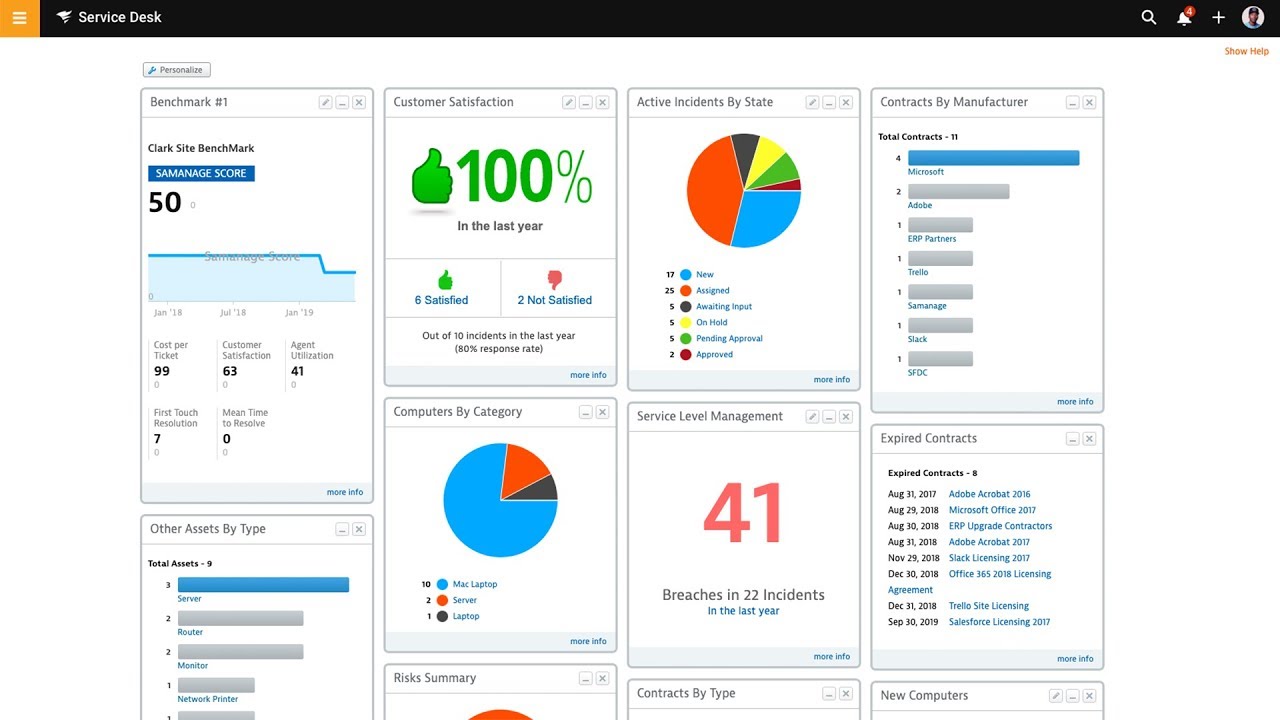
Is SolarWinds Service Desk the radiant solution to your IT management woes, or will it leave you feeling burned? User reviews from the past year paint a somewhat mixed picture of this popular platform. On the sunny side, SolarWinds Service Desk consistently receives praise for its user-friendly interface, making it a breeze for both seasoned IT professionals and tech-averse users to navigate. Users rave about the platform's automation capabilities, particularly for streamlining workflows and tackling repetitive tasks, saving precious time and boosting efficiency. The seamless integration with other tools, such as Dameware RE, is another major plus, allowing for a centralized IT management experience.
However, some shadows do loom over this otherwise bright landscape. A recurring gripe among users is the occasional sluggishness of the web application, which can put a damper on productivity. While the software boasts a wealth of features, some users, particularly those in larger enterprises, find certain aspects better suited for smaller businesses, yearning for more advanced functionalities. For instance, while the reporting feature provides data, users have noted its complexity requires third-party software to make sense of it.
In essence, SolarWinds Service Desk is like a reliable but basic car—it gets you where you need to go, but don't expect a luxurious ride. It's a solid choice for small to mid-sized businesses looking for an intuitive and feature-rich ITSM solution without breaking the bank. However, larger organizations with more complex needs might find themselves craving more horsepower and a smoother ride, potentially seeking alternative solutions like ServiceNow or ManageEngine ServiceDesk Plus that offer more comprehensive and scalable features.
Ease of Use: Users praise the intuitive interface, which makes submitting and managing tickets, tracking assets, and generating reports straightforward.
Customization: The platform offers extensive customization options, allowing users to tailor dashboards and workflows to their specific needs. This flexibility ensures a personalized experience that aligns with unique business processes.
Asset Management: SolarWinds Service Desk excels in asset management, providing a centralized repository for tracking IT assets, including devices and software licenses. This comprehensive view simplifies asset management tasks and ensures accurate inventory.
Automation: The software's robust automation capabilities streamline IT processes, such as automatically routing tickets to the appropriate personnel and escalating issues based on predefined rules. This automation reduces manual effort and improves overall efficiency.
Slow Reporting: Users have reported that generating reports can be slow, especially when dealing with a large number of entries.
Limited Data Export: The software is limited in its ability to export data, which can be a problem for businesses that rely on in-depth data analysis.
Customization Limitations: While the software offers some customization, users have expressed a desire for more flexibility in renaming fields and sections to better suit their specific needs.
Streamlined Ticket Management: SolarWinds Service Desk automates ticket routing and prioritization, reducing manual workload and ensuring that issues are addressed promptly and efficiently.
Enhanced Collaboration: The platform facilitates seamless communication among IT teams and end-users, enabling quicker resolution of incidents through shared insights and updates.
Comprehensive Reporting: With robust analytics tools, users can generate detailed reports on service desk performance, helping identify trends and areas for improvement.
Improved User Satisfaction: By providing a user-friendly interface and self-service options, the service desk enhances the end-user experience, leading to higher satisfaction rates.
Cost Efficiency: Automating routine tasks and optimizing resource allocation reduces operational costs, allowing IT departments to focus on strategic initiatives.
Incident Management: Streamlines the process of logging, tracking, and resolving IT incidents with automated workflows and customizable templates.
Service Catalog: Offers a centralized repository for all IT services, allowing users to easily request and track services through a user-friendly interface.
Change Management: Facilitates the planning, approval, and implementation of IT changes with a structured approach to minimize risk and disruption.
Problem Management: Identifies and manages the root causes of incidents to prevent future occurrences, using detailed analytics and reporting tools.
Asset Management: Provides comprehensive tracking and management of IT assets, including hardware and software, with real-time updates and lifecycle management.
Based on user reviews collected from popular reviews sites.
Analyst Score
i
Our Overall analyst rating for IT Asset Management Software products is based on scores in
our selection platform for 35
functional requirements, 14
technical requirements and 8
analyst verification questions. Each functional and technical requirement is scored on
a scale of 0 (not supported) to 100 (fully supported out of the box).
The analyst verification questions are scored as Yes (100) or No (0).
Is GroWrk a growing force in IT asset management, or does it need to work harder? User reviews from the past year paint a largely positive picture of GroWrk, particularly for companies with a global footprint. Users consistently praise its user-friendly interface and automation features, which streamline asset tracking and management.
GroWrk's standout strength lies in its global reach and ability to navigate the complexities of international asset deployment. Users highlight its effectiveness in handling diverse tax regulations and import fees, making it a valuable partner for businesses operating in multiple countries. However, some users express a desire for improved reporting functionalities and greater flexibility within the inventory database. While GroWrk excels in global asset management, some users point out that equipment delivery times could be improved, although they acknowledge the company's efforts to manage a large customer base.
Overall, GroWrk emerges as a strong contender in the IT asset management arena, especially for companies with internationally distributed teams. Its intuitive platform, coupled with its global expertise, makes it a suitable choice for businesses seeking to streamline their IT asset lifecycle, despite the need for refinements in specific areas.
Global Coverage: GroWrk excels at managing IT assets for businesses with a distributed workforce, simplifying procurement and deployment to over 150 countries.
User-Friendly Interface: The platform is consistently praised for its intuitive design, making it easy for both IT professionals and employees to navigate and manage assets.
Excellent Customer Support: Users frequently highlight the responsiveness and helpfulness of GroWrk's customer support team, ensuring any issues are addressed promptly.
End-to-End Lifecycle Management: GroWrk handles the entire IT asset lifecycle, from procurement and deployment to retrieval and disposal, streamlining the process for IT teams.
Automation and Time Savings: GroWrk's automation features simplify tasks like onboarding and inventory tracking, freeing up IT teams to focus on more strategic initiatives.
Inflexible Reporting: GroWrk's reporting features have opportunities for improvement, making it difficult for some users to get the precise data insights they need.
Inventory Database Limitations: The platform's inventory database has some limitations in its flexibility, which can be a drawback for businesses with complex IT asset management requirements.
Streamlined Asset Tracking: GroWrk provides a centralized platform to monitor and manage IT assets, reducing the risk of lost or misplaced equipment.
Cost Efficiency: By optimizing asset utilization and minimizing unnecessary purchases, GroWrk helps organizations save on IT expenses.
Enhanced Security: The software ensures that all IT assets are accounted for, reducing vulnerabilities and potential security breaches.
Improved Compliance: GroWrk assists in maintaining compliance with industry regulations by keeping detailed records of asset lifecycles and usage.
Time Savings: Automating routine asset management tasks frees up IT staff to focus on more strategic initiatives, increasing overall productivity.
Automated Asset Tracking: Seamlessly monitor and manage IT assets with real-time updates and location tracking.
Comprehensive Inventory Management: Maintain a detailed catalog of all hardware and software assets, including purchase and warranty information.
Lifecycle Management: Oversee the entire lifecycle of IT assets from procurement to disposal, ensuring optimal utilization and compliance.
Customizable Reporting: Generate detailed reports tailored to specific business needs, providing insights into asset performance and utilization.
Integration Capabilities: Easily integrate with existing systems such as ERP and CRM platforms to streamline workflows and data consistency.
Based on user reviews collected from popular reviews sites.
Analyst Score
i
Our Overall analyst rating for IT Asset Management Software products is based on scores in
our selection platform for 35
functional requirements, 14
technical requirements and 8
analyst verification questions. Each functional and technical requirement is scored on
a scale of 0 (not supported) to 100 (fully supported out of the box).
The analyst verification questions are scored as Yes (100) or No (0).
Is Ivanti Neurons for Discovery a discovery you'll want to make? User reviews from the last year suggest it could be, particularly for larger organizations. Customers consistently applaud its accuracy in asset tracking and management, highlighting its ability to provide a clear picture of their IT landscape. This granular visibility is essential for security posture, compliance audits, and strategic decision-making. Users also appreciate the platform's intuitive interface and straightforward network discovery, making it relatively easy to deploy and use. The robust integration capabilities and responsive customer support further enhance its appeal.
However, some users point out that Ivanti Neurons for Discovery can be a financial stretch, especially when compared to open-source alternatives. This price sensitivity makes it a tougher sell for smaller businesses with tighter budgets. Additionally, while the platform is generally user-friendly, some customization aspects might require a tech-savvy hand, potentially posing a hurdle for less experienced users. A recurring theme in user feedback is the desire for more comprehensive reporting features. While the software does offer reporting capabilities, users suggest that bolstering the analytics module would unlock even greater value from the wealth of data the platform gathers.
In essence, Ivanti Neurons for Discovery shines in its core functionality, providing a reliable and insightful solution for organizations grappling with the complexities of IT asset management. Its strengths lie in its accuracy, ease of use, and robust feature set. However, the cost factor and the need for more advanced reporting features are important considerations, particularly for smaller businesses or those with specific analytical requirements. Overall, Ivanti Neurons for Discovery is a powerful tool for organizations seeking to gain control and visibility over their IT assets, streamline operations, and make data-driven decisions.
Fast discovery: Users report that Ivanti Neurons for Discovery can identify assets on a network quickly, sometimes within minutes.
Accurate insights: The software is praised for providing reliable data on IT assets, which helps with decision-making and planning.
Real-time information: Ivanti Neurons for Discovery offers real-time asset tracking, allowing organizations to monitor their IT environment effectively.
Cost: Ivanti Neurons for Discovery can be expensive, especially when compared to open-source alternatives, potentially making it less appealing for budget-conscious businesses.
Technical Expertise for Customization: Tailoring Ivanti Neurons for Discovery to specific business needs may require a certain level of technical expertise, which could pose a challenge for companies without dedicated IT professionals.
Comprehensive Asset Visibility: Gain a complete view of all IT assets across your organization, enabling informed decision-making and efficient resource allocation.
Real-Time Data Insights: Access up-to-the-minute information on asset status and performance, allowing for proactive management and quick response to issues.
Cost Optimization: Identify underutilized or redundant assets to reduce unnecessary expenditures and optimize your IT budget.
Improved Compliance: Ensure adherence to software licensing agreements and regulatory requirements by maintaining accurate asset records.
Enhanced Security Posture: Detect unauthorized devices and software, reducing the risk of security breaches and data loss.
Automated Asset Discovery: Continuously scans and identifies all connected devices across the network, ensuring comprehensive visibility.
Real-Time Data Collection: Provides up-to-the-minute information on asset status and usage, enabling timely decision-making.
Agentless Scanning: Utilizes network protocols to discover devices without the need for installed agents, simplifying deployment.
Software Usage Monitoring: Tracks application usage patterns to help optimize software licensing and reduce costs.
Hardware Inventory Management: Maintains detailed records of hardware specifications and configurations for all devices.
Based on user reviews collected from popular reviews sites.
Analyst Score
i
Our Overall analyst rating for IT Asset Management Software products is based on scores in
our selection platform for 35
functional requirements, 14
technical requirements and 8
analyst verification questions. Each functional and technical requirement is scored on
a scale of 0 (not supported) to 100 (fully supported out of the box).
The analyst verification questions are scored as Yes (100) or No (0).
Can ManageEngine AssetExplorer help users unearth the full potential of their IT assets? User reviews from the last year suggest a mixed bag. While AssetExplorer is generally praised for its comprehensive features, user-friendly interface, and robust reporting, some drawbacks have been reported. Users particularly appreciate the remote control feature, which enables efficient remote support and sets it apart from competitors. One user raved about the detailed overview of login history, hardware changes, and software installations, calling it "a unique tool, very different from its competitors." However, some users have reported occasional bugs in reporting, particularly within the purchase order module. The network scanning feature has also been criticized for being overly comprehensive, leading to information overload.
Some users have expressed frustration with difficulties in record merging and internal issue reporting. One user, while praising the software's asset categorization, auto-detection, and license management capabilities, admitted that it "needs lots of customization in the beginning." Despite these drawbacks, ManageEngine AssetExplorer remains a powerful ITAM solution suitable for organizations of various sizes, especially those looking for an easy-to-use platform with strong remote control capabilities. However, potential users should be aware of the reported limitations in reporting, network scanning, and record management.
Asset Discovery: Automates the process of identifying and cataloging hardware and software assets across an IT infrastructure, reducing manual effort and improving data accuracy.
Software License Management: Helps organizations ensure compliance by tracking software licenses, identifying unused licenses, and providing alerts for upcoming renewals.
Remote Control: Enables IT support teams to remotely access and troubleshoot devices, improving response times and reducing downtime.
Comprehensive Asset Tracking: Provides a centralized repository for managing various asset-related information, including hardware specifications, software versions, purchase orders, and maintenance history.
Purchase Order Shortcomings: Users have reported that the purchase order module could benefit from improvements.
Network Scan Data Overload: The network scanning feature, while powerful, can sometimes deliver an overwhelming volume of information, making it challenging to pinpoint specific data points efficiently.
Cost Efficiency: By providing a comprehensive view of all IT assets, AssetExplorer helps organizations identify underutilized resources, enabling cost-saving measures such as reallocating or retiring unnecessary assets.
Improved Compliance: AssetExplorer ensures adherence to software licensing agreements by tracking installations and usage, reducing the risk of costly compliance fines.
Enhanced Security: With detailed asset tracking, organizations can quickly identify and address vulnerabilities, ensuring that all devices are up-to-date with the latest security patches.
Streamlined Audits: The software simplifies the audit process by maintaining a detailed and organized inventory of all IT assets, making it easier to generate reports and demonstrate compliance.
Increased Productivity: By automating routine asset management tasks, AssetExplorer frees up IT staff to focus on more strategic initiatives, boosting overall productivity.
Comprehensive Asset Tracking: Monitor and manage hardware and software assets across your organization with detailed insights.
Software License Management: Ensure compliance by tracking software licenses and identifying unauthorized installations.
Asset Lifecycle Management: Oversee the entire lifecycle of assets from procurement to disposal, optimizing asset utilization.
CMDB Integration: Integrate with Configuration Management Database (CMDB) to maintain a centralized repository of IT assets and configurations.
Automated Discovery: Utilize network scanning to automatically discover and catalog all connected devices within your network.
Based on user reviews collected from popular reviews sites.
Analyst Score
i
Our Overall analyst rating for IT Asset Management Software products is based on scores in
our selection platform for 35
functional requirements, 14
technical requirements and 8
analyst verification questions. Each functional and technical requirement is scored on
a scale of 0 (not supported) to 100 (fully supported out of the box).
The analyst verification questions are scored as Yes (100) or No (0).
Is SysAid the system you need to aid your IT needs? User reviews from the past year paint a largely positive picture of SysAid, particularly highlighting its prowess in IT Service Management (ITSM). Users consistently praise its intuitive interface and robust ticketing system, which streamlines incident tracking and resolution, a crucial aspect of IT support. SysAid's asset management capabilities also receive high marks, providing organizations with a centralized platform to track and manage their IT assets throughout their lifecycle. This granular visibility is essential for optimizing resource allocation and ensuring business continuity.
However, some users point out limitations in SysAid's customization options, noting that tailoring the platform to specific workflows can be challenging. Integration with other business systems has also been cited as an area for improvement. While SysAid offers integrations, some users have found the process to be less seamless than desired. Despite these drawbacks, SysAid's affordability, compared to competitors like Jira, makes it a compelling choice for small to medium-sized businesses.
For organizations seeking a comprehensive yet cost-effective ITSM solution, SysAid emerges as a strong contender, especially for those prioritizing efficient ticketing and asset management. However, businesses with complex workflows requiring extensive customization or seamless integration with a diverse technology stack might need to weigh these factors carefully when considering SysAid.
User-Friendly Interface: SysAid is known for its intuitive design, making it easy for IT teams to navigate and use its features effectively.
Efficient Ticketing System: The platform excels in streamlining ticket management, enabling IT teams to track, prioritize, and resolve issues efficiently.
Automation Capabilities: SysAid offers automation features, such as automated ticket routing, which can save time and improve the speed of issue resolution.
Self-Service Portal: The availability of a self-service portal empowers end-users to find solutions to common problems independently, reducing the workload on IT staff.
Customization Limitations: Some users have reported that SysAid's customization options are not as extensive as those offered by some competing ITSM tools, potentially limiting their ability to tailor the platform to their specific needs.
Integration Challenges: Integrating SysAid with certain third-party systems can be challenging, and some users have mentioned encountering unexpected costs associated with integrations.
Change Management Interface: While generally considered user-friendly, some users have found the interface for change management to be less intuitive compared to other ITSM solutions.
Support Responsiveness: Although SysAid's support is generally regarded as reliable, there have been suggestions that there's room for improvement in terms of proactiveness in addressing user issues.
Streamlined Ticket Management: SysAid automates ticket routing and prioritization, reducing response times and ensuring that IT teams can focus on resolving issues rather than managing queues.
Enhanced User Experience: With a user-friendly interface, SysAid allows both IT professionals and end-users to navigate the system effortlessly, improving overall satisfaction and reducing frustration.
Comprehensive Reporting: SysAid provides detailed analytics and reporting tools, enabling IT departments to track performance metrics, identify trends, and make data-driven decisions to enhance service delivery.
Integrated Asset Management: By combining IT service management with asset management, SysAid offers a holistic view of IT resources, facilitating better planning and resource allocation.
Customizable Workflows: SysAid allows organizations to tailor workflows to their specific processes, ensuring that the software adapts to the business rather than forcing the business to adapt to the software.
Service Desk Automation: Automates repetitive tasks such as ticket routing and prioritization, freeing up IT staff for more complex issues.
Asset Management: Provides a comprehensive view of all IT assets, including hardware and software, to streamline inventory tracking and management.
Self-Service Portal: Empowers users to resolve common issues independently through a user-friendly interface, reducing the burden on IT support teams.
Incident Management: Facilitates efficient tracking and resolution of IT incidents with customizable workflows and automated notifications.
Change Management: Offers structured processes for managing IT changes, minimizing risks and ensuring compliance with organizational policies.
Based on user reviews collected from popular reviews sites.
Analyst Score
i
Our Overall analyst rating for IT Asset Management Software products is based on scores in
our selection platform for 35
functional requirements, 14
technical requirements and 8
analyst verification questions. Each functional and technical requirement is scored on
a scale of 0 (not supported) to 100 (fully supported out of the box).
The analyst verification questions are scored as Yes (100) or No (0).
Is FreshService always refreshing, or does using it feel like a Monday morning? User reviews from the last year indicate FreshService is a breath of fresh air in the IT Service Management (ITSM) space, especially for its intuitive design and automation capabilities, which users say make it incredibly easy to use. Users consistently praise the clean interface, finding it much easier to navigate than some competing tools that feel clunky in comparison. The automation features are a major plus, streamlining tasks like ticket routing and incident resolution, which frees up IT teams to focus on more important projects. One user even compared FreshService favorably to ServiceNow, highlighting that it delivers similar functionality at a much lower price point.
However, some users wish for more robust reporting customization, noting that the current limitations prevent them from performing in-depth analysis. Additionally, the mobile app's functionality has received some negative feedback, with users describing it as "clunky" and in need of a refresh. Think of it like a brand-new race car with a frustratingly outdated navigation system - it gets you where you need to go, but not without encountering a few potholes along the way.
Overall, FreshService appears to be a great option for organizations, particularly small to medium-sized businesses, that need a robust yet affordable ITSM solution. It's like finding a reliable, affordable car - it may not have all the bells and whistles of a luxury model, but it reliably gets you where you need to go without breaking the bank. Its user-friendly design and automation features make it an excellent choice for teams who are new to ITSM or who are looking to streamline their current processes. However, organizations with complex reporting needs or that heavily rely on mobile functionality may want to explore other options or wait for FreshService to catch up.
Intuitive Interface: Freshservice is praised by user reviews for its user-friendly design, which makes it easy for IT staff at all technical skill levels to use and navigate.
Robust Automation: User reviews highlight Freshservice's strong automation capabilities, enabling businesses to streamline repetitive IT tasks, such as ticket routing, which can free up IT staff for more strategic initiatives.
Centralized Asset Management: User reviews state Freshservice provides a centralized system for tracking and managing IT assets, including hardware and software, enabling businesses to optimize asset utilization.
Reporting Customization: User reviews indicate reporting customization is limited, potentially impacting users who need highly granular or tailored reports.
Mobile App Experience: The mobile app, while functional, has areas for improvement, particularly regarding user experience and features, which could impact user satisfaction and efficiency.
Integrations: User reviews, particularly regarding Jamfcloud integration, suggest that Freshservice integrations can be unreliable and prone to errors, potentially causing frustration and workflow disruptions for users relying on specific integrations.
Streamlined Ticketing: FreshService automates ticket management, reducing manual workload and ensuring faster resolution times by categorizing and prioritizing tickets efficiently.
Enhanced Collaboration: The platform facilitates seamless communication among team members through integrated chat and shared ticket views, promoting a collaborative work environment.
Improved Incident Management: With FreshService, incidents are tracked and resolved systematically, minimizing downtime and maintaining service continuity.
Comprehensive Asset Management: It provides a centralized repository for tracking IT assets, helping organizations manage inventory, compliance, and lifecycle effectively.
Customizable Workflows: FreshService allows businesses to tailor workflows to their specific processes, ensuring alignment with organizational needs and improving operational efficiency.
Incident Management: Streamlines the process of restoring normal service operations with a structured workflow for logging, categorizing, and resolving incidents.
Service Catalog: Offers a customizable catalog of IT services that employees can request, enhancing user experience and service delivery.
Change Management: Facilitates the planning, approval, and implementation of changes to minimize risk and disruption to IT services.
Asset Management: Provides a comprehensive view of IT assets, enabling tracking, management, and optimization of hardware and software resources.
Problem Management: Identifies and manages the root causes of incidents to prevent recurrence, using a systematic approach to problem resolution.
Compare the Best IT Asset Management Software
Select up to 5 products from the
list
below to compare.
Product
Score
i
Our Overall analyst rating for IT Asset Management Software products is based on scores in
our selection platform for 35
functional requirements, 14
technical requirements and 8
analyst verification questions. Each functional and technical requirement is scored on
a scale of 0 (not supported) to 100 (fully supported out of the box).
The analyst verification questions are scored as Yes (100) or No (0).
Lansweeper is a comprehensive IT Asset Management solution that enables organizations to discover, track, and manage their hardware and software assets across the entire network. By automatically scanning devices, it provides detailed insights into asset configurations, usage, and lifecycle, facilitating efficient resource allocation and compliance management. Suitable for businesses of varying sizes, especially those in technology, finance, and healthcare sectors, Lansweeper excels in environments where accurate asset visibility is critical.
A standout feature of Lansweeper is its robust inventory management, which integrates seamlessly with other IT systems to streamline operations. Users appreciate its intuitive interface and customizable reporting capabilities, which enhance decision-making and IT governance. Compared to similar tools, Lansweeper is often praised for its scalability and depth of analytics, making it a preferred choice for organizations seeking a reliable and flexible asset management solution. Pricing varies based on the number of assets and specific requirements, so it is recommended to contact SelectHub for a personalized quote tailored to individual business needs.
Axonius is a comprehensive IT Asset Management platform that seamlessly integrates with various existing security and management tools to provide a unified view of all assets within an organization. It is particularly well-suited for medium to large enterprises across industries such as finance, healthcare, and technology, where managing diverse and complex IT environments is critical. The platform stands out with its ability to automate asset discovery, enforce compliance policies, and identify security gaps through real-time data aggregation and intelligent analytics. Users appreciate its intuitive interface, robust reporting capabilities, and the flexibility to customize workflows to meet specific organizational needs. Compared to similar solutions, Axonius is often praised for its depth of integration and ease of deployment, enhancing overall operational efficiency. Pricing details are not readily available; interested parties are encouraged to contact SelectHub for a personalized quote based on their specific requirements.
Device42 is a robust software solution designed for comprehensive IT Asset Management, enabling organizations to efficiently track and manage their hardware and software assets. It is particularly well-suited for medium to large enterprises across various industries, including technology, finance, and healthcare, where accurate asset oversight is critical. The platform offers unique benefits such as real-time asset discovery, detailed dependency mapping, and seamless integration with existing IT systems, enhancing visibility and control. Key features include automated inventory management, customizable dashboards, and advanced reporting capabilities that empower IT teams to make informed decisions. Users have praised Device42 for its intuitive interface and reliable performance, distinguishing it from comparable solutions by offering a more holistic approach to asset management. Pricing details are not readily available; interested parties are encouraged to contact SelectHub for a tailored quote based on their specific requirements.
Snipe-IT is a robust IT asset management software designed to streamline the tracking and management of an organization's hardware and software assets. It offers comprehensive features like asset lifecycle management, barcode scanning, and detailed reporting, making it ideal for businesses of varying sizes across industries such as technology, education, and healthcare. Snipe-IT excels in providing a user-friendly interface combined with flexibility and scalability, allowing organizations to customize workflows to suit their specific needs. Unique benefits include its open-source nature, facilitating extensive customization and integration with other systems. Users appreciate its powerful inventory tracking capabilities, automated alerts, and role-based access controls, which enhance operational efficiency and accountability. Compared to similar products, Snipe-IT is often praised for its affordability and ease of use, making it a preferred choice for organizations seeking a cost-effective yet comprehensive asset management solution. For detailed pricing information tailored to specific requirements, contacting SelectHub is recommended.
Reftab offers a robust software solution designed to streamline IT asset management, making it easier for businesses to track and control their technology resources. The platform provides comprehensive inventory management, allowing users to monitor hardware and software assets in real time. With intuitive dashboards and customizable reporting tools, managers can gain valuable insights into asset utilization and lifecycle stages. Reftab is particularly well-suited for medium to large enterprises across various industries such as technology, finance, and healthcare, where efficient asset management is crucial.
One of the standout benefits of Reftab is its user-friendly interface, which reduces the learning curve and increases adoption rates among staff. Additionally, the software offers automated tracking and alert systems that help prevent asset loss and ensure compliance with industry regulations. Unique features include seamless integration with existing IT systems and advanced analytics capabilities that provide actionable data for strategic decision-making.
Compared to other solutions, Reftab stands out for its reliability and flexibility, adapting to the specific needs of different organizations. Users consistently praise its performance and the excellent customer support that helps them maximize the platform's potential. While pricing details are not publicly disclosed, Reftab typically offers scalable packages to accommodate various company sizes and requirements, ensuring that businesses can find a plan that fits their budget.
Timly offers a robust solution for managing inventory and related tasks, enabling businesses to efficiently track stock levels, streamline ordering processes, and automate reporting. Specifically tailored for small to medium-sized enterprises in industries such as retail, manufacturing, and distribution, Timly excels in providing real-time visibility and control over inventory operations. Users appreciate its intuitive interface, customizable dashboards, and seamless integration with existing systems, which enhance operational efficiency and decision-making. Unique benefits include advanced analytics, scalable architecture, and reliable support, setting it apart from similar tools. While specific pricing details are not publicly available, interested parties are encouraged to contact SelectHub for a personalized quote based on their unique requirements. Overall, Timly stands out for its comprehensive features and user-centric design, making it a preferred choice for businesses seeking effective inventory management solutions.
GroWrk offers a sophisticated software solution for IT Asset Management, streamlining the process of tracking and managing IT equipment and resources. This platform is particularly beneficial for businesses in industries such as technology, finance, and healthcare, where efficient asset management is crucial. GroWrk stands out with its ability to automate inventory tracking, ensuring that assets are accounted for and maintained properly. Users appreciate its intuitive interface and robust reporting features, which provide valuable insights into asset utilization and lifecycle management. Compared to similar products, GroWrk is praised for its user-friendly design and comprehensive support. While specific pricing details are not readily available, potential users are encouraged to contact SelectHub for a personalized quote tailored to their specific requirements. This ensures that businesses can make informed decisions based on their unique needs and budget constraints.
ManageEngine AssetExplorer is a comprehensive IT asset management software designed to streamline the management of IT assets throughout their lifecycle. It is particularly well-suited for organizations in industries such as healthcare, finance, and education, where efficient asset tracking and compliance are crucial. The software offers robust features like asset discovery, inventory management, and software license compliance, which help businesses maintain control over their IT infrastructure. Users appreciate its intuitive interface and the ability to automate repetitive tasks, enhancing productivity. Compared to similar products, AssetExplorer is praised for its detailed reporting capabilities and seamless integration with other IT management tools. While specific pricing details are not readily available, potential users are encouraged to contact SelectHub for a tailored pricing quote that aligns with their specific requirements. Overall, AssetExplorer stands out for its reliability and effectiveness in managing IT assets efficiently.
ServiceNow ITAM is a sophisticated software solution designed to streamline IT Asset Management by automating the tracking, management, and optimization of IT assets throughout their lifecycle. It is particularly well-suited for large enterprises and industries such as finance, healthcare, and technology, where managing extensive IT inventories is crucial. The platform offers unique benefits like real-time visibility into asset utilization, cost savings through optimized asset allocation, and compliance assurance with regulatory standards. Users appreciate its powerful features, including comprehensive asset tracking, lifecycle management, and integration capabilities with other IT systems. Compared to similar products, ServiceNow ITAM is praised for its user-friendly interface and robust reporting tools, which enhance decision-making processes. Pricing details are typically customized based on organizational needs, so contacting SelectHub for a tailored quote is advisable. Overall, ServiceNow ITAM stands out for its ability to enhance operational efficiency and reduce IT costs effectively.
Asset Explorer is a robust IT Asset Management solution designed to meticulously track and manage an organization’s hardware and software assets throughout their lifecycle. It is ideally suited for medium to large enterprises across various sectors such as finance, healthcare, and technology, where maintaining comprehensive asset oversight is critical. The platform offers unique advantages like seamless integration with existing systems, automated asset discovery, and detailed reporting capabilities that enhance operational efficiency and ensure compliance with industry standards.
Among its standout features are asset lifecycle management, which allows for precise control from acquisition to disposal, and customizable dashboards that provide insightful analytics. Users appreciate its intuitive interface and the depth of its functionality, often highlighting its ability to streamline asset-related processes compared to other solutions. While specific pricing details are not publicly available, potential users are encouraged to reach out to SelectHub for a tailored pricing quote that fits their unique requirements.
Total Network Inventory provides robust IT asset management solutions, allowing organizations to meticulously track and manage their hardware and software assets across diverse networks. It is particularly well-suited for small to medium-sized businesses, IT departments, and sectors such as education and healthcare that demand precise asset oversight.
One of its key advantages is the intuitive interface, which simplifies complex asset management processes and enhances overall efficiency. The software boasts powerful features like automated inventory collection, detailed reporting, software license tracking, and comprehensive network monitoring. Users often highlight its reliability and cost-effectiveness, noting that it offers substantial functionality without the complexity found in similar tools. Pricing varies based on individual requirements, so it is recommended to contact SelectHub for a tailored quote that best fits your organizational needs.
BelManage is a comprehensive IT Asset Management solution designed to streamline the tracking and management of hardware and software assets within an organization. It is particularly well-suited for medium to large enterprises across various industries, including finance, healthcare, and technology, where efficient asset management is critical. The software offers unique advantages such as real-time inventory updates, automated compliance reporting, and robust lifecycle management tools, which help organizations reduce costs and enhance operational efficiency.
Among its standout features are intuitive dashboards, customizable reporting modules, and seamless integration capabilities with existing IT infrastructure, making it a powerful tool for IT departments seeking to optimize their asset management processes. Users have praised BelManage for its user-friendly interface and reliable performance, often highlighting its ability to adapt to diverse organizational needs compared to other solutions in the market.
Pricing for BelManage typically varies based on the number of assets being managed and the specific requirements of the organization. For accurate and tailored pricing information, it is recommended to contact SelectHub to obtain a quote that aligns with individual business needs.
WorkWize is a comprehensive software solution designed to streamline IT Asset Management and task management for organizations of varying sizes. By providing centralized tracking of hardware and software assets, it enables businesses to efficiently monitor inventory, manage lifecycles, and ensure compliance. WorkWize is particularly well-suited for industries such as information technology, healthcare, education, and manufacturing, where effective asset management is critical. Its unique benefits include real-time asset visibility, automated workflows, and robust reporting capabilities that enhance operational efficiency and reduce costs. Among its powerful features are intuitive dashboards, integration with existing IT infrastructure, and customizable alerts that cater to specific organizational needs. Users often praise WorkWize for its user-friendly interface and reliable performance, distinguishing it from comparable solutions in the market. Pricing is typically tailored based on the number of assets and specific requirements, so potential customers are encouraged to contact SelectHub for a personalized quote.
Loggle is a comprehensive software solution designed to streamline IT Asset Management by efficiently tracking and managing an organization’s technology resources. It is particularly well-suited for medium to large enterprises across various industries, including healthcare, finance, and education, where managing extensive IT inventories is critical. Loggle stands out with its intuitive interface and robust analytics capabilities, allowing users to gain deep insights into asset utilization and lifecycle management. Unique benefits include automated asset discovery, seamless integration with existing systems, and customizable reporting tools that enhance decision-making processes. Users appreciate powerful features such as real-time monitoring, compliance tracking, and proactive maintenance alerts, which contribute to reducing downtime and optimizing asset performance. Compared to similar products, Loggle is often praised for its user-friendly design and flexibility, making it adaptable to diverse organizational needs. Pricing details are not readily available; interested parties are encouraged to contact SelectHub for a tailored quote based on their specific requirements.
Setyl offers a comprehensive IT Asset Management software designed to streamline and optimize the tracking, maintenance, and utilization of technological assets within organizations. This solution is particularly well-suited for medium to large enterprises across various industries such as finance, healthcare, and technology, where managing complex IT infrastructures is crucial. One of its standout benefits is the ability to provide real-time visibility into asset lifecycles, ensuring efficient resource allocation and cost control. The platform boasts robust features like automated inventory tracking, detailed reporting, and seamless integration with existing systems, enhancing overall operational efficiency. Users have praised Setyl for its intuitive interface and reliable performance, often highlighting its superior customization options compared to other tools in the market. Pricing details are not publicly listed, so prospective customers are encouraged to reach out to SelectHub to receive a tailored quote based on their specific requirements.
Ivanti Neurons for Discovery is a sophisticated software solution designed to streamline IT Asset Management by providing comprehensive visibility into an organization's IT environment. It excels in identifying and tracking hardware and software assets, making it particularly beneficial for industries with extensive IT infrastructures, such as healthcare, finance, and manufacturing. The platform's standout features include real-time asset discovery, automated inventory management, and detailed reporting capabilities, which enhance operational efficiency and reduce costs. Users appreciate its intuitive interface and the ability to integrate seamlessly with other IT management tools. Compared to similar products, Ivanti Neurons for Discovery is praised for its robust functionality and ease of use. Pricing details are typically customized based on organizational needs, so it's advisable to contact SelectHub for a tailored quote. This ensures that businesses receive a solution that aligns with their specific requirements and budget constraints.
SysAid is a comprehensive Help Desk and IT Service Management software designed to streamline and automate various IT tasks. It is particularly well-suited for medium to large enterprises across industries such as healthcare, education, and finance, where efficient IT service delivery is crucial. The platform offers unique benefits like a robust ticketing system, asset management, and self-service portals, enhancing productivity and user satisfaction. Its powerful features include automation of repetitive tasks, integration capabilities, and advanced reporting tools, which provide valuable insights into IT operations. Users appreciate its intuitive interface and customizable workflows, which allow for tailored solutions to specific organizational needs. Compared to similar products, SysAid is praised for its flexibility and ease of use. Pricing details are not publicly available, so it is recommended to contact SelectHub for a personalized quote based on specific requirements. SysAid stands out for its ability to adapt to diverse IT environments, making it a versatile choice for IT management.
FreshService is a comprehensive IT Service Management platform designed to streamline and automate IT tasks, enhancing efficiency within organizations. It is particularly well-suited for IT departments in industries such as technology, healthcare, finance, and education, where robust service management is crucial. The platform stands out with its intuitive interface, extensive automation capabilities, and seamless integration with various business tools, enabling teams to manage incidents, assets, and change requests effortlessly. Unique benefits include its user-friendly self-service portal, detailed reporting and analytics, and a flexible workflow engine that adapts to specific organizational needs. Users appreciate its reliable performance and the ability to customize workflows without extensive technical expertise. Compared to similar solutions, FreshService is often praised for its ease of implementation and comprehensive feature set tailored to IT service management. Pricing details vary based on the chosen plan and organizational requirements; it is recommended to contact SelectHub for a personalized quote.
Ivanti provides a suite allowing users to manage and maintain IT assets, enterprise services, supply chain operations and endpoint environments. Its IT Asset Management (ITAM) optimizes asset usage for visibility and efficiency with at-a-glance information about hardware and other physical assets that are crucial to successful business operations. Users can leverage it for financial management, contract management, an asset repository, lifecycle tracking and more.
Additional offerings help users improve IT reporting, streamline tasks with automation, enhance visibility through data intelligence, control mobile devices and desktops, manage workspaces, set access privileges and more.
SolarWinds Service Desk is a comprehensive IT Service Management (ITSM) solution designed to streamline and automate various IT processes. It is particularly well-suited for organizations in industries such as healthcare, education, and finance, where efficient IT operations are crucial. The platform offers a range of powerful features, including incident management, change management, and asset management, which help improve service delivery and enhance user satisfaction. Users appreciate its intuitive interface and robust reporting capabilities, which provide valuable insights into IT performance. Compared to similar products, SolarWinds Service Desk is praised for its ease of use and flexibility. Pricing details are not readily available, so it is advisable to contact SelectHub for a tailored quote based on specific requirements. Overall, SolarWinds Service Desk stands out for its ability to effectively manage IT services, making it a valuable tool for businesses seeking to optimize their IT operations.
Kriti Sahay is a Technical Content Writer at SelectHub, writing content for Help Desk and Call Center Software. Kriti is based out of New Delhi, India. When she's not handling Buyer's Guides and other informational articles, she can be found experimenting in her kitchen, street shopping, or painting!
Joan Akash, a Senior Research Analyst at SelectHub, holds a Post-Graduate Diploma in Management with a specialization in Marketing. Her expertise as a researcher and reviewer spans diverse software categories, including Project Management, Customer Relationship Management, Live Chat, and Help Desk. Beyond her professional pursuits, Joan is spiritually driven, with a passion for teaching children and a penchant for reading biblical blogs and crafting poetry.
Manan is a native of Tezpur, Assam (India), who currently lives in Kolkata, West Bengal (India). At SelectHub, he works on categories like CRM, HR, PPM, BI, and EHR. He has a Bachelor of Technology in CSE from The Gandhi Institute of Engineering and Technology, a Master of Technology from The Institute of Engineering and Management IT, and an MBA in Finance from St. Xavier's College. He's published two research papers, one in a conference and the other in a journal, during his Master of Technology.
As an editor, Dianna Dragonetti leads a team of five writers in writing about a variety of software, with an emphasis on how these tools empower businesses. Categories include accounting, learning management systems, content management systems, supply chain management, and electronic data interchange.