---
description: Is Gusto the right solution for you? See where it's ranked among all Payroll Software. Read expert reviews, compare 2026 pricing, and explore top-rated features.
---
[Home](https://www.selecthub.com/) > [Payroll Management](https://www.selecthub.com/research/payroll-management/) > [Payroll Software](https://www.selecthub.com/c/payroll-software/) > Gusto
Categories:
- [Payroll Software](https://www.selecthub.com/c/payroll-software/)
- [HR Management Software](https://www.selecthub.com/c/hr-management-software/)
- ...
## What Is Gusto?
**Industry Specialties:** Serves all Industries
Gusto is a payroll and HR system that automates daily tasks. Features include multi-state pay runs and tax filing, along with benefits and compliance management, hiring, performance management, learning, and time and attendance management.
| **Best For** | Small and mid-sized businesses across industries needing easy, automated HR and payroll. |
| --- | --- |
| **Not Ideal For** | Large enterprises that require advanced succession planning, recruiting and custom reporting. |
| **Competitive Edge** | - Ease of use.
- Transparent pricing for monthly payroll.
- Multi-state tax filing with automated workflows.
|
| **Integrations** | - Accounting: [QuickBooks](https://www.selecthub.com/p/accounting-software/quickbooks-online/), [Xero](https://www.selecthub.com/p/accounting-software/xero/).
- Time tracking: [When I Work](https://www.selecthub.com/p/employee-scheduling-software/when-i-work/), [Homebase](https://www.selecthub.com/p/employee-scheduling-software/homebase/).
- POS, collaboration, benefits and tax software.
|
| **Price** | From $49/month + $6/employee. Month-to-month, no contracts. Add-ons cost extra; year-end tax filings may incur fees. |
| **Key Features** | - Full-service payroll with contractor support.
- Automated tax filing with credits & deductions.
- Employee self-service for onboarding, PTO, and benefits.
|
| **Biggest Downsides** | - Limited scalability & advanced features.
- Basic reporting.
- Slow support, extra tax filing costs.
|
| **Alternatives to Consider** | - QuickBooks Payroll: Better reporting, same-day deposit.
- [UKG Ready](https://www.selecthub.com/p/hr-management-software/ukg-ready/): Flexible payroll cut-offs, stronger time tools.
|
| **Verdict** | Gusto is a user-friendly payroll platform for SMBs, but it’s not ideal for large firms or those needing deep customization or global payroll. |
**My Research Approach for Gusto**
I tested Gusto hands-on by creating a free account to see how it performs in everyday use. Additionally, I used the data in our selection platform to compare Gusto with popular alternatives: QuickBooks Payroll, [OnPay](https://www.selecthub.com/p/payroll-software/onpay/), [Rippling](https://www.selecthub.com/p/hr-management-software/rippling/), and [ADP Run](https://www.selecthub.com/p/payroll-software/adp-run/). I went through Reddit user reviews extensively to learn what people think about it. To round out my process, I watched YouTube videos and browsed the vendor documentation to understand how the platform works.
PRICE
$
$
$
$
$
COMPANY SIZE
S
M
L
DEPLOYMENT
PLATFORM
[Try Before You Buy. Request a Free Demo Today!Request Demo It's completely free!](https://pmo.selecthub.com/get-product-demo/?category=Payroll+Software&product_name=Gusto&origin_url=https%3A%2F%2Fwww.selecthub.com%2Fp%2Fpayroll-software%2Fgusto%2F&product_logo=https%3A%2F%2Fcdn.selecthub.com%2Fproducts%2F8466a2b43729c29dcd7cc0fdfa1a9e7a-4770395907408ad234a01c495ed34cfa%2Fresources%2Fnormal%2Flogo.png%3F1693317793)
[Contributors](#view-contributors)
![Ritinder Kaur]() Written by Ritinder Kaur Senior Technical Content Writer [Read Bio](https://www.selecthub.com/author/ritinder-kaur/)
![Zachary Totah]() Edited by Zachary Totah Content Editor [Read Bio](https://www.selecthub.com/author/zachary-totah/)
User Sentiment i
![User satisfaction level icon: excellent]()
Based on 9898 reviews:
Add your rating:
![Screenshots]()![Screenshots]()![Screenshots]()
Product Screenshots and Videos
## #7
Gusto is ranked #7 on the top 10 Payroll Software leaderboard based on a comprehensive analysis performed by SelectHub research analysts. Compare the leaders with our In-Depth Report.
[Get the Report Now](https://pmo.selecthub.com/request-custom-scorecard?category_slug=payroll-software&product_slug=gusto&page_type=product&slug=gusto&product_name=Gusto&category=Payroll+Software&origin_url=https%3A%2F%2Fwww.selecthub.com%2Fp%2Fpayroll-software%2Fgusto%2F)
## Gusto Pricing
Based on our most recent analysis, Gusto pricing starts at $49 (Monthly).
[Get Price Quote](https://pmo.selecthub.com/get-product-pricing/?category=Payroll+Software&product_name=Gusto&origin_url=https%3A%2F%2Fwww.selecthub.com%2Fp%2Fpayroll-software%2Fgusto%2F&product_logo=https%3A%2F%2Fcdn.selecthub.com%2Fproducts%2F8466a2b43729c29dcd7cc0fdfa1a9e7a-4770395907408ad234a01c495ed34cfa%2Fresources%2Fnormal%2Flogo.png%3F1693317793&price=2)
- Price
-
$
$
$
$
$
i
- Starting From
- $49
- Pricing Model
- Monthly
- Free Trial
- No
## Training Resources
Gusto is supported with the following types of training:
- Documentation
- In Person
- Live Online
- Videos
- Webinars
## Support
The following support services are available for Gusto:
- Email
- Phone
- Chat
- FAQ
- Forum
- Help Desk
- Knowledge Base
- Tickets
- Training
- 24/7 Live Support
## Gusto Benefits and Insights
Why use Gusto?
### Key differentiators & advantages of Gusto
- **Payroll and Tax Management:** Gusto scored a 100 for payroll and tax features in our analysis. It fully supports automated filing, next-day direct deposits, lifetime accounts, meal premiums, multi-state payroll, off-cycle runs, payroll history, payroll journals, and garnishments.
- **Platform Security and Compliance:** Gusto earned a score of 100 in our analysis, with built-in SSO and two-factor authentication. In contrast, ADP Run uses partners for SSO, and Rippling relies on external providers for 2FA.
- **Integrations and Extensibility:** Gusto earned a 98 for integrations, with full support for cloud storage, benefits, collaboration, POS, performance, recognition, tax software, and middleware.
### Industry Expertise
Gusto serves small and mid-sized organizations globally, tailoring payroll and HR to each sector’s quirks, whether it’s tips, bonuses, job costing, remote hires, or grant allocations. Clients include accounting, architecture, fitness, manufacturing, marketing, new businesses, retail, and tech companies.
## Gusto Reviews
Based on our most recent analysis, Gusto reviews indicate a 'excellent' User Satisfaction Rating of 92% based on 9898 user reviews from 2 recognized software review sites.
![User satisfaction level icon: excellent]()
9898 reviews
92%
of users would recommend this product
### Synopsis of User Ratings and Reviews
Based on an aggregate of Gusto reviews taken from the sources above, the following pros & cons have been curated by a SelectHub Market Analyst.
#### Pros
- **Ease of Use:** Reviewers consistently highlighted Gusto’s intuitive and clean interface, which enables even non-technical users to use the platform comfortably.
- **Core HR Functionality:** Users said they appreciate having payroll, HR, benefits and time tracking in one system.
- **Automated Tax Filing:** Most Gusto reviewers praised its automated workflows for tax filing and compliance updates.
- **User Autonomy:** Reviewers often mentioned how easy it is to check paystubs, track PTO, request time off, and even access early pay, all without going through HR.
- **Time Savings:** Users reported that Gusto helped them eliminate manual payroll tasks and admin busywork.
**What Users Like**
- “I make payroll within 20 minutes or fewer through Gusto, and the tax auto-filings alone prevent thousands of dollars that I would otherwise pay for accounting fees annually. Compliance is automatic through the system because it automatically handles W-2s and 1099s without my having to chase deadlines.” - Nick Disney, Owner & CEO, [Sell My San Antonio House](https://www.sellmysanantoniohouse.com/)
#### Cons
- **Scalability Issues:** Users said the platform doesn’t scale well as it lacks applicant tracking and a wide-ranging global payroll.
- **Basic Reporting:** Most reviewers found Gusto’s reporting capabilities limited for their needs.
- **Slow Customer Support:** Most users criticized the support team for slow resolution of issues and repeated escalations when troubleshooting.
**What Users Dislike**
- “Gusto lags in responsiveness of customer service. When there is an issue, such as when the contractor payment didn't process, resolving it took four days. Reporting can be improved upon, too.” - Nick Disney
#### Researcher's Summary:
Gusto is a user-friendly alternative to traditional payroll providers, earning high praise from customers. Our research of Gusto reviews shows 93% of users would recommend it. Another reason for its popularity is clear pricing on the vendor’s website — you know what you’re in for and how much you have to pay. Additionally, there are no binding contracts, and you can unsubscribe anytime.
Though Gusto offers multi-state payroll, it’s not limited to the U.S. The vendor supports contractor payments in over 120 countries. For example: Gusto enabled [Rise Marketing](https://gusto.com/customers/case-studies/rise-marketing) to achieve 125% client growth by scaling from local Philadelphia operations to 3+ states and 7+ countries.
Building on this foundation, Gusto recently expanded its international offerings through a [Remote](https://www.selecthub.com/p/global-employment-platforms/remote-com/) integration and now provides payroll for full-time employees in 10 countries, including Canada and the UK.
Despite its strengths, Gusto has limitations. For instance, Gusto offers payroll cancellation but up to two days before processing, whereas UKG Ready allows you to set your own cut-off time.
Beyond payroll, reporting shows clear gaps. Gusto (83) trails QuickBooks (100) when it comes to breadth of features. A key limitation is that Gusto doesn’t allow report bookmarking — you’ll need to reapply filters and columns each time. Gusto tries to offset this by integrating with QuickBooks for reporting, but existing QuickBooks Accounting users often find it simpler to use QuickBooks Payroll directly.
Service issues add to these functional gaps. Customer support is slow and inconsistent according to reviews. The vendor also charges you extra for year-end tax filings, which Reddit users say is not in the fine print when signing up.
As for integrations though, I was impressed with the wide range of options. Gusto offers several APIs for partners to form inbound and outbound connections, which can be great if you’re ready to pay for them. What I especially liked was the Gusto Embedded API, which lets you integrate payroll capabilities into your HR platforms.
**My recommendation:** Gusto makes sense if you're seeking a payroll platform, embedded or otherwise. There are no minimum employee counts — you can use Gusto even if you're a 1-2 person company via the Solo plan. However, if you require deep customization or plan to grow beyond the mid-market segment, consider [Workday](https://www.selecthub.com/p/hr-management-software/workday-hcm/), [SuccessFactors](https://www.selecthub.com/p/hr-management-software/successfactors/), [Oracle HCM](https://www.selecthub.com/p/hr-management-software/oracle-hcm-cloud/), or [UKG Pro](https://www.selecthub.com/p/hr-management-software/ukg-pro/) instead.
## Key Features
- **Full-Service Payroll:** You can process payroll with 2-4 day direct deposit, split payments across multiple accounts, and cancel payruns if needed. Opt for the Plus or Premium plan for multi-state payroll, next-day direct deposit, time tracking and PTO and hiring tools, plus health insurance benefits.
- **Automated Tax Filing:** With Gusto, you can e-file key forms (1094/1095, 94x, I-9, W-4), automate tax filing with built-in calculators, and handle statutory and voluntary deductions. You can also claim tax credits (like for R&D), though you won’t get tax payment alerts.
- **Employee Self-Service Portal:** Gusto lets employees self-onboard, manage profiles, enroll in or waive benefits, upload and store documents and access their lifetime accounts. Managers can track time-off requests and employees’ working hours.
- **Integrated Benefits:** Employees can choose from over 9,000 medical, dental, vision, disability and life insurance plans. Gusto also offers add-ons for 401(k) plans, HSAs, and FSAs. You can also set up workers’ comp with automated deductions and broker integrations, though it requires a partner integration.
- **Core HR:** With Gusto, you can manage employee records, org charts and digital hiring and onboarding. And with the Premium plan, you can get HR advisory services.
- **Built-In Time Tools:** Your team can clock in via web, mobile, or kiosk with GPS tracking, request PTO, and follow custom time-off policies that integrate directly with payroll calculations. Basic scheduling is available, but you might require tools like When I Work if you want open shift management, shift swapping or employee self-scheduling.
- **Integrations:** Gusto connects with accounting software, time-tracking tools, and hundreds of business applications through native integrations and open APIs. The vendor also offers homegrown apps separate from the core application for applicant tracking, onboarding and performance reviews, among others.
- **Performance Tools:** You can set goals, conduct reviews, and track performance metrics through built-in evaluation processes (available with the Premium plan or as add-ons).
- **Dashboards and Reporting:** Gusto offers a range of pre-built report types, including payroll summaries, payroll details, tax liabilities, time tracking, and workforce costing.
## See It In Action: Payroll, Time Tracking & Shift Scheduling
**Usability**
I found Gusto simple and straightforward. After setting up an account, I was able to navigate the platform without any guidance. The side menu made it easy to jump between payroll, taxes, documents, and more. I also appreciated the task management feature on the homepage, which recommended next steps and let me view tasks by priority.
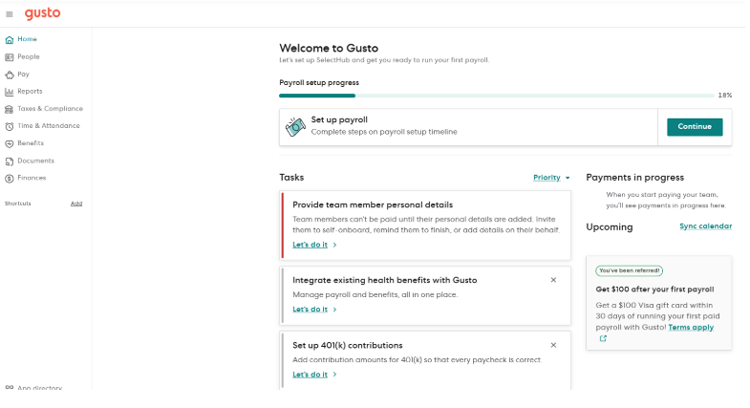
From here, navigating to the payroll setup was straightforward.
**Payroll Setup**
Gusto guided me through entering company details, team members, and pay schedules. Running payroll requires a subscription, but I could still see the set up was intuitive enough for managers to get started immediately.

[Source](https://youtu.be/mPHvgbxiXAI?si=v3fYHUeyJBD-sSjf&t=732)
After completing payroll setup, I explored how Gusto handles other features like time tracking and attendance.
**Time Tracking & Shift Scheduling**
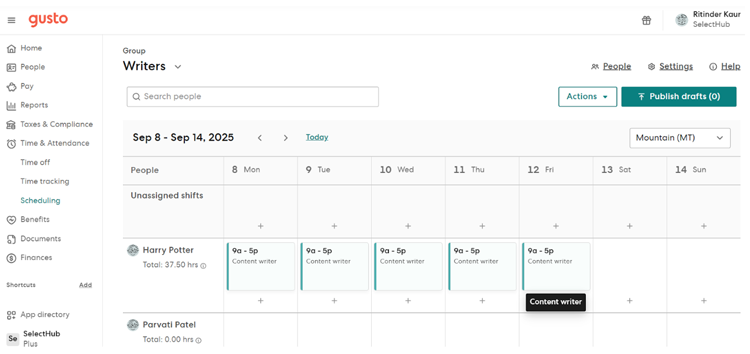
These functions were easy to set up within Gusto, and they felt like a natural extension of the payroll process. There were options to create time-off policies for PTO, sick time and floating holidays, and I liked that I could configure time tracking by team, location, or project.

The shift scheduling feature was similarly straightforward. Dragging and dropping shifts made it easy to create recurring schedules, though I found bulk editing to be nonexistent. For example, a store manager needing to change multiple shifts at once might find this process a bit tedious. Still, the ability to publish schedules and leave notes for the team was helpful.
## Approach to Common Payroll Challenges
- **Fragmented Systems:** Gusto combines payroll and benefits in one platform, something many small businesses struggle to find. [Lollipop Dental](https://gusto.com/customers/case-studies/lollipop-dental-health-insurance) succeeded in retaining talent and gained tax benefits by offering health insurance within Gusto.
- **Onboarding Delays:** Thanks to Gusto’s automated filing system and a stepwise onboarding checklist, [RealWork Labs](https://gusto.com/customers/case-studies/realworklabs) cut down onboarding paperwork by 12 hours per month.
- **International Payroll Challenges:** With Gusto Global, powered by Remote, [Abacus Hive](https://gusto.com/customers#abacus-hive) was able to hire, manage and pay international workers. The partnership offered expert guidance on cross-border hiring and HR, legal, payroll and tax compliance.
- **Multi-State Tax Registration:** Gusto lets you apply for state tax registration with a third-party service called CorpNet, and automates tax filing afterward. For example, [Serenity Forge](https://gusto.com/customers/case-studies/serenityforge) saved 30 hours of compliance work per month by delegating compliance to Gusto.
## Cost of Ownership
Frequently asked questions regarding Gusto pricing include:
**Q. What's included in the base price versus add-ons?**
A. The base price includes payroll processing, tax compliance, and basic benefits administration. Add-ons like workers' compensation, advanced time tracking, and performance management tools cost extra.
**Q. Are there any hidden fees with Gusto?**
A. Reddit users mention being surprised by year-end tax filing charges, so I recommend checking with the vendor on this.
**Q. How does Gusto's pricing scale as my business grows?**
A. Gusto charges $6 per employee per month. This flat rate makes it easy to predict costs, even as your team grows. The month-to-month pricing means you can add or remove employees without financial penalties as your workforce changes.
## Limitations
At the time of this review, these are some of Gusto's key limitations based on my research:
- Gusto lacks advanced training and recruiting features.
- Our analysts gave Gusto 50/100 for schedule and shift management, as it relies heavily on external partners and integrations to offer shift tracking, auto-scheduling and configuration.
- Gusto earned a 43 in our analysis for succession planning, lacking nine-box grids for skills tracking and bench strength assessment.
## FAQs
Frequently asked questions regarding Gusto include:
**Q. Is Gusto setup really free?**
A. Yes, Gusto offers a completely free setup with no hidden fees or implementation costs. You can get started immediately with their cloud-based platform, and they'll guide you through the initial setup process, including state tax registrations.
**Q. Do I need to sign a long-term contract with Gusto?**
A. No, Gusto operates on a month-to-month basis with no long-term contracts required. You can pause payroll if needed and restart whenever your business situation changes.
**Q. Can Gusto handle complex payroll situations like contractors and tips?**
A. Yes, Gusto processes W-2 employees and 1099 contractors in the same system and handles tipped wages and complex scheduling for industries like restaurants.
![Banner of Pricing guide for Gusto]()
## Pricing & Cost Details
Includes Price/User and Minimum Commitment Terms for Gusto
See Gusto Pricing Details
## Compare Payroll Software
These are the top products most often compared.
Generating Scorecard... Compare to Gusto
You can choose 4 products to compare
[![UKG Ready product logo]() UKG Ready](https://www.selecthub.com/p/hr-management-software/ukg-ready/)
[![QuickBooks Payroll product logo]() QuickBooks Payroll](https://www.selecthub.com/p/payroll-software/quickbooks-payroll/)
[![Rippling product logo]() Rippling](https://www.selecthub.com/p/hr-management-software/rippling/)
[![TriNet HR Plus product logo]() TriNet HR Plus](https://www.selecthub.com/p/hr-management-software/trinet/)
[![Namely product logo]() Namely](https://www.selecthub.com/p/hr-management-software/namely/)
[![Paychex product logo]() Paychex](https://www.selecthub.com/p/payroll-software/paychex/)
[![Justworks product logo]() Justworks](https://www.selecthub.com/p/peo-software/justworks/)
[![ADP RUN product logo]() ADP RUN](https://www.selecthub.com/p/payroll-software/adp-run/)
[![Square Payroll product logo]() Square Payroll](https://www.selecthub.com/p/payroll-software/square-payroll/)
Generating Scorecard... Compare to Gusto
## Head-to-Head
Comparison

vs
- [Aatrix](https://www.selecthub.com/payroll-software/gusto-vs-aatrix/)
- [ADP RUN](https://www.selecthub.com/payroll-software/gusto-vs-adp-run/)
- [ADP Workforce Now](https://www.selecthub.com/hr-management-software/adp-workforce-now-vs-gusto/)
- [APS Payroll](https://www.selecthub.com/payroll-software/gusto-vs-aps-payroll/)
- [Aurion](https://www.selecthub.com/payroll-software/gusto-vs-aurion/)
- [BambooHR](https://www.selecthub.com/payroll-software/gusto-vs-bamboohr/)
- [Bob UK Payroll](https://www.selecthub.com/payroll-software/gusto-vs-bob-uk-payroll/)
- [CheckWriters](https://www.selecthub.com/payroll-software/gusto-vs-checkwriters/)
- [Complete Payroll Solutions](https://www.selecthub.com/payroll-software/gusto-vs-complete-payroll-solutions/)
- [DATIS Payroll](https://www.selecthub.com/payroll-software/gusto-vs-datis-payroll/)
- [Dayforce](https://www.selecthub.com/payroll-software/gusto-vs-dayforce/)
- [Deel](https://www.selecthub.com/payroll-software/gusto-vs-deel/)
- [Dynamics 365 Human Resources](https://www.selecthub.com/payroll-software/gusto-vs-dynamics-365-human-resources/)
- [eBacon](https://www.selecthub.com/payroll-software/gusto-vs-ebacon/)
- [Everee](https://www.selecthub.com/payroll-software/gusto-vs-everee/)
- [Fingercheck](https://www.selecthub.com/payroll-software/gusto-vs-fingercheck/)
- [Greenshades](https://www.selecthub.com/payroll-software/gusto-vs-greenshades/)
- [Heartland Payroll](https://www.selecthub.com/payroll-software/gusto-vs-heartland-payroll/)
- [Infor HCM](https://www.selecthub.com/payroll-software/gusto-vs-infor-hcm/)
- [Inova Payroll](https://www.selecthub.com/payroll-software/gusto-vs-inova-payroll/)
- [Instant Pay](https://www.selecthub.com/payroll-software/gusto-vs-instant-pay/)
- [Namely](https://www.selecthub.com/payroll-software/gusto-vs-namely/)
- [OnPay](https://www.selecthub.com/payroll-software/gusto-vs-onpay/)
- [Oracle HCM Cloud](https://www.selecthub.com/payroll-software/gusto-vs-oracle-hcm-cloud/)
- [OrangeHRM](https://www.selecthub.com/payroll-software/gusto-vs-orangehrm/)
- [Patriot Payroll](https://www.selecthub.com/payroll-software/gusto-vs-patriot-payroll/)
- [Paycheck Manager](https://www.selecthub.com/payroll-software/gusto-vs-paycheck-manager/)
- [Paychex](https://www.selecthub.com/payroll-software/paychex-vs-gusto/)
- [Paychex Flex](https://www.selecthub.com/payroll-software/paychex-flex-vs-gusto/)
- [Paycom](https://www.selecthub.com/hr-management-software/paycom-vs-gusto/)
- [Paycor](https://www.selecthub.com/payroll-software/paycor-vs-gusto/)
- [Paylocity](https://www.selecthub.com/hr-management-software/paylocity-vs-gusto/)
- [Payroll4Free](https://www.selecthub.com/payroll-software/gusto-vs-payroll4free/)
- [PDS Vista](https://www.selecthub.com/payroll-software/gusto-vs-pds-vista/)
- [PrimePay](https://www.selecthub.com/payroll-software/gusto-vs-primepay/)
- [Proliant](https://www.selecthub.com/payroll-software/gusto-vs-proliant/)
- [QuickBooks Payroll](https://www.selecthub.com/payroll-software/gusto-vs-quickbooks-payroll/)
- [Rippling](https://www.selecthub.com/payroll-software/gusto-vs-rippling/)
- [Sage HR](https://www.selecthub.com/payroll-software/gusto-vs-sage-hr/)
- [Sage Payroll](https://www.selecthub.com/payroll-software/gusto-vs-sage-payroll/)
- [Square Payroll](https://www.selecthub.com/payroll-software/gusto-vs-square-payroll/)
- [SuccessFactors](https://www.selecthub.com/payroll-software/gusto-vs-successfactors/)
- [SurePayroll](https://www.selecthub.com/payroll-software/gusto-vs-surepayroll/)
- [TriNet HR Plus](https://www.selecthub.com/payroll-software/gusto-vs-trinet/)
- [UKG Pro](https://www.selecthub.com/hr-management-software/ukg-pro-vs-gusto/)
- [UKG Ready](https://www.selecthub.com/payroll-software/gusto-vs-ukg-ready/)
- [Wagepoint](https://www.selecthub.com/payroll-software/gusto-vs-wagepoint/)
- [Wave Payroll](https://www.selecthub.com/payroll-software/gusto-vs-wave-payroll/)
- [Workday HCM](https://www.selecthub.com/payroll-software/gusto-vs-workday-hcm/)
- [Wrapbook](https://www.selecthub.com/payroll-software/gusto-vs-wrapbook/)
## Awards
SelectHub research analysts have evaluated Gusto and concluded it earns best-in-class honors for Platform Security and Compliance and Integrations and Extensibility. Gusto stands above the rest by achieving an ‘Excellent’ rating as a User Favorite.


## Relevant Articles
[Zenefits vs. Gusto](https://www.selecthub.com/hris/zenefits-vs-gusto/)
## Pricing for Payroll Software
![Banner of Pricing guide for Payroll Software]()
## Similar Products
Here are the most similar products to Gusto.
[![Payescape product logo]() Payescape](https://www.selecthub.com/p/payroll-software/payescape/)
[![PayrollPanda product logo]() PayrollPanda](https://www.selecthub.com/p/payroll-software/payrollpanda/)
[![CenterPoint Payroll product logo]() CenterPoint Payroll](https://www.selecthub.com/p/payroll-software/centerpoint-payroll/)
[![Payroll Connected product logo]() Payroll Connected](https://www.selecthub.com/p/payroll-software/payroll-connected/)
[![Kredily product logo]() Kredily](https://www.selecthub.com/p/payroll-software/kredily/)
[![CyberPay product logo]() CyberPay](https://www.selecthub.com/p/payroll-software/cyberpay/)
[![Smart HR product logo]() Smart HR](https://www.selecthub.com/p/payroll-software/smart-hr/)
[![Certipay product logo]() Certipay](https://www.selecthub.com/p/payroll-software/certipay-online/)
[![Celergo product logo]() Celergo](https://www.selecthub.com/p/payroll-software/celergo/)
[![Hourly Payroll product logo]() Hourly Payroll](https://www.selecthub.com/p/payroll-software/hourly-payroll/)
## About the Contributors
The following expert team members are responsible for creating, reviewing, and fact checking the accuracy of this content.
[![Ritinder Kaur]()](https://www.selecthub.com/author/ritinder-kaur/)
Written by
[Ritinder Kaur](https://www.selecthub.com/author/ritinder-kaur/)
Senior Technical Content Writer
Ritinder Kaur is a Senior Technical Content Writer at SelectHub and has ten years of experience writing about B2B software and quality assurance. She has a Masters degree in English language and literature and writes about Business Intelligence and Data Science. Her articles on software testing have been published on Stickyminds.
[See Full Bio](https://www.selecthub.com/author/ritinder-kaur/)
[![Jaisri Narasimman]()](https://www.selecthub.com/author/jaisri-narasimman/)
Technical review by
[Jaisri Narasimman](https://www.selecthub.com/author/jaisri-narasimman/)
Principal Analyst
A graduate of NTU Singapore, Jaisri Narasimman honed her data mining and curation skills during her post-graduate education, focusing on developing strategies to help businesses make the most of their data. In her role at SelectHub, her research spans categories like HR, CRM and EHR.
[See Full Bio](https://www.selecthub.com/author/jaisri-narasimman/)
[![Zachary Totah]()](https://www.selecthub.com/author/zachary-totah/)
Edited by
[Zachary Totah](https://www.selecthub.com/author/zachary-totah/)
Content Editor
As SelectHub's Content Manager, Zac is in charge of content across diverse categories including CRM, ERP, HR, medical and project management. He has over 6 years of experience writing and editing for B2B tech and holds a B.A. in communications. His work is driven by his goal of making it less overwhelming for people to find software for their business.
[See Full Bio](https://www.selecthub.com/author/zachary-totah/)
Your review has been submitted
and should be visible within 24 hours.
Review Title
Pros
Cons
Overall feedback
Your name
Your job title
Industry
Choose your main industry
- Accounting / CPA
- Advertising
- Aerospace & Defense
- Agriculture
- Apparel
- Architecture
- Auto Dealership
- Automotive
- Banking & Financial Services
- Banking & Mortgage
- Chemicals
- Construction & Engineering
- Construction / Contracting
- Consulting
- Consumer Products
- Distribution
- E-commerce
- Education
- Electronics
- Energy & Utilities
- Federal Government
- Field Maintenance
- Food & Beverage
- Healthcare / Social Services
- Hospitality / Gaming / Travel
- Human Resources
- Industrial Machinery
- Information Technology & High Tech
- Insurance
- Legal
- Maintenance / Field Service
- Manufacturing
- Marketing Services
- Media & Communications / Entertainment
- Mill Products
- Mining / Metals
- Mortgage
- Non-Profit
- Not Available
- Oil & Gas
- Other
- Other Services
- Payroll Provider
- Pharmaceuticals
- Professional Employer Organization
- Professional Services
- Property Management
- Public Sector
- Real Estate
- Recruiting Agency
- Religious Institutions
- Retail
- Sales & Marketing
- Semiconductors
- Software / IT
- Sports and Recreation
- Staffing Agency
- State & Local Government
- Telecommunications
- Third-Party Administrator
- Transportation & Logistics
- Wholesale Distribution
Company Size
Choose your company size
- 1 employee
- 2 to 9 employees
- 10 - 19 employees
- 20 - 49 employees
- 50 - 99 employees
- 100 - 499 employee
- 500 - 999 employees
- 1,000 - 2,499 employees
- 2,500 - 4,999 employees
- 5,000 - 9,999 employees
- 10,000 - 24,999 employees
- 25,000 - 49,999 employees
- 50,000 + employees
```json
{
"@context": "https://schema.org",
"@type": "BreadcrumbList",
"itemListElement": [
{
"@type": "ListItem",
"position": 1,
"name": "Home",
"item": "https://www.selecthub.com/"
},
{
"@type": "ListItem",
"position": 2,
"name": "Payroll Management",
"item": "https://www.selecthub.com/research/payroll-management/"
},
{
"@type": "ListItem",
"position": 3,
"name": "Payroll Software",
"item": "https://www.selecthub.com/c/payroll-software/"
},
{
"@type": "ListItem",
"position": 4,
"name": "Gusto"
}
]
}
{
"@context": "http://schema.org",
"@type": "SoftwareApplication",
"name": "Gusto",
"description": "Gusto is a payroll and HR system that automates daily tasks. Features include multi-state pay runs and tax filing, along with benefits and compliance management, hiring, performance management, learning, and time and attendance management. Best For Small and mid-sized businesses across industries needing easy, automated HR and payroll. Not Ideal For Large enterprises that require advanced succession planning, recruiting and custom reporting. Competitive Edge Ease of use. Transparent pricing for monthly payroll. Multi-state tax filing with automated workflows. Integrations Accounting: QuickBooks, Xero. Time tracking: When I Work, Homebase. POS, collaboration, benefits and tax software. Price From $49/month + $6/employee. Month-to-month, no contracts. Add-ons cost extra; year-end tax filings may incur fees. Key Features Full-service payroll with contractor support. Automated tax filing with credits & deductions. Employee self-service for onboarding, PTO, and benefits. Biggest Downsides Limited scalability & advanced features. Basic reporting. Slow support, extra tax filing costs. Alternatives to Consider QuickBooks Payroll: Better reporting, same-day deposit. UKG Ready: Flexible payroll cut-offs, stronger time tools. Verdict Gusto is a user-friendly payroll platform for SMBs, but it’s not ideal for large firms or those needing deep customization or global payroll. My Research Approach for GustoI tested Gusto hands-on by creating a free account to see how it performs in everyday use. Additionally, I used the data in our selection platform to compare Gusto with popular alternatives: QuickBooks Payroll, OnPay, Rippling, and ADP Run. I went through Reddit user reviews extensively to learn what people think about it. To round out my process, I watched YouTube videos and browsed the vendor documentation to understand how the platform works.",
"review": {
"@type": "Review","reviewRating": {
"@type": "Rating",
"ratingValue": 75,
"bestRating": 100
},
"author": {
"@type": "Person",
"name": "Olivia Edens",
"reviewBody": "Gusto is a user-friendly alternative to traditional payroll providers, earning high praise from customers. Our research of Gusto reviews shows 93% of users would recommend it. Another reason for its popularity is clear pricing on the vendor’s website — you know what you’re in for and how much you have to pay. Additionally, there are no binding contracts, and you can unsubscribe anytime.Though Gusto offers multi-state payroll, it’s not limited to the U.S. The vendor supports contractor payments in over 120 countries. For example: Gusto enabled Rise Marketing to achieve 125% client growth by scaling from local Philadelphia operations to 3+ states and 7+ countries.Building on this foundation, Gusto recently expanded its international offerings through a Remote integration and now provides payroll for full-time employees in 10 countries, including Canada and the UK.Despite its strengths, Gusto has limitations. For instance, Gusto offers payroll cancellation but up to two days before processing, whereas UKG Ready allows you to set your own cut-off time.Beyond payroll, reporting shows clear gaps. Gusto (83) trails QuickBooks (100) when it comes to breadth of features. A key limitation is that Gusto doesn’t allow report bookmarking — you’ll need to reapply filters and columns each time. Gusto tries to offset this by integrating with QuickBooks for reporting, but existing QuickBooks Accounting users often find it simpler to use QuickBooks Payroll directly.Service issues add to these functional gaps. Customer support is slow and inconsistent according to reviews. The vendor also charges you extra for year-end tax filings, which Reddit users say is not in the fine print when signing up.As for integrations though, I was impressed with the wide range of options. Gusto offers several APIs for partners to form inbound and outbound connections, which can be great if you’re ready to pay for them. What I especially liked was the Gusto Embedded API, which lets you integrate payroll capabilities into your HR platforms.My recommendation: Gusto makes sense if you're seeking a payroll platform, embedded or otherwise. There are no minimum employee counts — you can use Gusto even if you're a 1-2 person company via the Solo plan. However, if you require deep customization or plan to grow beyond the mid-market segment, consider Workday, SuccessFactors, Oracle HCM, or UKG Pro instead."
}
},
"image": "https://cdn.selecthub.com/products/8466a2b43729c29dcd7cc0fdfa1a9e7a-4770395907408ad234a01c495ed34cfa/resources/normal/logo.png?1693317793",
"aggregateRating": {
"@type": "AggregateRating",
"ratingValue": "92",
"bestRating": "100",
"worstRating": "1",
"ratingCount": "9898"
},
"offers": {
"@type": "Offer",
"priceSpecification": {
"@type": "priceSpecification",
"price": "49",
"priceCurrency": "USD"
}
},
"positiveNotes": {
"@type": "ItemList",
"itemListElement": [
{
"@type": "ListItem",
"position": 1,
"name": "Ease of Use: Reviewers consistently highlighted Gusto’s intuitive and clean interface, which enables even non-technical users to use the platform comfortably."
},
{
"@type": "ListItem",
"position": 2,
"name": "Core HR Functionality: Users said they appreciate having payroll, HR, benefits and time tracking in one system."
},
{
"@type": "ListItem",
"position": 3,
"name": "Automated Tax Filing: Most Gusto reviewers praised its automated workflows for tax filing and compliance updates."
}
]
},
"negativeNotes": {
"@type": "ItemList",
"itemListElement": [
{
"@type": "ListItem",
"position": 1,
"name": "Scalability Issues: Users said the platform doesn’t scale well as it lacks applicant tracking and a wide-ranging global payroll."
},
{
"@type": "ListItem",
"position": 2,
"name": "Basic Reporting: Most reviewers found Gusto’s reporting capabilities limited for their needs."
},
{
"@type": "ListItem",
"position": 3,
"name": "Slow Customer Support: Most users criticized the support team for slow resolution of issues and repeated escalations when troubleshooting."
}
]
},
"applicationCategory": "Payroll Software"
}
{"@context":"https://schema.org","@type":"FAQPage","mainEntity":[{"@type":"Question","name":"Is Gusto setup really free?","acceptedAnswer":{"@type":"Answer","text":"Yes, Gusto offers a completely free setup with no hidden fees or implementation costs. You can get started immediately with their cloud-based platform, and they'll guide you through the initial setup process, including state tax registrations."}},{"@type":"Question","name":"Do I need to sign a long-term contract with Gusto?","acceptedAnswer":{"@type":"Answer","text":"No, Gusto operates on a month-to-month basis with no long-term contracts required. You can pause payroll if needed and restart whenever your business situation changes."}},{"@type":"Question","name":"Can Gusto handle complex payroll situations like contractors and tips?","acceptedAnswer":{"@type":"Answer","text":"Yes, Gusto processes W-2 employees and 1099 contractors in the same system and handles tipped wages and complex scheduling for industries like restaurants."}}]}
```