---
description: Is Connecteam the right solution for you? See where it's ranked among all Workforce Management Software. Read expert reviews, compare 2026 pricing, and explore top-rated features.
---
[Home](https://www.selecthub.com/) > [Workforce Management](https://www.selecthub.com/category/workforce-management/) > [Workforce Management Software](https://www.selecthub.com/c/workforce-management-software/) > Connecteam
Categories:
- [Workforce Management Software](https://www.selecthub.com/c/workforce-management-software/)
- [Employee Engagement Software](https://www.selecthub.com/c/employee-engagement-software/)
- [Employee Scheduling Software](https://www.selecthub.com/c/employee-scheduling-software/)
- [Online Training Software](https://www.selecthub.com/c/online-training-software/)
- [Performance Management Systems](https://www.selecthub.com/c/performance-management-software/)
- [Time and Attendance Software](https://www.selecthub.com/c/time-and-attendance-software/)
- ...
## What Is Connecteam?
**Industry Specialties:** Serves all industries.
Connecteam is a mobile-first workforce management platform designed to simplify businesses' management of remote and/or hybrid teams. Its app integrates essential tools like scheduling, time tracking, communication and HR management.
Its scheduling and time management features help you create and share schedules, track work hours with a GPS-enabled time clock and automate payroll processes.
It provides a centralized space for updates, work chats and surveys. Managers can share company announcements, hold discussions and gather feedback. The knowledge base feature lets teams access important documents and resources anytime.
For HR and training, Connecteam offers tools to onboard employees, assign courses, and track progress through quizzes and certificates. Recognition features let you reward achievements, while the document management system ensures compliance with industry regulations.
User reviews of Connecteam highlight its ease of use and intuitive interface that’s accessible even to non-tech-savvy employees. They praise its mobile-first design for enabling employees to manage tasks, schedules and communication directly from their phones.
Many also commend its excellent customer support. However, some users note a learning curve for more complex setups and wish it offered more granular customization and control.
Connecteam offers a 14-day free trial and four pricing plans each for Operations, Communications, and HR and Skills: Basic, Advanced, Expert and Enterprise. You can select one hub, two hubs or all three. Each hub offers flexible pricing plans, so you only pay for the features that work best for your business.
Pricing for each plan starts at $29 per month for basic features, with additional tiers offering more functionality at higher price points.
The Basic and Advanced plans offer sufficient features for smaller teams, with essential tools for communication, engagement and knowledge management. However, as organizations scale, the Expert and Enterprise plans offer better capabilities, such as unlimited knowledge bases, enhanced permissions and more storage. These higher-tier plans cater to larger businesses with more complex needs.
With its free-for-lifetime plan for small business teams of up to 10 users, it provides access to a wide range of features, including time tracking, task management, communication tools, scheduling, HR functions and digital forms. After you’ve completed your 14-day free trial, you can upgrade to the small business plan.
I’ll go into more detail about Connecteam’s pricing in the following sections.
**Our Research Process for Connecteam**
When I set out to evaluate Connecteam, I started by checking out its official website. I wanted to get a clear understanding of its features, pricing and customer feedback. I explored its popular capabilities like job scheduling, time clock, rewards and recognition, task management and help desk to see how they function in practice.
Next, read about its applications across various industries, use cases and roles. I also visited the self-service help center to read through articles and how-to guides and watched video tutorials to get tips on making the most out of my free trial.
Using our internal data, I compared Connecteam’s performance in areas such as dashboard and reporting, leave and absence management, employee engagement and collaboration, and platform capabilities and compliances against competitors such as Harvest, OnTheClock, Boomr and Jibble. This helped me assess its position in relation to its competitors and learn about its key differentiators and limitations.
To get a sense of how real users feel about Connecteam, I reviewed the feedback on platforms like G2, Capterra, Software Advice and TrustRadius. I also checked out real-world experiences on Quora and Reddit to see what users were saying. These insights gave me a better understanding of how well Connecteam performs and where there’s room for improvement.
Finally, I took Connecteam for a test drive with its free plan. I set up my account and explored key features like the time clock, job scheduler, task manager, knowledge base, contact directory and more. Testing these firsthand gave me a deeper sense of what it’s like to manage a workforce using Connecteam.
PRICE
$
$
$
$
$
COMPANY SIZE
S
M
L
DEPLOYMENT
PLATFORM
[Try Before You Buy. Request a Free Demo Today!Request Demo It's completely free!](https://pmo.selecthub.com/get-product-demo/?category=Workforce+Management+Software&product_name=Connecteam&origin_url=https%3A%2F%2Fwww.selecthub.com%2Fp%2Fworkforce-management-software%2Fconnecteam%2F&product_logo=https%3A%2F%2Fcdn.selecthub.com%2Fproducts%2F8371d58a2140475594cb7a1c22f0baaa-dd65e97b0111a9ddd0725d22103d8f88%2Fresources%2Fnormal%2Flogo.png%3F1738176679)
[Contributors](#view-contributors)
![Ishani Vats]() Written by Ishani Vats Technical Content Writer [Read Bio](https://www.selecthub.com/author/ishani-vats/)
![Dianna Dragonetti]() Edited by Dianna Dragonetti Content Editor [Read Bio](https://www.selecthub.com/author/dianna-dragonetti/)
User Sentiment i
![User satisfaction level icon: excellent]()
Based on 2550 reviews:
Add your rating:
![Videos]() ![Screenshots]()![Screenshots]()![Screenshots]()![Screenshots]()![Screenshots]()![Screenshots]()![Screenshots]()![Screenshots]()![Screenshots]()![Screenshots]()![Screenshots]()![Screenshots]()![Screenshots]()![Screenshots]()![Screenshots]()![Screenshots]()
Product Screenshots and Videos
## #5
Connecteam is ranked #5 on the top 10 Workforce Management Software leaderboard based on a comprehensive analysis performed by SelectHub research analysts. Compare the leaders with our In-Depth Report.
[Get the Report Now](https://pmo.selecthub.com/top-wfm-software-site-vers?category_slug=workforce-management-software&product_slug=connecteam&page_type=product&slug=connecteam&product_name=Connecteam&category=Workforce+Management+Software&origin_url=https%3A%2F%2Fwww.selecthub.com%2Fp%2Fworkforce-management-software%2Fconnecteam%2F)
## Connecteam Pricing
Based on our most recent analysis, Connecteam pricing starts at $29 (Monthly).
[Get Price Quote](https://pmo.selecthub.com/get-product-pricing/?category=Workforce+Management+Software&product_name=Connecteam&origin_url=https%3A%2F%2Fwww.selecthub.com%2Fp%2Fworkforce-management-software%2Fconnecteam%2F&product_logo=https%3A%2F%2Fcdn.selecthub.com%2Fproducts%2F8371d58a2140475594cb7a1c22f0baaa-dd65e97b0111a9ddd0725d22103d8f88%2Fresources%2Fnormal%2Flogo.png%3F1738176679&price=2)
- Price
-
$
$
$
$
$
i
- Starting From
- $29
- Pricing Model
- Monthly
- Free Trial
- Yes - Request for Free
## Training Resources
Connecteam is supported with the following types of training:
- Documentation
- In Person
- Live Online
- Videos
- Webinars
## Support
The following support services are available for Connecteam:
- Email
- Phone
- Chat
- FAQ
- Forum
- Help Desk
- Knowledge Base
- Tickets
- Training
- 24/7 Live Support
## Connecteam Benefits and Insights
Why use Connecteam?
### Key differentiators & advantages of Connecteam
- **Offers Key Features Right Out of the Box:** According to our data, Connecteam has an analyst score of 80, and offers a comprehensive set of features, many of which are ready to go out of the box. These include:
- **Employee Engagement and Collaboration (100):** Provides an activity feed for updates, an employee directory for searching colleague details and a group chat for team collaboration.
- **Platform Capabilities and Compliances (100):** The solution ensures compliance with ACA, ADA, FLSA and FMLA regulations, and offers configurable notifications, workflows, custom fields and a secure document repository.
- **Mobile Capabilities (96):** It offers native iOS and Android apps with a clock in/out option, chat messaging, geofencing, scheduling and shift trading tools. However, it doesn’t support offline access.
- **Simplifies HR & People Management:** The HR & Skills Hub allows you to onboard new employees quickly and get them up to speed faster, cutting down the time it takes for them to work efficiently.
- **Boosts Efficiency With Integrations:** Integrating with leading business software, such as Quickbooks, Gusto, Xero, Paychex and Zapier, can streamline your company’s payroll and scheduling operations.
- **Boosts Engagement:** B&B Beverage Management has consolidated various functions into the Connecteam app, saving time and improving efficiency for its multiple teams across diverse functions. Key results from the adoption include:
- **Time Savings:** Centralized employee management on one platform, replacing outdated tools like spreadsheets and manual systems.
- **Simplified Scheduling:** Easy mobile access to schedules for both managers and employees.
- **Efficient Payroll:** Faster payroll processing with GPS time tracking and a user-friendly clock-in/out system.
- **Streamlined Onboarding:** Real-time progress tracking for employees with an in-house digital onboarding platform that ensures smooth transitions for new hires.
- **Optimizes Workforce Efficiency with Scheduled vs. Actual Hours Tracking:** You can track scheduled versus actual hours to compare planned shifts with the time employees actually worked. This helps identify discrepancies, spot under or overworking employees, and address issues proactively.
### Industry Expertise
Connecteam is useful in all industries but is especially useful for managing mobile or distributed teams. Its mobile app and communication tools make it easy to share updates, assign tasks and stay connected in real time.
Industries like field services, hospitality and transportation benefit from its location-based features and tools for remote communication, helping simplify operations and keep employees engaged.
## Pros and Cons
Based on user reviews, I couldn’t find any obvious pros or cons for Connecteam. The feedback I gathered from user reviews was varied and didn’t strongly highlight specific strengths or weaknesses.
On the bright side, I spoke with a real-world user of Connecteam, [James Hacking](https://www.linkedin.com/in/james-hacking). He is the founder of [Socially Powerful](https://sociallypowerful.com/), a digital marketing agency, and is currently using Connecteam to manage his workforce. Here’s what he shared about his experience:
> One creative way we’ve used the software is to build a client feedback loop directly into task workflows. Our team uploads deliverables into Connecteam, tagging specific client-facing staff to review and log updates. This not only creates transparency across projects but also helps us track who touched what and when. It’s a layer of operational efficiency that’s hard to replicate manually."
When asked about where Connecteam could improve, he said:
> A drawback is the lack of deeper integrations with certain niche tools. While it’s great for general workforce management, if you rely on highly specialized platforms, you might find yourself toggling between systems more than you'd like.
> Still, our overall experience with Connecteam has been transformative. It’s become less of a tool and more of a structural pillar, helping us balance creativity with operational rigor. For teams navigating high-volume, fast-turnaround environments, it’s a practical solution that helps retain order without stifling innovation."
## Connecteam Reviews
Based on our most recent analysis, Connecteam reviews indicate a 'excellent' User Satisfaction Rating of 92% based on 2550 user reviews from 4 recognized software review sites.
![User satisfaction level icon: excellent]()
2550 reviews
92%
of users would recommend this product
### Synopsis of User Ratings and Reviews
Based on an aggregate of Connecteam reviews taken from the sources above, the following pros & cons have been curated by a SelectHub Market Analyst.
#### Pros
- **Ease of Use:** Connecteam is praised for its intuitive interface, user-friendly design, and simple setup. Users often highlight its accessibility for employees of all technical levels.
- **Mobile App:** The mobile app is frequently cited as a major advantage, enabling employees to access features, communicate, and manage tasks from anywhere, anytime.
- **Communication and Engagement:** Users appreciate the built-in communication tools that foster better collaboration and keep employees connected, even for remote teams.
- **Scheduling and Time Tracking:** Connecteam's scheduling and time tracking features are often praised for their efficiency and accuracy, simplifying payroll and attendance management.
- **Affordability:** Connecteam's pricing is considered competitive and appealing, especially for small and medium-sized businesses. The free plan for up to 10 employees is a valuable option.
- **Customer Support:** Users generally report positive experiences with Connecteam's customer support, noting its responsiveness and helpfulness.
#### Cons
- **Limited Customization:** Some users express a desire for more flexibility in customizing forms, workflows, and the overall appearance of the platform to better align with specific needs.
- **Reporting and Analytics:** While Connecteam offers basic reporting, some users find it lacking in-depth insights or customization options for workforce analysis and strategic decision-making.
- **Integrations:** The range of third-party integrations available could be expanded to enhance compatibility with other business tools and streamline workflows further.
- **Payroll Functionality:** Connecteam lacks built-in payroll processing, requiring integration with external providers, which can add an extra step and potential cost for businesses.
- **Notification Overload:** Some users report feeling overwhelmed by the volume of notifications, especially with active communication and task assignments. More granular notification controls could be beneficial.
#### Researcher's Summary:
I’ve thoroughly researched Connecteam to give you a clear understanding of what the platform offers, who it’s best for, and its strengths and limitations.
**Insights from Our Data**
According to our data, Connecteam has an analyst score of 80 and ranks among our top 10 workforce management, ahead of industry leaders like Quinyx (76), Calabrio (75), Dayforce (79) and SuccessFactors (79). The scores are based on how many features Connecteam supports and how they fulfill key needs, showing that strong, comprehensive features are one of its main strengths.
It scores over 90 in three critical areas: employee engagement and collaboration, platform capabilities (100), compliance (100) and mobile capabilities (96).
**Features That Stood Out to Me**
**Time Clock**
The time clock feature stands out as a great tool to manage employee work hours. It simplifies clocking in and out and offers the flexibility to use mobile devices or an on-site kiosk, making it suitable for a variety of workplaces.
**Scheduling**
Its scheduling features are equally useful and flexible. It helped American Transportation, a transportation service company, reduce the time spent on scheduling by 60%, saving up to 5 hours per week on payroll processing. The app made communication easier, reduced errors and allowed them to manage their driver availability across their fleet and locations easily.
You can easily create schedules, assign users, manage schedule properties and more on the web and mobile app.
You can create shareable schedule links for anyone, whether they’re inside or outside your organization, ideal for clients, partners or office monitors. The number of links depends on your plan: 1 with Advanced, 6 with Expert and unlimited with Enterprise. This feature is not available in the Basic plan.
Connecteam keeps timesheets accurate by flagging inconsistencies, tracking overtime, and auto-calculating hours, breaks and PTO. These features save a lot of time when processing payroll. The integration with popular payroll platforms like QuickBooks and Gusto is another advantage, especially for managing invoicing or tracking time on a project basis.
**Customization**
One thing that makes Connecteam special is its level of customization. From events and chats to shifts, tasks and updates, you can tailor almost everything to suit your business needs. This flexibility is a big plus for larger organizations with multiple departments or locations, as it helps address the diverse needs of a workforce.
**Digital Employee ID Card**
The digital employee ID card feature is another modern solution that I found impressive. It eliminates the hassle of physical cards by allowing you to issue or deactivate IDs instantly, enhancing security and simplifying onboarding or offboarding. The option to add QR codes for secure access to resources or entry points is a great addition.
That said, relying solely on mobile ID cards could be challenging if employees lose or forget their phones, so having a backup plan would be helpful.
**Geofencing**
Connecteam’s geofencing feature is also noteworthy. It uses GPS data to create virtual boundaries around specific locations, ensuring employees can only clock in or out when they’re within these areas, such as a job site or office. This solves issues like time theft or buddy punching, which can be costly over time.
However, it may feel restrictive for employees in certain cases, like being outside the boundary. The ability to approve or deny clock-ins from non-approved zones is helpful, but it requires regular oversight, which might be a challenge for smaller teams.
**A Sneak Peak Into My Free Trial Experience (Detailed Analysis in the Next Section)**
The free trial setup process was pretty straightforward, and I didn’t need to provide my credit card information to sign up. The dashboard was clean and easy to navigate, and the mobile app was just as intuitive as the desktop interface, making it simple to switch between devices without needing to relearn anything.
While the platform offers many features, which could feel overwhelming at first, I found the layout intuitive and easy to get used to. Spending a few hours exploring it helped me quickly understand how everything worked.
I added a few test users by entering their names, email addresses and phone numbers. They received invites instantly, and the process was smooth. Setting up the time clock feature was also simple. It lets employees clock in and out and includes helpful tools like restricting early clock-ins, auto-marking shifts as complete and location tracking for teams working in multiple locations.
I also explored the task management feature, which allows you to create tasks, assign them to specific team members and set deadlines. It’s easy to track progress, and the app sends reminders to ensure nothing gets overlooked.
**Which Type of Companies Use Connecteam**
Connecteam is great for small to medium-sized businesses looking for an all-in-one solution for managing a mobile workforce. It’s especially useful in industries like construction, hospitality, retail and field services, where employees often work remotely or across multiple locations.
### In a Nutshell
**What users like about Connecteam:**
- Intuitive mobile-first design that’s perfect for remote employees.
- Advanced scheduling and time tracking tools to manage shifts and attendance.
- All-in-one platform with features like task management, communications and training.
- Affordable pricing with scalable options for small to large teams.
**What users don’t like about Connecteam:**
- Limited integrations compared to other workforce management tools.
- Reporting capabilities could be more advanced for larger organizations.
- Some users find the customization options for forms and workflows restrictive.
**Ideal for:**
- Small to medium-sized businesses that manage hybrid or remote teams.
- Organizations seeking an easy-to-use app for employee engagement and communication.
- Businesses in industries like retail, hospitality and field services that need mobile workforce solutions.
**Not ideal for:**
- Larger enterprises that require extensive integrations and advanced analytics.
- Companies that rely heavily on custom workflows or complex reporting needs.
- Teams that need detailed industry-specific features beyond general workforce management.
## Connecteam In Action
I explored Connecteam using its 14-day free trial to get a firsthand experience with its features. I was immediately impressed by its modern, intuitive and exceptionally well-organized interface.
Both the mobile app and website feel effortless to navigate. It has plenty of features, yet everything is easy to find and explore. Take a look at the dashboard below.
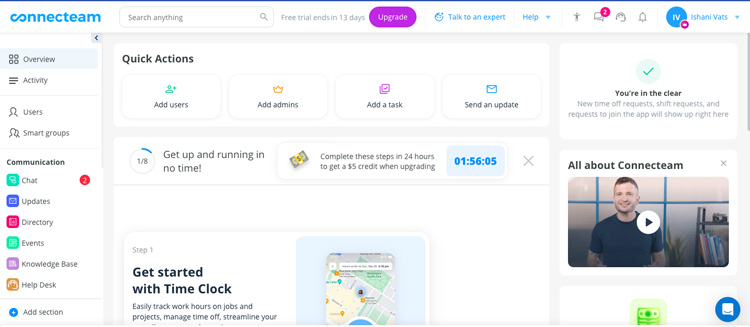
Notice how clean and organized it is? The color coding is simple and effective, the sidebar layout is spot on and the instructions are concise without being overwhelming.
Their mobile app offers an equally nice interface. Log in with your phone number, and you’ll be ready to use your account.

### The Sign-Up Process
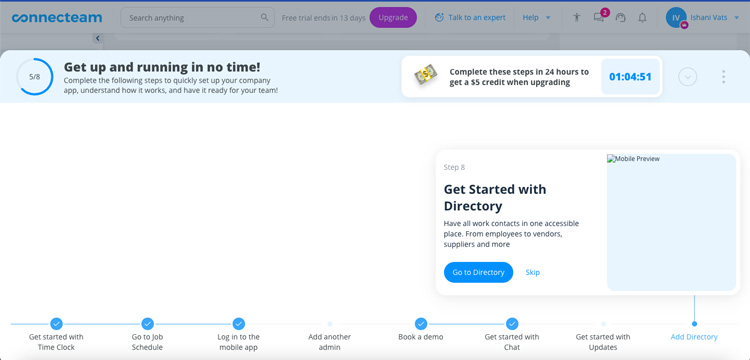
Getting started with Connecteam was simple. You input your business email and a few basic details about your industry and team size to suggest features unique to your needs. The best part is that it doesn’t ask for your credit card information or address. You just provide your phone number to receive OTPs and messages.
The free trial also includes onboarding tutorials that explain each section of the platform step by step. If you complete these steps within 24 hours of signing up, you will receive a $5 credit when upgrading.
### Adding Users
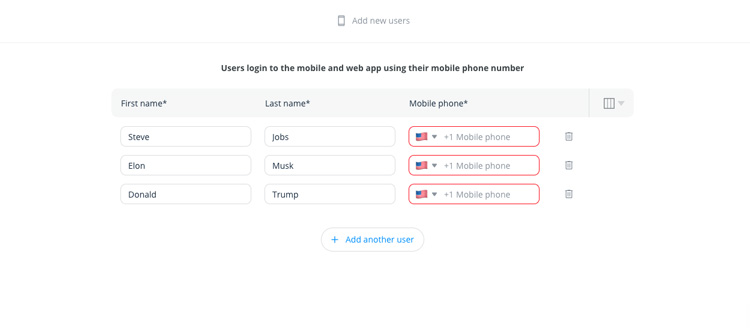
I started by adding a user, and the process was a breeze. I just clicked the Add User button on my dashboard and added the first and last names of the people I wanted to add.
One thing to note is that you can’t add a user without their phone number, so make sure you have that information before proceeding.
You can use the Connecteam mobile app to add users directly, either by entering their details, selecting them from your phone's contacts or sharing an invite link for them to join.

### Time Clock
Using Connecteam's time clock feature, employees can manage their work schedules and track their hours efficiently. They can easily clock in and out using the web or mobile app.
Under Today's Clock, users can check their total work hours for the day, submit requests to add shifts or report absences. The feature also allows users to view and manage all their requests in one place.
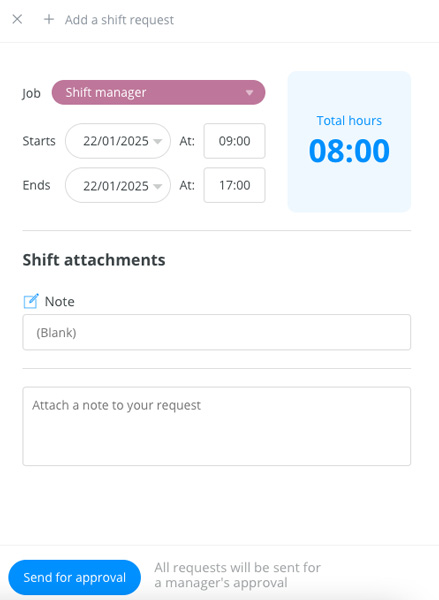
The timesheet provides a detailed breakdown of work, including regular hours, overtime, paid and unpaid time off, and total paid hours.
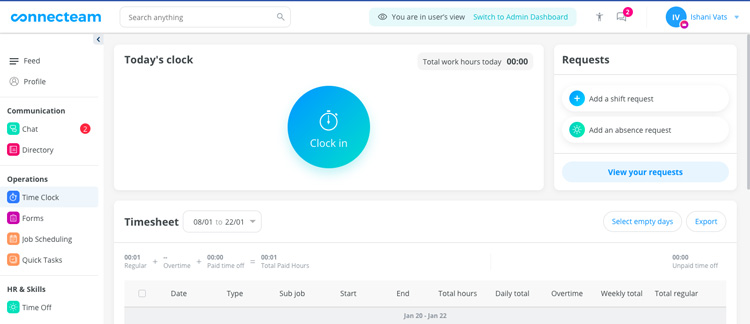
Employees can track specific details for each day, such as start and end times, sub-jobs, and daily or weekly totals. This setup helps them keep a clear record of their hours while ensuring they're updated on any scheduling changes.
Clock-in limitations ensure they don’t start their shifts too early, while clock-out limitations address forgotten clock-outs.
### Chat
You can create team chats for all users to share files and communicate with each other or start individual conversations.

You can also create channels to share announcements and keep your team updated. Channels are perfect for one-way communication since users can't comment on the posts, ensuring messages stay focused and organized.
To set up a channel, start by choosing a name (up to 25 characters) that reflects its purpose. You can attach files to your messages for additional context. The channel also allows anonymous messaging.
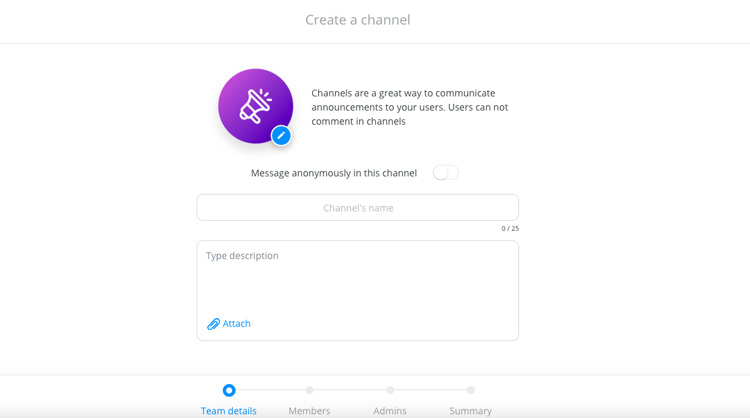
When managing your channel, you can add team details, assign members and select admins to oversee it. A summary of the channel provides a quick overview of its members and purpose.
### Updates
Connecteam allows you to send important messages and announcements to your team in a visually engaging way. You can choose a background for your update, edit text characteristics like size and style, and select from decorative options or solid colors depending on the tone you want to set.

You can optionally add a title (up to 50 characters) to your update to clarify it. To provide more context, you can include attachments such as images, videos, GIFs, files, YouTube links, location details and even live polls.
When sending your update, you can specify recipients, adjust publish settings (such as timing and visibility), and review the summary to ensure everything is set before sending it out.
### Events
I really like how customizable Connecteam’s Events feature is. You can set the event’s date, time and time zone and even add an end time. You can upload a cover photo or choose one from their pre-made options if you don’t have your own. You can also add a title, location and any files or details you want to share.

If you want to keep track of attendees, you can set up registration and assign roles. Before you finish, you can preview how the event will look on mobile to ensure everything is perfect. Once you’re happy with it, just choose your recipients, adjust the settings, and hit create.
It would be nice to have an option to sync Events with external calendars like Google or Outlook. That way, events would sync automatically, making scheduling even easier.
Another small but helpful update would be to allow more than one team member to help create events, especially for larger teams or more complicated events. Adding automated reminders would also ensure that no one forgets about the event.
### Help Desk
The Help Desk feature in Connecteam lets you simplify internal queries by creating a centralized system where employees can send questions directly to the right person or department.
You can set up multiple help desks tailored to different topics, like payroll, IT or HR, so employees always know where to go for answers. They can submit tickets for their queries, which are routed to assigned representatives.
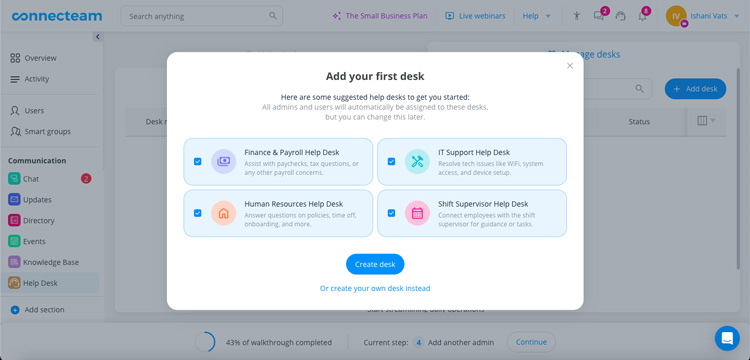
As an admin, you can manage these queries, assign them to specific team members, and track their progress, keeping everything organized and efficient. This structure saves time, reduces confusion, and keeps communication clear.
You can set up multiple help desks tailored to different topics, like payroll, IT or HR, ensuring employees always know where to go for answers. Employees can submit tickets for their queries, which are routed to assigned representatives.
As an admin, you can manage these queries, assign them to specific team members and track their progress. This saves time, reduces confusion and keeps communication clear.
### Job Scheduler
I really like how simple it is to schedule jobs. The steps are clear, and all the options are right there on the screen, making it a no-brainer. The easy-to-navigate interface lets you quickly learn by doing without getting stuck.
Check out the video below to see the Job Scheduler in action.
You can easily manage shifts in a way that fits your needs. You can add single or multiple shifts manually, import them from an Excel sheet or use templates for faster scheduling. Want to save time? You can duplicate or even create multi-duplicates of shifts and assign them to specific users or jobs.
In addition, you can start chats directly within a shift for quick communication and unpublish shifts if plans change.

I also appreciate how the Scheduler handles last-minute changes and uncovered shifts. It flags work-hour violations and gives managers control over employee actions, like restricting the ability to drop shifts.
If an employee can't perform a job, they can request a replacement as long as someone else is available to take over.

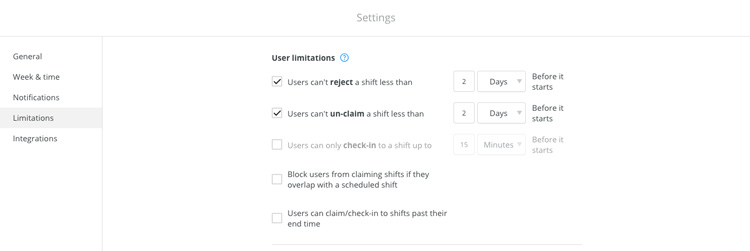
You can set rules, like how many days before a shift, users can no longer reject or unclaim it. You can also control when users can check in and block overlapping shifts, ensuring no one claims conflicting shifts if they're already scheduled. These options make managing shifts smooth and adaptable to your policies.
The app lets you manage notifications for every key shift-related action, such as when users confirm, reject, check-in, complete shifts, or request changes or replacements. You can receive alerts via mobile, web push or email and manage them all in the notification center. This way, you stay updated on all shift activities effortlessly.
You can also give employees more control over their shifts while maintaining administrative oversight. They can mark their availability, specify preferred work hours and even request shift replacements (with administrative approval).
The mobile app allows users to confirm, reject, check-in and mark shifts as completed. It also tracks status changes using GPS to ensure accurate location tracking.
### Time Off Management (Time off, Sick Leave, Unpaid Leave)
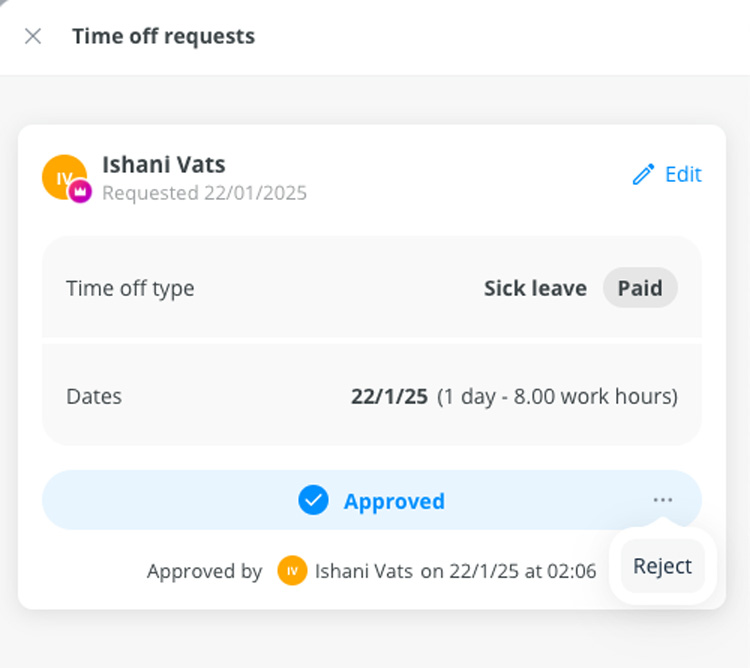
Employees can request time off, and admins can approve or decline those requests. See the video below for a look at how the process works in practice.
Admins can also reject a time-off request, even after it's been approved.
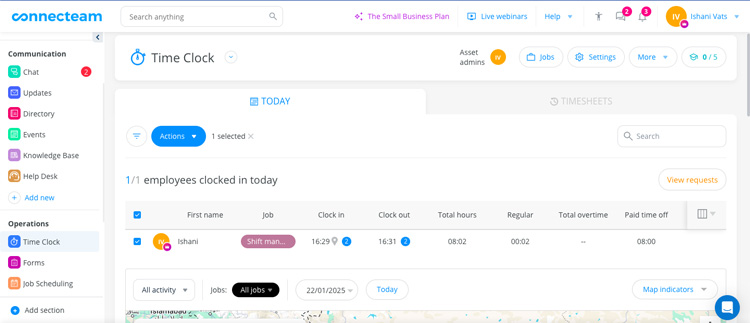
On one dashboard, you can view each employee's clock-in and clock-out times, total hours worked, overtime, PTO and other key information.
You can create a time-off policy to decide whether time off will be tracked in hours or days. You can set a balance limit or offer unlimited time off. If there’s a limit, you can specify whether it's a fixed yearly amount or based on hours worked. Plus, you can adjust settings like accrual cycles and assign the policy to your team.
### Mobile App
Connecteam offers two apps: the Connecteam app and the Kiosk app. Both apps offer the same features but serve different purposes.
The Connecteam app is designed for personal use on individual devices, giving each employee their own experience. The Kiosk app, on the other hand, is intended for shared use on a single device, like a tablet or computer, acting as a central login station for all employees.
When logging in, employees use their registered phone numbers in the Connecteam app, while the Kiosk app uses a unique 4-digit PIN assigned to each employee. This makes the Kiosk app ideal for workplaces where not every employee has their own device.
I appreciate that Connecteam’s mobile app is just as intuitive and user-friendly as its web app. It allows you to add and manage schedules, start conversations, clock in and out of work, create and fill out forms, access the phone directory and more.
I appreciate that Connecteam’s mobile app is just as intuitive and user-friendly as its web app. It lets you do a lot of things like adding and managing schedules, starting conversations, clocking in and out of work, creating and filling out forms, accessing the phone directory, and more.
Here’s what the admin dashboard looks like on the mobile app.
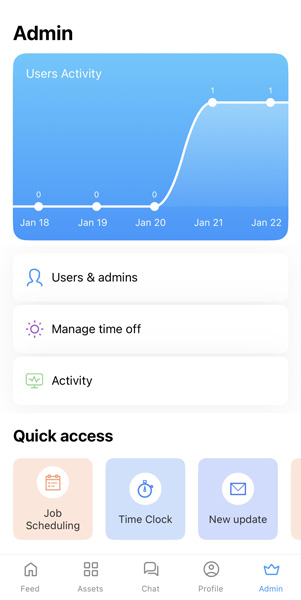
You can easily create shifts and assign them to employees in just a few clicks.

Employees can track and edit time directly on the app. They can also add shift and leave requests, view jobs, and message other users.
Here’s a look at the employee dashboard on the mobile app.
### Geofencing
Connecteam’s geofencing feature lets you track where employees clock in and out using GPS and ensure they’re where they need to be during work hours. You can set up unlimited geofenced areas that define specific locations where employees are allowed to clock in and out.
These zones can be customized based on shift requirements, job sites or specific work zones, and you can even control the hours during which geofencing rules apply. This makes it easy to eliminate issues like buddy punching, time theft or absences.
The admin dashboard displays employee locations on a map, with filters to view specific jobs, activities or past shifts.
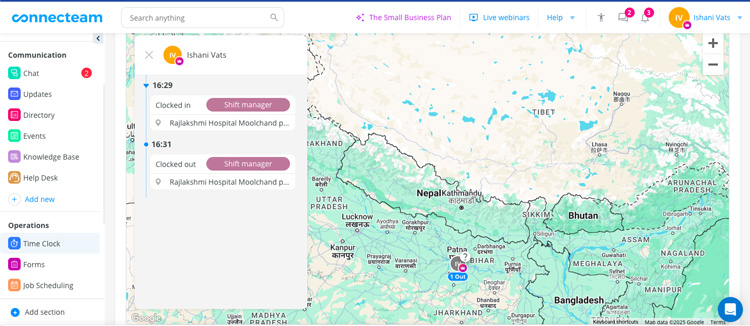
With real-time visibility, you can monitor employee attendance directly from your desktop or mobile device. The app provides instant updates, showing you exactly when and where employees clock in and out.
If employees attempt to clock in from outside the designated geofence, you’ll receive a request that you can approve or decline. This helps you verify that workers are arriving on time and staying within their assigned areas, providing peace of mind and control over field operations.
Geofencing also simplifies payroll by automatically logging accurate work hours and job locations onto a timesheet. This ensures that all clock-ins and clock-outs are tied to the correct locations. Alerts for early clock-ins, forgotten clock-outs, or overtime can help you address potential issues before they affect your bottom line.
Breadcrumb tracking shows employees’ routes, and you can turn on map indicators to highlight job sites or geofences.
**Note:** *Geofencing and Breadcrumb Tracking are included in Connecteam’s Advanced and Expert plans, while Live GPS Tracking is exclusively available in the Expert plan.*
## Key Features
### Operations
#### Time Clock
- **Timesheets:** Track employee hours easily with a simple timesheet system. Users can clock in and out, and the system automatically records the time, and admins can review and approve timesheets.
- **Pay Rate:** Set pay rates for each employee, and adjust rates per job if needed. Customize pay details based on roles or tasks to ensure accurate pay calculations for all team members.
- **Payroll Integrations**: Link your Connecteam account with popular payroll providers like Gusto, QuickBooks and Paychex.
**Task Management**
- **Task Creation:** Quickly create and assign tasks from your mobile device. Set one-time or recurring tasks with clear details, subtasks and attachments like checklists and files.
- **Task Tracking and Organization:** Easily track progress by grouping and filtering tasks by due date or priority. Get real-time status updates and keep a list of uncompleted tasks for easy follow-up.
- **Communication:** Use push notifications to remind team members of tasks and set up dedicated messaging channels. Chat directly with employees and tag them in comments to streamline communication.
#### Scheduling
- **Multi-Location Scheduling:** Manage employees across multiple locations without extra fees. The Cross Schedule Conflicts feature helps prevent scheduling overlaps for smooth shift management across sites.
- **Auto Scheduling:** Automatically create optimized schedules based on shift coverage, employee availability, time-off requests and qualifications.
- **Drag & Drop Scheduling:** Quickly assign or reassign shifts by simply dragging and dropping employee names.
#### Forms and Checklists
- **Custom Forms:** Use pre-made templates to save time and instantly distribute them across multiple locations.
- **Real-Time Updates:** Monitor submitted forms, interact with employees, and attach various file types like PDFs and images.
- **Data Storage:** Access and organize past submissions, and export and share reports across your organization.
### Communications
#### Updates
- **Personalization:** Personalize your feed with your brand’s logo, colors and media (GIFs, images, videos). For different types of posts, you can turn comments, likes, and emojis on or off.
- **Chat:** Reach specific teams, locations or departments, and send urgent updates via direct chat or text. Pin important updates, set reminders and track who has seen each post.
- **Analytics:** Use stats on employee reactions, views and engagement to measure the impact of your updates and fine-tune your communication strategy.
#### Directory
- **Centralized Storage:** The app allows you to keep all your work contacts in one place and search users by name, job title, department or location. You can also contact anyone via chat, email, text or call directly from the app.
- **Security:** Control who can access employee contact details to comply with privacy regulations.
- **Extended Network:** Add non-employee contacts such as vendors, suppliers and clients, and customize their details.
#### Surveys
- **Surveys and Polls:** Create custom surveys and polls to gather real-time feedback from your employees. Use pre-made templates or craft your own, and distribute them to team members.
- **Push Notifications and Auto-Reminders:** Send real-time alerts and reminders to ensure that all employees can participate easily, whether they’re in the office or outside.
- **Real-Time Insights:** Access live results immediately after employees submit their responses. Track who’s completed surveys and export data to Excel for further analysis.
#### Events
- **Event Management:** Plan, share and promote company events. Customize event invites with all the important details, like date, location and images, and send them to individuals, teams or the whole company.
- **Push Notifications and Auto-Reminders:** Send real-time alerts and reminders to ensure that all employees can participate easily, whether they’re in the office or outside. Display who’s attending and allow participants to confirm their attendance from anywhere.
### HR and Skills
#### Quizzes
- **Employee Quiz App:** Evaluate your team's knowledge on Connecteam’s Employee Quiz app. Create customizable courses and quizzes, track each employee's learning status, manage and evaluate performance, and more.
- **Progress Tracking:** Create quizzes quickly and track each employee’s progress from anywhere. Assess knowledge based on role, tenure or department to enhance your training efforts.
- **Rewards:** Reward top performers and motivate your team to keep learning, all within the same platform.
#### Documents
- **Document Management:** Digitize and organize all employee documents securely in one place. Let your team upload required documents directly from their phones, reducing hassle.
- **Expiration Tracking:** Set expiration dates for each document or document type, and notify employees when it’s time to renew their documents
- **Compliance:** Automate document collection, set up notifications for renewals, and ensure all compliance requirements are met with minimal effort.
#### Employee ID Card
- **Employee ID Management:** Digitally issue, update and manage employee IDs, and allow your team to carry their ID cards on their mobile devices.
- **Security and Efficiency:** Use QR codes for access management, instantly deactivate cards for former employees and prevent issues like lost or forgotten cards.
- **Customization:** Customize employee IDs to display the information you need, and make quick updates as required.
## Approach to Common Challenges
- **Simplifying Workforce Management:** With the Operations Hub, you can manage all your business processes in one place. Simplify staff scheduling with the Job Scheduler, assign tasks efficiently through Quick Tasks and eliminate paperwork by digitizing forms. Plus, with the Time Clock, you can track time easily and ensure smooth payroll processing without the end-of-month rush.
- **Improving Motivation and Engagement:** Connecteam’s recognition feature boosts engagement by making employees feel appreciated. Admins can celebrate achievements with personalized messages, GIFs and custom badges, while group celebrations and tracking recognition promote teamwork and a positive workplace culture.
- **Streamlining Scheduling Processes:** Recruitment Alley, a growing healthcare registry and staffing agency, transformed its scheduling process with Connecteam. The platform streamlined high-volume shift scheduling and improved employee management as the company expanded from 30 to over 130 employees. Key results include:
- **98% app adoption:** The easy-to-use platform was quickly embraced by the team.
- **60% reduction in human errors:** Automated features minimized scheduling mistakes.
- **5 hours saved per week:** Time spent managing schedules was significantly reduced.
- **Delivering Employee Training Remotely:** You can quickly train your frontline teams through their mobile devices and track progress in real time. Create and deliver courses, onboard users, set due dates, send reminders and manage certifications at any time, without having to be in the office.
- **Making Employee Management Effective:** Connecteam's Timeline App lets you view detailed timelines for each employee, including evaluations, salary changes and key events, with quick setup and no need for a company email. You can attach files, monitor refresher courses and ensure compliance with licenses, all from a user-friendly interface accessible on mobile.
## How Much Does Connecteam Cost?
Here’s my analysis of Connecteam's plans for the Operations, Communications and HR & Skills hub, and its four tiers: Basic, Advanced, Expert and Enterprise.
**Note:** *The pricing listed below is based on annual billing*.
#### Operations Hub
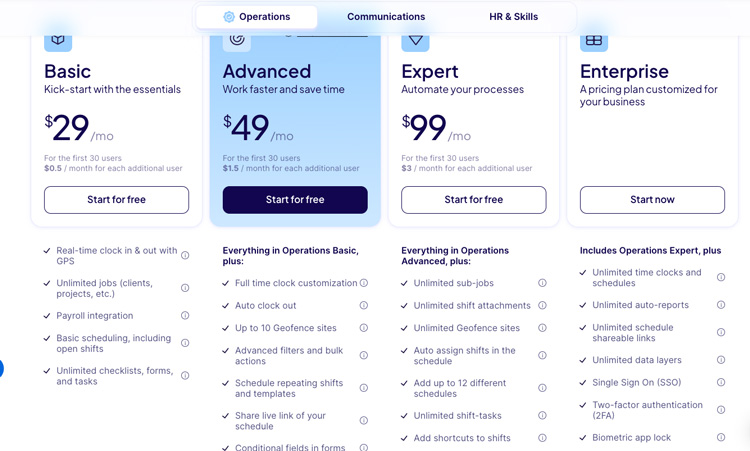
- **Basic**
- $29/month for up to 30 users
- $0.5/month for each additional user
- Features include real-time clock in/out, unlimited jobs, payroll integration and basic scheduling.
- **Advanced**
- $49/month for up to 30 users
- $1.5/month for each additional user
- Includes everything in the Basic plan, plus full-time clock customization, auto clock out, up to 10 geofence sites, advanced filters and bulk actions, schedule repeating shifts and templates and more.
- **Expert**
- $99/month for up to 30 users
- $3/month for each additional user
- Includes everything in the Advanced plan, plus unlimited sub-jobs, unlimited shift attachments, unlimited geofence sites, auto assign shifts in the schedule, add up to 12 different schedules, unlimited shift-tasks, add shortcuts to shifts, time clock and forms auto-reports.
- **Enterpris**
- Custom pricing
- Includes everything in the Expert plan, plus unlimited time clocks and schedules, unlimited auto-reports, unlimited schedule shareable links, unlimited data layers, Single Sign-On (SSO), two-factor authentication (2FA), biometric app lock, full API access and a personal success manager.
#### Communications Hub

- **Basic**
- $29/month for up to 30 users
- $0.5/month for each additional user
- Features include unlimited personal/group chats, media attachments and company feeds.
- **Advanced**
- $49/month for up to 30 users
- $1.5/month for each additional user
- Includes everything in the Communications Basic plan, plus the ability to schedule chat messages for later, advanced chat conversation settings, live polls on the company feed, advanced privacy settings in the directory, anonymous surveys, advanced thread control and automated Smart Groups.
- **Expert**
- $99/month for up to 30 users
- $3/month for each additional user
- Includes everything in the Communications Advanced plan, plus the ability to add shortcuts in chat, updates and events, pop-up updates with read confirmation, auto-translate feed updates, new device-login alerts, custom publishers for feed updates and more.
- **Enterprise**
- Custom pricing for companies with 300+ employees.
- Includes everything in the Communications Expert plan, plus unlimited storage in the knowledge base, unlimited number of help desks, unlimited attachment types per update, fully customized app welcome screen, biometric app lock, full API access and a personal success manager.
#### HR & Skills Hub
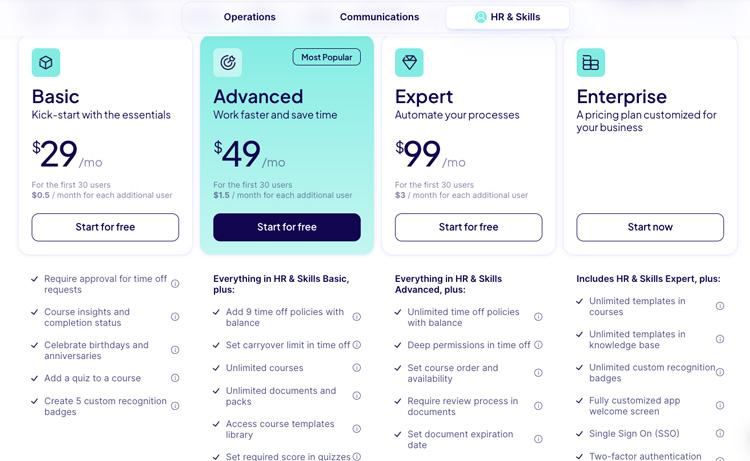
- **Basic**
- $29/month for up to 30 users
- $0.5/month for each additional user
- Includes approval for time off requests, course insights and completion status, celebrating birthdays and anniversaries, adding a quiz to a course and creating five custom recognition badges.
- **Advanced**
- $49/month for up to 30 users
- $1.5/month for each additional user
- Includes everything in the HR & Skills Basic plan, plus the ability to add nine time off policies with balance, set a carryover limit in time off, unlimited courses, unlimited documents and packs, access to the course templates library and more.
- **Expert**
- $99/month for up to 30 users
- $3/month for each additional user
- Includes everything in the HR & Skills Advanced plan, plus unlimited time off policies with balance, deep permissions in time off, the ability to set course order and availability, require a review process in documents, set document expiration dates, team-based celebrations, limit time off request time-frame and custom publishers for recognitions.
- **Enterprise**
- Custom pricing
- Includes everything in the HR & Skills Expert plan, plus unlimited templates in courses, unlimited templates in the knowledge base, unlimited custom recognition badges, a fully customized app welcome screen, SSO, 2FA, biometric app lock, full API access and a personal success manager.
**Pricing Summary (Monthly/Yearly) for each hub:**
- **Basic Plan:** $29/month, $348/year
- **Advanced Plan:** $49/month, $588/year
- **Expert Plan:** $99/month, $1,188/year
- **Enterprise Plan:** Custom pricing
**Yearly Savings:** If paid yearly, you save 18% on all plans.
The platform's plans gradually add more features to support growing needs. The Basic plan covers essential tools, but as you move to Advanced or higher, you get more options like scheduled messages, live polls and auto-translation.
Higher-tier plans also provide unlimited knowledge bases, geofencing, advanced permissions and deeper time-off management. Expert and Enterprise plans include unlimited storage, live GPS tracking, API access and help desk tools catering to larger organizations. This tiered structure ensures tailored solutions for varying business needs.
#### Free Plan for Small Businesses
Connecteam’s standout offering is its **free plan for small businesses with up to 10 users**. This plan offers over $4,000 worth of features annually with no hidden catches. Its initiative reflects the company's mission to support small businesses, especially in challenging economic conditions, by removing barriers such as complex sign-ins or costly software.
- The app's **Operations Hub** simplifies day-to-day management with tools for time clocks, scheduling, quick tasks and form submissions.
- The **Communications Hub** centralizes workplace communication, offering chat, updates, surveys and a knowledge base to ensure all employees stay informed and connected.
- The **HR & Skills Hub** further enhances functionality with onboarding tools, training modules, document sharing and recognition features.
After your 14-day free trial, you can switch to the Small Business Plan to continue using Connecteam for free without losing access to its features. This plan offers free, full access to all hubs, products and most of the platform's advanced features, making it ideal for smaller teams.
### Limited Plan
The Limited plan is ideal for companies with 11-30 employees. Here’s a quick look into the features it offers under the Operations, Communications, and HR and Skills hub:

### Refund Policy
Connecteam offers a flexible refund policy for annual subscriptions. If you cancel your Basic, Advanced or Expert annual plan within the first 30 days, you’ll receive a pro-rated refund for the remaining months. However, canceling your account and requesting a refund will immediately block access to your account, so it’s essential to export any important data in Excel or PDF before canceling.
For annual plans canceled after 30 days, no refunds are provided. Similarly, monthly subscriptions are non-refundable, but you can cancel anytime, and the plan will terminate at the end of the current billing cycle.
### Seat Management and Charges
You’re only charged for additional seats in the hubs you’re paying for. For instance, if you’re using Operations Expert, Communications Advanced, and HR & Skills Limited, you’ll only pay for additional seats in the Operations Expert and Communications Advanced plans.
When adding new users beyond your available seats, you’ll automatically be charged for the extra seats. Charges are calculated pro-rated based on the remaining time in your billing period.
- For monthly plans, the price reflects the time left in your current month. For example, adding a seat halfway through your billing month results in a half-month charge.
- For yearly plans, charges reflect the time left in the annual billing cycle. If you add a seat in September for a yearly plan starting in January, you’ll only pay for the remaining 4 months.
You can add seats incrementally or in bulk, depending on your needs. However, seats are non-refundable except for yearly subscriptions canceled within the first 30 days.
**Plan-Specific Rules:**
- **Small Business Plan:** Limited to 10 total active and archived users.
- **Enterprise Plan:** Seats are added in increments of 50 users.
## Cost Of Ownership
Frequently asked questions regarding Connecteam’s pricing include:
**Q. Does Connecteam offer a free trial?**
A. Yes, Connecteam offers a 14-day free trial.
**Q. What’s Included in Connecteam’s free plan?**
A. The Connecteam free plan offers a range of features to manage your team effectively at no cost:
**Time Tracking**
- One-time clock with real-time clock-in/out.
- Kiosk station for team use.
- Edit indications on timesheets.
- Mobile admin capabilities for easy management.
- Scheduling & Task Management:
- Employee scheduling with in-shift clock-in/out.
- Unlimited checklists and forms with pre-made templates.
- Task tagging (up to five tags) for streamlined filtering and searches.
**Communication Tools**
- Updates and announcements.
- Engaging posts with likes, comments, mentions and replies.
- Organizational chat and directory for streamlined communication.
- Event creation and management.
**Knowledge Base**
- One category with up to three knowledge bases, each allowing up to 3 folders.
- 500 MB storage per knowledge base.
- Templates for organizing resources.
- Training & Onboarding:
- One course category with up to three courses.
- Unlimited sections within courses, supporting text, images, PDFs and YouTube embeds.
- Quizzes with two possible answers per question.
**Employee Engagement & Rewards**
- Employee recognition with one default badge.
- Rewards with one document pack (up to three documents per pack).
**Q. How does Connecteam’s pricing work?**
A. Connecteam offers flexible plans for its three hubs: Basic, Advanced and Expert. You pay a fixed rate for up to 30 users and a per-user fee beyond that.
**Q. What happens when I have more than 30 users?**
A. Once your team reaches 30 users, Connecteam offers affordable pricing for each additional user. Here’s the cost breakdown:
**1) Basic Plan**
- **Yearly:** $0.50 per user/month
- **Monthly:** $0.60 per user/month
**2) Advanced Plan**
- **Yearly:** $1.50 per user/month
- **Monthly:** $1.80 per user/month
**3) Expert Plan**
- **Yearly:** $3.00 per user/month
- **Monthly:** $3.60 per user/month
Your plan’s fixed price covers the first 30 users, and then there is a small additional charge for each additional team member.
**Q. Do I have to pay for Connecteam?**
A. If you’re a small business with fewer than 10 employees, the **Small Business** plan is totally free and includes all the essentials you’ll need. If you have between 10 and 30 employees, you can continue using the free **Limited** plan after your 14-day trial. This plan includes the basics, and you can always upgrade as your needs grow.
**Q. How does the 14-day trial work?**
A. You can test out Connecteam’s full range of features for free for 14 days—no credit card required. This gives you a chance to explore everything the Expert plan has to offer. After the trial ends, you can choose between continuing with one of our premium plans or using the free **Limited** plan (which has fewer features).
**Q. What happens when my trial ends?**
A. When your 14-day trial wraps up, you’ll decide whether to keep using Connecteam by subscribing to a paid plan or opting for the free Limited plan. If you choose not to continue, all your data remains intact until you either decide to subscribe or delete your account.
**Q. Can I change plans after subscribing?**
A. Yes, you can switch your plan whenever you like! Whether you want to upgrade, downgrade or cancel, it’s flexible. The vendor offers both monthly subscriptions (which you can cancel anytime) and annual subscriptions (with a prorated refund if you cancel within the first 30 days).
**Q. How do the two free months for annual subscriptions work?**
A. If you choose to pay annually, you’ll effectively get 2 months for free. This is because your total annual cost is divided by 12, giving you a lower monthly rate than if you paid monthly.
**Q. What if I want to add more users during my billing cycle?**
A. If you need to add extra seats during the current billing period, we’ll calculate the cost on a pro-rated basis. You only pay for the remaining portion of the month. When your next billing cycle starts, the full cost of the new seats will be included.
**Q. Can I continue using Connecteam for free after my 14-day trial ends?**
A. Yes. After your 14-day free trial, you can switch to the Small Business Plan to keep using Connecteam for free without losing access to its features.
**Q. What currency is pricing in?**
A. All prices are in USD.
**Q. Does live tracking work 24/7?**
A. No, the Breadcrumbs feature only tracks employee locations during work hours. It stops recording when they clock out.
**Q. What does "number of time clocks/schedules" mean?**
A. If you have multiple locations, you can set up separate time clocks or schedules for each branch under the Advanced plan or higher.
## Limitations
Notable limitations of Connecteam include:
- **Lacks Offline Time Tracking:** Connecteam’s offline capabilities are limited. Without an internet connection, users can’t clock in or log breaks.
- **Doesn’t Offer Mileage Tracking:** Connecteam doesn’t track mileage automatically when employees clock in. However, you can use shift attachments to collect this information manually.
- **Lacks Security Features In the Basic Plan:** One drawback of Connecteam is that it offers key security features like SSO, 2FA, biometric app lock and full API access only under the Enterprise plan.
## Training Resources
- **Help Center:** Find guides on getting started, managing operations, communications, and HR tasks. It also offers troubleshooting, best practices, and technical support for API and integrations. Webinars and articles cover key features like scheduling, time tracking and employee management.
- **Video Tutorials:** Watch video tutorials that cover a wide range of topics to help you navigate the platform. These include basic setup, cross-platform features and operations, tutorials for the time clock, job scheduler, forms and tasks. Communications tutorials cover chat, directory and updates, while HR and skills tutorials focus on quizzes, knowledge base, documents, courses and time off.
- **Academy:** Connecteam Academy provides a library of video tutorials designed to help users get the most out of Connecteam's features. It covers various categories, including setup, operations, communications, HR & skills and industry-specific setups. The Academy also includes webinars and user manuals to offer support for different business needs.
## FAQs
Frequently asked questions regarding Connecteam include:
**Q. What is Connecteam used for?**
A. Connecteam is an all-in-one employee management app designed to streamline scheduling, communication, task management, and time tracking for businesses. It simplifies workforce operations with features like shift scheduling, job dispatching and collaboration tools, making it especially beneficial for managing remote employees.
**Q. Who is the CEO of Connecteam?**
A. Amir Nehemia is the CEO of Connecteam. With a background in military precision and corporate strategy, Amir leads the company in creating innovative solutions tailored for non-desk employees, ensuring businesses can effectively manage their teams.
**Q. Is Connecteam free to use?**
A. Connecteam offers a free plan, but some advanced features are only included in higher-tiered plans. For example, geofencing and breadcrumb tracking are available in the Advanced and Expert plans, while live GPS tracking is exclusive to the Expert plan.
**Q. Who owns Connecteam?**
A. Connecteam was founded in 2016 by Amir Nehemia, Daniel Nuriel and Yonatan Nuriel. It has since grown to serve over 36,000 customers in 80 countries, with prominent clients such as SodaStream, Sodexo and Berry Global.
**Q. Does Connecteam have payroll?**
A. Yes, Connecteam integrates with several payroll providers, including QuickBooks Online, Gusto, Xero (AU + UK) and Paychex Flex. Additionally, export templates for QuickBooks Desktop and ADP Run are available to simplify payroll processing.
**Q. How do I join Connecteam?**
A. To create an account, visit Connecteam’s website on your desktop and click Get Started. Alternatively, you can download the app, enter your country and mobile number, and verify your account.
**Q. Does Connecteam track your phone?**
A. Connecteam only tracks your location while you’re clocked in. Your location data isn’t shared with your employer or stored in the database when you’re off the clock, ensuring privacy during personal time.
**Q. How secure is Connecteam?**
A. Connecteam prioritizes security by adhering to industry-leading privacy and data protection standards. The platform undergoes regular security audits and penetration tests, relying on Tier 1 suppliers for cutting-edge infrastructure and advanced security measures.
**Q. What type of software is Connecteam?**
A. Connecteam is a workforce operations platform that combines scheduling, time tracking, task management, and communication tools into one solution, tailored for managing remote employees efficiently.
**Q. Does Connecteam have a desktop app?**
A. Yes, Connecteam is optimized for use on smartphones and desktop computers. While the regular Connecteam app can also be installed on tablets, it’s not specifically designed for tablet use, unlike the Kiosk app, which is tailored for devices like iPads.
**Q. How do I schedule in Connecteam?**
A. To create a new Job Schedule, navigate to the Job Schedule section in the left menu and click Add New. Give the schedule a title, then assign it to a smart group or select specific users. This setup allows you to manage schedules across multiple branches or locations effectively.
**Q. How much data does Connecteam use?**
A. Connecteam is designed to use minimal data. On average, a Connecteam app user consumes less than 1 MB of data per day.
**Q. Does Connecteam work without the internet?**
A. No, Connecteam requires an active internet connection to function. Whether you’re using the mobile app, Kiosk application or desktop version, an internet connection is necessary to access its features.
**Q. How easy is Connecteam to use?**
A. Connecteam is designed for ease of use, with an intuitive interface and mobile app. It doesn't require extensive technical knowledge, and setup is typically straightforward
**Q. Can Connecteam be customized to fit my business needs?**
A. Yes, Connecteam offers customization options for features like forms, fields and workflows.
**Q. Does Connecteam integrate with other business apps?**
A. Connecteam integrates with various popular apps, including payroll providers, accounting software, and productivity tools. Their website has a full list of integrations.
**Q. Can Connecteam be used to manage remote teams?**
A. Yes, Connecteam's mobile app and communication features are well-suited for managing remote or dispersed workforces. It facilitates communication, task management, and engagement across multiple locations.
![Banner of Pricing guide for Connecteam]()
## Pricing & Cost Details
See the Price/User for the top workforce management software… plus the most important considerations and questions to ask when shopping.
See Pricing Details
## Compare Workforce Management Software
These are the top products most often compared.
Generating Scorecard... Compare to Connecteam
You can choose 4 products to compare
[![SuccessFactors product logo]() SuccessFactors](https://www.selecthub.com/p/hr-management-software/successfactors/)
[![Deputy product logo]() Deputy](https://www.selecthub.com/p/employee-scheduling-software/deputy/)
[![Infor Workforce Management product logo]() Infor Workforce Management](https://www.selecthub.com/p/workforce-management-software/infor-workforce-management/)
[![Humanity product logo]() Humanity](https://www.selecthub.com/p/employee-scheduling-software/tcp-humanity/)
[![Quinyx product logo]() Quinyx](https://www.selecthub.com/p/workforce-management-software/quinyx/)
[![Calabrio product logo]() Calabrio](https://www.selecthub.com/p/workforce-management-software/calabrio/)
[![WorkForce Suite product logo]() WorkForce Suite](https://www.selecthub.com/p/workforce-management-software/workforce-suite/)
[![Verint Workforce Management product logo]() Verint Workforce Management](https://www.selecthub.com/p/workforce-management-software/verint-workforce-management/)
[![Agendrix product logo]() Agendrix](https://www.selecthub.com/p/employee-scheduling-software/agendrix/)
Generating Scorecard... Compare to Connecteam
## Head-to-Head
Comparison

vs
- [ADP Workforce Now](https://www.selecthub.com/hr-management-software/adp-workforce-now-vs-connecteam/)
- [Assembled](https://www.selecthub.com/workforce-management-software/assembled-vs-connecteam/)
- [BambooHR](https://www.selecthub.com/hr-management-software/bamboohr-vs-connecteam/)
- [Beeline](https://www.selecthub.com/workforce-management-software/beeline-vs-connecteam/)
- [Calabrio](https://www.selecthub.com/workforce-management-software/connecteam-vs-calabrio/)
- [cegid HR](https://www.selecthub.com/workforce-management-software/connecteam-vs-cegid-hr/)
- [ClearCo](https://www.selecthub.com/workforce-management-software/connecteam-vs-clearcompany/)
- [Crew](https://www.selecthub.com/workforce-management-software/crew-app-vs-connecteam/)
- [Dayforce](https://www.selecthub.com/hr-management-software/dayforce-vs-connecteam/)
- [Deltek Talent Management](https://www.selecthub.com/workforce-management-software/connecteam-vs-deltek-talent-management/)
- [Dynamics 365 Human Resources](https://www.selecthub.com/workforce-management-software/connecteam-vs-dynamics-365-human-resources/)
- [Fourth](https://www.selecthub.com/workforce-management-software/fourth-vs-connecteam/)
- [Gloat](https://www.selecthub.com/workforce-management-software/gloat-com-vs-connecteam/)
- [Infor HCM](https://www.selecthub.com/workforce-management-software/connecteam-vs-infor-hcm/)
- [Infor Workforce Management](https://www.selecthub.com/workforce-management-software/connecteam-vs-infor-workforce-management/)
- [Legion WFM](https://www.selecthub.com/workforce-management-software/connecteam-vs-legion-workforce/)
- [Namely](https://www.selecthub.com/hr-management-software/namely-vs-connecteam/)
- [Natural Insight](https://www.selecthub.com/workforce-management-software/natural-insight-vs-connecteam/)
- [NiCE Workforce Management](https://www.selecthub.com/workforce-management-software/connecteam-vs-nice-iex-workforce-management/)
- [Oracle HCM Cloud](https://www.selecthub.com/workforce-management-software/connecteam-vs-oracle-hcm-cloud/)
- [Oracle Talent Management](https://www.selecthub.com/workforce-management-software/connecteam-vs-oracle-talent-management/)
- [OrangeHRM](https://www.selecthub.com/workforce-management-software/connecteam-vs-orangehrm/)
- [Paycom](https://www.selecthub.com/hr-management-software/paycom-vs-connecteam/)
- [Paylocity](https://www.selecthub.com/hr-management-software/paylocity-vs-connecteam/)
- [PDS Vista](https://www.selecthub.com/workforce-management-software/connecteam-vs-pds-vista/)
- [PeopleFluent](https://www.selecthub.com/workforce-management-software/connecteam-vs-peoplefluent/)
- [POSS](https://www.selecthub.com/workforce-management-software/connecteam-vs-poss/)
- [QGenda](https://www.selecthub.com/workforce-management-software/qgenda-vs-connecteam/)
- [Quinyx](https://www.selecthub.com/workforce-management-software/connecteam-vs-quinyx/)
- [Rippling](https://www.selecthub.com/hr-management-software/rippling-vs-connecteam/)
- [Sage HR](https://www.selecthub.com/workforce-management-software/connecteam-vs-sage-hr/)
- [StaffReady](https://www.selecthub.com/workforce-management-software/staffready-vs-connecteam/)
- [SubItUp](https://www.selecthub.com/workforce-management-software/subitup-vs-connecteam/)
- [SuccessFactors](https://www.selecthub.com/hr-management-software/successfactors-vs-connecteam/)
- [SuccessFactors Talent Management](https://www.selecthub.com/workforce-management-software/connecteam-vs-successfactors-talent-management/)
- [SumTotal](https://www.selecthub.com/workforce-management-software/connecteam-vs-sumtotal/)
- [SwipeClock](https://www.selecthub.com/workforce-management-software/swipeclock-vs-connecteam/)
- [Symplr](https://www.selecthub.com/workforce-management-software/symplr-vs-connecteam/)
- [Synerion](https://www.selecthub.com/workforce-management-software/connecteam-vs-synerion/)
- [TalentGuard](https://www.selecthub.com/workforce-management-software/connecteam-vs-talentguard/)
- [TalentQuest](https://www.selecthub.com/workforce-management-software/connecteam-vs-talentquest/)
- [talentReef](https://www.selecthub.com/talent-management-system/talentreef-vs-connecteam/)
- [TriNet HR Plus](https://www.selecthub.com/hr-management-software/trinet-vs-connecteam/)
- [UKG Pro](https://www.selecthub.com/hr-management-software/ukg-pro-vs-connecteam/)
- [Unifocus](https://www.selecthub.com/workforce-management-software/connecteam-vs-unifocus/)
- [Verint Workforce Management](https://www.selecthub.com/workforce-management-software/connecteam-vs-verint-workforce-management/)
- [Workday HCM](https://www.selecthub.com/workforce-management-software/connecteam-vs-workday-hcm/)
- [Workday Talent Management](https://www.selecthub.com/workforce-management-software/connecteam-vs-workday-talent-management/)
- [WorkForce Suite](https://www.selecthub.com/workforce-management-software/workforce-suite-vs-connecteam/)
- [Worksuite](https://www.selecthub.com/workforce-management-software/connecteam-vs-worksuite/)
## Awards
SelectHub research analysts have evaluated Connecteam and concluded it earns best-in-class honors for Employee Engagement and Collaboration and Platform Capabilities and Compliances. Connecteam stands above the rest by achieving an ‘Excellent’ rating as a User Favorite.


## Pricing for Workforce Management Software
![Banner of Pricing guide for Workforce Management Software]()
## Similar Products
Here are the most similar products to Connecteam.
[![LightWork Software product logo]() LightWork Software](https://www.selecthub.com/p/workforce-management-software/lightwork-software/)
[![Roubler product logo]() Roubler](https://www.selecthub.com/p/workforce-management-software/roubler/)
[![Dyflexis product logo]() Dyflexis](https://www.selecthub.com/p/workforce-management-software/dyflexis/)
[![TransparentBusiness product logo]() TransparentBusiness](https://www.selecthub.com/p/workforce-management-software/transparentbusiness/)
[![Humanforce product logo]() Humanforce](https://www.selecthub.com/p/workforce-management-software/humanforce/)
[![Shiftee product logo]() Shiftee](https://www.selecthub.com/p/workforce-management-software/shiftee/)
[![Prospr At Work product logo]() Prospr At Work](https://www.selecthub.com/p/workforce-management-software/prospr-at-work/)
[![Ubeya product logo]() Ubeya](https://www.selecthub.com/p/workforce-management-software/ubeya/)
[![StaffingNation product logo]() StaffingNation](https://www.selecthub.com/p/workforce-management-software/staffingnation/)
[![foundU product logo]() foundU](https://www.selecthub.com/p/workforce-management-software/foundu/)
## About the Contributors
The following expert team members are responsible for creating, reviewing, and fact checking the accuracy of this content.
[![Ishani Vats]()](https://www.selecthub.com/author/ishani-vats/)
Written by
[Ishani Vats](https://www.selecthub.com/author/ishani-vats/)
Technical Content Writer
Ishani is a Technical Content Writer at SelectHub who covers LMS, workforce management, telemedicine and POS. She holds a master’s degree in Journalism and is passionate about translating complex technical concepts into engaging and accessible content for readers. Along with keeping the professional spirit hydrated, she likes petting dogs, looking up random facts and listening to any Lumineers song on repeat.
[See Full Bio](https://www.selecthub.com/author/ishani-vats/)
[![Dianna Dragonetti]()](https://www.selecthub.com/author/dianna-dragonetti/)
Edited by
[Dianna Dragonetti](https://www.selecthub.com/author/dianna-dragonetti/)
Content Editor
As an editor, Dianna Dragonetti leads a team of five writers in writing about a variety of software, with an emphasis on how these tools empower businesses. Categories include accounting, learning management systems, content management systems, supply chain management, and electronic data interchange.
[See Full Bio](https://www.selecthub.com/author/dianna-dragonetti/)
Your review has been submitted
and should be visible within 24 hours.
Review Title
Pros
Cons
Overall feedback
Your name
Your job title
Industry
Choose your main industry
- Accounting / CPA
- Advertising
- Aerospace & Defense
- Agriculture
- Apparel
- Architecture
- Auto Dealership
- Automotive
- Banking & Financial Services
- Banking & Mortgage
- Chemicals
- Construction & Engineering
- Construction / Contracting
- Consulting
- Consumer Products
- Distribution
- E-commerce
- Education
- Electronics
- Energy & Utilities
- Federal Government
- Field Maintenance
- Food & Beverage
- Healthcare / Social Services
- Hospitality / Gaming / Travel
- Human Resources
- Industrial Machinery
- Information Technology & High Tech
- Insurance
- Legal
- Maintenance / Field Service
- Manufacturing
- Marketing Services
- Media & Communications / Entertainment
- Mill Products
- Mining / Metals
- Mortgage
- Non-Profit
- Not Available
- Oil & Gas
- Other
- Other Services
- Payroll Provider
- Pharmaceuticals
- Professional Employer Organization
- Professional Services
- Property Management
- Public Sector
- Real Estate
- Recruiting Agency
- Religious Institutions
- Retail
- Sales & Marketing
- Semiconductors
- Software / IT
- Sports and Recreation
- Staffing Agency
- State & Local Government
- Telecommunications
- Third-Party Administrator
- Transportation & Logistics
- Wholesale Distribution
Company Size
Choose your company size
- 1 employee
- 2 to 9 employees
- 10 - 19 employees
- 20 - 49 employees
- 50 - 99 employees
- 100 - 499 employee
- 500 - 999 employees
- 1,000 - 2,499 employees
- 2,500 - 4,999 employees
- 5,000 - 9,999 employees
- 10,000 - 24,999 employees
- 25,000 - 49,999 employees
- 50,000 + employees
```json
{
"@context": "https://schema.org",
"@type": "BreadcrumbList",
"itemListElement": [
{
"@type": "ListItem",
"position": 1,
"name": "Home",
"item": "https://www.selecthub.com/"
},
{
"@type": "ListItem",
"position": 2,
"name": "Workforce Management",
"item": "https://www.selecthub.com/category/workforce-management/"
},
{
"@type": "ListItem",
"position": 3,
"name": "Workforce Management Software",
"item": "https://www.selecthub.com/c/workforce-management-software/"
},
{
"@type": "ListItem",
"position": 4,
"name": "Connecteam"
}
]
}
{
"@context": "http://schema.org",
"@type": "SoftwareApplication",
"name": "Connecteam",
"description": "Connecteam is a mobile-first workforce management platform designed to simplify businesses' management of remote and/or hybrid teams. Its app integrates essential tools like scheduling, time tracking, communication and HR management.Its scheduling and time management features help you create and share schedules, track work hours with a GPS-enabled time clock and automate payroll processes.It provides a centralized space for updates, work chats and surveys. Managers can share company announcements, hold discussions and gather feedback. The knowledge base feature lets teams access important documents and resources anytime.For HR and training, Connecteam offers tools to onboard employees, assign courses, and track progress through quizzes and certificates. Recognition features let you reward achievements, while the document management system ensures compliance with industry regulations.User reviews of Connecteam highlight its ease of use and intuitive interface that’s accessible even to non-tech-savvy employees. They praise its mobile-first design for enabling employees to manage tasks, schedules and communication directly from their phones.Many also commend its excellent customer support. However, some users note a learning curve for more complex setups and wish it offered more granular customization and control.Connecteam offers a 14-day free trial and four pricing plans each for Operations, Communications, and HR and Skills: Basic, Advanced, Expert and Enterprise. You can select one hub, two hubs or all three. Each hub offers flexible pricing plans, so you only pay for the features that work best for your business.Pricing for each plan starts at $29 per month for basic features, with additional tiers offering more functionality at higher price points.The Basic and Advanced plans offer sufficient features for smaller teams, with essential tools for communication, engagement and knowledge management. However, as organizations scale, the Expert and Enterprise plans offer better capabilities, such as unlimited knowledge bases, enhanced permissions and more storage. These higher-tier plans cater to larger businesses with more complex needs.With its free-for-lifetime plan for small business teams of up to 10 users, it provides access to a wide range of features, including time tracking, task management, communication tools, scheduling, HR functions and digital forms. After you’ve completed your 14-day free trial, you can upgrade to the small business plan.I’ll go into more detail about Connecteam’s pricing in the following sections.Our Research Process for ConnecteamWhen I set out to evaluate Connecteam, I started by checking out its official website. I wanted to get a clear understanding of its features, pricing and customer feedback. I explored its popular capabilities like job scheduling, time clock, rewards and recognition, task management and help desk to see how they function in practice.Next, read about its applications across various industries, use cases and roles. I also visited the self-service help center to read through articles and how-to guides and watched video tutorials to get tips on making the most out of my free trial.Using our internal data, I compared Connecteam’s performance in areas such as dashboard and reporting, leave and absence management, employee engagement and collaboration, and platform capabilities and compliances against competitors such as Harvest, OnTheClock, Boomr and Jibble. This helped me assess its position in relation to its competitors and learn about its key differentiators and limitations.To get a sense of how real users feel about Connecteam, I reviewed the feedback on platforms like G2, Capterra, Software Advice and TrustRadius. I also checked out real-world experiences on Quora and Reddit to see what users were saying. These insights gave me a better understanding of how well Connecteam performs and where there’s room for improvement.Finally, I took Connecteam for a test drive with its free plan. I set up my account and explored key features like the time clock, job scheduler, task manager, knowledge base, contact directory and more. Testing these firsthand gave me a deeper sense of what it’s like to manage a workforce using Connecteam.",
"review": {
"@type": "Review","reviewRating": {
"@type": "Rating",
"ratingValue": 80,
"bestRating": 100
},
"author": {
"@type": "Person",
"name": "Ishani Vats",
"reviewBody": "I’ve thoroughly researched Connecteam to give you a clear understanding of what the platform offers, who it’s best for, and its strengths and limitations.Insights from Our DataAccording to our data, Connecteam has an analyst score of 80 and ranks among our top 10 workforce management, ahead of industry leaders like Quinyx (76), Calabrio (75), Dayforce (79) and SuccessFactors (79). The scores are based on how many features Connecteam supports and how they fulfill key needs, showing that strong, comprehensive features are one of its main strengths.It scores over 90 in three critical areas: employee engagement and collaboration, platform capabilities (100), compliance (100) and mobile capabilities (96).Features That Stood Out to MeTime ClockThe time clock feature stands out as a great tool to manage employee work hours. It simplifies clocking in and out and offers the flexibility to use mobile devices or an on-site kiosk, making it suitable for a variety of workplaces.SchedulingIts scheduling features are equally useful and flexible. It helped American Transportation, a transportation service company, reduce the time spent on scheduling by 60%, saving up to 5 hours per week on payroll processing. The app made communication easier, reduced errors and allowed them to manage their driver availability across their fleet and locations easily.You can easily create schedules, assign users, manage schedule properties and more on the web and mobile app.You can create shareable schedule links for anyone, whether they’re inside or outside your organization, ideal for clients, partners or office monitors. The number of links depends on your plan: 1 with Advanced, 6 with Expert and unlimited with Enterprise. This feature is not available in the Basic plan.Connecteam keeps timesheets accurate by flagging inconsistencies, tracking overtime, and auto-calculating hours, breaks and PTO. These features save a lot of time when processing payroll. The integration with popular payroll platforms like QuickBooks and Gusto is another advantage, especially for managing invoicing or tracking time on a project basis.CustomizationOne thing that makes Connecteam special is its level of customization. From events and chats to shifts, tasks and updates, you can tailor almost everything to suit your business needs. This flexibility is a big plus for larger organizations with multiple departments or locations, as it helps address the diverse needs of a workforce.Digital Employee ID CardThe digital employee ID card feature is another modern solution that I found impressive. It eliminates the hassle of physical cards by allowing you to issue or deactivate IDs instantly, enhancing security and simplifying onboarding or offboarding. The option to add QR codes for secure access to resources or entry points is a great addition.That said, relying solely on mobile ID cards could be challenging if employees lose or forget their phones, so having a backup plan would be helpful.GeofencingConnecteam’s geofencing feature is also noteworthy. It uses GPS data to create virtual boundaries around specific locations, ensuring employees can only clock in or out when they’re within these areas, such as a job site or office. This solves issues like time theft or buddy punching, which can be costly over time.However, it may feel restrictive for employees in certain cases, like being outside the boundary. The ability to approve or deny clock-ins from non-approved zones is helpful, but it requires regular oversight, which might be a challenge for smaller teams.A Sneak Peak Into My Free Trial Experience (Detailed Analysis in the Next Section)The free trial setup process was pretty straightforward, and I didn’t need to provide my credit card information to sign up. The dashboard was clean and easy to navigate, and the mobile app was just as intuitive as the desktop interface, making it simple to switch between devices without needing to relearn anything.While the platform offers many features, which could feel overwhelming at first, I found the layout intuitive and easy to get used to. Spending a few hours exploring it helped me quickly understand how everything worked.I added a few test users by entering their names, email addresses and phone numbers. They received invites instantly, and the process was smooth. Setting up the time clock feature was also simple. It lets employees clock in and out and includes helpful tools like restricting early clock-ins, auto-marking shifts as complete and location tracking for teams working in multiple locations.I also explored the task management feature, which allows you to create tasks, assign them to specific team members and set deadlines. It’s easy to track progress, and the app sends reminders to ensure nothing gets overlooked.Which Type of Companies Use ConnecteamConnecteam is great for small to medium-sized businesses looking for an all-in-one solution for managing a mobile workforce. It’s especially useful in industries like construction, hospitality, retail and field services, where employees often work remotely or across multiple locations.In a NutshellWhat users like about Connecteam: Intuitive mobile-first design that’s perfect for remote employees. Advanced scheduling and time tracking tools to manage shifts and attendance. All-in-one platform with features like task management, communications and training. Affordable pricing with scalable options for small to large teams.What users don’t like about Connecteam: Limited integrations compared to other workforce management tools. Reporting capabilities could be more advanced for larger organizations. Some users find the customization options for forms and workflows restrictive.Ideal for: Small to medium-sized businesses that manage hybrid or remote teams. Organizations seeking an easy-to-use app for employee engagement and communication. Businesses in industries like retail, hospitality and field services that need mobile workforce solutions.Not ideal for: Larger enterprises that require extensive integrations and advanced analytics. Companies that rely heavily on custom workflows or complex reporting needs. Teams that need detailed industry-specific features beyond general workforce management.Connecteam In ActionI explored Connecteam using its 14-day free trial to get a firsthand experience with its features. I was immediately impressed by its modern, intuitive and exceptionally well-organized interface.Both the mobile app and website feel effortless to navigate. It has plenty of features, yet everything is easy to find and explore. Take a look at the dashboard below.Notice how clean and organized it is? The color coding is simple and effective, the sidebar layout is spot on and the instructions are concise without being overwhelming.Their mobile app offers an equally nice interface. Log in with your phone number, and you’ll be ready to use your account.The Sign-Up ProcessGetting started with Connecteam was simple. You input your business email and a few basic details about your industry and team size to suggest features unique to your needs. The best part is that it doesn’t ask for your credit card information or address. You just provide your phone number to receive OTPs and messages.The free trial also includes onboarding tutorials that explain each section of the platform step by step. If you complete these steps within 24 hours of signing up, you will receive a $5 credit when upgrading.Adding UsersI started by adding a user, and the process was a breeze. I just clicked the Add User button on my dashboard and added the first and last names of the people I wanted to add.One thing to note is that you can’t add a user without their phone number, so make sure you have that information before proceeding.You can use the Connecteam mobile app to add users directly, either by entering their details, selecting them from your phone's contacts or sharing an invite link for them to join.Time ClockUsing Connecteam's time clock feature, employees can manage their work schedules and track their hours efficiently. They can easily clock in and out using the web or mobile app. Under Today's Clock, users can check their total work hours for the day, submit requests to add shifts or report absences. The feature also allows users to view and manage all their requests in one place.The timesheet provides a detailed breakdown of work, including regular hours, overtime, paid and unpaid time off, and total paid hours.Employees can track specific details for each day, such as start and end times, sub-jobs, and daily or weekly totals. This setup helps them keep a clear record of their hours while ensuring they're updated on any scheduling changes.Clock-in limitations ensure they don’t start their shifts too early, while clock-out limitations address forgotten clock-outs.ChatYou can create team chats for all users to share files and communicate with each other or start individual conversations.You can also create channels to share announcements and keep your team updated. Channels are perfect for one-way communication since users can't comment on the posts, ensuring messages stay focused and organized.To set up a channel, start by choosing a name (up to 25 characters) that reflects its purpose. You can attach files to your messages for additional context. The channel also allows anonymous messaging.When managing your channel, you can add team details, assign members and select admins to oversee it. A summary of the channel provides a quick overview of its members and purpose.UpdatesConnecteam allows you to send important messages and announcements to your team in a visually engaging way. You can choose a background for your update, edit text characteristics like size and style, and select from decorative options or solid colors depending on the tone you want to set.You can optionally add a title (up to 50 characters) to your update to clarify it. To provide more context, you can include attachments such as images, videos, GIFs, files, YouTube links, location details and even live polls.When sending your update, you can specify recipients, adjust publish settings (such as timing and visibility), and review the summary to ensure everything is set before sending it out.EventsI really like how customizable Connecteam’s Events feature is. You can set the event’s date, time and time zone and even add an end time. You can upload a cover photo or choose one from their pre-made options if you don’t have your own. You can also add a title, location and any files or details you want to share.If you want to keep track of attendees, you can set up registration and assign roles. Before you finish, you can preview how the event will look on mobile to ensure everything is perfect. Once you’re happy with it, just choose your recipients, adjust the settings, and hit create.It would be nice to have an option to sync Events with external calendars like Google or Outlook. That way, events would sync automatically, making scheduling even easier.Another small but helpful update would be to allow more than one team member to help create events, especially for larger teams or more complicated events. Adding automated reminders would also ensure that no one forgets about the event.Help DeskThe Help Desk feature in Connecteam lets you simplify internal queries by creating a centralized system where employees can send questions directly to the right person or department.You can set up multiple help desks tailored to different topics, like payroll, IT or HR, so employees always know where to go for answers. They can submit tickets for their queries, which are routed to assigned representatives.As an admin, you can manage these queries, assign them to specific team members, and track their progress, keeping everything organized and efficient. This structure saves time, reduces confusion, and keeps communication clear.You can set up multiple help desks tailored to different topics, like payroll, IT or HR, ensuring employees always know where to go for answers. Employees can submit tickets for their queries, which are routed to assigned representatives. As an admin, you can manage these queries, assign them to specific team members and track their progress. This saves time, reduces confusion and keeps communication clear.Job SchedulerI really like how simple it is to schedule jobs. The steps are clear, and all the options are right there on the screen, making it a no-brainer. The easy-to-navigate interface lets you quickly learn by doing without getting stuck.Check out the video below to see the Job Scheduler in action. You can easily manage shifts in a way that fits your needs. You can add single or multiple shifts manually, import them from an Excel sheet or use templates for faster scheduling. Want to save time? You can duplicate or even create multi-duplicates of shifts and assign them to specific users or jobs.In addition, you can start chats directly within a shift for quick communication and unpublish shifts if plans change.I also appreciate how the Scheduler handles last-minute changes and uncovered shifts. It flags work-hour violations and gives managers control over employee actions, like restricting the ability to drop shifts.If an employee can't perform a job, they can request a replacement as long as someone else is available to take over.You can set rules, like how many days before a shift, users can no longer reject or unclaim it. You can also control when users can check in and block overlapping shifts, ensuring no one claims conflicting shifts if they're already scheduled. These options make managing shifts smooth and adaptable to your policies.The app lets you manage notifications for every key shift-related action, such as when users confirm, reject, check-in, complete shifts, or request changes or replacements. You can receive alerts via mobile, web push or email and manage them all in the notification center. This way, you stay updated on all shift activities effortlessly. You can also give employees more control over their shifts while maintaining administrative oversight. They can mark their availability, specify preferred work hours and even request shift replacements (with administrative approval).The mobile app allows users to confirm, reject, check-in and mark shifts as completed. It also tracks status changes using GPS to ensure accurate location tracking.Time Off Management (Time off, Sick Leave, Unpaid Leave)Employees can request time off, and admins can approve or decline those requests. See the video below for a look at how the process works in practice. Admins can also reject a time-off request, even after it's been approved.On one dashboard, you can view each employee's clock-in and clock-out times, total hours worked, overtime, PTO and other key information.You can create a time-off policy to decide whether time off will be tracked in hours or days. You can set a balance limit or offer unlimited time off. If there’s a limit, you can specify whether it's a fixed yearly amount or based on hours worked. Plus, you can adjust settings like accrual cycles and assign the policy to your team.Mobile AppConnecteam offers two apps: the Connecteam app and the Kiosk app. Both apps offer the same features but serve different purposes.The Connecteam app is designed for personal use on individual devices, giving each employee their own experience. The Kiosk app, on the other hand, is intended for shared use on a single device, like a tablet or computer, acting as a central login station for all employees.When logging in, employees use their registered phone numbers in the Connecteam app, while the Kiosk app uses a unique 4-digit PIN assigned to each employee. This makes the Kiosk app ideal for workplaces where not every employee has their own device.I appreciate that Connecteam’s mobile app is just as intuitive and user-friendly as its web app. It allows you to add and manage schedules, start conversations, clock in and out of work, create and fill out forms, access the phone directory and more.I appreciate that Connecteam’s mobile app is just as intuitive and user-friendly as its web app. It lets you do a lot of things like adding and managing schedules, starting conversations, clocking in and out of work, creating and filling out forms, accessing the phone directory, and more.Here’s what the admin dashboard looks like on the mobile app.You can easily create shifts and assign them to employees in just a few clicks.Employees can track and edit time directly on the app. They can also add shift and leave requests, view jobs, and message other users.Here’s a look at the employee dashboard on the mobile app.GeofencingConnecteam’s geofencing feature lets you track where employees clock in and out using GPS and ensure they’re where they need to be during work hours. You can set up unlimited geofenced areas that define specific locations where employees are allowed to clock in and out.These zones can be customized based on shift requirements, job sites or specific work zones, and you can even control the hours during which geofencing rules apply. This makes it easy to eliminate issues like buddy punching, time theft or absences.The admin dashboard displays employee locations on a map, with filters to view specific jobs, activities or past shifts.With real-time visibility, you can monitor employee attendance directly from your desktop or mobile device. The app provides instant updates, showing you exactly when and where employees clock in and out.If employees attempt to clock in from outside the designated geofence, you’ll receive a request that you can approve or decline. This helps you verify that workers are arriving on time and staying within their assigned areas, providing peace of mind and control over field operations.Geofencing also simplifies payroll by automatically logging accurate work hours and job locations onto a timesheet. This ensures that all clock-ins and clock-outs are tied to the correct locations. Alerts for early clock-ins, forgotten clock-outs, or overtime can help you address potential issues before they affect your bottom line.Breadcrumb tracking shows employees’ routes, and you can turn on map indicators to highlight job sites or geofences.Note: Geofencing and Breadcrumb Tracking are included in Connecteam’s Advanced and Expert plans, while Live GPS Tracking is exclusively available in the Expert plan."
}
},
"image": "https://cdn.selecthub.com/products/8371d58a2140475594cb7a1c22f0baaa-dd65e97b0111a9ddd0725d22103d8f88/resources/normal/logo.png?1738176679",
"aggregateRating": {
"@type": "AggregateRating",
"ratingValue": "92",
"bestRating": "100",
"worstRating": "1",
"ratingCount": "2550"
},
"offers": {
"@type": "Offer",
"priceSpecification": {
"@type": "priceSpecification",
"price": "29",
"priceCurrency": "USD"
}
},
"positiveNotes": {
"@type": "ItemList",
"itemListElement": [
{
"@type": "ListItem",
"position": 1,
"name": "Ease of Use: Connecteam is praised for its intuitive interface, user-friendly design, and simple setup. Users often highlight its accessibility for employees of all technical levels."
},
{
"@type": "ListItem",
"position": 2,
"name": "Mobile App: The mobile app is frequently cited as a major advantage, enabling employees to access features, communicate, and manage tasks from anywhere, anytime."
},
{
"@type": "ListItem",
"position": 3,
"name": "Communication and Engagement: Users appreciate the built-in communication tools that foster better collaboration and keep employees connected, even for remote teams."
}
]
},
"negativeNotes": {
"@type": "ItemList",
"itemListElement": [
{
"@type": "ListItem",
"position": 1,
"name": "Limited Customization: Some users express a desire for more flexibility in customizing forms, workflows, and the overall appearance of the platform to better align with specific needs."
},
{
"@type": "ListItem",
"position": 2,
"name": "Reporting and Analytics: While Connecteam offers basic reporting, some users find it lacking in-depth insights or customization options for workforce analysis and strategic decision-making."
},
{
"@type": "ListItem",
"position": 3,
"name": "Integrations: The range of third-party integrations available could be expanded to enhance compatibility with other business tools and streamline workflows further."
}
]
},
"applicationCategory": "Workforce Management Software"
}
```
