---
description: Is Smartsheet the right solution for you? See where it's ranked among all Work Management Software. Read expert reviews, compare 2026 pricing, and explore top-rated features.
---
[Home](https://www.selecthub.com/) > [Project Management](https://www.selecthub.com/category/project-management/) > [Work Management Software](https://www.selecthub.com/c/work-management-software/) > Smartsheet
Categories:
- [Work Management Software](https://www.selecthub.com/c/work-management-software/)
- [Collaboration Software](https://www.selecthub.com/c/collaboration-software-tools/)
- [Construction Scheduling Software](https://www.selecthub.com/c/construction-scheduling-software/)
- [PPM Software](https://www.selecthub.com/c/ppm-software/)
- [Project Management Software](https://www.selecthub.com/c/project-management-software/)
- [Workflow Management Software](https://www.selecthub.com/c/workflow-management-software/)
- ...
## What Is Smartsheet?
**Industry Specialties:** Serves all industries
Smartsheet is a cloud-based work management platform that helps users streamline and organize processes with a spreadsheet-esque interface, flexible templates, multiple views and team collaboration. Apart from the grid view, you can visualize projects using a Gantt chart, Kanban board, calendar view, card view or timeline view. Its no-code automations are another noteworthy feature, where you can build from templates or start from scratch.
It streamlines project creation with templates suited to different industries and end goals, so you have a jumping-off point instead of going in blind. Team collaboration capabilities include comments, conversations, and file and sheet sharing (even with people outside your organization). It also offers a customizable dashboard view.
Our analysts put in hours of research to score Smartsheet an 81 based on its capabilities, ranking it at number seven on our project management leaderboard. It stands out most for its mobile capabilities and project-tracking modules.
Users like Smartsheet’s easy-to-use interface, permission-based collaboration and time-saving, no-code automations. On the flip side, costly add-ons, slow load times and limited integrations inspire some user ire. Pricing starts at $9 per user per month.
**Our Research Process for Smartsheet**
I signed up for Smartsheet’s 30-day trial of their Business plan, which offers multiple project views, work tracking, an admin center, and unlimited guests and automations — in other words, plenty to work with. During the trial, I set up a content creation project complete with a custom workflow, in-house proofing, baselines and automations.
To broaden my perspective, I used our internal data to test and compare Smartsheet’s scores against [Zoho Projects](https://www.selecthub.com/p/project-management-software/zoho-projects/), [Asana](https://www.selecthub.com/p/project-management-software/asana/), [Airtable](https://www.selecthub.com/p/project-management-software/airtable/) and [Teamwork](https://www.selecthub.com/p/project-management-software/teamwork/). For an accurate picture of user sentiment, I scoured software review sites and contacted users to hear their firsthand experiences.
PRICE
$
$
$
$
$
COMPANY SIZE
S
M
L
DEPLOYMENT
PLATFORM
[Try Before You Buy. Request a Free Demo Today!Request Demo It's completely free!](https://pmo.selecthub.com/get-product-demo/?category=Work+Management+Software&product_name=Smartsheet&origin_url=https%3A%2F%2Fwww.selecthub.com%2Fp%2Fwork-management-software%2Fsmartsheet%2F&product_logo=https%3A%2F%2Fcdn.selecthub.com%2Fproducts%2Ff63f65b503e22cb970527f23c9ad7db1-66c88128e63628cf2cfc2d36a47576a9%2Fresources%2Fnormal%2Flogo.png%3F1728416130)
[Contributors](#view-contributors)
![Christina George]() Written by Christina George Technical Content Writer [Read Bio](https://www.selecthub.com/author/christina-george/)
![Dianna Dragonetti]() Edited by Dianna Dragonetti Content Editor [Read Bio](https://www.selecthub.com/author/dianna-dragonetti/)
User Sentiment i
![User satisfaction level icon: great]()
Based on 25822 reviews:
Add your rating:
![Screenshots]()![Screenshots]()![Screenshots]()![Screenshots]()![Screenshots]()![Screenshots]()![Screenshots]()
Product Screenshots and Videos
## #1
Smartsheet is ranked #1 in the Work Management Software product directory based on the latest available data collected by SelectHub. Compare the leaders with our In-Depth Report.
[Get the Report Now](https://pmo.selecthub.com/request-custom-scorecard?category_slug=work-management-software&product_slug=smartsheet&page_type=product&slug=smartsheet&product_name=Smartsheet&category=Work+Management+Software&origin_url=https%3A%2F%2Fwww.selecthub.com%2Fp%2Fwork-management-software%2Fsmartsheet%2F)
## Smartsheet Pricing
Based on our most recent analysis, Smartsheet pricing starts at $9 (Per User, Monthly (if Paying Annually)).
[Get Price Quote](https://pmo.selecthub.com/get-product-pricing/?category=Work+Management+Software&product_name=Smartsheet&origin_url=https%3A%2F%2Fwww.selecthub.com%2Fp%2Fwork-management-software%2Fsmartsheet%2F&product_logo=https%3A%2F%2Fcdn.selecthub.com%2Fproducts%2Ff63f65b503e22cb970527f23c9ad7db1-66c88128e63628cf2cfc2d36a47576a9%2Fresources%2Fnormal%2Flogo.png%3F1728416130&price=1)
- Price
-
$
$
$
$
$
i
- Starting From
- $9
- Pricing Model
- Per User, Monthly (if paying annually)
- Free Trial
- 30 Days - Request for Free
## Training Resources
Smartsheet is supported with the following types of training:
- Documentation
- In Person
- Live Online
- Videos
- Webinars
## Support
The following support services are available for Smartsheet:
- Email
- Phone
- Chat
- FAQ
- Forum
- Help Desk
- Knowledge Base
- Tickets
- Training
- 24/7 Live Support
## Smartsheet Benefits and Insights
Why use Smartsheet?
### Key differentiators & advantages of Smartsheet
- **Use Familiar Spreadsheet Formatting:** Move from regular spreadsheets to spreadsheets with versatile views and a greatly diminished need for formula knowledge to format sheets. Make adoption and training smoother because you’re not starting from scratch with processes. I especially liked the ability to enter data using a familiar cell view and then convert it to, say, a Kanban board.
- **Create No-Code Automations:** Use templates or build from scratch with a trigger, condition and action automation format. Save time on admin tasks with automations for alerts, approvals, document creation and sheet changes. Choose from four starting cell-related triggers and build from there. I thought the automation building was intuitive and straightforward. Check out our test in the “See It In Action” section below.
- **Improve Project Tracking:** Smartsheet beat out its competition in this module, with a score of 96 compared to Airtable (90), Zoho Projects (87), Asana (58) and Teamwork (56). Stand-out features included a risk assessment matrix template and a risk register template, KPI formulas and estimates to predict forecasted impact using data from past projects.
- **Upload Images To Projects and Scan Barcodes:** Mobile capabilities can often fly under the radar. Not so for Smartsheet, with its score of 88 putting it comfortably higher than Airtable (78), Zoho Projects (75), Asana (69) and Teamwork (58). Apart from the standard native app, web portal and notifications, I loved that you can take pictures using your phone, upload them to a form or sheet and edit them. Additionally, you can mark up images to add context or instructions. Another unique feature is its in-app barcode scanning. Examples of use cases include inventory management, field quality assurance and asset management.
- **Train As You Go:** Kick your project off with a checklist outlining best practices and research material. Use pop-ups and explainer icons with video links as you work to get a better understanding of features and capabilities. For example, I popped over to the help center to learn how to set up baselines for our Gantt chart (you need to edit the start date and end date columns).
### Industry Expertise
Used in every major industry, Smartsheet serves over 78,000 organizations in 160 countries. Its client base includes more than 75% of Fortune 500 companies and over 90% of Fortune 100 companies. Suitable for organizations of any size.
## Smartsheet Reviews
Based on our most recent analysis, Smartsheet reviews indicate a 'great' User Satisfaction Rating of 88% based on 25822 user reviews from 4 recognized software review sites.
![User satisfaction level icon: great]()
25822 reviews
88%
of users would recommend this product
### Synopsis of User Ratings and Reviews
Based on an aggregate of Smartsheet reviews taken from the sources above, the following pros & cons have been curated by a SelectHub Market Analyst.
#### Pros
- **Automation:** Reviewers appreciated the no-code automation and said that it helps to eliminate productivity killers and saves time.
- **Collaboration:** Users liked the sharing option with level-based permissions that allow collaboration with non-users and help coworkers and external stakeholders stay up-to-date on projects and processes.
- **Ease of Use:** A user-friendly interface and templates make it easy to set up, customize and access multiple views, according to reviewers.
**What Users Like**
- **Customization:** “We can customize it to fit various projects, whether we’re tracking client cases, managing document revisions, or planning team tasks. For instance, I created a project tracker for a major client contract negotiation. The ability to set deadlines, assign tasks, and update statuses in real time has streamlined our communication and kept everyone on the same page.” - Russ Johnson, Founder of [Linx Legal](https://linxlegal.com/)
- **Collaboration:** “We had this one job in a high-rise condo that put Smartsheet to the test. The sliding door system was an older model with custom-sized panels that aren’t easy to source, and it needed specific adjustments due to the unique structure of the frame. Typically, coordinating the right parts, tools, and technician experience for something like this would require several phone calls and a lot of back-and-forth. With Smartsheet, we were able to set up the job details to track not only the special parts needed but also assign a technician who was experienced with that model. When the parts came in, the technician was notified directly through Smartsheet, so he knew the moment everything was ready. It saved us from potential delays and kept the customer fully updated on when the work could be done.” - Gal Cohen, Business Development Leader and Field Area Manager [JDM Sliding Doors](https://slidingdoorrepairft.com/)
#### Cons
- **System Integration:** Limited integrations and complex configurations were an issue for reviewers.
- **Premium Add-Ons:** Reviewers noted that advanced features come with a price tag that can be prohibitive for some businesses.
- **Slow Loading Time:** Users reported it takes time to display screens and export formats occasionally.
**What Users Dislike**
- **Integration:** “Despite its many benefits, integrating Smartsheet with other systems posed some challenges. Initially, we experienced issues with data syncing between Smartsheet and our CRM software, leading to discrepancies in our financial reporting. Recognizing this, I allocated specific time for thorough testing before our full implementation, allowing us to identify and resolve any integration issues early on.” - Austin Rulfs, Founder of [Zanda Wealth Mortgage Brokers](https://zandawealth.com.au/)
- **Learning Curve:** “While Smartsheet is powerful, it can feel a bit overwhelming at first. I found that investing time in training sessions helped bridge that gap, making it easier for everyone to adapt and use the tool effectively.” - Russ Johnson, Founder of [Linx Legal](https://linxlegal.com/)
#### Researcher's Summary:
Spreadsheets make for a fantastic starter pack if you’re not quite ready to dive into the wonderful world of project management. And if you don’t mind testing the waters with the best of both worlds, Smartsheet might be right up your alley. During my free trial I wanted to answer one question: does Smartsheet really live up to its name?
Smartsheet started off strong with a helpful checklist with best practices to start you on the right path. I also loved the handy explainer videos to set me back on the straight and narrow whenever I got a little confused. The flexibility to build your own sheets from scratch or use modified templates was another win on the setup front.
I think one of my favorite things about Smartsheet — something that puts it far above any spreadsheet in my book — is the ability to add dynamic views to your projects and filter and customize views to meet task requirements. I put all my data in using the grid view, then added a card view organized by status, and then a Kanban Board sorted by task assignee. Sounds complicated maybe, but it actually made everything so much more organized and easy to parse.
Want to stay on the same page (literally) with proofs? Smartsheet excels (yep, that’s a pun) there too.
Collaborate on team documents, provide context, and add proofs and files to individual tasks or the entire sheet. I set a piece of content as a task and it was really easy to add a pin to address a specific point, highlight a problem using box annotations or use a literal arrow to point to what I wanted changed with the Comment with an arrow option. Bonus points for the ability to add extra files like logos and docs, and share sheets with external users.
The no-code automations were another gamechanger for a technically challenged user like me. You can choose from four different cell triggers, or pay a visit to the template library and fiddle around with custom inserts. Like me, reviewers also appreciated this feature and its incredible time-saving capacity.
However, during my trial, I did experience slower loading times, especially with larger spreadsheets — a grievance I noticed other users called out. Maybe it was my browser, maybe it was my laptop, but maybe it was Smartsheet. I will say, it's an acceptable trade-off for not having to memorize a bunch of formulas and stick to rigid views like some other programs make you do (if you know, you know).
Overall, I’d say Smartsheet is a great option for teams familiar with spreadsheets but who are on the lookout for more visualization, automation and collaboration, along with the budget to spend on advanced features.
## Key Features
- **Dashboards and Reports:** Customize your dashboard by adding widgets like reports, project-specific charts, shortcuts, images and text. Consolidate data from multiple sheets into a summary view using system reports. Track sheet changes using bi-directional functionality. Send reports via collaborative tools and change statuses to recur.
- **Multiple Views:** View your tasks using the grid view, akin to a spreadsheet, a Gantt view as an add-on to your grid view, a Kanban board where you can drag and drop tasks and group them by assignee or status, a timeline view, a card view with customizable lanes and a calendar view that displays your tasks across its duration or by start dates only.
- **Task Management:** Add your tasks and subtasks into each cell and use the indent and outdent buttons to divide tasks into groups that can be minimized to provide a project overview. Create or modify custom fields with your own text, dropdown lists and symbols to show status, assignees, priority, dates and latest comment. Attach files and proofs, write comments and mention users and set reminders for tasks.
- **Automations and Workflows:** Save time with custom processes and workflows you can build by modifying templates for reminders and alerts, document generation, row changes, sheet changes and updates, and approval requests. Build your own workflow automations from scratch by choosing your trigger, setting conditions and adding actions. Manage automations by deactivating, deleting, duplicating or unsubscribing.
- **Templates:** Use pre-built templates ranging from event management to HR workflows and marketing to streamline project creation. View complexity, task management and process before you apply a template. Build and save your own templates by customizing pre-built templates or creating them from scratch.
- **Integrations:** Drive productivity with integrations like Office 365, Dropbox, DocuSign and Google Workspace and use iCal or Google Calendar to track project statuses.
- **Team Collaboration:** Communicate with team members by commenting and mentioning users in individual tasks, adding files for additional information and chatting via the conversations tool where everyone with access to the sheet can see your comments. Integrate with Slack or Microsoft Teams to receive updates about your sheet and send messages to channels.
## See It In Action: Automations
There’s no country for project management software without automations. To see how devs put the “smart” in “Smartsheet,” I tested their automations feature using their built-in template and “create from scratch” option. Here’s how I did it.
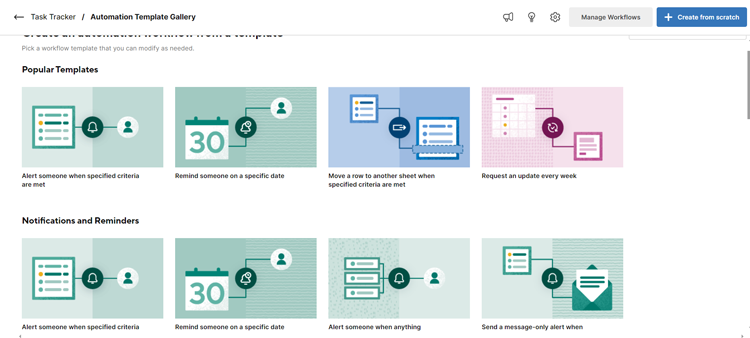
I started with a visit to the template library for some inspiration. Since status changes are a part of most workflows we settled on a template in the notifications and reminders section.
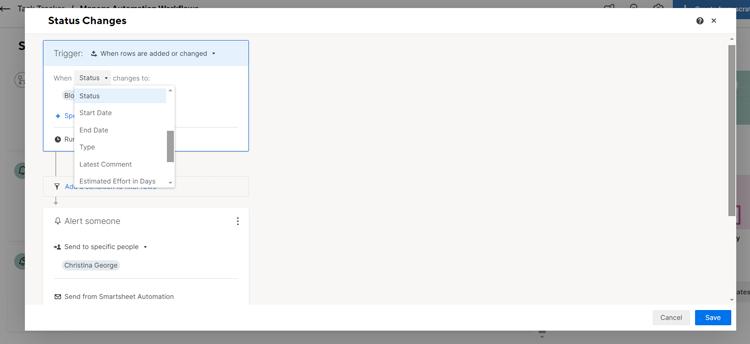
Next, I changed the automation name and got to work customizing the fields. There were multiple fields to choose from, but for our intents and purposes we selected status.
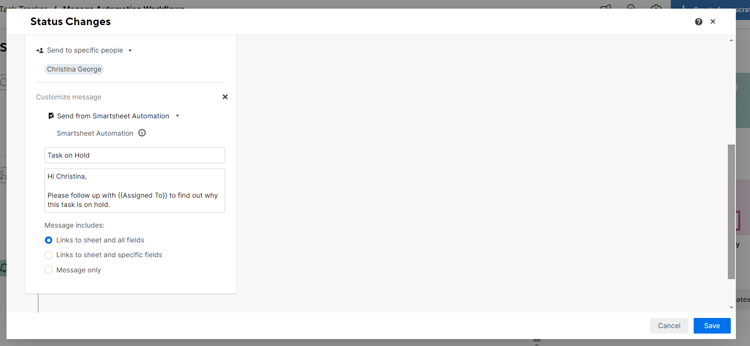
I chose the user name, wrote the email and specified the contents of the email. To see how the links would show up, I included links to sheet and all fields.
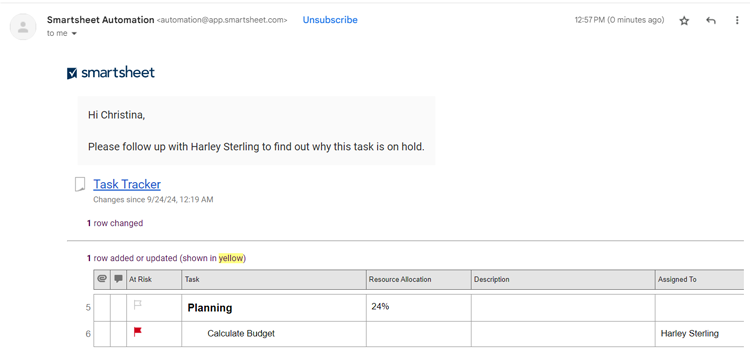
After moving the status from “In Progress” to “Blocked,” I got an alert in the notifications tab quite instantly and a few minutes later I received the email below. First automation done and dusted!
For the second automation I dove right into the “Create from scratch” option. I wanted a date-based automation to alert assignees that a task is due so they can adjust timelines and speak to their manager.

I wrote the email with clear next steps and a custom field for the assignee’s name. All that was left was to take it live.
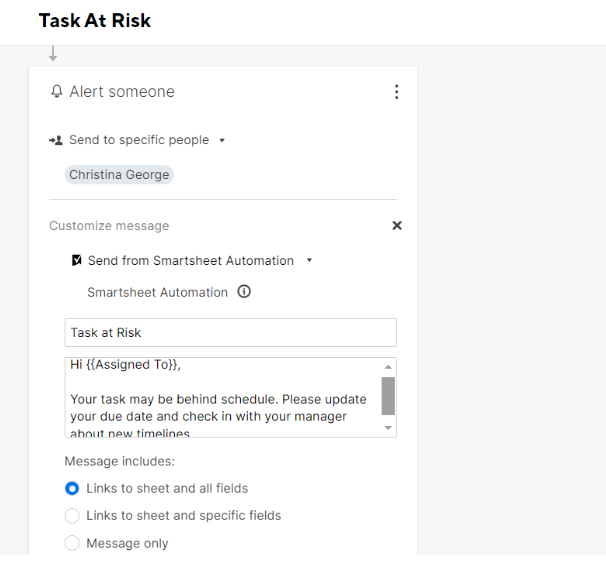
I changed the date for one of the tasks assigned to me and waited for the appointed hour to trigger a notification.
All-in-all, it was an intuitive experience I could manage without too much technical expertise. I liked the drop-down options for triggers and conditions and appreciated the test run option.
## Cost of Ownership
Frequently asked questions regarding Smartsheet pricing include:
**Q: What pricing model does Smartsheet follow?**
A: Smartsheet uses a per member, per month subscription model. They have four different pricing plans: Pro, Business, Enterprise, and Advanced. They also offer subsidized prices if you choose to be billed annually.
- **Pro:** Starts at $9 per user, monthly
- **Business:** Starts at $19 per user, monthly
- **Enterprise:** Price on request
- **Advanced Work Management:** Price on request
**Q: Is there a free trial of Smartsheet?**
A: Yes, Smartsheet offers a [free 30-day trial](https://pmo.selecthub.com/free-trial/?product_name=Smartsheet&category=Project%20Management%20Software&product_logo=https://cdn.selecthub.com/products/f63f65b503e22cb970527f23c9ad7db1-fdfb00fe3a5be3bbc38d52950c48d022/resources/normal/logo.png?1693316506) with 50 sheets, automations and most features, excluding workflows. You don’t need to add any payment information, all you need is a work email and you’re set.
## Limitations
At the time of this review, these are the limitations according to user feedback:
- Slow loading times and lags on occasion.
- Limited reporting criteria and filters.
- Cost prohibitive for smaller firms or individual users.
## Demo Resources
- **Knowledge Base:** Search through articles and videos for best tips, fixes and explainers when you experience a hiccup.
- **Community:** Connect with fellow users to share and receive helpful tips, get on the overachiever leaderboard and participate in discussions.
- **Smartsheet University:** Opt for on-demand, self-paced or instructor-based training and access certification courses.
## Compare to Other Leading Software
These are the top products most often compared.
Generating Scorecard... Compare to Smartsheet
You can choose 4 products to compare
[![Procore product logo]() Procore](https://www.selecthub.com/p/construction-management-software/procore/)
[![monday.com product logo]() monday.com](https://www.selecthub.com/p/project-management-software/monday/)
[![CoConstruct product logo]() CoConstruct](https://www.selecthub.com/p/construction-management-software/coconstruct/)
[![Buildertrend product logo]() Buildertrend](https://www.selecthub.com/p/construction-management-software/buildertrend/)
[![ConstructionOnline product logo]() ConstructionOnline](https://www.selecthub.com/p/construction-management-software/constructiononline/)
[![Assignar product logo]() Assignar](https://www.selecthub.com/p/construction-management-software/assignar/)
[![eSUB product logo]() eSUB](https://www.selecthub.com/p/construction-management-software/esub/)
[![LetsBuild product logo]() LetsBuild](https://www.selecthub.com/p/construction-management-software/letsbuild/)
[![Fieldwire product logo]() Fieldwire](https://www.selecthub.com/p/construction-management-software/fieldwire/)
Generating Scorecard... Compare to Smartsheet
## Head-to-Head
Comparison

vs
- [5pm](https://www.selecthub.com/work-management-software/smartsheet-vs-5pm/)
- [Adobe Workfront](https://www.selecthub.com/work-management-software/smartsheet-vs-adobe-workfront/)
- [Airtable](https://www.selecthub.com/work-management-software/smartsheet-vs-airtable/)
- [Aproove](https://www.selecthub.com/work-management-software/smartsheet-vs-aproove/)
- [Asana](https://www.selecthub.com/project-management-software/asana-vs-smartsheet/)
- [Avaza](https://www.selecthub.com/work-management-software/smartsheet-vs-avaza/)
- [Backlog](https://www.selecthub.com/work-management-software/smartsheet-vs-backlog/)
- [Basecamp](https://www.selecthub.com/project-management-software/basecamp-vs-smartsheet/)
- [Cerebro](https://www.selecthub.com/work-management-software/smartsheet-vs-cerebro/)
- [Cerri](https://www.selecthub.com/work-management-software/smartsheet-vs-cerri/)
- [ClickUp](https://www.selecthub.com/work-management-software/smartsheet-vs-clickup/)
- [DesignSmart](https://www.selecthub.com/work-management-software/smartsheet-vs-designsmart/)
- [Dynamics 365 Project Operations](https://www.selecthub.com/work-management-software/smartsheet-vs-dynamics-365-project-operations/)
- [Freedcamp](https://www.selecthub.com/work-management-software/smartsheet-vs-freedcamp/)
- [Gantter](https://www.selecthub.com/work-management-software/smartsheet-vs-gantter/)
- [GanttProject](https://www.selecthub.com/work-management-software/smartsheet-vs-ganttproject/)
- [Hive](https://www.selecthub.com/work-management-software/smartsheet-vs-hive/)
- [Jira](https://www.selecthub.com/project-management-software/jira-vs-smartsheet/)
- [Leantime](https://www.selecthub.com/work-management-software/smartsheet-vs-leantime/)
- [Merlin Project](https://www.selecthub.com/work-management-software/smartsheet-vs-merlin-project/)
- [Microsoft Project](https://www.selecthub.com/work-management-software/smartsheet-vs-microsoft-project/)
- [Monday Work Management](https://www.selecthub.com/work-management-software/smartsheet-vs-monday-work-management/)
- [monday.com](https://www.selecthub.com/work-management-software/smartsheet-vs-monday/)
- [Moovila](https://www.selecthub.com/work-management-software/smartsheet-vs-moovila/)
- [nTask](https://www.selecthub.com/work-management-software/smartsheet-vs-ntask/)
- [OpenProject](https://www.selecthub.com/work-management-software/smartsheet-vs-openproject/)
- [Paymo](https://www.selecthub.com/work-management-software/smartsheet-vs-paymo/)
- [Plutio](https://www.selecthub.com/work-management-software/smartsheet-vs-plutio/)
- [Podio](https://www.selecthub.com/work-management-software/smartsheet-vs-podio/)
- [Project Central](https://www.selecthub.com/work-management-software/smartsheet-vs-project-central/)
- [Project Insight](https://www.selecthub.com/work-management-software/smartsheet-vs-project-insight/)
- [Projectlibre](https://www.selecthub.com/work-management-software/smartsheet-vs-projectlibre/)
- [ProjectManager](https://www.selecthub.com/work-management-software/smartsheet-vs-projectmanager/)
- [Projecto](https://www.selecthub.com/work-management-software/smartsheet-vs-projecto/)
- [ProofHub](https://www.selecthub.com/work-management-software/smartsheet-vs-proofhub/)
- [ProWorkFlow](https://www.selecthub.com/work-management-software/smartsheet-vs-proworkflow/)
- [Quickbase](https://www.selecthub.com/work-management-software/smartsheet-vs-quickbase/)
- [Ravetree](https://www.selecthub.com/work-management-software/smartsheet-vs-ravetree/)
- [Redmine](https://www.selecthub.com/work-management-software/smartsheet-vs-redmine/)
- [Swit](https://www.selecthub.com/work-management-software/smartsheet-vs-swit/)
- [TaskRay](https://www.selecthub.com/work-management-software/smartsheet-vs-taskray/)
- [Teamwork](https://www.selecthub.com/work-management-software/smartsheet-vs-teamwork/)
- [Tempo Portfolio Manager](https://www.selecthub.com/work-management-software/smartsheet-vs-tempo-portfolio-manager/)
- [Trello](https://www.selecthub.com/project-management-software/trello-vs-smartsheet/)
- [Wimi](https://www.selecthub.com/work-management-software/smartsheet-vs-wimi-teamwork/)
- [WorkflowMax](https://www.selecthub.com/work-management-software/smartsheet-vs-workflowmax/)
- [Wrike](https://www.selecthub.com/work-management-software/smartsheet-vs-wrike/)
- [YouTrack](https://www.selecthub.com/work-management-software/smartsheet-vs-youtrack/)
- [Zenkit](https://www.selecthub.com/work-management-software/smartsheet-vs-zenkit/)
- [Zoho Projects](https://www.selecthub.com/work-management-software/smartsheet-vs-zoho-projects/)
## Awards
SelectHub research analysts have evaluated Smartsheet and concluded it earns best-in-class honors for Project Management.

## Similar Products
Here are the most similar products to Smartsheet.
[![RunRun.it product logo]() RunRun.it](https://www.selecthub.com/p/work-management-software/runrun-it/)
[![Monday Work Management product logo]() Monday Work Management](https://www.selecthub.com/p/work-management-software/monday-work-management/)
[![Swit product logo]() Swit](https://www.selecthub.com/p/work-management-software/swit/)
[![Ravetree product logo]() Ravetree](https://www.selecthub.com/p/work-management-software/ravetree/)
[![Aproove product logo]() Aproove](https://www.selecthub.com/p/work-management-software/aproove/)
[![Cerri product logo]() Cerri](https://www.selecthub.com/p/work-management-software/cerri/)
[![Plutio product logo]() Plutio](https://www.selecthub.com/p/work-management-software/plutio/)
[![ProWorkFlow product logo]() ProWorkFlow](https://www.selecthub.com/p/work-management-software/proworkflow/)
[![Adobe Workfront product logo]() Adobe Workfront](https://www.selecthub.com/p/work-management-software/adobe-workfront/)
[![Birdview PSA product logo]() Birdview PSA](https://www.selecthub.com/p/psa-software/birdview/)
## About the Contributors
The following expert team members are responsible for creating, reviewing, and fact checking the accuracy of this content.
[![Christina George]()](https://www.selecthub.com/author/christina-george/)
Written by
[Christina George](https://www.selecthub.com/author/christina-george/)
Technical Content Writer
An Associate Editor at SelectHub, Christina George creates and edits articles spanning project management, CPQ, CRM, marketing automation and home health software. As a Bachelor of Arts graduate with a triple major in Economics, Political Science and Sociology, her aim is to bring an integrated and simplified approach to long-form technical content. Formerly a food writer, copywriter, and social media sleuth, she has a soft spot for a quality pun. When not crafting articles and editing buyer's guides, you can find her attempting to score goals on the football field, binge-watching Curb Your Enthusiasm, or re-reading Pride and Prejudice for the nth time.
[See Full Bio](https://www.selecthub.com/author/christina-george/)
[![Dianna Dragonetti]()](https://www.selecthub.com/author/dianna-dragonetti/)
Edited by
[Dianna Dragonetti](https://www.selecthub.com/author/dianna-dragonetti/)
Content Editor
As an editor, Dianna Dragonetti leads a team of five writers in writing about a variety of software, with an emphasis on how these tools empower businesses. Categories include accounting, learning management systems, content management systems, supply chain management, and electronic data interchange.
[See Full Bio](https://www.selecthub.com/author/dianna-dragonetti/)
Your review has been submitted
and should be visible within 24 hours.
Review Title
Pros
Cons
Overall feedback
Your name
Your job title
Industry
Choose your main industry
- Accounting / CPA
- Advertising
- Aerospace & Defense
- Agriculture
- Apparel
- Architecture
- Auto Dealership
- Automotive
- Banking & Financial Services
- Banking & Mortgage
- Chemicals
- Construction & Engineering
- Construction / Contracting
- Consulting
- Consumer Products
- Distribution
- E-commerce
- Education
- Electronics
- Energy & Utilities
- Federal Government
- Field Maintenance
- Food & Beverage
- Healthcare / Social Services
- Hospitality / Gaming / Travel
- Human Resources
- Industrial Machinery
- Information Technology & High Tech
- Insurance
- Legal
- Maintenance / Field Service
- Manufacturing
- Marketing Services
- Media & Communications / Entertainment
- Mill Products
- Mining / Metals
- Mortgage
- Non-Profit
- Not Available
- Oil & Gas
- Other
- Other Services
- Payroll Provider
- Pharmaceuticals
- Professional Employer Organization
- Professional Services
- Property Management
- Public Sector
- Real Estate
- Recruiting Agency
- Religious Institutions
- Retail
- Sales & Marketing
- Semiconductors
- Software / IT
- Sports and Recreation
- Staffing Agency
- State & Local Government
- Telecommunications
- Third-Party Administrator
- Transportation & Logistics
- Wholesale Distribution
Company Size
Choose your company size
- 1 employee
- 2 to 9 employees
- 10 - 19 employees
- 20 - 49 employees
- 50 - 99 employees
- 100 - 499 employee
- 500 - 999 employees
- 1,000 - 2,499 employees
- 2,500 - 4,999 employees
- 5,000 - 9,999 employees
- 10,000 - 24,999 employees
- 25,000 - 49,999 employees
- 50,000 + employees
```json
{
"@context": "https://schema.org",
"@type": "BreadcrumbList",
"itemListElement": [
{
"@type": "ListItem",
"position": 1,
"name": "Home",
"item": "https://www.selecthub.com/"
},
{
"@type": "ListItem",
"position": 2,
"name": "Project Management",
"item": "https://www.selecthub.com/category/project-management/"
},
{
"@type": "ListItem",
"position": 3,
"name": "Work Management Software",
"item": "https://www.selecthub.com/c/work-management-software/"
},
{
"@type": "ListItem",
"position": 4,
"name": "Smartsheet"
}
]
}
{
"@context": "http://schema.org",
"@type": "SoftwareApplication",
"name": "Smartsheet",
"description": "Smartsheet is a cloud-based work management platform that helps users streamline and organize processes with a spreadsheet-esque interface, flexible templates, multiple views and team collaboration. Apart from the grid view, you can visualize projects using a Gantt chart, Kanban board, calendar view, card view or timeline view. Its no-code automations are another noteworthy feature, where you can build from templates or start from scratch.It streamlines project creation with templates suited to different industries and end goals, so you have a jumping-off point instead of going in blind. Team collaboration capabilities include comments, conversations, and file and sheet sharing (even with people outside your organization). It also offers a customizable dashboard view.Our analysts put in hours of research to score Smartsheet an 81 based on its capabilities, ranking it at number seven on our project management leaderboard. It stands out most for its mobile capabilities and project-tracking modules.Users like Smartsheet’s easy-to-use interface, permission-based collaboration and time-saving, no-code automations. On the flip side, costly add-ons, slow load times and limited integrations inspire some user ire. Pricing starts at $9 per user per month.Our Research Process for SmartsheetI signed up for Smartsheet’s 30-day trial of their Business plan, which offers multiple project views, work tracking, an admin center, and unlimited guests and automations — in other words, plenty to work with. During the trial, I set up a content creation project complete with a custom workflow, in-house proofing, baselines and automations.To broaden my perspective, I used our internal data to test and compare Smartsheet’s scores against Zoho Projects, Asana, Airtable and Teamwork. For an accurate picture of user sentiment, I scoured software review sites and contacted users to hear their firsthand experiences.",
"review": {
"@type": "Review","reviewRating": {
"@type": "Rating",
"ratingValue": 90,
"bestRating": 100
},
"author": {
"@type": "Person",
"name": "Christina George",
"reviewBody": "Spreadsheets make for a fantastic starter pack if you’re not quite ready to dive into the wonderful world of project management. And if you don’t mind testing the waters with the best of both worlds, Smartsheet might be right up your alley. During my free trial I wanted to answer one question: does Smartsheet really live up to its name?Smartsheet started off strong with a helpful checklist with best practices to start you on the right path. I also loved the handy explainer videos to set me back on the straight and narrow whenever I got a little confused. The flexibility to build your own sheets from scratch or use modified templates was another win on the setup front.I think one of my favorite things about Smartsheet — something that puts it far above any spreadsheet in my book — is the ability to add dynamic views to your projects and filter and customize views to meet task requirements. I put all my data in using the grid view, then added a card view organized by status, and then a Kanban Board sorted by task assignee. Sounds complicated maybe, but it actually made everything so much more organized and easy to parse.Want to stay on the same page (literally) with proofs? Smartsheet excels (yep, that’s a pun) there too.Collaborate on team documents, provide context, and add proofs and files to individual tasks or the entire sheet. I set a piece of content as a task and it was really easy to add a pin to address a specific point, highlight a problem using box annotations or use a literal arrow to point to what I wanted changed with the Comment with an arrow option. Bonus points for the ability to add extra files like logos and docs, and share sheets with external users.The no-code automations were another gamechanger for a technically challenged user like me. You can choose from four different cell triggers, or pay a visit to the template library and fiddle around with custom inserts. Like me, reviewers also appreciated this feature and its incredible time-saving capacity.However, during my trial, I did experience slower loading times, especially with larger spreadsheets — a grievance I noticed other users called out. Maybe it was my browser, maybe it was my laptop, but maybe it was Smartsheet. I will say, it's an acceptable trade-off for not having to memorize a bunch of formulas and stick to rigid views like some other programs make you do (if you know, you know).Overall, I’d say Smartsheet is a great option for teams familiar with spreadsheets but who are on the lookout for more visualization, automation and collaboration, along with the budget to spend on advanced features."
}
},
"image": "https://cdn.selecthub.com/products/f63f65b503e22cb970527f23c9ad7db1-66c88128e63628cf2cfc2d36a47576a9/resources/normal/logo.png?1728416130",
"aggregateRating": {
"@type": "AggregateRating",
"ratingValue": "88",
"bestRating": "100",
"worstRating": "1",
"ratingCount": "25822"
},
"offers": {
"@type": "Offer",
"priceSpecification": {
"@type": "priceSpecification",
"price": "9",
"priceCurrency": "USD"
}
},
"positiveNotes": {
"@type": "ItemList",
"itemListElement": [
{
"@type": "ListItem",
"position": 1,
"name": "Automation: Reviewers appreciated the no-code automation and said that it helps to eliminate productivity killers and saves time."
},
{
"@type": "ListItem",
"position": 2,
"name": "Collaboration: Users liked the sharing option with level-based permissions that allow collaboration with non-users and help coworkers and external stakeholders stay up-to-date on projects and processes."
},
{
"@type": "ListItem",
"position": 3,
"name": "Ease of Use: A user-friendly interface and templates make it easy to set up, customize and access multiple views, according to reviewers."
}
]
},
"negativeNotes": {
"@type": "ItemList",
"itemListElement": [
{
"@type": "ListItem",
"position": 1,
"name": "System Integration: Limited integrations and complex configurations were an issue for reviewers."
},
{
"@type": "ListItem",
"position": 2,
"name": "Premium Add-Ons: Reviewers noted that advanced features come with a price tag that can be prohibitive for some businesses."
},
{
"@type": "ListItem",
"position": 3,
"name": "Slow Loading Time: Users reported it takes time to display screens and export formats occasionally."
}
]
},
"applicationCategory": "Work Management Software"
}
```
