---
description: Is OpenBlue Workplace the right solution for you? See where it's ranked among all IWMS Software. Read expert reviews, compare 2026 pricing, and explore top-rated features.
---
[Home](https://www.selecthub.com/) > [Facilities Management](https://www.selecthub.com/category/facility-management/) > [IWMS Software](https://www.selecthub.com/c/iwms-software/) > OpenBlue Workplace
Categories:
- [IWMS Software](https://www.selecthub.com/c/iwms-software/)
- [Facility Management Software](https://www.selecthub.com/c/facility-management-software/)
- ...
## What Is OpenBlue Workplace?
**Industry Specialties:** Corporate, Finance, Healthcare, Government, Higher Education, Technology
FMS:Workplace from FM:Systems is a comprehensive integrated workplace management system (IWMS) designed to help organizations identify underused areas, track lease terms, expirations and critical dates to ensure compliance and avoid missed opportunities for renegotiation and make informed decisions about real estate acquisitions, disposals or renovations.
While user reviews are limited, the system is known for its centralized control, real-time data insights, customizable reporting, enhanced communication and space optimization capabilities. However, the initial learning curve is steep and customization and integration can be complex.
The cost ranges widely depending on the modules selected and your organization size. For details, request a custom quote.
**Our Research Process for FMS:Workplace**
I was given sandbox access to FMS:Workplace for this review so I could get hands-on with the product. I tested key features like space planning, desk moves, service requests and reporting to see how they hold up in action.
To supplement my test run, I also looked at case studies from organizations like the University of Nottingham and Sutter Health to get a sense of how this software works at scale.
PRICE
$
$
$
$
$
COMPANY SIZE
S
M
L
DEPLOYMENT
PLATFORM
[Try Before You Buy. Request a Free Demo Today!Request Demo It's completely free!](https://pmo.selecthub.com/get-product-demo/?category=IWMS+Software&product_name=OpenBlue%2BWorkplace&origin_url=https%3A%2F%2Fwww.selecthub.com%2Fp%2Fiwms-software%2Ffm-systems%2F&product_logo=https%3A%2F%2Fcdn.selecthub.com%2Fproducts%2F8562ae5e286544710b2e7ebe9858833b-669c0a3fce1a55754ce8c9ee47b7fc81%2Fresources%2Fnormal%2Flogo.webp%3F1787667436)
[Contributors](#view-contributors)
![Riya Jamble]() Written by Riya Jamble Technical Content Writer [Read Bio](https://www.selecthub.com/author/riya-jamble/)
![Dianna Dragonetti]() Edited by Dianna Dragonetti Content Editor [Read Bio](https://www.selecthub.com/author/dianna-dragonetti/)
User Sentiment i
![User satisfaction level icon: great]()
Based on 116 reviews:
Add your rating:
![Screenshots]()![Screenshots]()![Screenshots]()![Screenshots]()
Product Screenshots and Videos
## #7
OpenBlue Workplace is ranked #7 in the IWMS Software product directory based on the latest available data collected by SelectHub. Compare the leaders with our In-Depth Report.
[Get the Report Now](https://pmo.selecthub.com/request-custom-scorecard?category_slug=iwms-software&product_slug=fm-systems&page_type=product&slug=fm-systems&product_name=OpenBlue+Workplace&category=IWMS+Software&origin_url=https%3A%2F%2Fwww.selecthub.com%2Fp%2Fiwms-software%2Ffm-systems%2F)
## OpenBlue Workplace Pricing
Based on our most recent analysis, OpenBlue Workplace pricing starts in the range of $1,000 or more.
[Get Price Quote](https://pmo.selecthub.com/get-product-pricing/?category=IWMS+Software&product_name=OpenBlue%2BWorkplace&origin_url=https%3A%2F%2Fwww.selecthub.com%2Fp%2Fiwms-software%2Ffm-systems%2F&product_logo=https%3A%2F%2Fcdn.selecthub.com%2Fproducts%2F8562ae5e286544710b2e7ebe9858833b-669c0a3fce1a55754ce8c9ee47b7fc81%2Fresources%2Fnormal%2Flogo.webp%3F1787667436&price=5)
- Price
-
$
$
$
$
$
i
- Starting From
- Custom Quote
i
- Pricing Model
- Annually, Quote-Based
- Free Trial
- No
## Training Resources
OpenBlue Workplace is supported with the following types of training:
- Documentation
- In Person
- Live Online
- Videos
- Webinars
## Support
The following support services are available for OpenBlue Workplace:
- Email
- Phone
- Chat
- FAQ
- Forum
- Help Desk
- Knowledge Base
- Tickets
- Training
- 24/7 Live Support
## OpenBlue Workplace Benefits and Insights
Why use OpenBlue Workplace?
### Key differentiators & advantages of OpenBlue Workplace
- **Improve Asset Management:** In our analysis, the solution scored extremely well for tracking assets from start to finish. You can easily organize them into clear hierarchies, monitor their value over time (depreciation) and even track any downtime they might experience.
- **Ensure Proactive Maintenance:** FMS:Workplace scored 98 for maintenance management capabilities, more than competitors like [eFacility](https://www.selecthub.com/p/facility-management-software/efacility/) (61) and [FMX](https://www.selecthub.com/p/facility-management-software/fmx/) (94). The tools offered make it easy to report maintenance problems, track reactive maintenance jobs and schedule preventive maintenance.
- **Boost Safety:** The product scored 100 for safety and security capabilities (monitoring energy consumption, reporting incidents, approving work permits and storing compliance details), more than its competitors eFacility (67) and FMX (27).
- **Make Data-Driven Decisions:** In our analysis, the system scored really well for generating the information you need to track work order completion rates, equipment downtime, reactive maintenance work hours, etc. It comes with lots of ready-to-use reports and dashboards, or you can create your own custom ones to monitor exactly what matters to you.
### Industry Expertise
Caters to corporate offices, higher education campuses, healthcare organizations, government facilities and financial providers.
## OpenBlue Workplace Reviews
Based on our most recent analysis, OpenBlue Workplace reviews indicate a 'great' User Satisfaction Rating of 85% based on 116 user reviews from 4 recognized software review sites.
![User satisfaction level icon: great]()
116 reviews
85%
of users would recommend this product
### Synopsis of User Ratings and Reviews
Based on an aggregate of OpenBlue Workplace reviews taken from the sources above, the following pros & cons have been curated by a SelectHub Market Analyst.
#### Pros
- **Centralized Control:** Manage all aspects of facility operations from a single platform, streamlining processes and improving efficiency.
- **Real-Time Data:** Gain real-time insights into facility performance, enabling proactive maintenance and energy management, reducing downtime and costs.
- **Customizable Reports:** Generate tailored reports to make informed decisions about space usage, occupancy trends and maintenance activities.
- **Enhanced Communication:** Features like automated alerts and mobile capabilities improve communication among team members, ensuring quick response to issues and better coordination.
- **Space Optimization:** Tools for space management and planning assist in maximizing the use of available space, contributing to better workplace environments and operational savings.
- **Asset Management:** Keeping track of assets and their maintenance schedules helps in extending their life span and avoiding unexpected failures, saving costs in the long run.
- **Scalability:** Adapt to the growing needs of your business with a flexible architecture that seamlessly scales to accommodate additional users, sites and modules.
#### Cons
- **Steep Learning Curve:** The system can be complex and challenging for new users to learn due to its extensive features and functionalities. This complexity often necessitates comprehensive training programs, which can be time-consuming and costly for organizations.
- **Customization Challenges:** While there are several customization options, tailoring the software to specific organizational needs can be intricate and may require specialized technical expertise. This can lead to additional implementation costs and potential delays in achieving full system functionality.
- **Integration Complexities:** Integrating the system with existing enterprise systems, such as HR or finance platforms, can pose technical challenges. Ensuring seamless data exchange between different apps may require custom development or middleware solutions, adding to the overall implementation complexity.
- **Mobile App Limitations:** The mobile app's functionality may not encompass all the features available in the desktop version, potentially hindering users who require full access to the system while on the go. This can limit the effectiveness of mobile workforces or those who frequently travel.
#### Researcher's Summary:
Think workplace management isn’t the most exciting topic? Well, FMS:Workplace might make you think again.
Let’s start with my personal favorite feature: the floor plan viewer. Maybe not the most thrilling name, but being able to drag-and-drop people onto desks, color-code teams and measure distance between workstations is weirdly satisfying. It also makes space planning way easier — and more fun — than flipping through PDFs or wrestling with CAD files.
I also tested out move management, which was surprisingly smooth. You enter details, pick a spot on the floor plan, attach any assets the person’s bringing with them (laptop, monitor, even their personal ficus). I had a brief moment of confusion selecting multiple assets, but once I figured out the interface, it was quick. Took about 15 minutes to complete a full move request.
And scenario planning? Kind of a nerdy dream. You can mock up different layouts, stack teams across floors, and test “what if” space ideas. The UI’s a little dense at first — one of those tools where you need a good 10 minutes to get your bearings — but once you’re in, it’s powerful. You get the big picture and the little stuff, like whether Sales and IT really should be seated next to each other (spoiler: no).
The supervisor dashboard gives you everything in one place: open requests, priorities and who they’re assigned to. You can dispatch tasks with one click. It takes a lot of the chaos out of tracking who’s doing what.
And I get why so many large organizations — from universities to global health companies — are using it.
The [University of Nottingham](https://fmsystems.com/resource/customer-success/university-of-nottingham/) manages over 500 buildings, and before FMS:Workplace, their data lived in a system that was, to put it nicely, the opposite of agile. Like, “you’ll get your report once Dan gets back from holiday and unplugs the USB stick” kind of not-agile.
Once they rolled out FMS:Workplace and started using desk sensors, they discovered what many of us have long suspected: Fridays are basically just for show. They were opening 13 buildings for around 200 people. So, they started shutting down unused areas early, turning off HVAC and saving thousands each year without affecting a single meeting. That’s the power of actually knowing what’s going on in your buildings.
A [global healthcare company](https://fmsystems.com/resource/customer-success/global-healthcare-technology-success-story/) manages close to 10 million square feet across 100+ countries. With FMS:Workplace, they brought consistency to how they manage, maintain and allocate space. They even estimated $100 million in cost avoidance just by optimizing what they already had instead of building new space.
Are there quirks? Sure. Trackpad users will definitely appreciate a mouse when navigating floor plans. And some modules, like stack planning, take a little trial and error. But nothing here feels unmanageable — and once you’re set up, the payoff is huge.
Here’s what I’ll leave you with: FMS:Workplace helps you run your spaces like someone who knows what they’re doing. Not someone chasing emails about desk assignments or walking into rooms with six chairs and zero people.
And if it saves facilities teams from having to decode which desk was “definitely taken” because someone left their favorite mug there? That alone justifies the investment.
## Key Features
- **Centralized Database:** Track and manage your space inventory including floor plans, room details, occupancy information, asset locations and usage metrics.
- **Floor Plan Viewer:** Visualize and interact with 2D and 3D floor plans, making it easier to understand spatial relationships, identify available areas and plan moves or reconfigurations. You can also import CAD and Revit drawings into the system with just a few clicks.
- **Move Management:** Employees or managers can initiate move requests through a web-based interface. Capture essential move details like move date, department, reason and type. You can also make multiple move requests with options for adding people by group, building, floor or individual.
- **Scenario Planning:** Move employees and assets on floor plans to test different layouts and space allocation options. Evaluate each scenario's implications such as occupancy changes, adjacency requirements and potential conflicts. Create interactive stack plans that illustrate how departments, teams or individuals will be allocated across multiple floors and buildings within a specified timeframe
- **Real Estate and Lease:** Find and review specific lease agreements including financial details and important deadlines. The dashboard view lets you see high-level metrics like square footage, average rent per square foot and monthly rent for all properties. Get automatic reminders for critical lease dates, so you can stay on top of renewals and other important events.
- **Project Management:** Create detailed project plans with tasks, dependencies and timelines. Assign tasks and resources to team members. Develop comprehensive project budgets, including estimated and actual costs. Track expenses against the budget in real time. Provide a collaborative platform for project teams to share information, documents and updates.
- **Reporting:** Apply filters and parameters to customize reports and focus on specific data sets. For example, you can generate a space usage report for a particular building or floor, or filter maintenance work orders by status or priority. You can drill down into details. For instance, clicking on a bar in a space usage chart could display a list of rooms or departments contributing to that data.
- **Asset Management:** Monitor the financial aspects of assets by recording initial acquisition dates and costs. You can also calculate asset depreciation over time. Create and maintain a precise inventory of various asset types including their location, condition and other relevant attributes. Manage warranty information, as well as details about certified maintenance personnel and vendors.
- **Work Order Management:** Tailor work order forms to collect specific information relevant to different request types (e.g., repairs, installations, inspections). Define specific response and resolution time targets for different work order types and priorities, ensuring timely service delivery and meeting customer expectations. Create and set statuses like requested, in progress and complete to track work orders.
- **Preventive Maintenance:** Create and reuse PM templates for common maintenance tasks to save time and ensure consistent processes. Customize templates to match specific equipment types or asset categories.
## See It In Action: My Honest Take
**The good part:**
- Save valuable time by adding frequently used views, reports and documents to your favorites
- Import CAD and Revit models into the system for better visualization.
- Make on-the-fly adjustments to your floor plans with markup capabilities.
**The not-so-good part:**
- The system may challenge less tech-savvy individuals, requiring extra training or support.
- The parts inventory module is suited for larger equipment, not consumables like toilet paper or towels.
- Importing drawings needs specific formatting like including boundary lines into spaces, adding an extra step.
I was lucky enough to test the system to see how it fared in different scenarios.
### Scenario 1: Evaluating Expansion Opportunities
**How FMS:Workplace handled it using its location map capabilities**
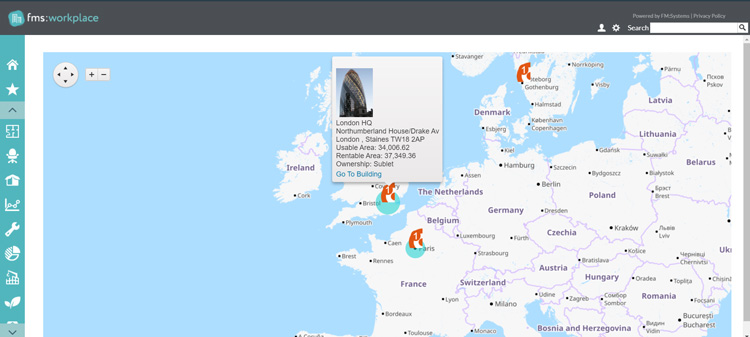
You can zoom in and out on the map, hovering over each location to see details like rentable and usable area, and ownership status.
Click on the “Go to Building” button to access additional info like gross area and assignable area which could assist you in evaluating whether a particular location has the capacity to accommodate growth.
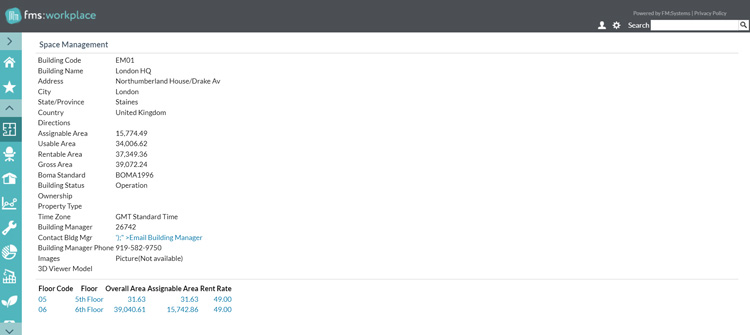
However, the most glaring issue was the noticeable lag when navigating the map. Simple actions like panning or zooming often resulted in a frustrating delay, impeding my ability to efficiently explore different areas.
### Scenario 2: Assigning Space to Team Members
**How FMS:Workplace handled it using its floor plan viewer**
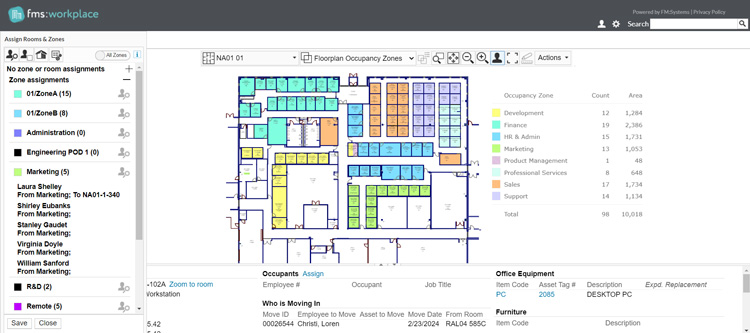
You can see the whole office layout, every desk and empty space. Then, it’s as simple as dragging and dropping your team members' names onto a suitable spot on the plan.

I particularly liked how I could color-code different teams or departments. This helps you see at a glance how you’re using the space and identify any potential conflicts.
The ability to measure distances was also helpful for ensuring that everyone had enough personal space and that frequently collaborating team members were located near each other.
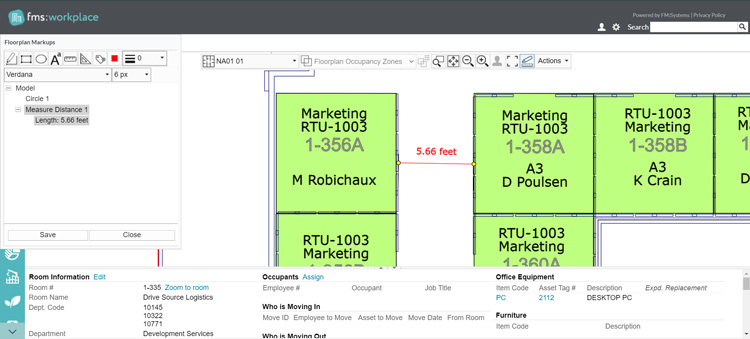
Navigating floor plans using my laptop's trackpad was a major pain point. Zooming in and out felt clunky and imprecise. An external mouse is definitely a must!
### Scenario 3: Moving an Employee to a New Space
**How FMS:Workplace handled it using its move management tools**
You can start by submitting a new move request for an employee. The form is straightforward, requiring details like employee information, departments, move locations and the reason for the move.

I appreciated the floorplan viewer, which allowed me to pinpoint the exact rooms involved in the move. The entire process took about 15 minutes, which seemed reasonable.

You can also add assets to your move request. The asset catalog was conveniently located at the bottom of the screen.
Initially, I struggled with selecting multiple assets, as it wasn't the typical "Control + click" method. However, once I figured out the arrow system, it became easier.

The ability to add multiple moves simultaneously was impressive. The system offered various options, like adding people by group, building, floor, individual or zone.

Adding multiple moves can also speed up the process of managing employee relocations or onboarding new hires, especially in large organizations. Instead of tedious, individual entries, administrators can execute bulk moves, saving time and effort.
### Scenario 4: Comparing Different Office Layouts
**How FMS:Workplace handled it using its scenario and stack planning capabilities**
I wasn't prepared for the initial learning curve of the stack planning module. It took me a good 30 minutes just to figure out how to drag and drop floors, and even longer to make sense of the visual representation.
The multitude of views and options on a single screen was initially overwhelming, and it took some trial and error to understand how to effectively manipulate the interface.
However, I persevered, and the payoff was immense. I imported the floor plans of the current office and a promising new building.
With a few clicks, I had interactive stack plans for both locations, allowing me to visualize how my teams would fit into each space.

The color-coded blocks representing different departments can help you see cramped spaces as well as where you have room to breathe.
### Scenario 5: Tackling Work Orders
**How FMS:Workplace handled it using its facility maintenance modules**
The "Open Work (Supervisor View)" was my go-to view in the facility maintenance tab. It provides you with a clear and concise overview of all pending work orders, neatly organized with essential details like requester, location, category, priority and assignee.
I particularly appreciated the ability to filter and sort the work orders based on various criteria. This enables you to quickly identify high-priority issues that need immediate attention, as well as tasks that you can delegate to specific technicians based on their skills and availability.

The "Dispatch" button is another handy feature. With a single click, you can assign a work order to a technician, which sends a notification on their mobile devices. This eliminates time-consuming phone calls or emails, ensuring that tasks are assigned promptly and efficiently.
Once a work order is completed, it moves to the "Closed Work" view. This can serve as a valuable archive, allowing you to review the history of maintenance activities, track technician performance and identify any recurring issues that may require further attention.
### Scenario 6: Making Service Requests
**How FMS:Workplace handled it using its service request form**
I could clearly specify the issue, upload a photo for clarity, and even mark the request as urgent if necessary.
The form's structure, with fields like "Health, Safety, or Security Issue?", "Building Code," and "Room Needing Service," ensured that I provided all the necessary information upfront. This eliminated the back-and-forth communication that could delay the resolution of my requests in the past.

Once submitted, you can track the progress of your request in real time. You no longer have to wonder if anyone has even seen your request or when it might be addressed.
### Scenario 7: Reserving a Space
**How FMS:Workplace handled it using its room scheduling capabilities**
Select Room Scheduling from the sidebar and click on Reserve Space. This will open a new dialog box where you have to fill in details like subject, date and time, project and location.
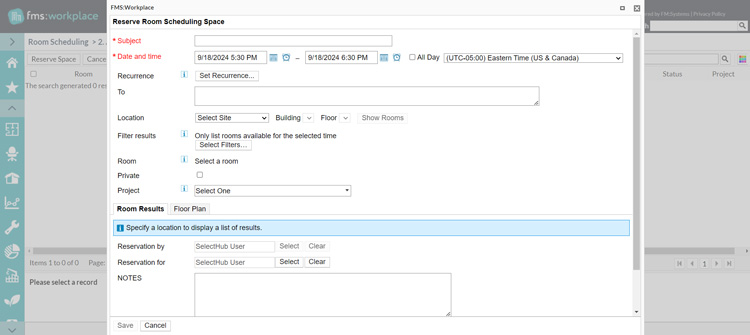
The system automatically changes the time zone according to your selected location.
The one thing I particularly liked was the ability to set a recurrence pattern. Recurring events often involve the same group of people and require the same resources. Setting a recurring pattern ensures that your chosen room remains available for these events, preventing conflicts and ensuring consistency in scheduling.

**Insider Tip**
Tailor your space management experience by creating views that prioritize the information most important to you. You can create views for each module (asset management, room scheduling, facility maintenance, hoteling and more). For instance, a "New Service Request" view under asset management can speed up equipment repair requests.
You might have to spend some time getting familiar with the process. But the payoff is worth it.
## Approach to Common Facility Management Challenges
- **Inefficient Space Usage:** The University of Dundee faced a common problem: they didn't truly know how their campus spaces were being used. The system’s occupancy sensors changed that. It helped them:
- **Reclaim Underused Spaces:** By identifying rooms that were rarely used, the university could confidently reallocate these spaces for more productive purposes.
- **Convert School-Controlled Rooms to Central Spaces:** Sensor data revealed low usage of specialized rooms, justifying their conversion to shared spaces accessible to the entire university community.
- **Prioritize Room Upgrades:** The data highlighted popular meeting spaces, enabling the university to target investments in refurbishments and upgrades towards the most frequently used areas.
- **Increased Real Estate Costs:** Sutter Health used workplace analytics capabilities to collect real-time data on how their office spaces were used. The results were as follows:
- **Uncover Wasteful Space:** The data collected revealed a striking underuse of office space, with an average occupancy rate of only 3-10%.
- **Identify Real Estate Adjustments:** They identified spaces that can be eliminated or repurposed to align with their actual needs.
- **Project Cost Savings:** Based on these insights, they projected a potential cost savings of $21 million by eliminating 700,000 square feet of underused office space.
- **Difficulty in Adapting to Hybrid Work Models:** The system empowered a global food service leader to design and manage flexible work environments. It helped them:
- **Put Employees in Control:** Employees can reserve desks and conference rooms via a mobile app, fostering autonomy and reducing administrative overhead.
- **Facilitate Agile Moves:** Moving teams and people around is a major headache. The system makes it simple to reconfigure your workspace with drag-and-drop capabilities.
- **Cater to Individual Preferences:** The system supports a mix of assigned seating and hoteling, which means there's a spot for everyone, no matter how they like to work.
- **Time-Consuming Facility Management Tasks:** Global healthcare technology struggled with fragmented systems and manual processes, leading to inefficiencies, inconsistent data and limited visibility into their real estate portfolio. The system allowed them to:
- **Save Time:** Automation significantly reduced the time and effort required for various activities such as space and move management, and maintenance requests by 80%, freeing up valuable time for facility managers.
- **Make Smarter Decisions:** Real-time data and analytics enabled them to make informed choices about space usage, maintenance and investments.
- **Keep Employees Happy:** Streamlined processes for things like making service requests and moves made life easier for everyone.
## Approach to Common Workspace Management Challenges
- **Inefficient Space Usage:** The system helps organizations identify underused spaces through occupancy sensors and data analytics, enabling them to repurpose or reallocate these areas for better efficiency.
- **Difficulty in Adapting to Hybrid Work Models:** The platform empowers employees to reserve desks and rooms via a mobile app, and facilitates easy reconfiguration of workspaces, catering to both assigned seating and hoteling preferences.
- **Time-Consuming Facility Management Tasks:** Automation of tasks like space and move management, and maintenance requests saves time for facility managers.
- **Lack of Visibility into Real Estate Portfolio:** The system provides a centralized database to track and manage space inventory, lease agreements and assets, offering a comprehensive view of your real estate portfolio.
- **Difficulty in Planning and Managing Moves:** Web-based move requests, floor plan visualization and asset tracking simplify the entire move process, from initiation to completion.
- **Inefficient Maintenance Management:** The platform enables proactive scheduling of maintenance tasks based on asset conditions or usage, reducing unplanned downtime and extending asset life spans.
## Cost of Ownership
Frequently asked questions regarding FMS:Workplace pricing include:
**Q: What are the available pricing options?**
A: The vendor offers custom quotes based on what modules you need.
## Limitations
At the time of this review, these are the limitations according to user feedback:
- Doesn’t support altering the floor plan (e.g., changing room numbers, fonts, or sizes) without republishing.
- Lacks GIS capabilities for locating graphical data (buildings) relative to each other and for exterior utilities.
## Demo Resources
- **Video Library:** Access product demo videos via the vendor’s website to gain insights into the platform's capabilities and benefits.
## FAQs
Frequently asked questions regarding FMS:Workplace include:
**Q: How is the solution different from other IWMS providers?**
A: FM:Systems offers an all-in-one workplace management solution with scalable employee experience, workplace and visitor management, workplace analytics and smart sensor solutions. It provides insights into facility space performance and supports an employee-focused workplace. The system integrates with [AutoCAD](https://www.selecthub.com/p/manufacturing-software/autocad/), Autodesk Revit, Microsoft Exchange and Microsoft Outlook.
**Q: Who is the product unsuitable for?**
A: The system isn’t best suited for the manufacturing industry.
**Q: Is the system FedRAMP authorized, and will it integrate with my building automation system (BAS) like [Metasys](https://www.selecthub.com/p/facility-management-software/metasys/)?**
A: The system is in the final stages of FedRAMP approval/authorization. Additionally, the vendor is working on integrating the solution with JCI Metasys specifically for automating work order tickets based on JCI Metasys equipment faults and alarms.
## Case Study Source Links
- [University of Dundee](https://fmsystems.com/resource/customer-success/university-of-dundee/)
- [Sutter Health](https://fmsystems.com/resource/customer-success/sutter-health/)
- [Global Food Service Leader](https://fmsystems.com/resource/customer-success/global-food-service/)
- [Global Healthcare Technology](https://fmsystems.com/resource/customer-success/global-healthcare-technology-success-story/)
## Compare to Other Leading Software
These are the top products most often compared.
Generating Scorecard... Compare to OpenBlue Workplace
You can choose 4 products to compare
[![eFACiLiTY product logo]() eFACiLiTY](https://www.selecthub.com/p/facility-management-software/efacility/)
[![Eptura Asset product logo]() Eptura Asset](https://www.selecthub.com/p/eam-software/eptura-asset/)
[![FAMIS 360 product logo]() FAMIS 360](https://www.selecthub.com/p/facility-management-software/famis-360/)
[![Facilitron product logo]() Facilitron](https://www.selecthub.com/p/facility-management-software/facilitron/)
[![Cryotos product logo]() Cryotos](https://www.selecthub.com/p/cmms-software/cryotos/)
[![MPulse product logo]() MPulse](https://www.selecthub.com/p/cmms-software/mpulse-software/)
[![eSPACE product logo]() eSPACE](https://www.selecthub.com/p/facility-management-software/espace/)
[![FMX product logo]() FMX](https://www.selecthub.com/p/facility-management-software/fmx/)
[![ServiceChannel product logo]() ServiceChannel](https://www.selecthub.com/p/facility-management-software/servicechannel/)
Generating Scorecard... Compare to OpenBlue Workplace
## Head-to-Head
Comparison

vs
- [Archibus](https://www.selecthub.com/iwms-software/archibus-vs-fm-systems/)
- [Archilogic](https://www.selecthub.com/iwms-software/fm-systems-vs-archilogic/)
- [Calven](https://www.selecthub.com/iwms-software/fm-systems-vs-calven/)
- [Cobot](https://www.selecthub.com/iwms-software/cobot-vs-fm-systems/)
- [Essensys](https://www.selecthub.com/iwms-software/fm-systems-vs-essensys/)
- [Hubstar](https://www.selecthub.com/iwms-software/fm-systems-vs-hubstar/)
- [Nuvolo](https://www.selecthub.com/iwms-software/nuvolo-vs-fm-systems/)
- [OfficeSpace](https://www.selecthub.com/iwms-software/officespace-vs-fm-systems/)
- [Planon](https://www.selecthub.com/iwms-software/fm-systems-vs-planon/)
- [Robin Powered](https://www.selecthub.com/iwms-software/fm-systems-vs-robin-powered/)
- [Saltmine](https://www.selecthub.com/iwms-software/fm-systems-vs-saltmine/)
- [Skedda](https://www.selecthub.com/iwms-software/skedda-vs-fm-systems/)
- [Tango Analytics](https://www.selecthub.com/iwms-software/fm-systems-vs-tango-analytics/)
- [TRIRIGA](https://www.selecthub.com/iwms-software/tririga-vs-fm-systems/)
- [UnSpot](https://www.selecthub.com/iwms-software/fm-systems-vs-unspot/)
- [WorkInSync](https://www.selecthub.com/iwms-software/fm-systems-vs-workinsync/)
- [YAROOMS](https://www.selecthub.com/iwms-software/fm-systems-vs-yarooms/)
## Awards
SelectHub research analysts have evaluated OpenBlue Workplace and concluded it deserves the award for the Best Overall IWMS Software available today and earns best-in-class honors for Asset Management, Human Resources Management, Maintenance Management, Reporting and Dashboard, Safety and Security Management and Visitor Management.


## Relevant Articles
[The Best Workspace Management Software](https://www.selecthub.com/cmms/facility-management-cmms/workspace-management-software/)
## Testimonials
As a large public research university, we need to make sure our space is optimized not only for student and faculty success, but also for rigorous funding formulas that evaluate need. By centralizing and optimizing our spaces proactively with the help of FM:Systems, we’re able to optimize our resources - and prove that what we plan to do next can deliver significant value.
\- John Gerken
Assistant Vice President of Campus Planning at University of Texas, San Antonio
## Product Case Studies
[pdfGlobal Food Service Leader](https://cdn.selecthub.com/product_case_studies/667/study.pdf?X-Amz-Algorithm=AWS4-HMAC-SHA256&X-Amz-Credential=AKIAJBPSG65OJTMJV3TQ%2F20261027%2Fus-east-1%2Fs3%2Faws4_request&X-Amz-Date=20261027T040132Z&X-Amz-Expires=604800&X-Amz-SignedHeaders=host&X-Amz-Signature=891748d66485cefe5346132ac886ba0ef411a09ccb032af0dfc9c8bd7c99c0db) [pdfUniversity of Texas San Antonio](https://cdn.selecthub.com/product_case_studies/668/study.pdf?X-Amz-Algorithm=AWS4-HMAC-SHA256&X-Amz-Credential=AKIAJBPSG65OJTMJV3TQ%2F20261027%2Fus-east-1%2Fs3%2Faws4_request&X-Amz-Date=20261027T040132Z&X-Amz-Expires=604800&X-Amz-SignedHeaders=host&X-Amz-Signature=b0c7a383e049d5402c204cd1c76571f698dccbf1fec292b9c3431cdee6f6413a)
## Product Publications
[pdfFM:Systems Overview](https://cdn.selecthub.com/product_publications/809/publication.pdf?X-Amz-Algorithm=AWS4-HMAC-SHA256&X-Amz-Credential=AKIAJBPSG65OJTMJV3TQ%2F20261027%2Fus-east-1%2Fs3%2Faws4_request&X-Amz-Date=20261027T040132Z&X-Amz-Expires=604800&X-Amz-SignedHeaders=host&X-Amz-Signature=e63ab135f3b8452199d8c00e7529402adf2bb6a1331ba75f5b9847ffd6e54959) [pdfFMS:Workplace Overview](https://cdn.selecthub.com/product_publications/810/publication.pdf?X-Amz-Algorithm=AWS4-HMAC-SHA256&X-Amz-Credential=AKIAJBPSG65OJTMJV3TQ%2F20261027%2Fus-east-1%2Fs3%2Faws4_request&X-Amz-Date=20261027T040132Z&X-Amz-Expires=604800&X-Amz-SignedHeaders=host&X-Amz-Signature=cf87c4e7d3b9d6e00d04dad360af0440fdb58d896a144e1636b84ebf1b034bc2) [pdfFMS:Workplace & Metasys Integration](https://cdn.selecthub.com/product_publications/811/publication.pdf?X-Amz-Algorithm=AWS4-HMAC-SHA256&X-Amz-Credential=AKIAJBPSG65OJTMJV3TQ%2F20261027%2Fus-east-1%2Fs3%2Faws4_request&X-Amz-Date=20261027T040132Z&X-Amz-Expires=604800&X-Amz-SignedHeaders=host&X-Amz-Signature=3052b951e46a56ff4f82070f8d532aef68be47f9fd8b20f04cee40010f1b03e1)
## Similar Products
Here are the most similar products to OpenBlue Workplace.
[![WebCoRE product logo]() WebCoRE](https://www.selecthub.com/p/iwms-software/webcore-workplace/)
[![Planon product logo]() Planon](https://www.selecthub.com/p/iwms-software/planon/)
[![TRIRIGA product logo]() TRIRIGA](https://www.selecthub.com/p/iwms-software/tririga/)
[![Archibus product logo]() Archibus](https://www.selecthub.com/p/iwms-software/archibus/)
[![WorkInSync product logo]() WorkInSync](https://www.selecthub.com/p/iwms-software/workinsync/)
[![UnSpot product logo]() UnSpot](https://www.selecthub.com/p/iwms-software/unspot/)
[![Hubstar product logo]() Hubstar](https://www.selecthub.com/p/iwms-software/hubstar/)
[![Calven product logo]() Calven](https://www.selecthub.com/p/iwms-software/calven/)
[![Saltmine product logo]() Saltmine](https://www.selecthub.com/p/iwms-software/saltmine/)
[![Archilogic product logo]() Archilogic](https://www.selecthub.com/p/iwms-software/archilogic/)
A note from FM:Systems
FM:Systems was founded with a mission to transform the way companies manage their physical workspaces, offering a comprehensive suite of solutions tailored to meet the evolving needs of modern businesses.
At its core, FM:Systems focuses on optimizing space utilization, improving real estate planning, and enhancing the overall employee experience. Our innovative software solutions enable organizations to efficiently manage office spaces, track occupancy, and streamline facility operations. By leveraging advanced technologies like IoT sensors, data analytics, and AI-driven insights, FM:Systems provides real-time visibility and actionable data to make informed decisions.
With a commitment to sustainability and a focus on creating intelligent work environments, FM:Systems is at the forefront of the digital transformation in workplace management. Our solutions empower organizations to reduce costs, enhance productivity, and create a more connected and agile workplace.
\- ., .
## About the Contributors
The following expert team members are responsible for creating, reviewing, and fact checking the accuracy of this content.
[![Riya Jamble]()](https://www.selecthub.com/author/riya-jamble/)
Written by
[Riya Jamble](https://www.selecthub.com/author/riya-jamble/)
Technical Content Writer
Riya is a Technical Content Writer at SelectHub. She writes content for our construction scheduling and bidding, CMMS and medical billing categories. She's also a part of the social media team where she crafts posts that engage and resonate with our audience. Riya holds a Graduate Degree in Journalism and Mass Communication from Lovely Professional University, Punjab, India. Fueled by a love for black coffee, her day begins and ends with its energizing ritual. Riya enjoys a variety of TV series, including Friends, Suits, American Horror Story, and How to Get Away with Murder. During her free time, you'll find her reading or spending time with her close ones. She believes in magic and is waiting for that day when reality compromises and fairytale swirls around with a smile.
[See Full Bio](https://www.selecthub.com/author/riya-jamble/)
[![Dianna Dragonetti]()](https://www.selecthub.com/author/dianna-dragonetti/)
Edited by
[Dianna Dragonetti](https://www.selecthub.com/author/dianna-dragonetti/)
Content Editor
As an editor, Dianna Dragonetti leads a team of five writers in writing about a variety of software, with an emphasis on how these tools empower businesses. Categories include accounting, learning management systems, content management systems, supply chain management, and electronic data interchange.
[See Full Bio](https://www.selecthub.com/author/dianna-dragonetti/)
Your review has been submitted
and should be visible within 24 hours.
Review Title
Pros
Cons
Overall feedback
Your name
Your job title
Industry
Choose your main industry
- Accounting / CPA
- Advertising
- Aerospace & Defense
- Agriculture
- Apparel
- Architecture
- Auto Dealership
- Automotive
- Banking & Financial Services
- Banking & Mortgage
- Chemicals
- Construction & Engineering
- Construction / Contracting
- Consulting
- Consumer Products
- Distribution
- E-commerce
- Education
- Electronics
- Energy & Utilities
- Federal Government
- Field Maintenance
- Food & Beverage
- Healthcare / Social Services
- Hospitality / Gaming / Travel
- Human Resources
- Industrial Machinery
- Information Technology & High Tech
- Insurance
- Legal
- Maintenance / Field Service
- Manufacturing
- Marketing Services
- Media & Communications / Entertainment
- Mill Products
- Mining / Metals
- Mortgage
- Non-Profit
- Not Available
- Oil & Gas
- Other
- Other Services
- Payroll Provider
- Pharmaceuticals
- Professional Employer Organization
- Professional Services
- Property Management
- Public Sector
- Real Estate
- Recruiting Agency
- Religious Institutions
- Retail
- Sales & Marketing
- Semiconductors
- Software / IT
- Sports and Recreation
- Staffing Agency
- State & Local Government
- Telecommunications
- Third-Party Administrator
- Transportation & Logistics
- Wholesale Distribution
Company Size
Choose your company size
- 1 employee
- 2 to 9 employees
- 10 - 19 employees
- 20 - 49 employees
- 50 - 99 employees
- 100 - 499 employee
- 500 - 999 employees
- 1,000 - 2,499 employees
- 2,500 - 4,999 employees
- 5,000 - 9,999 employees
- 10,000 - 24,999 employees
- 25,000 - 49,999 employees
- 50,000 + employees
```json
{
"@context": "https://schema.org",
"@type": "BreadcrumbList",
"itemListElement": [
{
"@type": "ListItem",
"position": 1,
"name": "Home",
"item": "https://www.selecthub.com/"
},
{
"@type": "ListItem",
"position": 2,
"name": "Facilities Management",
"item": "https://www.selecthub.com/category/facility-management/"
},
{
"@type": "ListItem",
"position": 3,
"name": "IWMS Software",
"item": "https://www.selecthub.com/c/iwms-software/"
},
{
"@type": "ListItem",
"position": 4,
"name": "OpenBlue Workplace"
}
]
}
{
"@context": "http://schema.org",
"@type": "SoftwareApplication",
"name": "OpenBlue Workplace",
"description": "FMS:Workplace from FM:Systems is a comprehensive integrated workplace management system (IWMS) designed to help organizations identify underused areas, track lease terms, expirations and critical dates to ensure compliance and avoid missed opportunities for renegotiation and make informed decisions about real estate acquisitions, disposals or renovations.While user reviews are limited, the system is known for its centralized control, real-time data insights, customizable reporting, enhanced communication and space optimization capabilities. However, the initial learning curve is steep and customization and integration can be complex.The cost ranges widely depending on the modules selected and your organization size. For details, request a custom quote.Our Research Process for FMS:WorkplaceI was given sandbox access to FMS:Workplace for this review so I could get hands-on with the product. I tested key features like space planning, desk moves, service requests and reporting to see how they hold up in action.To supplement my test run, I also looked at case studies from organizations like the University of Nottingham and Sutter Health to get a sense of how this software works at scale.",
"review": {
"@type": "Review","reviewRating": {
"@type": "Rating",
"ratingValue": 90,
"bestRating": 100
},
"author": {
"@type": "Person",
"name": "Riya Jamble",
"reviewBody": "Think workplace management isn’t the most exciting topic? Well, FMS:Workplace might make you think again.Let’s start with my personal favorite feature: the floor plan viewer. Maybe not the most thrilling name, but being able to drag-and-drop people onto desks, color-code teams and measure distance between workstations is weirdly satisfying. It also makes space planning way easier — and more fun — than flipping through PDFs or wrestling with CAD files.I also tested out move management, which was surprisingly smooth. You enter details, pick a spot on the floor plan, attach any assets the person’s bringing with them (laptop, monitor, even their personal ficus). I had a brief moment of confusion selecting multiple assets, but once I figured out the interface, it was quick. Took about 15 minutes to complete a full move request.And scenario planning? Kind of a nerdy dream. You can mock up different layouts, stack teams across floors, and test “what if” space ideas. The UI’s a little dense at first — one of those tools where you need a good 10 minutes to get your bearings — but once you’re in, it’s powerful. You get the big picture and the little stuff, like whether Sales and IT really should be seated next to each other (spoiler: no).The supervisor dashboard gives you everything in one place: open requests, priorities and who they’re assigned to. You can dispatch tasks with one click. It takes a lot of the chaos out of tracking who’s doing what.And I get why so many large organizations — from universities to global health companies — are using it.The University of Nottingham manages over 500 buildings, and before FMS:Workplace, their data lived in a system that was, to put it nicely, the opposite of agile. Like, “you’ll get your report once Dan gets back from holiday and unplugs the USB stick” kind of not-agile.Once they rolled out FMS:Workplace and started using desk sensors, they discovered what many of us have long suspected: Fridays are basically just for show. They were opening 13 buildings for around 200 people. So, they started shutting down unused areas early, turning off HVAC and saving thousands each year without affecting a single meeting. That’s the power of actually knowing what’s going on in your buildings.A global healthcare company manages close to 10 million square feet across 100+ countries. With FMS:Workplace, they brought consistency to how they manage, maintain and allocate space. They even estimated $100 million in cost avoidance just by optimizing what they already had instead of building new space.Are there quirks? Sure. Trackpad users will definitely appreciate a mouse when navigating floor plans. And some modules, like stack planning, take a little trial and error. But nothing here feels unmanageable — and once you’re set up, the payoff is huge.Here’s what I’ll leave you with: FMS:Workplace helps you run your spaces like someone who knows what they’re doing. Not someone chasing emails about desk assignments or walking into rooms with six chairs and zero people.And if it saves facilities teams from having to decode which desk was “definitely taken” because someone left their favorite mug there? That alone justifies the investment."
}
},
"image": "https://cdn.selecthub.com/products/8562ae5e286544710b2e7ebe9858833b-669c0a3fce1a55754ce8c9ee47b7fc81/resources/normal/logo.webp?1787667436",
"aggregateRating": {
"@type": "AggregateRating",
"ratingValue": "85",
"bestRating": "100",
"worstRating": "1",
"ratingCount": "116"
},
"positiveNotes": {
"@type": "ItemList",
"itemListElement": [
{
"@type": "ListItem",
"position": 1,
"name": "Centralized Control: Manage all aspects of facility operations from a single platform, streamlining processes and improving efficiency."
},
{
"@type": "ListItem",
"position": 2,
"name": "Real-Time Data: Gain real-time insights into facility performance, enabling proactive maintenance and energy management, reducing downtime and costs."
},
{
"@type": "ListItem",
"position": 3,
"name": "Customizable Reports: Generate tailored reports to make informed decisions about space usage, occupancy trends and maintenance activities."
}
]
},
"negativeNotes": {
"@type": "ItemList",
"itemListElement": [
{
"@type": "ListItem",
"position": 1,
"name": "Steep Learning Curve: The system can be complex and challenging for new users to learn due to its extensive features and functionalities. This complexity often necessitates comprehensive training programs, which can be time-consuming and costly for organizations."
},
{
"@type": "ListItem",
"position": 2,
"name": "Customization Challenges: While there are several customization options, tailoring the software to specific organizational needs can be intricate and may require specialized technical expertise. This can lead to additional implementation costs and potential delays in achieving full system functionality."
},
{
"@type": "ListItem",
"position": 3,
"name": "Integration Complexities: Integrating the system with existing enterprise systems, such as HR or finance platforms, can pose technical challenges. Ensuring seamless data exchange between different apps may require custom development or middleware solutions, adding to the overall implementation complexity."
}
]
},
"applicationCategory": "IWMS Software"
}
```