---
description: Is DrChrono the right solution for you? See where it's ranked among all Medical Software. Read expert reviews, compare 2026 pricing, and explore top-rated features.
---
[Home](https://www.selecthub.com/) > [Medical Management](https://www.selecthub.com/category/medical/) > [Medical Software](https://www.selecthub.com/c/medical-software/) > DrChrono
Categories:
- [Medical Software](https://www.selecthub.com/c/medical-software/)
- [EHR Software](https://www.selecthub.com/c/ehr-software/)
- [EMR Software](https://www.selecthub.com/c/emr-software/)
- [Medical Billing Software](https://www.selecthub.com/c/medical-billing-software/)
- [Medical Practice Management Software](https://www.selecthub.com/c/medical-practice-management-software/)
- [Mental Health Software](https://www.selecthub.com/c/mental-health-software/)
- [Occupational Therapy Software](https://www.selecthub.com/c/occupational-therapy-software/)
- [Patient Scheduling Software](https://www.selecthub.com/c/patient-scheduling-software/)
- [Telehealth Platforms](https://www.selecthub.com/c/telehealth-platforms/)
- [Telemedicine Software](https://www.selecthub.com/c/telemedicine-software/)
- ...
## What Is DrChrono?
**Industry Specialties:** Cardiology, Dermatology, Internal Medicine, Psychiatry, Urology, OBGYN, Chiropractic, Physical Therapy, Podiatry, Mental Health
DrChrono is a cloud-based EHR and medical billing solution that helps you manage patient records, schedule appointments, verify insurance coverage, submit claims and process payments — all from a single interface. This reduces administrative burden, minimizes billing errors and speeds up your reimbursement process, giving you more time to focus on improving patient care.
For the practice as a whole, the system helps:
- **Get Paid Faster:** Automate billing and insurance claims to reduce errors and speed up payments.
- **Improve Financial Health:** Track outstanding payments and identify potential billing issues.
- **Negotiate Better Rates:** Gain insights to negotiate more effectively with insurance companies.
For doctors, this means:
- **Effortless Access to Patient Information:** Imagine having a patient's medical history — allergies, medications, past visits — at your fingertips.
- **Simplified Appointments and Prescriptions:** Schedule appointments and send prescriptions electronically in just a few clicks.
For patients, it means:
- **Taking Control of Their Health:** Book appointments, communicate with their doctor and access their own records through the patient portal.
- **Staying on Track:** Receive automated reminders for appointments and medication refills.
You can connect with apps like Relaymed, [Updox](https://www.selecthub.com/p/telehealth-platforms/updox/), Holly, [DeepScribe](https://www.selecthub.com/p/medical-software/deepscribe/), ZocDoc, [ClearGage](https://www.selecthub.com/p/medical-billing-software/cleargage/), NextPatient and more.
I tested the system to see how it works in real-world scenarios. Here’s the scoop: while mastering the billing module may require some effort and billing data import has limitations, the system’s intuitive interface and accessibility from any device make it a user-friendly option.
A free trial and flexible pricing plans allow you to explore its potential and determine the right fit for your practice.
**Our Research Process For DrChrono**
I didn’t want to waste a minute of my 30-day DrChrono trial, so I dove right in, testing capabilities for both providers and patients. For medical practices, I checked out the main platform; to get the patient side of things, I played around with the OnPatient portal — more on that later.
But before getting hands-on, I took a deep dive into feature videos, one-pagers that summarized platform capabilities and the knowledge base to make sure I wasn’t flying blind.
I also consulted our research team and analyzed our internal data, which scored key features like clinical charting, documentation, claims management and reporting. This helped me see how DrChrono stacks up against competitors like Practice Fusion and athenaOne, informing my approach.
PRICE
$
$
$
$
$
COMPANY SIZE
S
M
L
DEPLOYMENT
PLATFORM
[Try Before You Buy. Request a Free Demo Today!Request Demo It's completely free!](https://pmo.selecthub.com/get-product-demo/?category=Medical+Software&product_name=DrChrono&origin_url=https%3A%2F%2Fwww.selecthub.com%2Fp%2Fmedical-software%2Fdrchrono%2F&product_logo=https%3A%2F%2Fcdn.selecthub.com%2Fproducts%2F621c090c3a61c6809130675a63897a0f-b15dbb041cf58cfc60123b30e434dad4%2Fresources%2Foriginal%2Flogo.svg%3F1741099695)
[Contributors](#view-contributors)
![Riya Jamble]() Written by Riya Jamble Technical Content Writer [Read Bio](https://www.selecthub.com/author/riya-jamble/)
![Dianna Dragonetti]() Edited by Dianna Dragonetti Content Editor [Read Bio](https://www.selecthub.com/author/dianna-dragonetti/)
User Sentiment i
![User satisfaction level icon: good]()
Based on 540 reviews:
Add your rating:
![Screenshots]()![Screenshots]()![Screenshots]()![Screenshots]()![Screenshots]()![Screenshots]()
Product Screenshots and Videos
## #2
DrChrono is ranked #2 in the Medical Software product directory based on the latest available data collected by SelectHub. Compare the leaders with our In-Depth Report.
[Get the Report Now](https://pmo.selecthub.com/request-custom-scorecard?category_slug=medical-software&product_slug=drchrono&page_type=product&slug=drchrono&product_name=DrChrono&category=Medical+Software&origin_url=https%3A%2F%2Fwww.selecthub.com%2Fp%2Fmedical-software%2Fdrchrono%2F)
## DrChrono Pricing
Based on our most recent analysis, DrChrono pricing starts in the range of $100 - $500.
[Get Price Quote](https://pmo.selecthub.com/get-product-pricing-medical/?category=Medical+Software&product_name=DrChrono&origin_url=https%3A%2F%2Fwww.selecthub.com%2Fp%2Fmedical-software%2Fdrchrono%2F&product_logo=https%3A%2F%2Fcdn.selecthub.com%2Fproducts%2F621c090c3a61c6809130675a63897a0f-b15dbb041cf58cfc60123b30e434dad4%2Fresources%2Foriginal%2Flogo.svg%3F1741099695&price=3)
- Price
-
$
$
$
$
$
i
- Starting From
- Custom Quote
i
- Pricing Model
- Quote-Based
- Free Trial
- 30 Days - Request for Free
## Training Resources
DrChrono is supported with the following types of training:
- Documentation
- In Person
- Live Online
- Videos
- Webinars
## Support
The following support services are available for DrChrono:
- Email
- Phone
- Chat
- FAQ
- Forum
- Help Desk
- Knowledge Base
- Tickets
- Training
- 24/7 Live Support
## DrChrono Benefits and Insights
Why use DrChrono?
### Key differentiators & advantages of DrChrono
- **Spend Less Time on Documentation:** In our analysis, DrChrono excelled with a perfect score of 100 for clinical charting functionalities, making it easier to document encounters, track vitals and review patient history without getting buried in paperwork. Get the information you need in seconds, so you can spend less time clicking through records and more time focusing on your patients.
- **Standardize Notes with Customizable Templates:** In our analysis, DrChrono scored 100 for features that let you create structured notes with less effort, surpassing [Practice Fusion](https://www.selecthub.com/p/ehr-software/practice-fusion/) and [athenaOne](https://www.selecthub.com/p/ehr-software/athenaone/) (86). With auto-generated notes, predefined clinical templates and customizable progress notes, you can ensure every patient record is clear, complete and easy to access.
- **Maximize Reimbursements with Fewer Claim Denials:** The product scored 100 for claims management capabilities, outperforming athenaOne (89). Batch submissions, automated validation and real-time resubmission tools help you catch errors before claims go out, prevent costly delays and ensure you get paid the right amount without spending hours fixing billing mistakes.
- **Get the Insights You Need:** DrChrono scored 88 in our analysis for reporting and analytics, outperforming Practice Fusion (68) and athenaOne (75). It gives you a clear view of financial performance, productivity and patient trends, helping you track key metrics, spot revenue leaks and optimize operations without digging through endless spreadsheets.
- **Access Data Remotely:** With a score of 81, DrChrono outperforms athenaOne (72) and Practice Fusion (68) in mobile capabilities. Scan barcodes, update records, send messages, and upload images or videos, all from your mobile device. Plus, with a native iOS app, push notifications and speech-to-text dictation, you can get more done without being tied to a desk.
- **Protect Data and Ensure Compliance:** DrChrono scored 96, higher than athenaOne (94) for features that make it easier to stay compliant with HIPAA, FIPS 140-2 and HL7 while keeping patient data secure with encryption, smart access controls and detailed activity tracking.
### Industry Expertise
Serves specialties like cardiology, dermatology, internal medicine, psychiatry, urology, OBGYN, chiropractic, physical therapy, podiatry, mental health and more.
## DrChrono Reviews
Based on our most recent analysis, DrChrono reviews indicate a 'good' User Satisfaction Rating of 79% based on 540 user reviews from 4 recognized software review sites.
![User satisfaction level icon: good]()
540 reviews
79%
of users would recommend this product
### Synopsis of User Ratings and Reviews
Based on an aggregate of DrChrono reviews taken from the sources above, the following pros & cons have been curated by a SelectHub Market Analyst.
#### Pros
- **Ease of Use:** Navigate patient charts, create shortcuts and access billing info without a steep learning curve.
- **Customization:** Tailor the system to your specific needs and preferences like customizing templates, workflows and reports.
- **Easy Medical Coding:** Find and assign ICD, CPT and HCPCS codes to patients' bills to save time and reduce coding errors.
#### Cons
- **Contractual Obligations:** Canceling subscriptions can be challenging, potentially leading to early termination fees. Automatic renewals may also catch you off guard.
- **Subpar Customer Support:** Long wait times, unhelpful responses and unresolved issues from customer representatives might disrupt your processes.
- **Occasional Glitches:** System crashes, slow navigation and difficulties with scheduling and other functionalities can cause frustration.
#### Researcher's Summary:
I was able to explore DrChrono’s features using a free trial. Here's what stood out:
- **Easy to Use & Customize:** DrChrono is really intuitive. Navigating the platform was a breeze and customizing templates for notes, forms and workflows was simple. It’s flexible, but not in a way that feels overwhelming, which is perfect for anyone who needs a system that adapts to them.
- **Access from Anywhere:** The cloud-based nature of DrChrono means you can access it from just about any device — laptop, tablet, phone — you name it. This is a massive win for anyone who's on the go.
- **OnPatient Portal:** Patients can access their own records, book appointments and pay their bills online. It takes a lot of work off your plate and allows patients to manage their healthcare on their own terms. The fact that it’s easy for them to use is a big plus.
- **Flexible Pricing:** DrChrono offers four pricing plans, and the free trial gives you a solid chance to test everything out before making any commitments.
**What Could Be Better:**
- **Reports Cannot Be Auto-Scheduled:** If you need to run reports regularly, you’ll have to do it manually every time. It’s like needing your daily coffee but having to grind the beans yourself each morning. It works, but it’s not as convenient as it could be.
- **Limited Payment Options:** DrChrono doesn’t support payment methods like Google Pay, Apple Pay or Samsung Pay. Given how often we use these mobile payments, this felt like a missed opportunity to make things easier for patients and providers.
- **No Offline Mobile Access:** Another thing that bugged me is the lack of offline mobile access. If you’re in a place with spotty internet or traveling without Wi-Fi, you’re out of luck. Accessing patient data offline would be a nice touch, especially for those who are always on the move.
- **Clunky Custom Form Builder:** The custom form builder is a bit of a pain to use. While it’s great that you can create your own forms, the interface isn’t the most intuitive. Navigating between sections felt clunky, and I had to spend a bit of time figuring it out. It would be nice if it was a little more straightforward.
- **No Telehealth Session Recording:** For many practices, being able to record consultations is critical for review or compliance. This is a big miss, and honestly, I’m hoping they’ll add this feature in the future.
While DrChrono doesn't have a publicly confirmed built-in AI system, it works with special AI tools to simplify doctors' jobs. Here are some of the main ones:
- **DeepScribe** helps doctors write notes quickly. It listens to what the doctor and patient say and turns it into a neat, professional-looking note, saving lots of time.
- **Diagnoss** is another smart tool that helps with billing. It reads what doctors write about patients and finds the right billing codes for the visit. This helps doctors get paid faster and correctly.
If you're looking for a comprehensive, user-friendly system that can be customized to your practice, we'd definitely recommend taking a closer look.
We’ve discussed more about the features in the See It in Action section. Do check it out to know how the system works in different scenarios.
## Key Features
- **Custom Forms and Vitals:** Add custom fields, drop-downs and checkboxes to capture exactly what you need (e.g., cardiology forms with specific heart diagrams). You can even add your logo for a polished, professional look. Monitor vitals like blood glucose and oxygen saturation, and view trends over time using the built-in flowsheet.
- **Online Scheduling:** Set provider availability, offer different appointment types — like new patient visits, follow-ups or consultations — with custom durations and add buffer time to prevent back-to-back rushes. Verify insurance eligibility in real time to confirm patient coverage before prescribing or scheduling procedures.
- **Prescription Management:** Send prescriptions to pharmacies right from the patient’s chart. Check if a medication is covered, see alternative options and review prior authorization requirements instantly. Access PDMP data directly within the EHR to spot potential misuse or doctor shopping, helping you prescribe safely and efficiently.
- **Medical Coding and Billing:** Combine frequently used CPT, HCPCS, custom codes and ICD-10 codes into a single profile, along with common modifiers (e.g., modifier 25 for separate E/M services). Perform basic code checks to spot errors like invalid codes or missing modifiers. Create estimates to ensure compliance with the No Surprises Act.
- **Claims and Denial Management:** Submit electronic claims to insurers and track their status in real time. Automatically check claims for errors like missing information or formatting mistakes to reduce denials. Generate reports to identify common denial patterns and submit corrected claims or appeal letters within the system.
- **Prior Authorizations:** Automatically populate the prior authorization request form with relevant patient information (demographics, insurance details, medication prescribed) pulled from the patient's chart.
- **Lab and Immunization Management:** Order lab tests from providers like Quest Diagnostics and Labcorp, then view results directly in the patient’s chart. Set up custom lab panels such as a lipid panel or prenatal panel with a single click. Automatically send and retrieve immunization records from state IIS to prevent duplicate vaccinations and ensure compliance.
- **Patient Reminders:** Send automated appointment reminders via email, text or SMS. Configure reminders to be sent at various intervals before the appointment a few days before, the day before or a few hours before.
- **Mobile Capabilities:** Schedule appointments, send patient statements, bill insurance, document patient encounters, access lab results and more from iOS devices like iPad, iPhone and Mac.
- **Speech-to-Text:** Dictate clinical notes, patient histories and more while your words appear on the screen in real time. Review and edit as you go, speeding up documentation.
- **Telehealth:** Patients can join video sessions from their computer, tablet or smartphone using an emailed link. Providers can share their screen to review medical records, lab results and educational materials in real time.
- **BI Tools:** Get a clear picture of your practice’s performance with easy-to-understand visual reports. Track revenue, expenses and profitability in one place. Stay on top of claim submissions, denials and reimbursements so you can spot issues before they impact cash flow.
## See It in Action: Features Tested and Reviewed
### Scenario 1: Scheduling bulk appointments
**How does DrChrono handle it through its bulk scheduling feature**
Things we looked at:
- Can it schedule appointments for multiple patients at once, or is it limited to single patients?
- Does the system support scheduling various appointment types, such as follow-ups, new patient visits and procedures during bulk scheduling?
- Does the system proactively detect and resolve potential scheduling conflicts when booking multiple appointments simultaneously?
- Can users create recurring appointments?
**Note:** You’ll have to import your patient data before you start scheduling appointments. You can’t bulk import your patient list if you’re on the free plan. It took us an hour to add 30 patients into the system manually.
Select the Bulk Appointments option from the Schedule tab.

The search bar on the left seems to be the key to adding patients. It's a bit unusual that the patient list isn't visible right away, only appearing as you start typing in the search bar.

Selecting patients feels a bit tedious. You have to click on each one individually. It would be great if they added Ctrl+Click or Shift+Select to make it quicker to grab a bunch of patients at once!

We liked how it asked us the time and duration of the first appointment and scheduled other patients' appointments based on that.
We also liked how we could schedule recurring appointments for all the patients selected in the group. We could also enable group bookings (scheduling multiple appointments in the same time range).
It also alerted us when we tried to schedule two appointments at the same time, preventing overbooking and scheduling conflicts.

Bulk scheduling worked well overall, but it was a bit limited in that we had to create separate bulk appointments for different appointment types. It would be more convenient if we could mix them within the same schedule.
### Scenario 2: Setting up appointment reminders
**How does DrChrono handle it through reminder profile functionality**
Things we looked at:
- Can reminders be sent through various channels like email, SMS, in-app notifications and phone calls?
- Is it possible to customize reminder templates with practice branding, extra information or personalized messages?
Select the Reminder Profiles option from the Schedule tab.

The system lets you craft different sets of reminders called "profiles." You can tailor each profile with the timing and delivery method (like email, text or phone call) and even add custom messages.

It's a pretty handy tool, but setting it up feels a bit disjointed. You have to create the profile first and then remember to apply it to each appointment individually. It would be way smoother if it was all integrated into the scheduling process.
It's a bit more work than just having it all happen automatically, but at least it gives you lots of control over how your patients get reminded.
### Scenario 3: Creating a custom clinical form
**How does DrChrono handle it through its form builder**
Things we looked at:
- Can we create forms without needing to write any code?
- Are there pre-built templates to speed up the process?
- Can we see changes in real time and preview the final form before publishing?
- Does the form builder offer a variety of field types (text, dropdown, checkbox, etc.)?
Before diving in, it's wise to map out your typical charting workflow, visualizing how you want the form to flow from start to finish. Consider what information you'll need at each stage of the patient encounter to organize the form logically.
**Building the Form:**
Head to “Clinical” > “Form Builder” to access the form creation area.
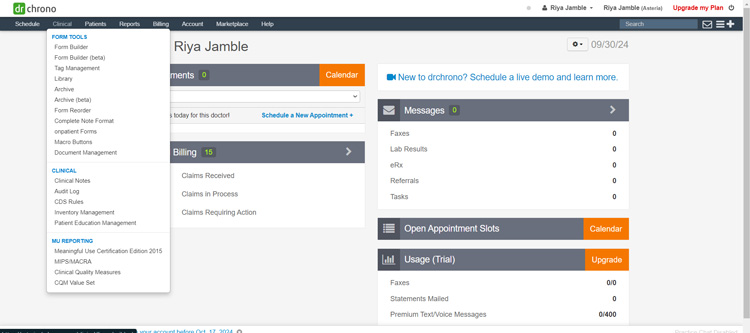
The right-side panel houses your form tools — various field types like short text, yes/no, single/multiple select, and even diagrams and headers. You simply click on a field type, then click on the form preview in the center to place it where you want.

Each field can be customized by clicking on it. This is where you'll add the actual questions or prompts you want your patients or staff to respond to.

If you're used to the SOAP (Subjective, Objective, Assessment, Plan) format for notes, there's a dedicated section type.
Smart fields add a layer of interactivity to your forms. They're essentially fields that are hidden until a corresponding "switch" is turned on. This declutters your forms and only shows relevant questions when needed.
For example, if a patient indicates they have allergies, a smart field could reveal additional questions about the specific allergens.

Reference fields let you pull data from other areas of the patient's chart or even from different forms. It's great for avoiding duplicate data entry and keeping everything consistent.
For example, you could pull in the patient's chief complaint from their intake form directly into their clinical note.

However, the interface might not be as modern or intuitive as some other form builders on the market. Navigating between different section types and mastering advanced features like smart fields could require some additional training or support.
### Scenario 4: Documenting patient details
**How does DrChrono handle it through macro buttons**
Things we looked at:
- Can we create and save macros easily?
- Is there a clear process for deleting macros with appropriate warnings?
Macros simplify charting by auto-populating frequently used text or patient data.
So, first off, you head to the "Clinical" section and find "Macro Buttons." To make a new macro, you just give it a name and then type in the text you want it to use.

They even have these handy buttons to pull in info from the patient's chart, which is pretty neat.

Once you've saved your macro, you'll see it listed on the left side of the page. You can rearrange them however you like, which is helpful if you have a bunch.

If you ever need to get rid of a macro, you can delete it from the Macro Buttons page. Just be careful, because once it's gone, it's gone for good.

Overall, macros seem like a great way to speed up your charting. It's perfect for those phrases or notes you type over and over again.
### Scenario 5: Setting Up Visual Alerts
**How does DrChrono handle it through patient flags**
Things we looked at:
- Can we easily create new patient flags and customize their names and colors?
- Is there a limit to the number of flags we can create?
- Can we edit or delete existing flags?
- Do flags trigger any alerts or reminders during patient encounters?
**Creating Patient Flags:**
First, you head over to the "Patients" tab and find the "Patient Flags" option in the dropdown.
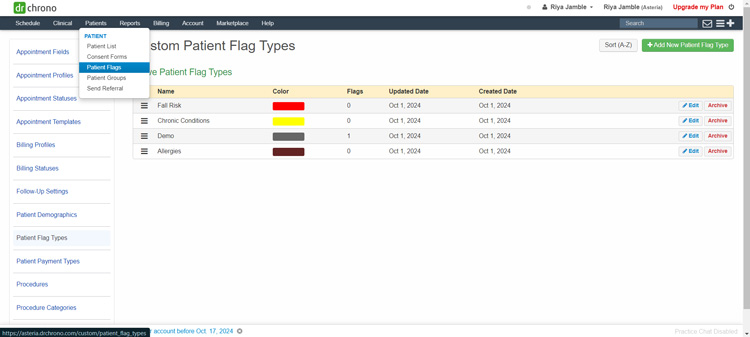
Once you're there, you click on "+Add New Patient Flag Type." This opens up a little window where you can name your flag (like Allergies or Fall Risk) and pick a color for it.

You can create as many flags as you want. However, you can't actually assign the flag to a patient right there. You have to go find the patient's chart to apply it. It would be so much easier if you could just do it all in one place!
It's like making a label but then having to go to a completely different room to stick it on something! Talk about a workflow interruption.
Another thing: you can’t delete a flag, you’ll need to archive it.
### Scenario 6: Creating patient bills
**How does DrChrono handle it through its billing features**
Things we looked at:
- Can we add multiple ICD-10, CPT and HCPCS codes to a single billing profile?
- Can we edit billing profiles to add or remove codes?
- Can we apply a billing profile when scheduling an appointment?
- How do we delete a billing profile that is no longer needed?
Let’s first start with creating billing profiles.
Head over to the Schedule tab and select Billing Profile.

Click on the Add New Profile button and enter the appropriate codes. For example, we used these values:
- **Profile Name:** Skin Biopsy
- **ICD-10 Code:** L72.3 (sebaceous cyst) and D23.30 (Other benign neoplasms of skin of unspecified part of face)
- **CPT Code:** 11100, 12001 and 11400
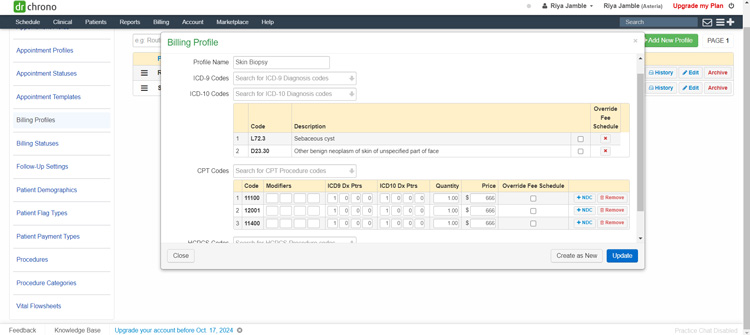
Once the profile is created, you can edit it (add and remove codes).
Billing profiles are only as good as the information you put into them. So, take the time to create accurate, well-defined profiles. Review them regularly and update them as needed. And if you're unsure about a code, don't guess. Consult your coding resources or a billing expert.
**Note:** You can’t delete billing profiles, you can only archive them.
After creating your profiles, you can assign them to your patients in four ways:
- Appointment window
- Live claims feed
- Clinical note
- Form builder
Once you assign a profile, you can either adjust the billing on the same screen or head to the billing details page. Add details like:
- Billing status
- ICD version
- Payment profile
- Payer pre-auth number
- Billing note

Click on Verify and Save.
You can view the superbill without leaving the screen.

Send the bill to your patient’s online portal. The moment you send it to the OnPatient portal, the patient will receive a mail and after logging in they can instantly check their superbill.

Adding billing details isn’t difficult if you have everything set up like fee schedules and billing profiles. The system also comes with ICD, CPT and HCPCS codes, helping providers and billers to quickly select the appropriate codes from the preloaded list, speeding up the billing process.
### Scenario 7: Adding Insurance Details
**How does DrChrono handle it through its claims management features**
Things we looked at:
- Can we add multiple insurance info to a patient’s chart?
- Can we submit claims electronically?
Head over to your patient’s chart and select Insurances.

You can add primary, secondary, tertiary, auto accident, worker’s comp and Durable Medical Equipment (DME) insurance details to a patient’s chart.

As an example, we used these details:
- **Subscriber is the Patient:** Yes
- **Insured person is the same person as the Patient:** Yes
- **Insurance Company:** Blue Cross/Blue Shield
- **Carrier Payer ID:** BCBS123
- **Alternate Eligibility Payer:** N/A
- **TPL Code:** N/A
- **Insurance ID Number:** A1B2C3D4E5
- **Insurance group name:** Acme Corporation Employees
- **Insurance group number:** G12345
- **Insurance plan name:** BlueChoice PPO
- **Insurance plan type:** Preferred Provider Organization (PPO)
- **Insurance claim office number:** 1-800-555-1212
- **Number visits allowed per year:** 20
- **Card issued date:** 01/01/2024
- **Primary Insurance Notes:** None
Unfortunately, we were unable to check the system’s real-time eligibility and claims submitting functionality as it needed us to upgrade to a paid plan.
### OnPatient Portal
We also tested the platform’s OnPatient portal to check things from the patient’s point of view. After all, when patients have a positive experience with your practice, they’re more likely to be satisfied with their care and recommend your practice to others.
**Enabling OnPatient Access**
To enable OnPatient portal access you need to update these patient details:
- Social security number
- Address
- Valid phone number and email address
If you don’t have these details, the patient won’t receive an email invitation to activate their account.
To enable the OnPatient access for the patient, open your patient’s chart and click on the OnPatient Access tab from the sidebar. Click on the Enable Patient Access button.

The patient will receive an email invite.

You’ll need to update your account and practice settings to enable online appointment scheduling.
Don’t forget to highlight the day and times for which you want to allow online appointment scheduling in your online schedule settings.

Here’s what we thought about the OnPatient Portal.
The portal looked clean and user-friendly. Once the patient signs up, they can:
**Book appointments and video visits**
The appointment tab allows the patient to book in-person and video visits.

We liked how quickly we could schedule appointments. Just select the doctor, location and date and add the reason for the visit. It’s that easy. As a patient, we wouldn’t want to go through a complicated process to just book a session.

After we booked the appointment, it took us to an onboarding form. The portal did a great job of using available patient data like contact, address, insurance details and allergies to create a smoother onboarding experience.

Pre-populating relevant fields not only saves time for both patients and providers but also minimizes the chance of errors or missing information.
The portal didn’t allow us to go to the next step until we read and signed the HIPAA consent form, ensuring HIPAA compliance.
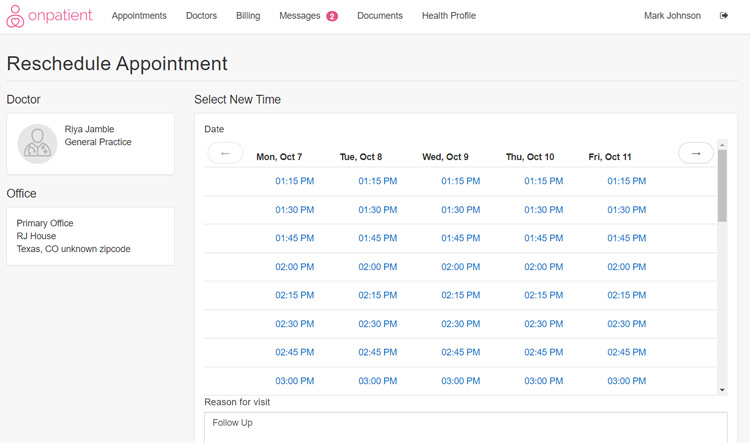
**Reschedule and cancel appointments**
This was easy too. Just select the appointment you want to reschedule and select a new date and time.
**Make payments**
**Note:** You’ll have to enroll with DrChrono Payments to enable online patient payments.
Adding bank details was a necessary step to set up payments and we didn’t want to use our personal account for that, so we could not test the payments part of the patient portal.
However, according to their support page, once you connect through Stripe, patients can make payments and update their credit/debit cards through the portal.
**Check messages**
We sent a statement through DrChrono’s provider account to the patient’s online portal to see how it displays. The statement was sent within seconds. When we opened the statement, it opened in a new tab.

As a patient, we could also reply to messages. This feature is super handy when you have questions about a certain lab result or bills.

We think anyone can learn to navigate the OnPatient portal within 30 minutes. Even someone who has never used a system before can navigate it easily, it’s that simple.
## Approach to Common EHR Challenges
- **Reduce Charting Headaches:** Manage appointments, talk to patients and get reports from an integrated platform. Range Urgent Care used this to cut their charting time by 50%. This increased their provider-patient interaction time by 10 minutes or more per patient, leading to a more relaxed and unrushed “coffee shop-like” patient experience.
- **Dictate, Don’t Type:** [Dr. Surinder Saini](https://www.drchrono.com/resources/case-studies/speech-to-text/), a Southern California-based gastroenterologist, used speech-to-text capabilities to chart patients’ notes. He also noticed the system adapted to his accent without compromising notes.
- **Achieve Claim Transparency:** [New Day Therapy](https://www.drchrono.com/case-studies/new-day-therapy-uses-drchrono-rcm-to-empower-their-clinicians-community/), a mental health practice, saw 100% of claims paid within 60 days with the system’s live claims feed and payment analysis report.
- **Tailor the System to Your Unique Needs:** Customize templates, forms and workflows to fit your specialty preferences. [CityHealth Urgent Care](https://www.drchrono.com/case-studies/drchronos-open-api-and-ehr-helped-cityhealth-urgent-care-pivot-to-covid-19-testing/) used the system’s open API and customizable EHR to quickly pivot to COVID-19 testing during the pandemic, allowing them to adapt to the changing healthcare landscape and meet their community needs.
- **Prescribe Anywhere, Access Anytime:** Easily share patient information with other healthcare providers, labs and pharmacies, ensuring a smooth care continuum. [BearTooth Brainworks’](https://www.drchrono.com/resources/case-studies/psychiatry-practice/) founder Brian O’Neill uses the system’s ePrescribing functionality to send prescriptions to any U.S. pharmacy, ensuring patients have uninterrupted access to medications, even while traveling.
## Cost of Ownership
Frequently asked questions regarding DrChrono pricing include:
**Q: What are the available pricing options?**
A: The vendor offers four pricing plans:
- Prometheus
- Hippocrates
- Apollo
- Apollo Plus
Once you fill out a form on their pricing page, a representative will contact you regarding pricing details.
## Limitations
At the time of this review, these are the limitations according to user feedback:
- Reports cannot be auto-scheduled.
- Patients can’t pay using digital wallets like Google Pay, Apple Pay or Samsung Pay.
- Offline mobile access isn’t supported.
- The custom form builder is difficult to use.
- Telehealth sessions cannot be recorded.
## Demo Resources
- **Free Trial:** The vendor provides a free trial to help you experience the platform firsthand. This hands-on approach lets you explore the features, navigate the interface and determine if the system meets your needs.
- **Training Videos:** Check out the training videos that walk you through specific features like telehealth, macro buttons and form building step by step.
- **Feature Videos:** These give you a quick rundown of what each tool does and how it can benefit your practice.
## FAQs
Frequently asked questions regarding DrChrono include:
**Q: Can I use the system on my current devices?**
A: You can access it from any device with an internet connection, whether it's your laptop, desktop computer, tablet or smartphone. It works best on Google Chrome according to the vendor, but other browsers like Safari, Firefox and Edge work fine too.
**Q: Can I import data from my other EHR?**
A: Yes, you can import your practice and patient data.
You'll need to sign an annual contract to get started. There are specific file formats for different types of patient data (like demographics, medical history, etc.). The vendor will provide you with a table that outlines those requirements. You'll then need to reach out to your current EHR provider and request your data in those formats.
Once you have your data files, you can securely upload them to a shared cloud storage folder (the vendor typically uses Box.com). They’ll provide you with the necessary access details.
Then, the team will take it from there! The data transfer usually takes about three weeks to complete.
However, you can’t import billing data like credit/debit card info or electronic remittance advice and claim details.
**Q: Does the vendor provide training?**
A: Yes, the implementation specialist assigned to you will conduct six one-hour training sessions. They cover features like:
- Scheduling
- Charting
- Form building
- Billing
- Message center and reports
- Mobile app
## Compare to Other Leading Software
These are the top products most often compared.
Generating Scorecard... Compare to DrChrono
You can choose 4 products to compare
[![NextGen Enterprise product logo]() NextGen Enterprise](https://www.selecthub.com/p/ehr-software/nextgen-enterprise/)
[![CareCloud Central product logo]() CareCloud Central](https://www.selecthub.com/p/medical-practice-management-software/carecloud-central/)
[![Oracle Ambulatory EHR product logo]() Oracle Ambulatory EHR](https://www.selecthub.com/p/ehr-software/oracle-ambulatory-ehr/)
[![eClinicalWorks product logo]() eClinicalWorks](https://www.selecthub.com/p/ehr-software/eclinicalworks/)
[![athenaOne product logo]() a†heηaOne](https://www.selecthub.com/p/ehr-software/athenaone/)
[![Elation Health product logo]() Elation Health](https://www.selecthub.com/p/ehr-software/elation-health/)
[![Tebra EHR product logo]() Tebra EHR](https://www.selecthub.com/p/ehr-software/tebra-ehr/)
[![AdvancedMD product logo]() AdvancedMD](https://www.selecthub.com/p/medical-software/advancedmd/)
[![EpicCare product logo]() EpicCare](https://www.selecthub.com/p/ehr-software/epiccare/)
Generating Scorecard... Compare to DrChrono
## Head-to-Head
Comparison

vs
- [AdvancedMD](https://www.selecthub.com/medical-software/advancedmd-vs-drchrono/)
- [CentralReach](https://www.selecthub.com/medical-software/drchrono-vs-centralreach/)
- [DeepScribe](https://www.selecthub.com/medical-software/drchrono-vs-deepscribe/)
- [OhMD](https://www.selecthub.com/medical-software/drchrono-vs-ohmd/)
- [Redox](https://www.selecthub.com/medical-software/drchrono-vs-redox/)
## Awards
SelectHub research analysts have evaluated DrChrono and concluded it deserves the award for the Best Overall Medical Software available today and earns best-in-class honors for Platform Capabilities.


## Relevant Articles
[Top EHR Software 2024](https://www.selecthub.com/medical-software/fast-track-ehr-software-comparison-guide/) [DrChrono vs. Kareo Billing](https://www.selecthub.com/medical-billing-software/drchrono-vs-kareo-billing/) [DrChrono vs. Cerner Practice Management](https://www.selecthub.com/medical-practice-management-software/drchrono-vs-cerner-practice-management/) [DrChrono vs. EZClaim](https://www.selecthub.com/medical-billing-software/drchrono-vs-ezclaim/)
## Similar Products
Here are the most similar products to DrChrono.
[![Ready Doc product logo]() Ready Doc](https://www.selecthub.com/p/medical-software/ready-doc/)
[![OhMD product logo]() OhMD](https://www.selecthub.com/p/medical-software/ohmd/)
[![AdvancedMD product logo]() AdvancedMD](https://www.selecthub.com/p/medical-software/advancedmd/)
[![HiDoctor product logo]() HiDoctor](https://www.selecthub.com/p/medical-software/hidoctor/)
[![Infor Cloverleaf product logo]() Infor Cloverleaf](https://www.selecthub.com/p/medical-software/infor-cloverleaf/)
[![Provation MD product logo]() Provation MD](https://www.selecthub.com/p/medical-software/provation-md/)
[![Compliancy Group product logo]() Compliancy Group](https://www.selecthub.com/p/medical-software/compliancy-group/)
[![DeepScribe product logo]() DeepScribe](https://www.selecthub.com/p/medical-software/deepscribe/)
[![CentralReach product logo]() CentralReach](https://www.selecthub.com/p/medical-software/centralreach/)
[![ZOLL emsCharts product logo]() ZOLL emsCharts](https://www.selecthub.com/p/medical-software/ems-charts/)
## About the Contributors
The following expert team members are responsible for creating, reviewing, and fact checking the accuracy of this content.
[![Riya Jamble]()](https://www.selecthub.com/author/riya-jamble/)
Written by
[Riya Jamble](https://www.selecthub.com/author/riya-jamble/)
Technical Content Writer
Riya is a Technical Content Writer at SelectHub. She writes content for our construction scheduling and bidding, CMMS and medical billing categories. She's also a part of the social media team where she crafts posts that engage and resonate with our audience. Riya holds a Graduate Degree in Journalism and Mass Communication from Lovely Professional University, Punjab, India. Fueled by a love for black coffee, her day begins and ends with its energizing ritual. Riya enjoys a variety of TV series, including Friends, Suits, American Horror Story, and How to Get Away with Murder. During her free time, you'll find her reading or spending time with her close ones. She believes in magic and is waiting for that day when reality compromises and fairytale swirls around with a smile.
[See Full Bio](https://www.selecthub.com/author/riya-jamble/)
[![Dianna Dragonetti]()](https://www.selecthub.com/author/dianna-dragonetti/)
Edited by
[Dianna Dragonetti](https://www.selecthub.com/author/dianna-dragonetti/)
Content Editor
As an editor, Dianna Dragonetti leads a team of five writers in writing about a variety of software, with an emphasis on how these tools empower businesses. Categories include accounting, learning management systems, content management systems, supply chain management, and electronic data interchange.
[See Full Bio](https://www.selecthub.com/author/dianna-dragonetti/)
Your review has been submitted
and should be visible within 24 hours.
Review Title
Pros
Cons
Overall feedback
Your name
Your job title
Industry
Choose your main industry
- Accounting / CPA
- Advertising
- Aerospace & Defense
- Agriculture
- Apparel
- Architecture
- Auto Dealership
- Automotive
- Banking & Financial Services
- Banking & Mortgage
- Chemicals
- Construction & Engineering
- Construction / Contracting
- Consulting
- Consumer Products
- Distribution
- E-commerce
- Education
- Electronics
- Energy & Utilities
- Federal Government
- Field Maintenance
- Food & Beverage
- Healthcare / Social Services
- Hospitality / Gaming / Travel
- Human Resources
- Industrial Machinery
- Information Technology & High Tech
- Insurance
- Legal
- Maintenance / Field Service
- Manufacturing
- Marketing Services
- Media & Communications / Entertainment
- Mill Products
- Mining / Metals
- Mortgage
- Non-Profit
- Not Available
- Oil & Gas
- Other
- Other Services
- Payroll Provider
- Pharmaceuticals
- Professional Employer Organization
- Professional Services
- Property Management
- Public Sector
- Real Estate
- Recruiting Agency
- Religious Institutions
- Retail
- Sales & Marketing
- Semiconductors
- Software / IT
- Sports and Recreation
- Staffing Agency
- State & Local Government
- Telecommunications
- Third-Party Administrator
- Transportation & Logistics
- Wholesale Distribution
Company Size
Choose your company size
- 1 employee
- 2 to 9 employees
- 10 - 19 employees
- 20 - 49 employees
- 50 - 99 employees
- 100 - 499 employee
- 500 - 999 employees
- 1,000 - 2,499 employees
- 2,500 - 4,999 employees
- 5,000 - 9,999 employees
- 10,000 - 24,999 employees
- 25,000 - 49,999 employees
- 50,000 + employees
```json
{
"@context": "https://schema.org",
"@type": "BreadcrumbList",
"itemListElement": [
{
"@type": "ListItem",
"position": 1,
"name": "Home",
"item": "https://www.selecthub.com/"
},
{
"@type": "ListItem",
"position": 2,
"name": "Medical Management",
"item": "https://www.selecthub.com/category/medical/"
},
{
"@type": "ListItem",
"position": 3,
"name": "Medical Software",
"item": "https://www.selecthub.com/c/medical-software/"
},
{
"@type": "ListItem",
"position": 4,
"name": "DrChrono"
}
]
}
{
"@context": "http://schema.org",
"@type": "SoftwareApplication",
"name": "DrChrono",
"description": "DrChrono is a cloud-based EHR and medical billing solution that helps you manage patient records, schedule appointments, verify insurance coverage, submit claims and process payments — all from a single interface. This reduces administrative burden, minimizes billing errors and speeds up your reimbursement process, giving you more time to focus on improving patient care.For the practice as a whole, the system helps: Get Paid Faster: Automate billing and insurance claims to reduce errors and speed up payments. Improve Financial Health: Track outstanding payments and identify potential billing issues. Negotiate Better Rates: Gain insights to negotiate more effectively with insurance companies.For doctors, this means: Effortless Access to Patient Information: Imagine having a patient's medical history — allergies, medications, past visits — at your fingertips. Simplified Appointments and Prescriptions: Schedule appointments and send prescriptions electronically in just a few clicks.For patients, it means: Taking Control of Their Health: Book appointments, communicate with their doctor and access their own records through the patient portal. Staying on Track: Receive automated reminders for appointments and medication refills.You can connect with apps like Relaymed, Updox, Holly, DeepScribe, ZocDoc, ClearGage, NextPatient and more.I tested the system to see how it works in real-world scenarios. Here’s the scoop: while mastering the billing module may require some effort and billing data import has limitations, the system’s intuitive interface and accessibility from any device make it a user-friendly option.A free trial and flexible pricing plans allow you to explore its potential and determine the right fit for your practice.Our Research Process For DrChronoI didn’t want to waste a minute of my 30-day DrChrono trial, so I dove right in, testing capabilities for both providers and patients. For medical practices, I checked out the main platform; to get the patient side of things, I played around with the OnPatient portal — more on that later.But before getting hands-on, I took a deep dive into feature videos, one-pagers that summarized platform capabilities and the knowledge base to make sure I wasn’t flying blind.I also consulted our research team and analyzed our internal data, which scored key features like clinical charting, documentation, claims management and reporting. This helped me see how DrChrono stacks up against competitors like Practice Fusion and athenaOne, informing my approach.",
"review": {
"@type": "Review","reviewRating": {
"@type": "Rating",
"ratingValue": 86,
"bestRating": 100
},
"author": {
"@type": "Person",
"name": "Riya Jamble",
"reviewBody": "I was able to explore DrChrono’s features using a free trial. Here's what stood out: Easy to Use & Customize: DrChrono is really intuitive. Navigating the platform was a breeze and customizing templates for notes, forms and workflows was simple. It’s flexible, but not in a way that feels overwhelming, which is perfect for anyone who needs a system that adapts to them. Access from Anywhere: The cloud-based nature of DrChrono means you can access it from just about any device — laptop, tablet, phone — you name it. This is a massive win for anyone who's on the go. OnPatient Portal: Patients can access their own records, book appointments and pay their bills online. It takes a lot of work off your plate and allows patients to manage their healthcare on their own terms. The fact that it’s easy for them to use is a big plus. Flexible Pricing: DrChrono offers four pricing plans, and the free trial gives you a solid chance to test everything out before making any commitments.What Could Be Better: Reports Cannot Be Auto-Scheduled: If you need to run reports regularly, you’ll have to do it manually every time. It’s like needing your daily coffee but having to grind the beans yourself each morning. It works, but it’s not as convenient as it could be. Limited Payment Options: DrChrono doesn’t support payment methods like Google Pay, Apple Pay or Samsung Pay. Given how often we use these mobile payments, this felt like a missed opportunity to make things easier for patients and providers. No Offline Mobile Access: Another thing that bugged me is the lack of offline mobile access. If you’re in a place with spotty internet or traveling without Wi-Fi, you’re out of luck. Accessing patient data offline would be a nice touch, especially for those who are always on the move. Clunky Custom Form Builder: The custom form builder is a bit of a pain to use. While it’s great that you can create your own forms, the interface isn’t the most intuitive. Navigating between sections felt clunky, and I had to spend a bit of time figuring it out. It would be nice if it was a little more straightforward. No Telehealth Session Recording: For many practices, being able to record consultations is critical for review or compliance. This is a big miss, and honestly, I’m hoping they’ll add this feature in the future.While DrChrono doesn't have a publicly confirmed built-in AI system, it works with special AI tools to simplify doctors' jobs. Here are some of the main ones: DeepScribe helps doctors write notes quickly. It listens to what the doctor and patient say and turns it into a neat, professional-looking note, saving lots of time. Diagnoss is another smart tool that helps with billing. It reads what doctors write about patients and finds the right billing codes for the visit. This helps doctors get paid faster and correctly.If you're looking for a comprehensive, user-friendly system that can be customized to your practice, we'd definitely recommend taking a closer look.We’ve discussed more about the features in the See It in Action section. Do check it out to know how the system works in different scenarios."
}
},
"image": "https://cdn.selecthub.com/products/621c090c3a61c6809130675a63897a0f-b15dbb041cf58cfc60123b30e434dad4/resources/original/logo.svg?1741099695",
"aggregateRating": {
"@type": "AggregateRating",
"ratingValue": "79",
"bestRating": "100",
"worstRating": "1",
"ratingCount": "540"
},
"positiveNotes": {
"@type": "ItemList",
"itemListElement": [
{
"@type": "ListItem",
"position": 1,
"name": "Ease of Use: Navigate patient charts, create shortcuts and access billing info without a steep learning curve."
},
{
"@type": "ListItem",
"position": 2,
"name": "Customization: Tailor the system to your specific needs and preferences like customizing templates, workflows and reports."
},
{
"@type": "ListItem",
"position": 3,
"name": "Easy Medical Coding: Find and assign ICD, CPT and HCPCS codes to patients' bills to save time and reduce coding errors."
}
]
},
"negativeNotes": {
"@type": "ItemList",
"itemListElement": [
{
"@type": "ListItem",
"position": 1,
"name": "Contractual Obligations: Canceling subscriptions can be challenging, potentially leading to early termination fees. Automatic renewals may also catch you off guard."
},
{
"@type": "ListItem",
"position": 2,
"name": "Subpar Customer Support: Long wait times, unhelpful responses and unresolved issues from customer representatives might disrupt your processes."
},
{
"@type": "ListItem",
"position": 3,
"name": "Occasional Glitches: System crashes, slow navigation and difficulties with scheduling and other functionalities can cause frustration."
}
]
},
"applicationCategory": "Medical Software"
}
```
