---
description: Is Miro the right solution for you? See where it's ranked among all Collaboration Software. Read expert reviews, compare 2026 pricing, and explore top-rated features.
---
[Home](https://www.selecthub.com/) > [Project Management](https://www.selecthub.com/category/project-management/) > [Collaboration Software](https://www.selecthub.com/c/collaboration-software-tools/) > Miro
Categories:
- [Collaboration Software](https://www.selecthub.com/c/collaboration-software-tools/)
- [Diagram Software](https://www.selecthub.com/c/diagram-software/)
- [Visual Collaboration Tools](https://www.selecthub.com/c/visual-collaboration-tools/)
- [Whiteboard Software](https://www.selecthub.com/c/whiteboard-software/)
- [Workflow Management Software](https://www.selecthub.com/c/workflow-management-software/)
- ...
## What Is Miro?
**Industry Specialties:** Serves all industries
Miro is a visual collaboration platform designed to enhance creativity and innovation in teams of all sizes and types. This cloud-based tool functions in remote, hybrid, and in-office settings, enabling employees to work together across different formats, channels, tools, and time zones.
The software is especially useful for marketing, product management, design, and engineering departments. For companies that need more customization, Miro also provides a developer platform that makes the interface adjustable to unique business requirements.
**Our Research Process for Miro**
Full disclosure, SelectHub uses the free version of Miro for our content workflow and brainstorming. Even so, I asked our research team to help me go beyond my basic understanding with key benefits and features. I then spent a week testing each differentiator and capability on our new and existing boards. Additionally, I browsed Reddit and software review sites for user insights and visited the help center whenever I needed a hand.
PRICE
$
$
$
$
$
COMPANY SIZE
S
M
L
DEPLOYMENT
PLATFORM
[Try Before You Buy. Request a Free Demo Today!Request Demo It's completely free!](https://pmo.selecthub.com/get-product-demo/?category=Collaboration+Software&product_name=Miro&origin_url=https%3A%2F%2Fwww.selecthub.com%2Fp%2Fcollaboration-software-tools%2Fmiro%2F&product_logo=https%3A%2F%2Fcdn.selecthub.com%2Fproducts%2Ff8e918489f1e0a81ff11312f4d0630c1-b5d4ce6909d5172edac82945e1e8d59a%2Fresources%2Fnormal%2Flogo.png%3F1735986577)
[Contributors](#view-contributors)
![Christina George]() Written by Christina George Technical Content Writer [Read Bio](https://www.selecthub.com/author/christina-george/)
![Dianna Dragonetti]() Edited by Dianna Dragonetti Content Editor [Read Bio](https://www.selecthub.com/author/dianna-dragonetti/)
User Sentiment i
![User satisfaction level icon: excellent]()
Based on 19997 reviews:
Add your rating:
![Screenshots]()![Screenshots]()![Screenshots]()
Product Screenshots and Videos
## #6
Miro is ranked #6 in the Collaboration Software product directory based on the latest available data collected by SelectHub. Compare the leaders with our In-Depth Report.
[Get the Report Now](https://pmo.selecthub.com/request-custom-scorecard?category_slug=collaboration-software-tools&product_slug=miro&page_type=product&slug=miro&product_name=Miro&category=Collaboration+Software&origin_url=https%3A%2F%2Fwww.selecthub.com%2Fp%2Fcollaboration-software-tools%2Fmiro%2F)
## Miro Pricing
Based on our most recent analysis, Miro pricing starts at $8 (Per User, Monthly (if Paying Annually), Freemium).
[Get Price Quote](https://pmo.selecthub.com/get-product-pricing/?category=Collaboration+Software&product_name=Miro&origin_url=https%3A%2F%2Fwww.selecthub.com%2Fp%2Fcollaboration-software-tools%2Fmiro%2F&product_logo=https%3A%2F%2Fcdn.selecthub.com%2Fproducts%2Ff8e918489f1e0a81ff11312f4d0630c1-b5d4ce6909d5172edac82945e1e8d59a%2Fresources%2Fnormal%2Flogo.png%3F1735986577&price=1)
- Price
-
$
$
$
$
$
i
- Starting From
- $8
- Pricing Model
- Per User, Monthly (if paying annually), Freemium
- Free Trial
- 14 Days - Request for Free
## Training Resources
Miro is supported with the following types of training:
- Documentation
- In Person
- Live Online
- Videos
- Webinars
## Support
The following support services are available for Miro:
- Email
- Phone
- Chat
- FAQ
- Forum
- Help Desk
- Knowledge Base
- Tickets
- Training
- 24/7 Live Support
## Miro Benefits and Insights
Why use Miro?
### Key differentiators & advantages of Miro
- **Visualize with AI:** Get an assist from machine learning and AI to create content on the board using your prompts. For example, I typed in “create a content creation workflow” and selected the type of output I wanted — a flowchart and an ER diagram. You can also create documents, sticky notes and even images.
- **Get Inspiration from Templates:** Build from a not-so-blank canvas. Create boards from in-built templates or diagrams like interactive whiteboards, mind maps, drawings, and planning boards or take your pick from user-generated boards in the Miroverse. My personal favorite was the Pac-Man-themed sprint retrospective, but other helpful templates include system mapping toolkits, customer journey maps, content calendars and sprints.
- **Boost Brainstorming with Clusters:** Say goodbye to disorganized meeting minutes by typing down pointers on sticky notes and clustering them based on tags, author name or AI-identified patterns or sentiment. I liked that you can even create a shareable document out of clusters (with a little help from AI).
- **Collaborate with Remote Team Members:** Make it easier to facilitate strategic planning sessions to generate ideas, hold discussions and build plans even while working asynchronously, without having to worry about interference from storage or bandwidth limits, data loss, and other limitations. Use interactive, pre-made templates for activities like PI planning, brainwriting, retrospectives and concept mapping to keep meetings focused and organized.
### Industry Expertise
Miro is best suited for larger teams that need to collaborate extensively in real-time, both within the team and with external stakeholders. It's particularly useful for teams that need to work on large workflows, communicate effectively, and create presentations.
## Miro Reviews
Based on our most recent analysis, Miro reviews indicate a 'excellent' User Satisfaction Rating of 93% based on 19997 user reviews from 4 recognized software review sites.
![User satisfaction level icon: excellent]()
19997 reviews
93%
of users would recommend this product
### Synopsis of User Ratings and Reviews
Based on an aggregate of Miro reviews taken from the sources above, the following pros & cons have been curated by a SelectHub Market Analyst.
#### Pros
- **User Friendly:** Users appreciated the intuitive and interactive interface and its professional-looking pre-built templates to get started.
- **Real-Time Collaboration:** Digital whiteboards for brainstorming, real-time votes and comments and in-board video meetings to capture team and individual ideas remotely were a plus for users.
- **Visualization:** Reviewers liked Miro’s customizable and graphical representation of flows and ideas and simplified diagramming.
#### Cons
- **Limited Free Features:** Users noted that the free version had basic export functionality and limited editable boards.
- **Learning Curve:** Reviewers said big boards can be overwhelming and that it’s hard to stay up to date on new features.
- **Lags and Navigation:** Slow loading times and lags for larger boards, and difficulty moving around the page when presenting were problems for reviewers.
#### Researcher's Summary:
Miro is a cloud-based collaboration platform designed to help users manage projects and create products with the help of digital whiteboards, real-time interactions, visualization and AI. The boards are easy to set up, either from scratch or with a helping hand from Miroverse templates.
I liked the user access settings, where each board essentially works as a proofing-style group chat where you can start video calls, add sticky notes and comments and modify the board (if you have permission, that is).
Another standout feature is the built-in AI (although I may have squandered all of our monthly credits on this test, sorry team). I prompted the AI to build a generic content workflow using sticky notes, flow charts and an ER diagram – a great way to get things started before you modify it to suit your generic needs. I also created and imported a document from the flowchart, fantastic for company guidelines and processes.
A game-changer for brainstorming, Miro allows all team members to add in sticky notes that you can then cluster according to user or AI-identified sentiment or patterns, so a whole slew of ideas doesn’t seem too intimidating. That said, I did notice a few lags with our larger board and difficulty toggling — you can’t just click and move, you need to use the horizontal and vertical scroll bars.
Overall, Miro is an excellent tool for remote and hybrid teams looking for real-time collaboration and visualization. Although the free plan is adequate if you’re a small business, upgrading is a whole different ball game and well worth the investment for more boards and interactive presentations.
## Key Features
- **Boards:** Bring your projects and ideas to life with customizable boards that you can build from scratch, with AI or from a template library. Visualize tasks, brainstorm ideas and execute projects using flowcharts, mind maps, brainwriting, Kanban boards and sprint planning. Set view and edit access and share boards with internal and external users.
- **Diagramming and Process Mapping:** Take your ideas from A to B and so on and so forth with diagramming and process mapping boards that use different shapes, themes, swimlanes and annotations. Use flowcharts, BPMN and UML diagrams to show interdependencies, connections and handoffs between lanes. Organize your content hierarchically, customize your mind maps and export them as PDFs.
- **Collaboration Tools:** Boost employee participation in your workshops no matter their location. Capture and convert physical materials in real time into editable digital sticky notes, making it easier to share information and collaborate on projects. Communicate on each board with comments, notes, votes, video chats, group messages and video messages.
- **Interactive Presentation Mode:** Replace static slide decks with editable and colorful frames to create an engaging, visually appealing setting for co-creation. Employees and customers alike can actively comment, contribute ideas and raise concerns through interactive presentations.
- **Project Management:** Move from ideas to execution by creating projects using project templates, Kanban boards, Gantt charts, sprints and Agile boards. Add tags, assignees, statuses and due dates to tasks and create workflows.
- **Frames:** Allow employees to work on elements of a presentation or file privately and publish it when ready through the hide-and-reveal setting. Once the board’s content and layout are finalized, lock published elements in place so they can’t be edited or moved.
- **Integration Maximus:** Tailor the platform to unique business needs with over 100 apps and integrations. The platform offers bi-directional syncing, automation, and natively embedded boards, ensuring that users get the most out of their existing tools without having to switch between multiple platforms.
- **Multi-User Launcher:** Launch Video Chat directly from the interface. The platform enables timeboxing activities, ensuring everyone stays on track and aware of the time remaining using the Countdown Timer.
- **Developer Platform:** Enable development teams to create custom plugins and integrations to meet more complex business requirements.
- **Web SDK:** Build customized applications and experiences within a board and interact directly with the board's user interface. Manage data securely with advanced security and ITSM tools.
- **REST API:** Integrate Miro with other applications to enable data and information exchange. Miro’s REST API provides a broad range of CRUD (Create, Read, Update, Delete) operations that span boards, board members, and board items.
- **Live Embeds:** Users can complete their tasks while working on other apps using Miro.
## See It In Action: Set Up A Sprint Planning Board
Miro may originate from a Slavic word, but you don’t have to know another language to put it to work. I was vaguely familiar with how it all worked because we used it to demonstrate our content workflow back in the day. Now, it was time to put it to the test.
Because Miro is already very well-known for their mind maps, I thought I’d try a different tack with their sprint planning board. I liked that I could choose a template from pre-built options or from user-generated boards in the Miroverse.

It was very easy to locate the sprint planning template and apply it to the board, but it couldn’t hurt to have a preview of each template before you use it.

Next, it was time to get a bird’s eye view of what the board offered. There were plenty of options to distribute team members’ workloads and brainstorm with sticky notes.
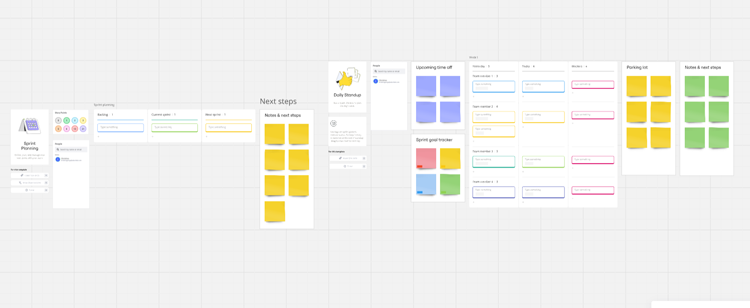
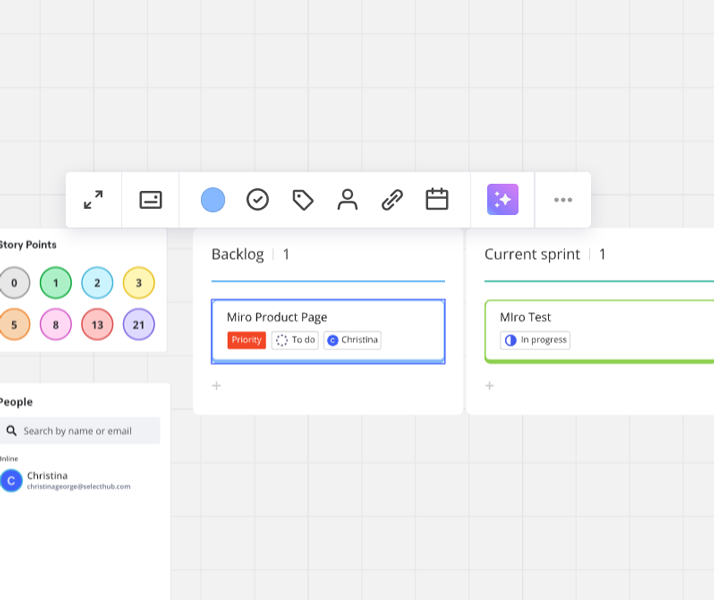
It offers three different steps where I added tasks along with information like status, assignee, tags and dates. The drag-and-drop functionality was a win, although I would have liked to add a few more fields.
I only used the free version, so I couldn’t test out the import cards from Jira or show dependencies feature, but I kept it so you know its there.
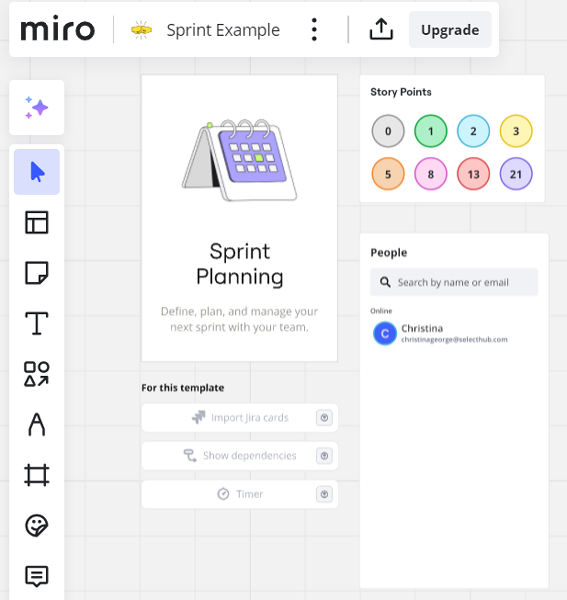
Even if you’re not a coder or a technological mastermind, it’s simple to create a board using pre-built templates or from the Miroverse that you can customize to meet your needs.
## Cost of Ownership
Frequently asked questions regarding Slack pricing include:
**Q: What pricing plans does Miro offer?**
A: Miro has four pricing tiers: Free, Starter, Business and Enterprise. The Free plan offers three editable boards and basic features. Pro starts at $8 per user per month, Business starts at $20 per user per month. Pricing for the Enterprise plan requires a quote.
**Q: Is there a free version of Miro?**
A: Yes, Miro offers a free plan with three editable boards, unlimited team members, 10 AI Miro credits, core integrations, five talk tracks and basic board exports.
**Q: Are there any discounts available for Miro?**
A: Yes, Miro offers a [30% discount on paid plans for non-profits](https://help.miro.com/hc/en-us/articles/360026839633-NPO-subscriptions#h_c4762328-30f8-4111-aee7-99b100489b78) and [$1,000 credit for startups](https://help.miro.com/hc/en-us/articles/360014912819-Miro-for-Startups-program) that meet their criteria.
## Limitations
At the time of this review, these are the limitations according to user feedback:
- Large boards lag sometimes.
- Steep learning curve.
- Cost-prohibitive for smaller companies.
## Demo Resources
- **Community:** Join the community forum to connect with other users to register for events, share tips and tricks and network.
- **Help Center:** Troubleshoot by searching through articles, courses and videos.
- **Miro Academy:** Attend webinars, watch videos and register for courses so you can earn badges.
## Compare to Other Leading Software
These are the top products most often compared.
Generating Scorecard... Compare to Miro
You can choose 4 products to compare
[![SmartDraw product logo]() SmartDraw](https://www.selecthub.com/p/diagram-software/smartdraw/)
[![Lucidchart product logo]() Lucidchart](https://www.selecthub.com/p/diagram-software/lucidchart/)
[![Cacoo product logo]() Cacoo](https://www.selecthub.com/p/diagram-software/cacoo/)
[![Visio product logo]() Visio](https://www.selecthub.com/p/diagram-software/visio/)
[![EdrawMax product logo]() EdrawMax](https://www.selecthub.com/p/diagram-software/edrawmax/)
[![Creately product logo]() Creately](https://www.selecthub.com/p/diagram-software/creately/)
[![Gliffy product logo]() Gliffy](https://www.selecthub.com/p/diagram-software/gliffy/)
[![draw.io product logo]() draw.io](https://www.selecthub.com/p/diagram-software/draw-io/)
[![FigJam product logo]() FigJam](https://www.selecthub.com/p/diagram-software/figjam/)
Generating Scorecard... Compare to Miro
## Head-to-Head
Comparison

vs
- [ActiveCollab](https://www.selecthub.com/collaboration-software-tools/miro-vs-activecollab/)
- [Bublup](https://www.selecthub.com/collaboration-software-tools/miro-vs-bublup/)
- [Conceptboard](https://www.selecthub.com/collaboration-software-tools/miro-vs-conceptboard/)
- [Confluence](https://www.selecthub.com/collaboration-software-tools/confluence-vs-miro/)
- [Easynote](https://www.selecthub.com/collaboration-software-tools/miro-vs-easynote/)
- [Glasscubes](https://www.selecthub.com/collaboration-software-tools/miro-vs-glasscubes/)
- [Google Workspace](https://www.selecthub.com/collaboration-software-tools/google-workspace-vs-miro/)
- [Huddle App](https://www.selecthub.com/collaboration-software-tools/miro-vs-huddle-app/)
- [Lark](https://www.selecthub.com/collaboration-software-tools/miro-vs-lark-suite/)
- [Microsoft 365](https://www.selecthub.com/collaboration-software-tools/microsoft-365-vs-miro/)
- [Microsoft 365 Business](https://www.selecthub.com/collaboration-software-tools/miro-vs-microsoft-365-business/)
- [Microsoft 365 Copilot](https://www.selecthub.com/collaboration-software-tools/miro-vs-microsoft-365-copilot/)
- [Microsoft 365 Education](https://www.selecthub.com/collaboration-software-tools/miro-vs-microsoft-365-education/)
- [Microsoft 365 Enterprise](https://www.selecthub.com/collaboration-software-tools/miro-vs-microsoft-365-enterprise/)
- [Microsoft Lists](https://www.selecthub.com/collaboration-software-tools/miro-vs-microsoft-lists/)
- [Microsoft Loop](https://www.selecthub.com/collaboration-software-tools/miro-vs-microsoft-loop/)
- [Notion](https://www.selecthub.com/collaboration-software-tools/miro-vs-notion-so/)
- [PlanPlus Online](https://www.selecthub.com/collaboration-software-tools/miro-vs-planplus-online/)
- [Rocket Chat](https://www.selecthub.com/collaboration-software-tools/miro-vs-rocket-chat/)
- [SharePoint](https://www.selecthub.com/collaboration-software-tools/sharepoint-vs-miro/)
- [Slack](https://www.selecthub.com/collaboration-software-tools/slack-vs-miro/)
- [Slite](https://www.selecthub.com/collaboration-software-tools/miro-vs-slite/)
- [Steady](https://www.selecthub.com/collaboration-software-tools/miro-vs-status-space/)
- [TeamHub](https://www.selecthub.com/collaboration-software-tools/miro-vs-teamhub/)
- [Vyopta](https://www.selecthub.com/collaboration-software-tools/miro-vs-vyopta/)
- [Webex Suite](https://www.selecthub.com/collaboration-software-tools/miro-vs-webex-suite/)
- [Zimbra](https://www.selecthub.com/collaboration-software-tools/miro-vs-zimbra/)
- [Zoom Workplace](https://www.selecthub.com/collaboration-software-tools/miro-vs-zoom-workplace/)
## Awards
SelectHub research analysts have evaluated Miro and concluded it earns best-in-class honors for Integrations and Security. Miro stands above the rest by achieving an ‘Excellent’ rating as a User Favorite.


## Similar Products
Here are the most similar products to Miro.
[![Range product logo]() Range](https://www.selecthub.com/p/collaboration-software-tools/range-labs/)
[![Futuramo product logo]() Futuramo](https://www.selecthub.com/p/collaboration-software-tools/futuramo/)
[![Krock product logo]() Krock](https://www.selecthub.com/p/collaboration-software-tools/krock-io/)
[![ScrumGenius product logo]() ScrumGenius](https://www.selecthub.com/p/collaboration-software-tools/scrumgenius/)
[![Nozbe product logo]() Nozbe](https://www.selecthub.com/p/collaboration-software-tools/nozbe/)
[![Axero product logo]() Axero](https://www.selecthub.com/p/collaboration-software-tools/axero/)
[![Steady product logo]() Steady](https://www.selecthub.com/p/collaboration-software-tools/status-space/)
[![Huddle App product logo]() Huddle App](https://www.selecthub.com/p/collaboration-software-tools/huddle-app/)
[![Glasscubes product logo]() Glasscubes](https://www.selecthub.com/p/collaboration-software-tools/glasscubes/)
[![ActiveCollab product logo]() ActiveCollab](https://www.selecthub.com/p/collaboration-software-tools/activecollab/)
## About the Contributors
The following expert team members are responsible for creating, reviewing, and fact checking the accuracy of this content.
[![Christina George]()](https://www.selecthub.com/author/christina-george/)
Written by
[Christina George](https://www.selecthub.com/author/christina-george/)
Technical Content Writer
An Associate Editor at SelectHub, Christina George creates and edits articles spanning project management, CPQ, CRM, marketing automation and home health software. As a Bachelor of Arts graduate with a triple major in Economics, Political Science and Sociology, her aim is to bring an integrated and simplified approach to long-form technical content. Formerly a food writer, copywriter, and social media sleuth, she has a soft spot for a quality pun. When not crafting articles and editing buyer's guides, you can find her attempting to score goals on the football field, binge-watching Curb Your Enthusiasm, or re-reading Pride and Prejudice for the nth time.
[See Full Bio](https://www.selecthub.com/author/christina-george/)
[![Dianna Dragonetti]()](https://www.selecthub.com/author/dianna-dragonetti/)
Edited by
[Dianna Dragonetti](https://www.selecthub.com/author/dianna-dragonetti/)
Content Editor
As an editor, Dianna Dragonetti leads a team of five writers in writing about a variety of software, with an emphasis on how these tools empower businesses. Categories include accounting, learning management systems, content management systems, supply chain management, and electronic data interchange.
[See Full Bio](https://www.selecthub.com/author/dianna-dragonetti/)
Your review has been submitted
and should be visible within 24 hours.
Review Title
Pros
Cons
Overall feedback
Your name
Your job title
Industry
Choose your main industry
- Accounting / CPA
- Advertising
- Aerospace & Defense
- Agriculture
- Apparel
- Architecture
- Auto Dealership
- Automotive
- Banking & Financial Services
- Banking & Mortgage
- Chemicals
- Construction & Engineering
- Construction / Contracting
- Consulting
- Consumer Products
- Distribution
- E-commerce
- Education
- Electronics
- Energy & Utilities
- Federal Government
- Field Maintenance
- Food & Beverage
- Healthcare / Social Services
- Hospitality / Gaming / Travel
- Human Resources
- Industrial Machinery
- Information Technology & High Tech
- Insurance
- Legal
- Maintenance / Field Service
- Manufacturing
- Marketing Services
- Media & Communications / Entertainment
- Mill Products
- Mining / Metals
- Mortgage
- Non-Profit
- Not Available
- Oil & Gas
- Other
- Other Services
- Payroll Provider
- Pharmaceuticals
- Professional Employer Organization
- Professional Services
- Property Management
- Public Sector
- Real Estate
- Recruiting Agency
- Religious Institutions
- Retail
- Sales & Marketing
- Semiconductors
- Software / IT
- Sports and Recreation
- Staffing Agency
- State & Local Government
- Telecommunications
- Third-Party Administrator
- Transportation & Logistics
- Wholesale Distribution
Company Size
Choose your company size
- 1 employee
- 2 to 9 employees
- 10 - 19 employees
- 20 - 49 employees
- 50 - 99 employees
- 100 - 499 employee
- 500 - 999 employees
- 1,000 - 2,499 employees
- 2,500 - 4,999 employees
- 5,000 - 9,999 employees
- 10,000 - 24,999 employees
- 25,000 - 49,999 employees
- 50,000 + employees
```json
{
"@context": "https://schema.org",
"@type": "BreadcrumbList",
"itemListElement": [
{
"@type": "ListItem",
"position": 1,
"name": "Home",
"item": "https://www.selecthub.com/"
},
{
"@type": "ListItem",
"position": 2,
"name": "Project Management",
"item": "https://www.selecthub.com/category/project-management/"
},
{
"@type": "ListItem",
"position": 3,
"name": "Collaboration Software",
"item": "https://www.selecthub.com/c/collaboration-software-tools/"
},
{
"@type": "ListItem",
"position": 4,
"name": "Miro"
}
]
}
{
"@context": "http://schema.org",
"@type": "SoftwareApplication",
"name": "Miro",
"description": "Miro is a visual collaboration platform designed to enhance creativity and innovation in teams of all sizes and types. This cloud-based tool functions in remote, hybrid, and in-office settings, enabling employees to work together across different formats, channels, tools, and time zones. The software is especially useful for marketing, product management, design, and engineering departments. For companies that need more customization, Miro also provides a developer platform that makes the interface adjustable to unique business requirements.Our Research Process for MiroFull disclosure, SelectHub uses the free version of Miro for our content workflow and brainstorming. Even so, I asked our research team to help me go beyond my basic understanding with key benefits and features. I then spent a week testing each differentiator and capability on our new and existing boards. Additionally, I browsed Reddit and software review sites for user insights and visited the help center whenever I needed a hand. ",
"review": {
"@type": "Review","reviewRating": {
"@type": "Rating",
"ratingValue": 80,
"bestRating": 100
},
"author": {
"@type": "Person",
"name": "Christina George",
"reviewBody": "Miro is a cloud-based collaboration platform designed to help users manage projects and create products with the help of digital whiteboards, real-time interactions, visualization and AI. The boards are easy to set up, either from scratch or with a helping hand from Miroverse templates.I liked the user access settings, where each board essentially works as a proofing-style group chat where you can start video calls, add sticky notes and comments and modify the board (if you have permission, that is).Another standout feature is the built-in AI (although I may have squandered all of our monthly credits on this test, sorry team). I prompted the AI to build a generic content workflow using sticky notes, flow charts and an ER diagram – a great way to get things started before you modify it to suit your generic needs. I also created and imported a document from the flowchart, fantastic for company guidelines and processes.A game-changer for brainstorming, Miro allows all team members to add in sticky notes that you can then cluster according to user or AI-identified sentiment or patterns, so a whole slew of ideas doesn’t seem too intimidating. That said, I did notice a few lags with our larger board and difficulty toggling — you can’t just click and move, you need to use the horizontal and vertical scroll bars.Overall, Miro is an excellent tool for remote and hybrid teams looking for real-time collaboration and visualization. Although the free plan is adequate if you’re a small business, upgrading is a whole different ball game and well worth the investment for more boards and interactive presentations."
}
},
"image": "https://cdn.selecthub.com/products/f8e918489f1e0a81ff11312f4d0630c1-b5d4ce6909d5172edac82945e1e8d59a/resources/normal/logo.png?1735986577",
"aggregateRating": {
"@type": "AggregateRating",
"ratingValue": "93",
"bestRating": "100",
"worstRating": "1",
"ratingCount": "19997"
},
"offers": {
"@type": "Offer",
"priceSpecification": {
"@type": "priceSpecification",
"price": "8",
"priceCurrency": "USD"
}
},
"positiveNotes": {
"@type": "ItemList",
"itemListElement": [
{
"@type": "ListItem",
"position": 1,
"name": "User Friendly: Users appreciated the intuitive and interactive interface and its professional-looking pre-built templates to get started."
},
{
"@type": "ListItem",
"position": 2,
"name": "Real-Time Collaboration: Digital whiteboards for brainstorming, real-time votes and comments and in-board video meetings to capture team and individual ideas remotely were a plus for users."
},
{
"@type": "ListItem",
"position": 3,
"name": "Visualization: Reviewers liked Miro’s customizable and graphical representation of flows and ideas and simplified diagramming."
}
]
},
"negativeNotes": {
"@type": "ItemList",
"itemListElement": [
{
"@type": "ListItem",
"position": 1,
"name": "Limited Free Features: Users noted that the free version had basic export functionality and limited editable boards."
},
{
"@type": "ListItem",
"position": 2,
"name": "Learning Curve: Reviewers said big boards can be overwhelming and that it’s hard to stay up to date on new features."
},
{
"@type": "ListItem",
"position": 3,
"name": "Lags and Navigation: Slow loading times and lags for larger boards, and difficulty moving around the page when presenting were problems for reviewers."
}
]
},
"applicationCategory": "Collaboration Software"
}
```
