---
description: Is SAP Analytics Cloud the right solution for you? See where it's ranked among all Business Intelligence Tools. Read expert reviews, compare 2026 pricing, and explore top-rated features.
---
[Home](https://www.selecthub.com/) > [Business Intelligence](https://www.selecthub.com/research/business-intelligence/) > [Business Intelligence Tools](https://www.selecthub.com/c/business-intelligence-tools/) > SAP Analytics Cloud
Categories:
- [Business Intelligence Tools](https://www.selecthub.com/c/business-intelligence-tools/)
- [Big Data Analytics Tools](https://www.selecthub.com/c/big-data-analytics-tools/)
- [Business Analytics Tools](https://www.selecthub.com/c/business-analytics-tools/)
- [CPM Software](https://www.selecthub.com/c/cpm-software/)
- [Enterprise Reporting Software](https://www.selecthub.com/c/enterprise-reporting-system/)
- [EPM Software](https://www.selecthub.com/c/epm-software/)
- [FP&A Software](https://www.selecthub.com/c/fp-and-a-software/)
- ...
## What Is SAP Analytics Cloud?
**Industry Specialties:** Serves all industries.
SAP Analytics Cloud (SAC) is a software-as-a-service built on the SAP Business Technology Platform. It’s the driving force behind SAP’s data services, especially its financial planning and consolidation offerings and makes the cut for the top ten products on our leaderboard.
The platform provides accessible dashboards that meet WCAG 2.1 standards, AI-powered forecasting with Smart Predict and natural-language querying through conversational insights. It also simplifies data prep with automated joins and smart data typing, and helps you understand what’s driving your numbers with key driver analysis and smart discovery.
SAP Analytics Cloud connects to Apache Hive, [Spark](https://www.selecthub.com/p/business-intelligence-tools/apache-spark/), [Informatica](https://www.selecthub.com/p/etl-tools/informatica-powercenter/), [Marketo](https://www.selecthub.com/p/marketing-automation-software/marketo/), Pardot, [Eloqua](https://www.selecthub.com/p/marketing-automation-software/eloqua/), [MailChimp](https://www.selecthub.com/p/marketing-automation-software/mailchimp/), [SurveyMonkey](https://www.selecthub.com/p/customer-experience-software/surveymonkey-enterprise/), [PayPal](https://www.selecthub.com/p/ecommerce-platforms/paypal/), [Stripe](https://www.selecthub.com/p/pos-software/stripe/), [Square](https://www.selecthub.com/p/pos-software/square-pos/), [SQL Server](https://www.selecthub.com/p/relational-database-solutions/sql-server/), [MySQL](https://www.selecthub.com/p/relational-database-solutions/mysql/) and PostgreSQL. SAP Analytics uses ERP, eCommerce, CRM, marketing, project management, SEO and NoSQL data by relying on partner integrations.
The SAP Business Intelligence plan is for you if simple reporting is what you need. The vendor prices it at $36 per user monthly.
You can boost sales by identifying underperforming products and regions and improve products and services by analyzing customer behavior and purchasing trends.
You can opt for the Planning edition to create realistic budgets with accurate predictions at a cost of $14,100 per user annually. Allocating resources where they’re needed cuts down costs, and improved inventory management helps prevent unpleasant surprises, like extra overhead, due to stockouts or overstocking.
The Digital Boardroom is what it sounds like — a meeting-style presentation module with a responsive design and compelling dashboards. It’ll cost extra even if you have the enterprise edition.
The vendor offers a 30-day trial extendable up to 60 additional days, though you won’t be able to test its AI features unless you upgrade. Usage statistics are available to administrators on the Analytics Hub.
A mobile app is available, though browser access on mobile isn’t supported, except for Safari on iOS.
User reviews praise SAP Analytics for its visual storytelling and analytics, though most people say they need tech support for complex data modeling tasks and generating reports.
**Our Research Process for SAP Analytics**
I relied on the free trial to test SAC’s story and data analyzer modules. My focus areas included key buyer concerns, such as ease of use, data visualization and insight sharing. I also referred to the BI data in our selection platform to see how SAP Analytics Cloud compared to other top BI products, including [Tableau](https://www.selecthub.com/p/business-intelligence-tools/tableau/), [Spotfire](https://www.selecthub.com/p/big-data-analytics-tools/spotfire/), [Cognos Analytics](https://www.selecthub.com/p/business-intelligence-tools/cognos-analytics/) and [SAS Visual Analytics](https://www.selecthub.com/p/business-intelligence-tools/sas-visual-analytics/).
YouTube videos were my primary go-to’s. Also, I used in-house data compiled from in-depth market research, RFIs, user reviews, vendor outreach and product documentation.
PRICE
$
$
$
$
$
COMPANY SIZE
S
M
L
DEPLOYMENT
PLATFORM
[Try Before You Buy. Request a Free Demo Today!Request Demo It's completely free!](https://pmo.selecthub.com/get-product-demo/?category=Business+Intelligence+Tools&product_name=SAP%2BAnalytics%2BCloud&origin_url=https%3A%2F%2Fwww.selecthub.com%2Fp%2Fbusiness-intelligence-tools%2Fsap-analytics-cloud%2F&product_logo=https%3A%2F%2Fcdn.selecthub.com%2Fproducts%2F0801a457294fafbd8fe3116176252636-be45b937416f8d2cfc74345736831611%2Fresources%2Fnormal%2Flogo.png%3F1735673531)
[Contributors](#view-contributors)
![Ritinder Kaur]() Written by Ritinder Kaur Senior Technical Content Writer [Read Bio](https://www.selecthub.com/author/ritinder-kaur/)
![Dianna Dragonetti]() Edited by Dianna Dragonetti Content Editor [Read Bio](https://www.selecthub.com/author/dianna-dragonetti/)
User Sentiment i
![User satisfaction level icon: great]()
Based on 2054 reviews:
Add your rating:
![Screenshots]()![Screenshots]()![Screenshots]()![Screenshots]()![Screenshots]()![Screenshots]()![Screenshots]()![Screenshots]()![Screenshots]()
Product Screenshots and Videos
## #6
SAP Analytics Cloud is ranked #6 on the top 10 Business Intelligence Tools leaderboard based on a comprehensive analysis performed by SelectHub research analysts. Compare the leaders with our In-Depth Report.
[Get the Report Now](https://pmo.selecthub.com/bi-report-pd-vers?category_slug=business-intelligence-tools&product_slug=sap-analytics-cloud&page_type=product&slug=sap-analytics-cloud&product_name=SAP+Analytics+Cloud&category=Business+Intelligence+Tools&origin_url=https%3A%2F%2Fwww.selecthub.com%2Fp%2Fbusiness-intelligence-tools%2Fsap-analytics-cloud%2F)
## SAP Analytics Cloud Pricing
Based on our most recent analysis, SAP Analytics Cloud pricing starts at $36 (Per User, Monthly).
[Get Price Quote](https://pmo.selecthub.com/get-product-pricing/?category=Business+Intelligence+Tools&product_name=SAP%2BAnalytics%2BCloud&origin_url=https%3A%2F%2Fwww.selecthub.com%2Fp%2Fbusiness-intelligence-tools%2Fsap-analytics-cloud%2F&product_logo=https%3A%2F%2Fcdn.selecthub.com%2Fproducts%2F0801a457294fafbd8fe3116176252636-be45b937416f8d2cfc74345736831611%2Fresources%2Fnormal%2Flogo.png%3F1735673531&price=2)
- Price
-
$
$
$
$
$
i
- Starting From
- $36
- Pricing Model
- Per User, Monthly
- Free Trial
- 30 Days - Request for Free
## Training Resources
SAP Analytics Cloud is supported with the following types of training:
- Documentation
- In Person
- Live Online
- Videos
- Webinars
## Support
The following support services are available for SAP Analytics Cloud:
- Email
- Phone
- Chat
- FAQ
- Forum
- Help Desk
- Knowledge Base
- Tickets
- Training
- 24/7 Live Support
## SAP Analytics Cloud Benefits and Insights
Why use SAP Analytics Cloud?
### Key differentiators & advantages of SAP Analytics Cloud
- **Embedded Analytics:** SAP Analytics Cloud, with a score of 100, is among the top five BI tools for embedded capabilities. It handles bidirectional filtering between your app and the embedded content, supports secure multi-tenant deployments, and lets you write back directly to SAP BW/4HANA through OData. Tableau can’t do that without extra tools, and SAS doesn’t support it at all.
- **Mobile Capabilities:** SAP Analytics Cloud (90) ranks ahead of Spotfire (84) and Qlik Sense (79) for mobile functionality. You can stay informed with push notifications, collaborate using in-app discussions, and make decisions on any device, thanks to a responsive design.
### Industry Expertise
SAP Analytics Cloud is a solution for all industries. It has an especially effective implementation in sales, marketing, finance, operations, human resources, public services, oil and gas, real estate and more. It also offers a multitude of business content packages that provide end-to-end dashboards for a wide range of industries.
## SAP Analytics Cloud Reviews
Based on our most recent analysis, SAP Analytics Cloud reviews indicate a 'great' User Satisfaction Rating of 84% based on 2054 user reviews from 5 recognized software review sites.
![User satisfaction level icon: great]()
2054 reviews
84%
of users would recommend this product
### Synopsis of User Ratings and Reviews
Based on an aggregate of SAP Analytics Cloud reviews taken from the sources above, the following pros & cons have been curated by a SelectHub Market Analyst.
#### Pros
- **Data Visualization:** Approximately 91% of users who reviewed visualization said that they can customize dashboards effortlessly with the solution’s wide range of templates and graphics libraries.
- **Ease of Use:** Citing the platform’s modern and intuitive interface, around 89% of reviewers said that the platform makes it easy to develop stories without technical knowledge thanks to Smart Discovery.
- **Data Analysis:** Mentioning its forecasting and predictive analysis capabilities, approximately 87% of the people reviewed said that the solution enables collaborative enterprise planning via statistical and predictive analysis.
- **Web and Mobile Accessibility:** Discussing its easy accessibility on multiple browsers, around 72% users said that the platform works well on a wide range of devices.
- **Data Connectivity:** Approximately 70% of the reviewers who mentioned integration said that the tool, with strong live data connections, integrates well with other applications and data sources.
- **Functionality:** Around 55% of the users who discussed features said that the tool is scalable and quite versatile, with frequent updates.
#### Cons
- **Performance:** Approximately 85% of users who reviewed performance said that some features do not work well at the enterprise level.
- **Reporting:** Around 58% of the reviewers who mentioned reporting said that report creation with the tool is complicated and needs IT support.
- **Data Management:** Approximately 52% of users who discussed data preparation said that the platform needs more ubiquitous data modeling capabilities.
#### Researcher's Summary:
SAC acts as a hub for your myriad SAP modules, pulling together business planning and consolidation, finance, ERP and supply chain management. While all these SAP products are giants in their own right, SAC gives you, the user, a unified platform to make sense of your data with in-app data modeling and analytics.
I spent time working with SAP analytics with the 30-day trial, which includes access to SAP Datasphere (formerly SAP Data Warehouse), and while the back-end capabilities are there, I hit snags early. The AI assistant built into Datasphere couldn’t launch any tutorials, and I had to fall back on YouTube just to understand basic tasks. This wasn’t a one-off — the native help content repeatedly broke, leaving the first mile experience more frustrating than it should’ve been.
Once inside, I found the data integration impressive. You can pull from Excel, CSV and even Google Sheets. Performance was solid when working with SAP data, but I noticed sluggishness even with smaller file uploads, suggesting scale may become a bottleneck outside the SAP ecosystem. That matches what around 85% of enterprise users have reported in reviews.
Most users who reviewed data integration said the tool handles large amounts of data seamlessly, and SAP scores a perfect 100 in our analysis for data management, at par with [MicroStrategy](https://www.selecthub.com/p/business-intelligence-tools/microstrategy/) and [Power BI](https://www.selecthub.com/p/business-intelligence-tools/power-bi/).
Lacking a data dictionary, the platform allows you to manage source metadata within your projects. This could be why some reviews wished for greater versatility in data modeling.
Many users who reviewed visualization appreciated the platform for its rich graphics libraries and templates, and I agree. In our analysis, SAP Analytics Cloud earned a score of 100 for dashboarding and data visualization. In this aspect, it leaves behind stalwarts like Power BI and [Oracle Analytics Cloud](https://www.selecthub.com/p/business-intelligence-tools/oracle-analytics-cloud/). Reviewing functionality, most people liked its versatility and scalability.
Its predictive and augmented analysis capabilities had many fans among reviewers, with most praising the platform for strong planning and business analytics. Our analysts give SAP Analytics a 93 score for reporting insights, alerts, auto-scheduling and natural language results.
As an example, [Juniper Networks](https://www.sap.com/asset/dynamic/2024/09/3065d015-d87e-0010-bca6-c68f7e60039b.html?video=3c672d75-d67e-0010-bca6-c68f7e60039b), an AI-driven networking platform, eliminated 100% of its manual planning, budgeting and forecasting in Excel by moving to data modeling in SAP Analytics Cloud.
But quite a few people said there’s scope for improvement in live data analytics. Around 85% of reviewers discussing performance said it struggles at the enterprise level and when offline, though quite a few noted that it performs exceedingly well within the SAP ecosystem.
Overall, SAP Analytics Cloud is for organizations already locked into the SAP ecosystem, especially if you’re looking for a financial planning and consolidation tool. If you’re looking for a BI and predictive analytics tool, there are better options.
## Key Features
- **Accessible Dashboards:** SAP Analytics supports screen readers, speech recognition, color contrast and alternative text for images to help meet accessibility standards such as WCAG 2.1.
- **Smart Predict:** Forecast events using SAP’s machine learning algorithms on your data. Predict whether a customer will buy a product, and anticipate order value, sales figures and campaign impact with classification, regression and time-series analysis.
- **Conversational Insights:** Click on Just Ask on the toolbar, pick a model, add it to your session and type your question using the available data. SAP Analytics auto-completes your queries and suggests questions for further analysis.
- **Augmented Data Prep:** Automatically identifies metrics, dimensions, dates, locations and hierarchies. SAP Analytics uses statistics and heuristics to assign data types, then links related tables with Auto Data Joins.
- **Key Driver Analysis:** Spot the key drivers of critical metrics and understand variances and correlations with **Smart Insights**. Take corrective action by identifying outliers, thanks to Smart Discovery.
## See It In Action
I decided to take it for a test drive for you; there’s a 30-day trial, which should give your teams ample time to check it out.
A free SAC trial includes access to SAP Datasphere, previously called SAP Data Warehouse. However, their tutorials were glitchy, and I had to resort to YouTube videos. SAP Datasphere has an AI Assistant, which failed to launch tutorials when prompted.
Stories are the staple of SAC, but toggling between the story and data views wasn't intuitive. Data workers might find the learning curve short; however, newbies can find it confusing initially. Plus, moving widgets to reorganize the workspace should be straightforward, but it isn’t.
As a tribute to financial planning, its primary offering, SAC offers a special dimension called Account for defining metrics such as revenue, gross profit, operating expenses and cost of sold goods.
Besides CSV and Excel, you can import Google Sheets data as well, though it’ll require authorization from your Google Suite administrator.
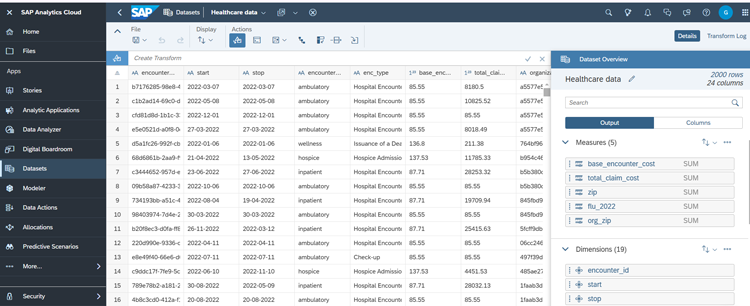
You can download stories as PDF and PowerPoint files and bookmark filters, input controls, prompts and views. Conditional formatting and smart insights will save you time by surfacing relevant information when you need it.
The Just Ask feature launched in the Q1 2024 release sounds promising. Grouped filters are a new user-friendly feature in the Q4 2024 release, which should make user searches quicker.

With SAC, the vendor has prioritized advanced features for planning and financial analysis, but interface navigation needs improvement.
## Limitations
Some of the product limitations include:
- Doesn’t offer built-in statistical functions for financial market analysis.
- Lacks automated data model deployment and monitoring capabilities.
- Doesn’t support voice-based NLP.
![Banner of Pricing guide for SAP Analytics Cloud]()
## Pricing & Cost Details
See the Price/User for the top business intelligence tools… plus the most important considerations and questions to ask when shopping.
See Pricing Details
## Compare Business Intelligence Tools
These are the top products most often compared.
Generating Scorecard... Compare to SAP Analytics Cloud
You can choose 4 products to compare
[![Strategy One product logo]() Strategy One](https://www.selecthub.com/p/business-intelligence-tools/strategy-one/)
[![Oracle Analytics Cloud product logo]() Oracle Analytics Cloud](https://www.selecthub.com/p/data-analytics-software/oracle-analytics-cloud/)
[![Qlik Sense product logo]() Qlik Sense](https://www.selecthub.com/p/business-intelligence-tools/qlik-sense/)
[![Domo product logo]() Domo](https://www.selecthub.com/p/business-intelligence-tools/domo/)
[![Power BI product logo]() Power BI](https://www.selecthub.com/p/business-intelligence-tools/power-bi/)
[![Tableau product logo]() Tableau](https://www.selecthub.com/p/business-intelligence-tools/tableau/)
[![Spotfire product logo]() Spotfire](https://www.selecthub.com/p/data-visualization-tools/spotfire/)
[![SAS Visual Analytics product logo]() SAS Visual Analytics](https://www.selecthub.com/p/data-visualization-tools/sas-visual-analytics/)
[![Cognos Analytics product logo]() Cognos Analytics](https://www.selecthub.com/p/business-intelligence-tools/cognos-analytics/)
Generating Scorecard... Compare to SAP Analytics Cloud
## Head-to-Head
Comparison

vs
- [BusinessObjects](https://www.selecthub.com/business-intelligence-tools/businessobjects-vs-sap-analytics-cloud/)
- [Clear Analytics](https://www.selecthub.com/business-intelligence-tools/sap-analytics-cloud-vs-clear-analytics/)
- [Cognos Analytics](https://www.selecthub.com/business-intelligence-tools/cognos-analytics-vs-sap-analytics-cloud/)
- [CRM Analytics](https://www.selecthub.com/business-analytics-tools/crm-analytics-vs-sap-analytics-cloud/)
- [datacube](https://www.selecthub.com/business-intelligence-tools/sap-analytics-cloud-vs-datacube/)
- [Datameer](https://www.selecthub.com/business-analytics-tools/datameer-vs-sap-analytics-cloud/)
- [Domo](https://www.selecthub.com/business-intelligence-tools/domo-vs-sap-analytics-cloud/)
- [Dundas BI](https://www.selecthub.com/business-intelligence-tools/sap-analytics-cloud-vs-dundas-bi/)
- [eazyBI](https://www.selecthub.com/business-intelligence-tools/sap-analytics-cloud-vs-eazybi/)
- [Fractal](https://www.selecthub.com/business-analytics-tools/fractal-analytics-vs-sap-analytics-cloud/)
- [GoodData](https://www.selecthub.com/business-intelligence-tools/gooddata-vs-sap-analytics-cloud/)
- [IBM Watson Analytics](https://www.selecthub.com/business-analytics-tools/ibm-watson-analytics-vs-sap-analytics-cloud/)
- [Infor Birst](https://www.selecthub.com/business-intelligence-tools/birst-vs-sap-analytics-cloud/)
- [InfoZoom](https://www.selecthub.com/business-intelligence-tools/sap-analytics-cloud-vs-infozoom/)
- [Klipfolio](https://www.selecthub.com/business-intelligence-tools/klipfolio-vs-sap-analytics-cloud/)
- [KNIME](https://www.selecthub.com/business-intelligence-tools/knime-vs-sap-analytics-cloud/)
- [Knowi](https://www.selecthub.com/business-intelligence-tools/sap-analytics-cloud-vs-knowi/)
- [Mathematica](https://www.selecthub.com/business-intelligence-tools/mathematica-vs-sap-analytics-cloud/)
- [Metabase](https://www.selecthub.com/business-intelligence-tools/metabase-vs-sap-analytics-cloud/)
- [Mode](https://www.selecthub.com/business-intelligence-tools/mode-analytics-vs-sap-analytics-cloud/)
- [Oracle Business Intelligence](https://www.selecthub.com/business-intelligence-tools/oracle-bi-vs-sap-analytics-cloud/)
- [Panintelligence](https://www.selecthub.com/business-intelligence-tools/sap-analytics-cloud-vs-panintelligence/)
- [Phocas](https://www.selecthub.com/business-intelligence-tools/phocas-vs-sap-analytics-cloud/)
- [Power BI](https://www.selecthub.com/business-intelligence-tools/power-bi-vs-sap-analytics-cloud/)
- [Pyramid Analytics](https://www.selecthub.com/business-intelligence-tools/pyramid-analytics-vs-sap-analytics-cloud/)
- [Qlik Sense](https://www.selecthub.com/business-intelligence-tools/qlik-sense-vs-sap-analytics-cloud/)
- [QuickSight](https://www.selecthub.com/business-intelligence-tools/quicksight-vs-sap-analytics-cloud/)
- [SAP Business Data Cloud](https://www.selecthub.com/business-intelligence-tools/sap-analytics-cloud-vs-sap-business-data-cloud/)
- [SAS Business Analytics](https://www.selecthub.com/business-intelligence-tools/sap-analytics-cloud-vs-sas-business-analytics/)
- [Sigma Computing](https://www.selecthub.com/business-intelligence-tools/sigma-computing-vs-sap-analytics-cloud/)
- [Strategy One](https://www.selecthub.com/business-intelligence-tools/strategy-one-vs-sap-analytics-cloud/)
- [Tableau](https://www.selecthub.com/business-intelligence-tools/tableau-vs-sap-analytics-cloud/)
- [TARGIT](https://www.selecthub.com/business-intelligence-tools/targit-vs-sap-analytics-cloud/)
- [Yellowfin BI](https://www.selecthub.com/business-intelligence-tools/sap-analytics-cloud-vs-yellowfin-bi/)
- [Zoho Analytics](https://www.selecthub.com/business-intelligence-tools/zoho-analytics-vs-sap-analytics-cloud/)
## Awards
SelectHub research analysts have evaluated SAP Analytics Cloud and concluded it earns best-in-class honors for Embedded Analytics Capabilities.

## Pricing for Business Intelligence Tools
![Banner of Pricing guide for Business Intelligence Tools]()
## Similar Products
Here are the most similar products to SAP Analytics Cloud.
[![Gyana product logo]() Gyana](https://www.selecthub.com/p/business-intelligence-tools/gyana-bi/)
[![White Cup BI product logo]() White Cup BI](https://www.selecthub.com/p/business-intelligence-tools/white-cup-bi/)
[![bipp product logo]() bipp](https://www.selecthub.com/p/business-intelligence-tools/bipp-io/)
[![DeltaMaster product logo]() DeltaMaster](https://www.selecthub.com/p/business-intelligence-tools/deltamaster/)
[![Quick BI product logo]() Quick BI](https://www.selecthub.com/p/business-intelligence-tools/quick-bi/)
[![Lumenore product logo]() Lumenore](https://www.selecthub.com/p/business-intelligence-tools/lumenore/)
[![Slemma product logo]() Slemma](https://www.selecthub.com/p/business-intelligence-tools/slemma/)
[![Halo BI product logo]() Halo BI](https://www.selecthub.com/p/business-intelligence-tools/halo-bi/)
[![Omniscope product logo]() Omniscope](https://www.selecthub.com/p/business-intelligence-tools/omniscope/)
[![Intellicus product logo]() Intellicus](https://www.selecthub.com/p/business-intelligence-tools/intellicus/)
## About the Contributors
The following expert team members are responsible for creating, reviewing, and fact checking the accuracy of this content.
[![Ritinder Kaur]()](https://www.selecthub.com/author/ritinder-kaur/)
Written by
[Ritinder Kaur](https://www.selecthub.com/author/ritinder-kaur/)
Senior Technical Content Writer
Ritinder Kaur is a Senior Technical Content Writer at SelectHub and has ten years of experience writing about B2B software and quality assurance. She has a Masters degree in English language and literature and writes about Business Intelligence and Data Science. Her articles on software testing have been published on Stickyminds.
[See Full Bio](https://www.selecthub.com/author/ritinder-kaur/)
[![Dianna Dragonetti]()](https://www.selecthub.com/author/dianna-dragonetti/)
Edited by
[Dianna Dragonetti](https://www.selecthub.com/author/dianna-dragonetti/)
Content Editor
As an editor, Dianna Dragonetti leads a team of five writers in writing about a variety of software, with an emphasis on how these tools empower businesses. Categories include accounting, learning management systems, content management systems, supply chain management, and electronic data interchange.
[See Full Bio](https://www.selecthub.com/author/dianna-dragonetti/)
Your review has been submitted
and should be visible within 24 hours.
Review Title
Pros
Cons
Overall feedback
Your name
Your job title
Industry
Choose your main industry
- Accounting / CPA
- Advertising
- Aerospace & Defense
- Agriculture
- Apparel
- Architecture
- Auto Dealership
- Automotive
- Banking & Financial Services
- Banking & Mortgage
- Chemicals
- Construction & Engineering
- Construction / Contracting
- Consulting
- Consumer Products
- Distribution
- E-commerce
- Education
- Electronics
- Energy & Utilities
- Federal Government
- Field Maintenance
- Food & Beverage
- Healthcare / Social Services
- Hospitality / Gaming / Travel
- Human Resources
- Industrial Machinery
- Information Technology & High Tech
- Insurance
- Legal
- Maintenance / Field Service
- Manufacturing
- Marketing Services
- Media & Communications / Entertainment
- Mill Products
- Mining / Metals
- Mortgage
- Non-Profit
- Not Available
- Oil & Gas
- Other
- Other Services
- Payroll Provider
- Pharmaceuticals
- Professional Employer Organization
- Professional Services
- Property Management
- Public Sector
- Real Estate
- Recruiting Agency
- Religious Institutions
- Retail
- Sales & Marketing
- Semiconductors
- Software / IT
- Sports and Recreation
- Staffing Agency
- State & Local Government
- Telecommunications
- Third-Party Administrator
- Transportation & Logistics
- Wholesale Distribution
Company Size
Choose your company size
- 1 employee
- 2 to 9 employees
- 10 - 19 employees
- 20 - 49 employees
- 50 - 99 employees
- 100 - 499 employee
- 500 - 999 employees
- 1,000 - 2,499 employees
- 2,500 - 4,999 employees
- 5,000 - 9,999 employees
- 10,000 - 24,999 employees
- 25,000 - 49,999 employees
- 50,000 + employees
```json
{
"@context": "https://schema.org",
"@type": "BreadcrumbList",
"itemListElement": [
{
"@type": "ListItem",
"position": 1,
"name": "Home",
"item": "https://www.selecthub.com/"
},
{
"@type": "ListItem",
"position": 2,
"name": "Business Intelligence",
"item": "https://www.selecthub.com/research/business-intelligence/"
},
{
"@type": "ListItem",
"position": 3,
"name": "Business Intelligence Tools",
"item": "https://www.selecthub.com/c/business-intelligence-tools/"
},
{
"@type": "ListItem",
"position": 4,
"name": "SAP Analytics Cloud"
}
]
}
{
"@context": "http://schema.org",
"@type": "SoftwareApplication",
"name": "SAP Analytics Cloud",
"description": "SAP Analytics Cloud (SAC) is a software-as-a-service built on the SAP Business Technology Platform. It’s the driving force behind SAP’s data services, especially its financial planning and consolidation offerings and makes the cut for the top ten products on our leaderboard.The platform provides accessible dashboards that meet WCAG 2.1 standards, AI-powered forecasting with Smart Predict and natural-language querying through conversational insights. It also simplifies data prep with automated joins and smart data typing, and helps you understand what’s driving your numbers with key driver analysis and smart discovery.SAP Analytics Cloud connects to Apache Hive, Spark, Informatica, Marketo, Pardot, Eloqua, MailChimp, SurveyMonkey, PayPal, Stripe, Square, SQL Server, MySQL and PostgreSQL. SAP Analytics uses ERP, eCommerce, CRM, marketing, project management, SEO and NoSQL data by relying on partner integrations.The SAP Business Intelligence plan is for you if simple reporting is what you need. The vendor prices it at $36 per user monthly.You can boost sales by identifying underperforming products and regions and improve products and services by analyzing customer behavior and purchasing trends.You can opt for the Planning edition to create realistic budgets with accurate predictions at a cost of $14,100 per user annually. Allocating resources where they’re needed cuts down costs, and improved inventory management helps prevent unpleasant surprises, like extra overhead, due to stockouts or overstocking.The Digital Boardroom is what it sounds like — a meeting-style presentation module with a responsive design and compelling dashboards. It’ll cost extra even if you have the enterprise edition.The vendor offers a 30-day trial extendable up to 60 additional days, though you won’t be able to test its AI features unless you upgrade. Usage statistics are available to administrators on the Analytics Hub.A mobile app is available, though browser access on mobile isn’t supported, except for Safari on iOS.User reviews praise SAP Analytics for its visual storytelling and analytics, though most people say they need tech support for complex data modeling tasks and generating reports.Our Research Process for SAP AnalyticsI relied on the free trial to test SAC’s story and data analyzer modules. My focus areas included key buyer concerns, such as ease of use, data visualization and insight sharing. I also referred to the BI data in our selection platform to see how SAP Analytics Cloud compared to other top BI products, including Tableau, Spotfire, Cognos Analytics and SAS Visual Analytics.YouTube videos were my primary go-to’s. Also, I used in-house data compiled from in-depth market research, RFIs, user reviews, vendor outreach and product documentation.",
"review": {
"@type": "Review","reviewRating": {
"@type": "Rating",
"ratingValue": 86,
"bestRating": 100
},
"author": {
"@type": "Person",
"name": "SelectHub",
"reviewBody": "SAC acts as a hub for your myriad SAP modules, pulling together business planning and consolidation, finance, ERP and supply chain management. While all these SAP products are giants in their own right, SAC gives you, the user, a unified platform to make sense of your data with in-app data modeling and analytics.I spent time working with SAP analytics with the 30-day trial, which includes access to SAP Datasphere (formerly SAP Data Warehouse), and while the back-end capabilities are there, I hit snags early. The AI assistant built into Datasphere couldn’t launch any tutorials, and I had to fall back on YouTube just to understand basic tasks. This wasn’t a one-off — the native help content repeatedly broke, leaving the first mile experience more frustrating than it should’ve been.Once inside, I found the data integration impressive. You can pull from Excel, CSV and even Google Sheets. Performance was solid when working with SAP data, but I noticed sluggishness even with smaller file uploads, suggesting scale may become a bottleneck outside the SAP ecosystem. That matches what around 85% of enterprise users have reported in reviews.Most users who reviewed data integration said the tool handles large amounts of data seamlessly, and SAP scores a perfect 100 in our analysis for data management, at par with MicroStrategy and Power BI.Lacking a data dictionary, the platform allows you to manage source metadata within your projects. This could be why some reviews wished for greater versatility in data modeling.Many users who reviewed visualization appreciated the platform for its rich graphics libraries and templates, and I agree. In our analysis, SAP Analytics Cloud earned a score of 100 for dashboarding and data visualization. In this aspect, it leaves behind stalwarts like Power BI and Oracle Analytics Cloud. Reviewing functionality, most people liked its versatility and scalability. Its predictive and augmented analysis capabilities had many fans among reviewers, with most praising the platform for strong planning and business analytics. Our analysts give SAP Analytics a 93 score for reporting insights, alerts, auto-scheduling and natural language results.As an example, Juniper Networks, an AI-driven networking platform, eliminated 100% of its manual planning, budgeting and forecasting in Excel by moving to data modeling in SAP Analytics Cloud.But quite a few people said there’s scope for improvement in live data analytics. Around 85% of reviewers discussing performance said it struggles at the enterprise level and when offline, though quite a few noted that it performs exceedingly well within the SAP ecosystem.Overall, SAP Analytics Cloud is for organizations already locked into the SAP ecosystem, especially if you’re looking for a financial planning and consolidation tool. If you’re looking for a BI and predictive analytics tool, there are better options."
}
},
"image": "https://cdn.selecthub.com/products/0801a457294fafbd8fe3116176252636-be45b937416f8d2cfc74345736831611/resources/normal/logo.png?1735673531",
"aggregateRating": {
"@type": "AggregateRating",
"ratingValue": "84",
"bestRating": "100",
"worstRating": "1",
"ratingCount": "2054"
},
"offers": {
"@type": "Offer",
"priceSpecification": {
"@type": "priceSpecification",
"price": "36",
"priceCurrency": "USD"
}
},
"positiveNotes": {
"@type": "ItemList",
"itemListElement": [
{
"@type": "ListItem",
"position": 1,
"name": "Data Visualization: Approximately 91% of users who reviewed visualization said that they can customize dashboards effortlessly with the solution’s wide range of templates and graphics libraries."
},
{
"@type": "ListItem",
"position": 2,
"name": "Ease of Use: Citing the platform’s modern and intuitive interface, around 89% of reviewers said that the platform makes it easy to develop stories without technical knowledge thanks to Smart Discovery."
},
{
"@type": "ListItem",
"position": 3,
"name": "Data Analysis: Mentioning its forecasting and predictive analysis capabilities, approximately 87% of the people reviewed said that the solution enables collaborative enterprise planning via statistical and predictive analysis."
}
]
},
"negativeNotes": {
"@type": "ItemList",
"itemListElement": [
{
"@type": "ListItem",
"position": 1,
"name": "Performance: Approximately 85% of users who reviewed performance said that some features do not work well at the enterprise level."
},
{
"@type": "ListItem",
"position": 2,
"name": "Reporting: Around 58% of the reviewers who mentioned reporting said that report creation with the tool is complicated and needs IT support."
},
{
"@type": "ListItem",
"position": 3,
"name": "Data Management: Approximately 52% of users who discussed data preparation said that the platform needs more ubiquitous data modeling capabilities."
}
]
},
"applicationCategory": "Business Intelligence Tools"
}
```
