---
description: Is Xero the right solution for you? See where it's ranked among all Accounting Software. Read expert reviews, compare 2026 pricing, and explore top-rated features.
---
[Home](https://www.selecthub.com/) > [Accounting & Financial Management](https://www.selecthub.com/category/accounting/) > [Accounting Software](https://www.selecthub.com/c/accounting-software/) > Xero
Categories:
- [Accounting Software](https://www.selecthub.com/c/accounting-software/)
- [Accounts Payable Software](https://www.selecthub.com/c/accounts-payable-software/)
- [Accounts Receivable Software](https://www.selecthub.com/c/accounts-receivable-software/)
- [Bookkeeping Software](https://www.selecthub.com/c/bookkeeping-software/)
- [Financial Management Systems](https://www.selecthub.com/c/financial-management-systems/)
- [Financial Reporting Software](https://www.selecthub.com/c/financial-reporting-software/)
- [Nonprofit Accounting Software](https://www.selecthub.com/c/nonprofit-accounting-software/)
- ...
## What Is Xero?
**Industry Specialties:** Serves all industries
Xero is all-encompassing cloud-based accounting software catering to small businesses. It provides crucial accounting features such as recording transactions, analytics and reporting, invoicing, bank reconciliations, and expense tracking.
Xero offers user-friendly interfaces and automated features that help small business owners save time and simplify financial management.
While Xero caters well to various industries, its strengths lie in freelancer/contractor work, startups, and service-based businesses. Pricing scales with business size and complexity, starting at a monthly subscription for basic accounting needs and increasing with additional features and users.
Compared to some competitors, Xero offers a robust mobile app, strong integrations with third-party tools, and a focus on user experience. However, it may lack advanced inventory management or complex accounting functions suited for larger enterprises.
Ultimately, Xero's value proposition lies in its ease of use, automation, and scalability, making it a popular choice for small businesses seeking a streamlined and efficient accounting solution.
**Our Research Process for Xero**
I took a deep dive into Xero's free trial for one month. I explored key features like managing accounting transactions, customizing the dashboard and generating accounting reports.
I also relied on YouTube videos for tutorials and reviews, along with our in-house data that summarizes user sentiments. This gave me a well-rounded view of Xero from both personal experience and real-world feedback.
PRICE
$
$
$
$
$
COMPANY SIZE
S
M
L
DEPLOYMENT
PLATFORM
[Try Before You Buy. Request a Free Demo Today!Request Demo It's completely free!](https://pmo.selecthub.com/get-product-demo/?category=Accounting+Software&product_name=Xero&origin_url=https%3A%2F%2Fwww.selecthub.com%2Fp%2Faccounting-software%2Fxero%2F&product_logo=https%3A%2F%2Fcdn.selecthub.com%2Fproducts%2F96c974552b3f2839fcc751e7f12679ce-fec316dba4c44668e509fdc6d1525bb0%2Fresources%2Fnormal%2Flogo.webp%3F1749010902)
[Contributors](#view-contributors)
![Khyati Badiyani]() Written by Khyati Badiyani Technical Content Writer [Read Bio](https://www.selecthub.com/author/khyati-badiyani/)
![Hunter Lowe]() Edited by Hunter Lowe Content Editor [Read Bio](https://www.selecthub.com/author/hunter-lowe/)
User Sentiment i
![User satisfaction level icon: great]()
Based on 4621 reviews:
Add your rating:
![Screenshots]()![Screenshots]()![Screenshots]()
Product Screenshots and Videos
## #3
Xero is ranked #3 on the top 10 Accounting Software leaderboard based on a comprehensive analysis performed by SelectHub research analysts. Compare the leaders with our In-Depth Report.
[Get the Report Now](https://pmo.selecthub.com/request-custom-scorecard?category_slug=accounting-software&product_slug=xero&page_type=product&slug=xero&product_name=Xero&category=Accounting+Software&origin_url=https%3A%2F%2Fwww.selecthub.com%2Fp%2Faccounting-software%2Fxero%2F)
## Xero Pricing
Based on our most recent analysis, Xero pricing starts at $5 (Monthly).
[Get Price Quote](https://pmo.selecthub.com/get-product-pricing/?category=Accounting+Software&product_name=Xero&origin_url=https%3A%2F%2Fwww.selecthub.com%2Fp%2Faccounting-software%2Fxero%2F&product_logo=https%3A%2F%2Fcdn.selecthub.com%2Fproducts%2F96c974552b3f2839fcc751e7f12679ce-fec316dba4c44668e509fdc6d1525bb0%2Fresources%2Fnormal%2Flogo.webp%3F1749010902&price=1)
- Price
-
$
$
$
$
$
i
- Starting From
- $5
- Pricing Model
- Monthly
- Free Trial
- No
## Training Resources
Xero is supported with the following types of training:
- Documentation
- In Person
- Live Online
- Videos
- Webinars
## Support
The following support services are available for Xero:
- Email
- Phone
- Chat
- FAQ
- Forum
- Help Desk
- Knowledge Base
- Tickets
- Training
- 24/7 Live Support
## Xero Benefits and Insights
Why use Xero?
### Key differentiators & advantages of Xero
- **Affordable Payroll:** Save countless hours on tracking expenses, calculating payments, processing payroll and more.
- **Better Interoperability:** Centralize company processes and handle a wide range of functionality with more than 700 add-ons available through the app marketplace. This includes programs for CRM, e-commerce, inventory, invoicing, job tracking, payroll, time and attendance and more.
- **Centralizes Data and Processes:** Organize information and put the primary software that handles day-to-day issues all in one place. Manage files to a document library where users can see originals next to updated versions. Send files to stakeholders to ensure a clear flow of information.
- **Saves Time:** Eliminate tedious data entry and ensure better data integrity by cutting down on human error. Provide a clear documentation trail to ensure that the business is running ethically and save time hunting for documents when it’s time to verify the information.
### Industry Expertise
Xero serves clients in more than 180 countries and integrates with many solutions. ExpensePoint, an expense management software, announced an integration between QuickBooks Online, Xero Accounting and FreshBooks. Xero has shown up in many different industry news sources, including AccountingWEB, Business Wire, The Courier, iTnews, TechRepublic and more. Additionally, it was named an industry leader in the report, “COVID-19 Impact on 2021-2026 Global and Regional Accounting Software for Small Businesses Market Report 2020 Industry Production.”
## Xero Reviews
Based on our most recent analysis, Xero reviews indicate a 'great' User Satisfaction Rating of 87% based on 4621 user reviews from 4 recognized software review sites.
![User satisfaction level icon: great]()
4621 reviews
87%
of users would recommend this product
### Synopsis of User Ratings and Reviews
Based on an aggregate of Xero reviews taken from the sources above, the following pros & cons have been curated by a SelectHub Market Analyst.
#### Pros
- **Affordable:** Of all the reviews that mentioned price, over 70% felt it was well within their price range and felt satisfied.
- **Good Customer Service:** Over 70% of reviews that mentioned the customer support said they received excellent service, especially from their reps.
- **Excellent Functionality:** In more than 50% of all reviews that mentioned features, users were happy with its capabilities. They especially like the integrations, reconciliation process, invoices and accounting functions.
- **Simple and intuitive interface:** Xero's clean layout and straightforward navigation make it easy for users of all skill levels to manage their finances. In over 80% of reviews that mentioned the UI, users said it was easy to navigate.
- **Automated tasks:** Xero automates repetitive tasks like invoicing, expense tracking, and bank reconciliation, saving users valuable time and reducing errors.
- **Mobile app for on-the-go access:** Manage your finances and stay up-to-date on your business performance anytime, anywhere with Xero's mobile app.
- **Customizable reports and dashboards:** Gain valuable insights into your cash flow, profitability, and other key financial metrics with Xero's customizable reports and dashboards.
- **Multi-user access and permissions:** Collaborate with team members and advisors seamlessly with Xero's secure multi-user access and permission controls.
#### Cons
- **Limited inventory management:** Xero lacks advanced inventory tracking features, making it less suitable for businesses with complex inventory needs.
- **Learning curve for complex features:** While basic tasks are easy, some advanced features like multi-currency accounting can be challenging for non-accountants to navigate. Though the system was widely popular after implementation, users said it was old-fashioned and had a steep learning curve in 20% of reviews that mentioned the UI.
- **Higher cost for advanced features:** Access to advanced features like payroll processing and multi-currency comes at a higher price point, potentially exceeding budgets for smaller businesses.
- **Limited phone support:** Xero primarily relies on email and live chat for support, which may not be ideal for users seeking immediate assistance with critical issues.
- **Integration limitations:** While offering many integrations, some key business tools may not have seamless integration with Xero, requiring workarounds or data duplication.
- **Invoices:** While around 60% of users felt that the invoicing system worked well, around 40% said they had trouble making changes to them once they were saved.
- **Downgrading Issues:** Around 20% of reviews that mentioned price said they had issues while trying to go to a lower pricing tier and often ended up paying a month or more at a higher rate.
#### Researcher's Summary:
As far as our assessment goes, Xero ranks second on our list of enterprise accounting systems, placing it solidly above most competitors for central accounting functions and financial management for small businesses. Lets look at how this platform delivers on our high ranking.
Xero’s dashboards are a dream. You get a snapshot of your invoices, bills, quotes, and business transactions and can customize them based on what’s most important to you. Users also had a lot to say about Xero’s invoicing. Branded templates let you skip putting invoices together piece by piece while maintaining professionalism.
Reviewers also say invoicing is pretty seamless as it sets up automated payment reminders, conducts auto calculations of amounts and taxes, and provides seamless connections with bank accounts — with top-tier security, I might add.
Xero’s short-term cash flow analysis tools give users a sneak peek into financial health. For Pamela Phillip, a long-time customer and small business owner, cash flow analysis was a much-needed feature to help gauge clients’ real-time financial data. As the manager of an accounting firm, she could use it to help clients access loans and other funding during the changing business landscapes of COVID-19.
However, Xero’s basic plan only offers a 30-day projection. Longer projections are available in Xero's more expensive plans.
Many users also felt that Xero has extensive integration options and marked its ease of integration as a primary benefit. Our analysts agreed and gave Xero a perfect 100 for this critical requirement. It also ranks better than [Zoho Books](https://www.selecthub.com/p/accounting-software/zoho-books/) and [Freshbooks](https://www.selecthub.com/p/accounting-software/freshbooks/) in terms of integrating with inventory management tools and CRM.
Xero’s in-house inventory management isn’t bad, either. You can import inventory details in bulk in various file formats and track and manage them under a single platform.
Invoice management is a critical part of Xero but some reviewers highlighted that Xero fails to apply late fees on overdue invoices. Our analysts gave Xero a score of 50 for late fees for overdue invoices, as it doesn’t automatically calculate and apply the late fees when the invoice moves ahead of the due date.
Users also mentioned that Xero doesn’t support all bank types, so they had to manually import and export bank transactions.
Overall, Xero checks the important boxes for its target audience by offering a well-rounded accounting tool for small businesses. It supports crucial accounting functions like invoicing, expense management and financial reports. It’s suitable for small businesses that don’t require an extensive set of financial management features. But, if your requirements are more sophisticated, you might want to consider other tools.
## Key Features
- **Payroll Processing:** Provide payroll across 50 states. See when payments are due, track them and ensure on time payment. Analyze accounts payable with a quick view, schedule advanced payments and make batch payments.
- **Banking:** Connect to the right bank to track and facilitate transactions daily. Keep an eye on the flow of money through a secure connection that goes directly into the solution.
- **Expense Management:** Seamlessly track and manage expense claims. Access real-time data and reports that provide insight into patterns and trends. Record costs, see and approve claims, view overall spending and dole out reimbursements. Capture receipts to monitor employee spending and verify costs.
- **Project Management:** Integrate with other workflows to facilitate financial project management. Provide a quote for client work before you begin to track time, costs, profitability and other variables for an accurate invoice.
- **Customer History:** Use smart lists and contacts to contact details, emails, past sales, emails, invoices, past payments and more when working with a partner or client.
- **Mobile App:** Let users track bank transactions, send invoices, access supplier details and more, from any mobile device.
- **Inventory Management:** Undertake basic inventory management, including taking inventory, seeing what was bought or sold, look at reports on how well items are doing and get invoices and orders.
- **Gusto Integration:** Calculate and pay taxes, deductions and employees through an integration with the [accounting software Gusto](https://www.selecthub.com/payroll-software/gusto/). Simplify compliance and keep on top of industry updates.
- **Other Capabilities:** Processes payment in multiple currencies, calculates sales taxes, tracks purchase orders, manages files and does several other administrative tasks.
## See It In Action
While testing, I loved Xero’s clean, sleek, and easily navigable interface. Not to forget its guided onboarding experience that allows you to understand the different features and their use cases quickly. This guidance is especially useful when you’re a small business owner unfamiliar with accounting jargon.
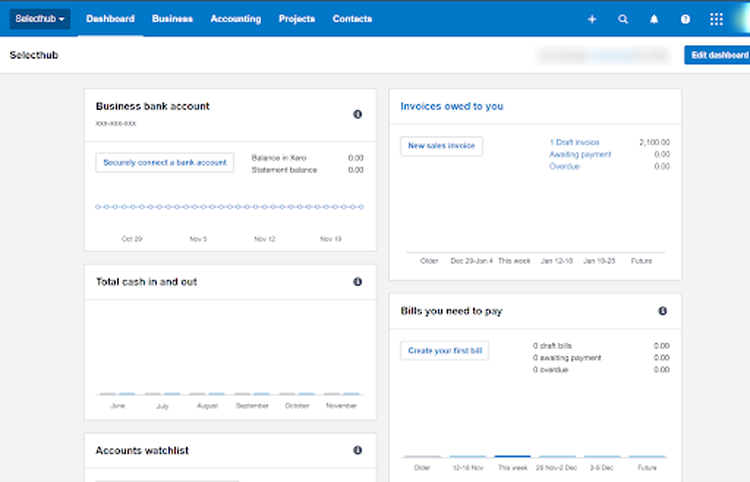
Xero’s customizable dashboard.
I liked that you could remove the widgets on the dashboard or move them with a simple drag and drop, mark favorites, and even create invoices or bills right from the homepage.
Xero offers inventory management and I tested it for its ease of use. I found it easy to add products, but realized it’s a hassle to add each one manually. Luckily, Xero also offers options to import CSV files to upload products. I couldn’t test the inventory plus feature as it’s not available in the free trial and basic plan. That feature allows you to sync your eCommerce sales orders and update product listings.
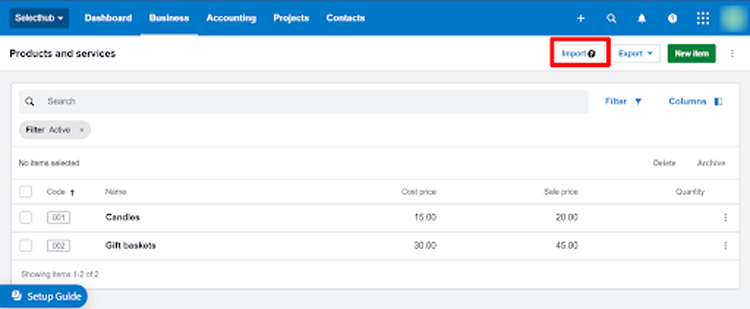
Adding products & services in Xer.o
Additionally, I faced a few setbacks in adding taxes and generating reports. While Xero ensures global tax compliance, the overall interface for filing taxes feels slightly outdated compared to the rest of the actions. I also got flustered when Xero logged out after just a few minutes of inactivity.

Generating sales tax report on Xero.
## Approach to Common Challenges
- **Time-consuming manual tasks:** Xero automates repetitive tasks like bank reconciliation, invoice creation, and expense tracking, saving time and reducing errors.
- **Limited visibility into financial performance:** Xero offers customizable reports and dashboards that provide real-time insights into cash flow, profitability, and financial health.
- **Collaboration and communication challenges:** Xero's multi-user access and permission levels enable collaboration among team members and advisors, fostering better financial decision-making.
- **Managing receipts and paperwork:** Xero integrates with receipt management apps like Hubdoc, allowing users to capture and store receipts digitally for easy access and organization.
- **Staying up-to-date with tax compliance:** Xero tracks tax obligations and generates tax reports, simplifying tax filing and compliance for businesses.
## Cost Of Ownership
Frequently asked questions regarding Xero pricing include:
- **Q: How much does Xero cost per month?**
A: Xero offers several subscription plans to fit different business needs, starting at $5 per month for the Early plan and scaling up to $18 per month for the Established plan.
- **Q: Are there any hidden fees or additional costs I should be aware of?**
A: While the subscription fee covers core accounting features, some additional costs may apply. Payroll processing comes with a separate fee per employee, and some integrations with third-party tools may have extra charges. Make sure to check the specific plan details and explore potential integrations before committing.
- **Q: Is Xero worth the cost compared to other accounting software options?**
A: Deciding if Xero justifies its cost depends on your specific needs and budget. While its user-friendly interface and automation features come at a premium compared to basic accounting software, Xero offers significant value for businesses seeking cloud-based solutions, seamless integrations, and mobile accessibility.
## Limitations
Notable limitations of Xero include:
- **Inventory management:** Limited tracking of items and stock levels, may require third-party integrations for complex inventory needs.
- **Project tracking:** Basic project tracking features, lacks advanced project management capabilities for multi-phase projects or task dependencies.
- **Customization:** Limited ability to customize charts of accounts or reports without add-ons, may not fully align with unique business structures.
- **Integrations:** While offering many integrations, some key business tools may not have seamless integration with Xero.
- **Phone support:** Primarily relies on email and live chat support, lacks dedicated phone support for immediate assistance.
- **API rate limits:** Restrictions on the number of API calls per minute and per day, may impact high-volume transaction processing.
## Suite Support
Xero has a support page that directs users to various resources depending on the type of user, problem or scenario. It has 24/7 support accessible via submitting tickets. It also comes with multiple training materials, including blogs, product updates, guides for small businesses, accounting glossaries and more.
*mail\_outline*Email: Subscribers have access to online chat support from Xero experts through the platform’s support hub. From there, they can message their customer service team.
*school*Training: Xero offers users unlimited support through FAQs, a community page, an accounting glossary and courses to help understand the program.
*phone*Phone: Support via telephone is available through Xero, however, the vendor does not offer inbound telephone support. Xero's support team may make a call to their clients when necessary, but there is no phone number through which the company can be reached for support. Xero warns that any numbers found online claiming to be their support line are fraudulent.
*local\_offer*Tickets and Live Chat: Users can submit case files by clicking the help icon and tracking the cases through the “my cases” section. There’s no live chat immediately available on the website, but users can message through their portal.
## FAQs
Frequently asked questions regarding Xero include:
- **Q: Is Xero suitable for my business type?**
A: Xero works well for various businesses, particularly freelancers, startups, and service-based companies. Its strengths lie in invoicing, expense tracking, and basic accounting needs. For complex inventory management or large volume transactions, other solutions might be more suitable.
- **Q: How easy is Xero to learn and use?**
A: Xero boasts a user-friendly interface and intuitive navigation. Basic tasks like invoicing and expense tracking are straightforward, even for non-accountants. However, some advanced features like multi-currency accounting may require a learning curve.
- **Q: How secure is my data with Xero?**
A: Xero takes data security seriously, employing industry-standard encryption and security measures to protect user information. Additionally, multi-user access controls allow businesses to limit access to sensitive data.
- **Q: Can I import my existing data from another software?**
A: Yes, Xero offers data import tools for various accounting software. However, the complexity of the import process depends on the specific software and data volume. Xero provides user guides and support to help with the transition.
- **Q: How does Xero handle multi-currency transactions?**
A: Xero's advanced plans support multi-currency transactions, allowing businesses to manage invoices, expenses, and reports in different currencies. Automatic exchange rate updates ensure accuracy. However, navigating multi-currency features may require advanced accounting knowledge.
- **Q: What kind of customer support does Xero offer?**
A: Xero offers email, live chat, and community forum support. Additionally, paid plans include phone support for quicker assistance with critical issues. Extensive online resources, including video tutorials and knowledge base articles, are also available.
- **Q: Does Xero integrate with other business tools I use?**
A: Yes, Xero integrates with numerous third-party tools for CRM, e-commerce, payments, and productivity. Users can customize their workflow by connecting Xero with their preferred tools for seamless data exchange and improved efficiency.
1 https://www.xero.com/uk/small-businesses/customers/de-jong-phillips/
![Banner of Pricing guide for Xero]()
## Pricing & Cost Details
Includes Price/User and Minimum Commitment Terms for Xero
See Xero Pricing Details
## Compare Accounting Software
These are the top products most often compared.
Generating Scorecard... Compare to Xero
You can choose 4 products to compare
[![Sage Intacct product logo]() Sage Intacct](https://www.selecthub.com/p/accounting-software/sage-intacct/)
[![QuickBooks Online product logo]() QuickBooks Online](https://www.selecthub.com/p/financial-management-systems/quickbooks-online/)
[![Odoo product logo]() Odoo](https://www.selecthub.com/p/financial-management-systems/odoo/)
[![Zoho Books product logo]() Zoho Books](https://www.selecthub.com/p/accounting-software/zoho-books/)
[![SAP Business One product logo]() SAP Business One](https://www.selecthub.com/p/financial-management-systems/sap-business-one/)
[![Sage 50 Accounting product logo]() Sage 50 Accounting](https://www.selecthub.com/p/accounting-software/sage-50cloud-accounting/)
[![Freshbooks product logo]() Freshbooks](https://www.selecthub.com/p/financial-management-systems/freshbooks/)
[![BQE Core product logo]() BQE Core](https://www.selecthub.com/p/accounting-software/bqe-core/)
[![FreeAgent product logo]() FreeAgent](https://www.selecthub.com/p/accounting-software/freeagent/)
Generating Scorecard... Compare to Xero
## Head-to-Head
Comparison

vs
- [AccountEdge](https://www.selecthub.com/accounting-software/xero-vs-accountedge/)
- [Accounting Seed](https://www.selecthub.com/accounting-software/xero-vs-accounting-seed/)
- [Accountmate](https://www.selecthub.com/accounting-software/xero-vs-accountmate/)
- [Adminsoft Accounts](https://www.selecthub.com/accounting-software/xero-vs-adminsoft-accounts/)
- [AppZen](https://www.selecthub.com/accounting-software/xero-vs-appzen/)
- [Bill.com](https://www.selecthub.com/accounting-software/xero-vs-bill-com/)
- [BQE Core](https://www.selecthub.com/accounting-software/xero-vs-bqe-core/)
- [Countable.co](https://www.selecthub.com/accounting-software/xero-vs-countable-co/)
- [Daxko Accounting](https://www.selecthub.com/accounting-software/xero-vs-daxko-accounting/)
- [Dext Commerce](https://www.selecthub.com/accounting-software/xero-vs-dext-commerce/)
- [DocuPhase](https://www.selecthub.com/accounting-software/xero-vs-docuphase/)
- [DOKKA](https://www.selecthub.com/accounting-software/xero-vs-dokka/)
- [e-conomic](https://www.selecthub.com/accounting-software/xero-vs-e-conomic/)
- [Fiverr Workspace](https://www.selecthub.com/accounting-software/xero-vs-fiverr-workspace/)
- [FloQast](https://www.selecthub.com/accounting-software/xero-vs-floqast/)
- [FreeAgent](https://www.selecthub.com/accounting-software/xero-vs-freeagent/)
- [GnuCash](https://www.selecthub.com/accounting-software/xero-vs-gnucash/)
- [Gravity Software](https://www.selecthub.com/accounting-software/xero-vs-gravity-software/)
- [KashFlow](https://www.selecthub.com/accounting-software/xero-vs-kashflow/)
- [Kashoo](https://www.selecthub.com/accounting-software/xero-vs-kashoo/)
- [M3 Accounting](https://www.selecthub.com/accounting-software/xero-vs-m3-accounting/)
- [Manager](https://www.selecthub.com/accounting-software/xero-vs-manager-io/)
- [Multiview ERP](https://www.selecthub.com/accounting-software/xero-vs-multiview-erp/)
- [NetSuite Accounting](https://www.selecthub.com/accounting-software/xero-vs-netsuite-accounting/)
- [Odoo Accounting](https://www.selecthub.com/accounting-software/xero-vs-odoo-accounting/)
- [Oracle Financials Cloud](https://www.selecthub.com/accounting-software/xero-vs-oracle-financials-cloud/)
- [Osome](https://www.selecthub.com/accounting-software/xero-vs-osome/)
- [Pineapple Code](https://www.selecthub.com/accounting-software/xero-vs-pineapple-code/)
- [PROCAS](https://www.selecthub.com/accounting-software/xero-vs-procas/)
- [QuickBooks Desktop Enterprise](https://www.selecthub.com/accounting-software/xero-vs-quickbooks-desktop-enterprise/)
- [QuickBooks Enterprise](https://www.selecthub.com/accounting-software/xero-vs-quickbooks-enterprise/)
- [QuickBooks Online Advanced](https://www.selecthub.com/accounting-software/xero-vs-quickbooks-online-advanced/)
- [QuickBooks Premier](https://www.selecthub.com/accounting-software/xero-vs-quickbooks-premier/)
- [QuickBooks Pro](https://www.selecthub.com/accounting-software/xero-vs-quickbooks-pro/)
- [RightWorks Transaction Pro](https://www.selecthub.com/accounting-software/xero-vs-rightworks-transaction-pro/)
- [Sage 100](https://www.selecthub.com/accounting-software/xero-vs-sage-100/)
- [Sage 50 Accounting](https://www.selecthub.com/accounting-software/xero-vs-sage-50cloud-accounting/)
- [Sage Accounting](https://www.selecthub.com/accounting-software/xero-vs-sage-accounting/)
- [Sage Intacct](https://www.selecthub.com/accounting-software/xero-vs-sage-intacct/)
- [SAP S/4 HANA Finance](https://www.selecthub.com/accounting-software/xero-vs-sap-finance/)
- [ScaleFactor](https://www.selecthub.com/accounting-software/xero-vs-scalefactor/)
- [Synder](https://www.selecthub.com/accounting-software/xero-vs-synder/)
- [Tipalti](https://www.selecthub.com/accounting-software/xero-vs-tipalti/)
- [TravelBank](https://www.selecthub.com/accounting-software/xero-vs-travelbank/)
- [Veryfi](https://www.selecthub.com/accounting-software/xero-vs-veryfi/)
- [Wave Accounting](https://www.selecthub.com/accounting-software/xero-vs-wave-accounting/)
- [Xledger](https://www.selecthub.com/accounting-software/xero-vs-xledger/)
- [Yendo Accounting](https://www.selecthub.com/accounting-software/xero-vs-yendo-accounting/)
- [ZipBooks](https://www.selecthub.com/accounting-software/xero-vs-zipbooks/)
- [Zoho Books](https://www.selecthub.com/accounting-software/xero-vs-zoho-books/)
## Awards
SelectHub research analysts have evaluated Xero and concluded it earns best-in-class honors for Mobile Support, Tax Management and Integration and Extensibility.


## Pricing for Accounting Software
![Banner of Pricing guide for Accounting Software]()
## Similar Products
Here are the most similar products to Xero.
[![Namu product logo]() Namu](https://www.selecthub.com/p/accounting-software/namu-software/)
[![erly product logo]() erly](https://www.selecthub.com/p/accounting-software/erly/)
[![Clear Books product logo]() Clear Books](https://www.selecthub.com/p/accounting-software/clear-books/)
[![Anfix product logo]() Anfix](https://www.selecthub.com/p/accounting-software/anfix/)
[![KashFlow product logo]() KashFlow](https://www.selecthub.com/p/accounting-software/kashflow/)
[![Odoo Accounting product logo]() Odoo Accounting](https://www.selecthub.com/p/accounting-software/odoo-accounting/)
[![Yendo Accounting product logo]() Yendo Accounting](https://www.selecthub.com/p/accounting-software/yendo-accounting/)
[![GnuCash product logo]() GnuCash](https://www.selecthub.com/p/accounting-software/gnucash/)
[![FrontAccounting product logo]() FrontAccounting](https://www.selecthub.com/p/accounting-software/frontaccounting/)
[![ZarMoney product logo]() ZarMoney](https://www.selecthub.com/p/accounting-software/zarmoney/)
## About the Contributors
The following expert team members are responsible for creating, reviewing, and fact checking the accuracy of this content.
[![Khyati Badiyani]()](https://www.selecthub.com/author/khyati-badiyani/)
Written by
[Khyati Badiyani](https://www.selecthub.com/author/khyati-badiyani/)
Technical Content Writer
As a Technical Content Writer at SelectHub, Khyati creates insightful content across accounting, supply chain, and transportation management categories. Backed by a degree in business management from Ahmedabad University and over five years of experience in the B2B SaaS space, she brings both industry knowledge and clarity to complex topics. Outside of work, Khyati’s chasing stories in all forms — exploring new places, binge-watching the latest shows and films, or immersing herself in slice-of-life reads.
[See Full Bio](https://www.selecthub.com/author/khyati-badiyani/)
[![Hunter Lowe]()](https://www.selecthub.com/author/hunter-lowe/)
Edited by
[Hunter Lowe](https://www.selecthub.com/author/hunter-lowe/)
Content Editor
Hunter Lowe is a Content Editor, Writer and Market Analyst at SelectHub. His team covers categories that range from ERP and business intelligence to transportation and supply chain management. Hunter is an avid reader and Dungeons and Dragons addict who studied English and Creative Writing through college. In his free time, you'll likely find him devising new dungeons for his players to explore, checking out the latest video games, writing his next horror story or running around with his daughter.
[See Full Bio](https://www.selecthub.com/author/hunter-lowe/)
Your review has been submitted
and should be visible within 24 hours.
Review Title
Pros
Cons
Overall feedback
Your name
Your job title
Industry
Choose your main industry
- Accounting / CPA
- Advertising
- Aerospace & Defense
- Agriculture
- Apparel
- Architecture
- Auto Dealership
- Automotive
- Banking & Financial Services
- Banking & Mortgage
- Chemicals
- Construction & Engineering
- Construction / Contracting
- Consulting
- Consumer Products
- Distribution
- E-commerce
- Education
- Electronics
- Energy & Utilities
- Federal Government
- Field Maintenance
- Food & Beverage
- Healthcare / Social Services
- Hospitality / Gaming / Travel
- Human Resources
- Industrial Machinery
- Information Technology & High Tech
- Insurance
- Legal
- Maintenance / Field Service
- Manufacturing
- Marketing Services
- Media & Communications / Entertainment
- Mill Products
- Mining / Metals
- Mortgage
- Non-Profit
- Not Available
- Oil & Gas
- Other
- Other Services
- Payroll Provider
- Pharmaceuticals
- Professional Employer Organization
- Professional Services
- Property Management
- Public Sector
- Real Estate
- Recruiting Agency
- Religious Institutions
- Retail
- Sales & Marketing
- Semiconductors
- Software / IT
- Sports and Recreation
- Staffing Agency
- State & Local Government
- Telecommunications
- Third-Party Administrator
- Transportation & Logistics
- Wholesale Distribution
Company Size
Choose your company size
- 1 employee
- 2 to 9 employees
- 10 - 19 employees
- 20 - 49 employees
- 50 - 99 employees
- 100 - 499 employee
- 500 - 999 employees
- 1,000 - 2,499 employees
- 2,500 - 4,999 employees
- 5,000 - 9,999 employees
- 10,000 - 24,999 employees
- 25,000 - 49,999 employees
- 50,000 + employees
```json
{
"@context": "https://schema.org",
"@type": "BreadcrumbList",
"itemListElement": [
{
"@type": "ListItem",
"position": 1,
"name": "Home",
"item": "https://www.selecthub.com/"
},
{
"@type": "ListItem",
"position": 2,
"name": "Accounting & Financial Management",
"item": "https://www.selecthub.com/category/accounting/"
},
{
"@type": "ListItem",
"position": 3,
"name": "Accounting Software",
"item": "https://www.selecthub.com/c/accounting-software/"
},
{
"@type": "ListItem",
"position": 4,
"name": "Xero"
}
]
}
{
"@context": "http://schema.org",
"@type": "SoftwareApplication",
"name": "Xero",
"description": "Xero is all-encompassing cloud-based accounting software catering to small businesses. It provides crucial accounting features such as recording transactions, analytics and reporting, invoicing, bank reconciliations, and expense tracking.Xero offers user-friendly interfaces and automated features that help small business owners save time and simplify financial management.While Xero caters well to various industries, its strengths lie in freelancer/contractor work, startups, and service-based businesses. Pricing scales with business size and complexity, starting at a monthly subscription for basic accounting needs and increasing with additional features and users.Compared to some competitors, Xero offers a robust mobile app, strong integrations with third-party tools, and a focus on user experience. However, it may lack advanced inventory management or complex accounting functions suited for larger enterprises.Ultimately, Xero's value proposition lies in its ease of use, automation, and scalability, making it a popular choice for small businesses seeking a streamlined and efficient accounting solution.Our Research Process for XeroI took a deep dive into Xero's free trial for one month. I explored key features like managing accounting transactions, customizing the dashboard and generating accounting reports.I also relied on YouTube videos for tutorials and reviews, along with our in-house data that summarizes user sentiments. This gave me a well-rounded view of Xero from both personal experience and real-world feedback.",
"review": {
"@type": "Review","reviewRating": {
"@type": "Rating",
"ratingValue": 84,
"bestRating": 100
},
"author": {
"@type": "Person",
"name": "Khyati Badiyani",
"reviewBody": "As far as our assessment goes, Xero ranks second on our list of enterprise accounting systems, placing it solidly above most competitors for central accounting functions and financial management for small businesses. Lets look at how this platform delivers on our high ranking.Xero’s dashboards are a dream. You get a snapshot of your invoices, bills, quotes, and business transactions and can customize them based on what’s most important to you. Users also had a lot to say about Xero’s invoicing. Branded templates let you skip putting invoices together piece by piece while maintaining professionalism.Reviewers also say invoicing is pretty seamless as it sets up automated payment reminders, conducts auto calculations of amounts and taxes, and provides seamless connections with bank accounts — with top-tier security, I might add.Xero’s short-term cash flow analysis tools give users a sneak peek into financial health. For Pamela Phillip, a long-time customer and small business owner, cash flow analysis was a much-needed feature to help gauge clients’ real-time financial data. As the manager of an accounting firm, she could use it to help clients access loans and other funding during the changing business landscapes of COVID-19.However, Xero’s basic plan only offers a 30-day projection. Longer projections are available in Xero's more expensive plans.Many users also felt that Xero has extensive integration options and marked its ease of integration as a primary benefit. Our analysts agreed and gave Xero a perfect 100 for this critical requirement. It also ranks better than Zoho Books and Freshbooks in terms of integrating with inventory management tools and CRM.Xero’s in-house inventory management isn’t bad, either. You can import inventory details in bulk in various file formats and track and manage them under a single platform.Invoice management is a critical part of Xero but some reviewers highlighted that Xero fails to apply late fees on overdue invoices. Our analysts gave Xero a score of 50 for late fees for overdue invoices, as it doesn’t automatically calculate and apply the late fees when the invoice moves ahead of the due date.Users also mentioned that Xero doesn’t support all bank types, so they had to manually import and export bank transactions.Overall, Xero checks the important boxes for its target audience by offering a well-rounded accounting tool for small businesses. It supports crucial accounting functions like invoicing, expense management and financial reports. It’s suitable for small businesses that don’t require an extensive set of financial management features. But, if your requirements are more sophisticated, you might want to consider other tools."
}
},
"image": "https://cdn.selecthub.com/products/96c974552b3f2839fcc751e7f12679ce-fec316dba4c44668e509fdc6d1525bb0/resources/normal/logo.webp?1749010902",
"aggregateRating": {
"@type": "AggregateRating",
"ratingValue": "87",
"bestRating": "100",
"worstRating": "1",
"ratingCount": "4621"
},
"offers": {
"@type": "Offer",
"priceSpecification": {
"@type": "priceSpecification",
"price": "5",
"priceCurrency": "USD"
}
},
"positiveNotes": {
"@type": "ItemList",
"itemListElement": [
{
"@type": "ListItem",
"position": 1,
"name": "Affordable: Of all the reviews that mentioned price, over 70% felt it was well within their price range and felt satisfied."
},
{
"@type": "ListItem",
"position": 2,
"name": "Good Customer Service: Over 70% of reviews that mentioned the customer support said they received excellent service, especially from their reps."
},
{
"@type": "ListItem",
"position": 3,
"name": "Excellent Functionality: In more than 50% of all reviews that mentioned features, users were happy with its capabilities. They especially like the integrations, reconciliation process, invoices and accounting functions."
}
]
},
"negativeNotes": {
"@type": "ItemList",
"itemListElement": [
{
"@type": "ListItem",
"position": 1,
"name": "Limited inventory management: Xero lacks advanced inventory tracking features, making it less suitable for businesses with complex inventory needs."
},
{
"@type": "ListItem",
"position": 2,
"name": "Learning curve for complex features: While basic tasks are easy, some advanced features like multi-currency accounting can be challenging for non-accountants to navigate. Though the system was widely popular after implementation, users said it was old-fashioned and had a steep learning curve in 20% of reviews that mentioned the UI."
},
{
"@type": "ListItem",
"position": 3,
"name": "Higher cost for advanced features: Access to advanced features like payroll processing and multi-currency comes at a higher price point, potentially exceeding budgets for smaller businesses."
}
]
},
"applicationCategory": "Accounting Software"
}
```